Five Core Differences Between Claude Code and Regular AI Chat

Claude Code is an AI programming assistant that directly operates on your project files
Claude Code is a CLI coding tool by Anthropic that differs from traditional AI chat by directly reading/writing files, running commands, and understanding your entire codebase. It achieves memory through layered configuration files and connects to external services via the MCP protocol. Compared to Cursor, it's more token-efficient and not tied to any specific editor.
What is Claude Code
Claude Code is an AI programming assistant, but unlike traditional AI chat tools, it can directly manipulate project files on your computer. You simply tell it what to do in natural language, and it automatically understands your project structure and completes the task.
The core difference in one sentence: It doesn't just chat — it actually gets things done for you.
Claude Code is built on the Claude large language model developed by Anthropic. It's an AI coding tool with a command-line interface (CLI) as its primary interaction method. Unlike traditional IDE plugins, it exists as a terminal-native tool that integrates directly into developers' existing workflows. Under the hood, it leverages Claude's long context window capability (supporting up to 200K tokens), meaning it can "read" large amounts of project code at once without requiring developers to manually split and feed information. This design philosophy is called "agentic coding" — where AI is no longer a passive question-answerer but an intelligent agent that actively executes tasks.
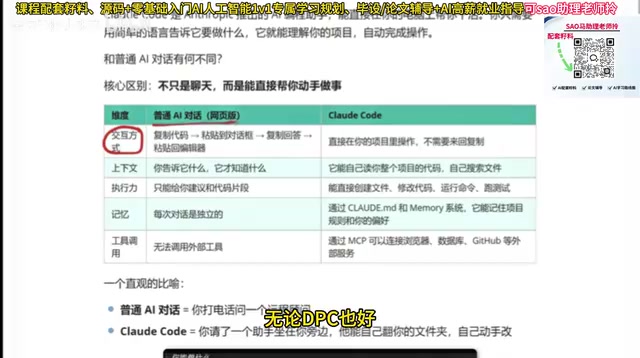
Five-Dimensional Comparison: Claude Code vs Regular AI Chat
Interaction Method
Traditional AI chat requires you to copy code into the chat window, then paste the response back into your editor. Claude Code operates directly within your project, eliminating the back-and-forth copy-paste workflow.
Context Understanding
Regular AI only knows what you tell it. Claude Code can automatically read your entire project codebase, search files on its own, and understand the full picture of your project.
This context understanding capability relies on two key technologies: the large model's long context window, and intelligent code indexing and retrieval mechanisms. When you launch Claude Code in your project's root directory, it automatically scans the directory structure and configuration files (such as package.json, tsconfig.json, etc.) to build an overall understanding of the project. When it needs to dive deeper into a specific module, it proactively uses system commands like grep and find to search for relevant code, rather than asking users to provide it manually. This "active exploration" capability is essentially an application of the ReAct (Reasoning + Acting) inference pattern — the model first thinks about what information it needs, then executes actions to obtain that information, and continues reasoning based on the new data.
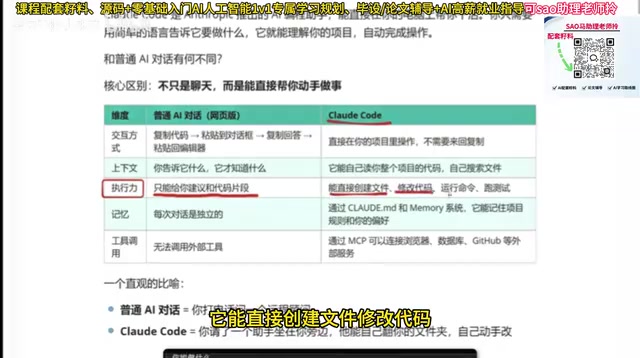
Execution Power
Regular AI can only provide suggestions or code snippets. Claude Code can directly create files, modify code, run commands, and execute tests.
Memory
Regular AI treats each conversation independently — close the window and the memory disappears. Claude Code remembers your project rules and coding style preferences through configuration files.
Specifically, Claude Code's memory capability is implemented through a layered configuration file system. Developers can create a CLAUDE.md file in the project root directory containing coding standards, architectural conventions, commonly used commands, and other information. Claude Code automatically reads these files on every startup, essentially giving the AI assistant a "work manual." It also supports user-level global configuration for storing cross-project universal preferences. This design elegantly solves the inherent "stateless" limitation of large language models — although the model itself doesn't have cross-session memory, persistent configuration files achieve an effect similar to long-term memory.
Tool Integration
Regular AI struggles to call external tools. Claude Code can directly connect to browsers, databases, GitHub, and other external services through MCP.
MCP stands for Model Context Protocol, an open standard protocol released by Anthropic in late 2024. Its core idea is to provide AI models with a standardized way to connect to external data sources and tools, similar to how HTTP provides a unified standard for web browsing in the internet world. Through MCP, Claude Code can plug into various external services like a "plugin system": connecting to browsers for web automation, connecting to databases for SQL queries, connecting to GitHub for PR reviews and code commits, and more. MCP uses a client-server architecture where each external service runs as an MCP Server, and Claude Code acts as the MCP Client making calls. This design allows the community to freely develop new MCP servers, continuously expanding AI's capability boundaries.
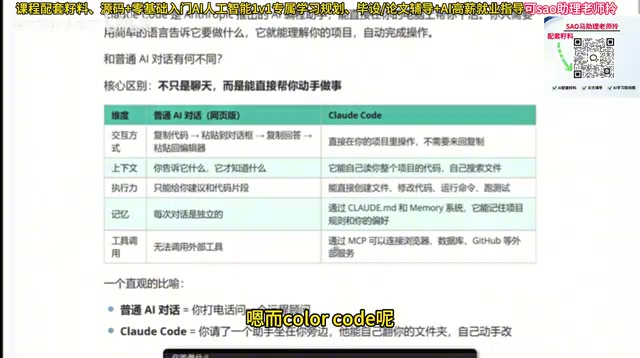
An Intuitive Analogy
Regular AI chat = Calling a remote consultant on the phone (knows everything but can't do anything hands-on)
Claude Code = Having an assistant sitting right next to you who can browse through folders and modify code themselves.
What Claude Code Can Do
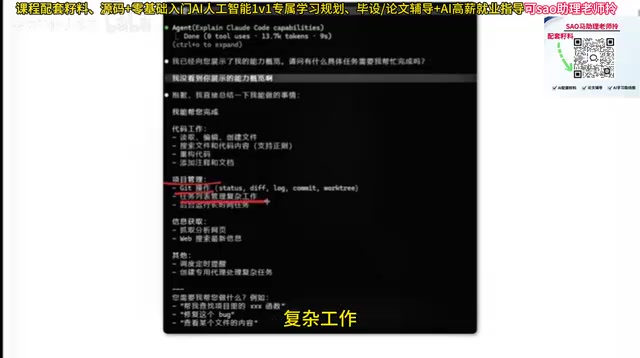
Based on real-world usage feedback, Claude Code's capabilities cover:
- Code work: Read, edit, create files, search code, refactor, add comments and documentation
- Project management: Git operations, task list management, running long-duration tasks in the background
- Information retrieval: Fetching and analyzing web pages, web search
- Other: Scheduling timed reminders, creating dedicated agents for complex tasks
Claude Code vs Cursor: How to Choose
Both are excellent AI coding tools, but they represent two different architectural philosophies. Cursor is a deeply customized IDE based on VS Code that embeds AI capabilities into a graphical editor, offering Tab completion, inline editing, multi-file diff previews, and other visual interaction experiences — ideal for developers who prefer GUI operations. Claude Code takes a CLI-first approach; it's not tied to any specific editor and can work alongside Vim, Neovim, VS Code, JetBrains, or any other editor.
From a practical experience standpoint, Claude Code is more economical with token consumption, and for frontend developers, the generated results better match expectations. Regarding token consumption, Claude Code directly uses Anthropic's API with transparent and controllable billing, while Cursor uses a subscription model that may trigger request limits during heavy use. For frontend development scenarios, Claude Code typically generates code with a cleaner, more modern style, which relates to the Claude model's training data and alignment strategy. If you're already comfortable with Cursor, there's no need to force a switch, but Claude Code is worth trying.
Key Takeaways
- Claude Code is an AI programming assistant that directly operates on project files — it's more than just chat
- It outperforms traditional AI across five dimensions: interaction method, context understanding, execution power, memory, and tool integration
- Through the MCP protocol, it can connect to browsers, databases, GitHub, and other external services
- Compared to Cursor, Claude Code has advantages in token consumption and frontend development experience
Related articles
 Deep Dives
Deep Dive into How OpenClaw (Open-Source Crayfish) AI Agent Works
Deep analysis of OpenClaw AI Agent internals: System Prompt, tool calling, SubAgents, Skill system, memory, and Context Engineering explained.
 Deep Dives
Demystifying Transformer: A Word-Continuation Function, Deconstructed
Understand Transformer through the lens of word continuation. Breaking down language generation into Embedding, Transformer Block, and Probability output modules for intuitive understanding.
 Deep Dives
MCP and A2A Protocols Explained: The USB Era of Agent Interoperability
A deep dive into MCP (Model Context Protocol) and A2A (Agent-to-Agent Protocol) — their architecture, core features, and how they work together to enable plug-and-play agent interoperability.