Five Core Differences Between Claude Code and Traditional AI Chat Tools

Claude Code is an AI programming assistant that autonomously executes tasks, representing a paradigm shift from chat to action.
Claude Code is a flagship product of the Agentic AI paradigm. Unlike traditional conversational AI, it can autonomously read code, modify files, and run commands directly in your local project. This article compares it with traditional AI across five dimensions: interaction model, context understanding, execution power, memory, and tool invocation, while distinguishing it from Cursor—Claude Code is an autonomous execution agent while Cursor is an enhanced editor, and the two can complement each other.
A New Species of AI Programming Assistant: Why Claude Code Is Taking Off
Claude Code has been blowing up in developer circles lately. It's not just another chatbot, nor a simple code completion tool—it's an AI programming assistant that can actually do work directly on your computer. You simply tell it what to do in natural language, and it understands your project structure, automatically handling everything from writing code to managing files.
Sounds similar to ChatGPT or DeepSeek? The differences are actually enormous. Claude Code represents an emerging paradigm in AI—Agentic AI. Unlike traditional Conversational AI, Agentic AI possesses autonomous planning, tool invocation, and multi-step execution capabilities. Traditional conversational AI is essentially a "Q&A machine" where each interaction is an independent input-output pair; Agentic AI can decompose a complex goal into multiple subtasks, execute them sequentially, and dynamically adjust its strategy based on intermediate results. This architectural difference enables Claude Code to handle complex tasks like "fix the entire authentication module" that require cross-file, cross-tool collaboration.
This article examines five key dimensions that reveal the fundamental differences between Claude Code and traditional AI chat tools, helping you decide whether it's worth adopting.
Five-Dimensional Comparison: Claude Code vs Traditional AI Chat
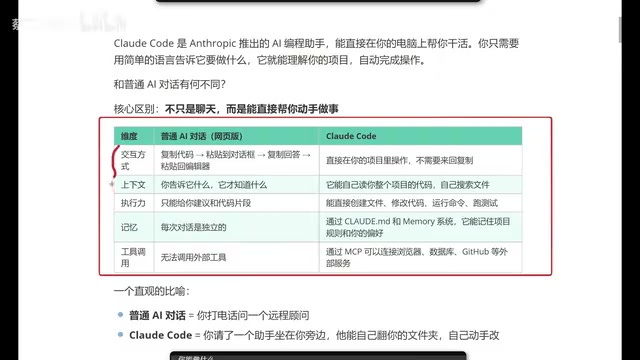
1. Interaction Model: The End of Copy-Paste
Using traditional AI chat tools for coding typically goes like this: copy code → paste into chat → wait for response → copy the answer → paste back into editor. The process isn't complicated, but it's extremely tedious, especially when you need to debug iteratively.
Claude Code completely transforms this workflow. It runs directly in your project directory, with all operations completed locally—no back-and-forth copying and pasting required. You chat with it in your terminal, and it modifies your files directly—what you see is what you get, changes take effect immediately.
2. Context Understanding: From "It Only Knows What You Tell It" to "It Goes and Looks Itself"
A core pain point of traditional AI chat is limited context. It only knows what you tell it. A real project might have dozens or hundreds of files—you can't possibly paste all your code into a chat window.
Claude Code takes a completely different approach: it can automatically read your entire project's code, proactively searching files, analyzing dependencies, and understanding project architecture. This means when you say "help me fix this bug," you don't need to explain the project structure—it finds the relevant files and understands the context on its own.
Notably, Claude Code employs an on-demand file reading context management strategy, loading only code snippets relevant to the current task into the context window rather than injecting the entire codebase at once—this is one of the underlying reasons for its more efficient token consumption.
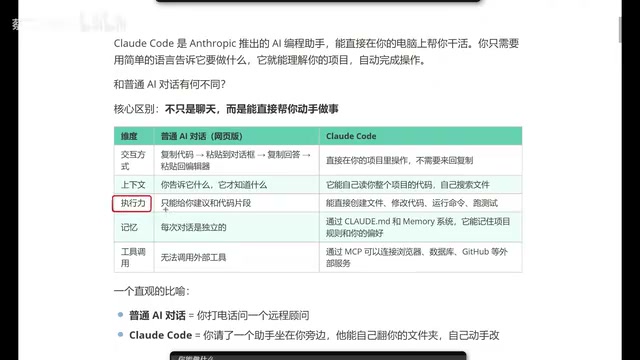
3. Execution Power: Not Just Giving Advice, But Actually Doing the Work
This is the most critical difference between Claude Code and traditional AI chat. Traditional AI can only give you code snippets or suggestions—you need to integrate and execute them yourself. But a real project isn't a single file; it's composed of numerous files and complex code structures.
Claude Code can directly create files, modify code, run commands, and execute tests. It's not telling you "you should do this"—it's actually doing it for you. This transformation from "advisor" to "executor" is Claude Code's most revolutionary characteristic.
4. Memory: Remembering Your Preferences and Coding Style
Traditional AI chat is stateless—close the window, start a new conversation, and all previous context vanishes. Every conversation is independent, requiring you to repeatedly explain the same background information.
Claude Code achieves persistent project memory through the configuration file CLAUDE.md. This Markdown file placed in the project root directory borrows from the software engineering principle of "convention over configuration"—developers write project specifications, coding styles, tech stack preferences, prohibited operations, and other information into it, and Claude Code reads it first upon each startup as system-level context.
From an engineering perspective, this mechanism also solves consistency issues in team collaboration scenarios: once CLAUDE.md is included in version control, all team members using Claude Code follow the same project conventions, preventing AI from generating inconsistently styled code. This aligns with the design philosophy of engineering configuration files like .editorconfig and .eslintrc.
5. Tool Invocation: Connecting External Services via MCP Protocol
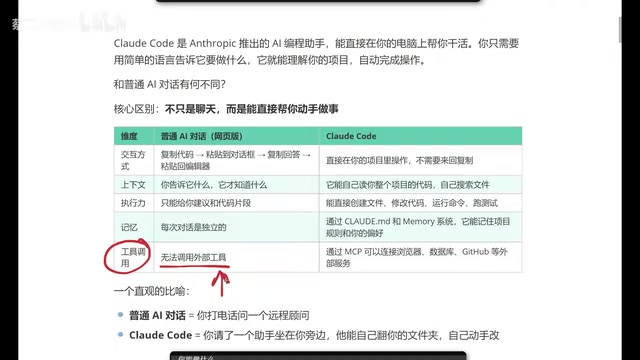
Traditional web-based AI essentially cannot invoke external tools. While ChatGPT later added some plugin capabilities, the barrier to use is high, and some require additional payment.
Claude Code can directly connect to browsers, databases, GitHub, and other external services through the MCP (Model Context Protocol). MCP is a standardized protocol open-sourced by Anthropic in late 2024, designed to solve the fragmentation problem of integrating AI models with external tools—it draws on the design approach of LSP (Language Server Protocol), defining a unified client-server communication specification: the AI model acts as the client, while various external services provide standardized interfaces as MCP Servers. Developers only need to implement an MCP Server once for it to be reused by all AI tools that support MCP. The openness of this protocol has quickly gained follow-up support from major vendors like Microsoft and Google, and it's becoming an important infrastructure standard for the AI tool ecosystem.
This means Claude Code can not only write code but also help you query databases, submit PRs, and scrape web information—truly achieving integration across the development toolchain.
An Intuitive Analogy
If you had to summarize the difference between Claude Code and traditional AI chat in one sentence:
Traditional AI chat = Calling a remote consultant on the phone (they're brilliant, know everything, but can only give advice)
Claude Code = Having an assistant sitting right next to you (they can browse through your folders themselves and modify code hands-on)
What Can Claude Code Do? Complete Capability List
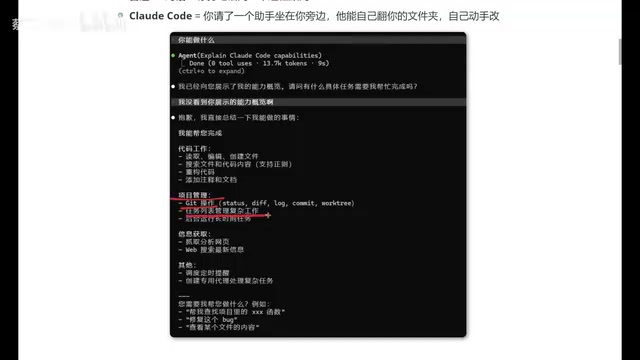
Based on actual usage experience, Claude Code's capabilities cover the following areas:
Code Work:
- Read, edit, and create files
- Search files and code content
- Refactor code, add comments and documentation
Project Management:
- Git operations (commits, branch management, etc.)
- Task list management
- Run long-running tasks in the background
Information Retrieval:
- Scrape and analyze web pages
- Web search for the latest information
Advanced Features:
- Schedule timed reminders
- Create dedicated agents for complex tasks
Claude Code vs Cursor: How to Choose?
Many developers ask: I've been using Cursor—should I switch to Claude Code?
To understand this question, you first need to clarify the product positioning differences. Cursor is an AI-native IDE deeply built on VS Code, with core advantages in seamlessly embedding AI capabilities into a graphical development environment—Tab completion, inline editing, Composer multi-file editing, and other features are deeply integrated with the editor, offering a gentle learning curve and intuitive visual feedback. Claude Code is a CLI (command-line interface) tool aimed at developers who prefer terminal operations, emphasizing autonomous execution rather than assisted completion. The two represent different product philosophies for AI programming tools: Cursor is an "enhanced editor" where AI extends the editor's capabilities; Claude Code is an "autonomous execution agent" where the editor is just one of the objects it operates on.
From practical usage, Claude Code has two notable strengths:
- More efficient token consumption: Tokens are the basic unit of measurement for how large language models process text, and the cost of AI programming tools is directly tied to token consumption. Claude Code's on-demand file reading context management strategy makes its token usage more efficient when completing equivalent tasks. Using Claude 3.5 Sonnet's pricing as an example, input tokens cost $3 per million, and a complete refactoring task for a medium-sized project might consume hundreds of thousands of tokens—the long-term cost savings from efficiency differences are considerable.
- Better frontend development experience: For frontend developers, Claude Code's generated results tend to better match expectations, reducing time spent on iterative adjustments.
The two are not mutually exclusive—the key is your use case and personal preference. If you're pursuing higher execution efficiency and lower usage costs, Claude Code is worth trying; if you rely more on graphical interfaces and instant feedback within the editor, Cursor remains an excellent choice.
Conclusion: The Evolution from AI Chat to AI Execution
Claude Code represents an important evolutionary direction for AI programming tools: from conversational advice to direct execution. It's no longer a "remote consultant" you need to communicate with repeatedly, but a "personal assistant" that understands your entire project, remembers your preferences, and gets work done hands-on. Behind this transformation is the combined support of a series of technical innovations including Agentic AI architecture, MCP standardized protocols, and persistent context management.
For programmers, this is genuinely an AI programming tool worth paying attention to. Whether you want to boost development efficiency or experience the latest form of AI programming, Claude Code is worth taking the time to explore and try.
Related articles
 Tutorials
Cursor + Codex Dual-IDE Collaboration: A Practical Methodology for Open-Source Project Customization
A complete methodology for open-source project customization based on real-world experience, detailing the Cursor+Codex dual-IDE workflow, seven-stage process, MVP validation, and AI source code reading techniques.
 Tutorials
Cursor Multi-Agent in Practice: Building a Full-Stack Next.js Blog in 50 Minutes
Build a full-stack blog in 50 minutes using Cursor IDE's multi-Agent mode with Next.js, Clerk auth, and Supabase. Learn the 4-phase AI Agent workflow and key integration pitfalls.
 Tutorials
Building an AI Software Factory from Scratch: A Cursor Engineer's Hands-On Experience with Multi-Agent Collaboration
Cursor engineer Eric shares practical insights on building an AI software factory: automation levels, guardrail design, parallel Agent management, and scaling to 1000+ Agents for 24/7 development.