From Traditional RAG to Agentic RAG: Principles Compared and Enterprise-Grade Implementation Guide

Evolution from traditional RAG to Agentic RAG: principles, comparison, and enterprise implementation
This article systematically explains the limitations of traditional RAG—its fixed unidirectional workflow cannot handle retrieval failures or incomplete information—and details how Agentic RAG solves these problems by turning retrieval capabilities into tools and granting LLMs autonomous decision-making with multi-turn iteration. Using the open-source ChatBox project's source code, it demonstrates the enterprise-grade Agentic RAG implementation path based on LangGraph, highlighting that the real technical challenges lie in tool design, prompt engineering, and offline pipeline optimization.
Introduction: The Dilemma of Traditional RAG
Have you ever encountered this scenario: you spent a ton of time building a RAG system, only to have the model give irrelevant answers, retrieving a bunch of seemingly related but completely useless content? A user asks "What documents are in the knowledge base?" and the system crashes—because it can only search, not think. When it fails to retrieve an answer, it simply gives up instead of trying a different query, checking the context, or retrying.
RAG (Retrieval-Augmented Generation) was proposed by Meta AI in 2020. Its core idea is to combine the generative capabilities of large language models with the retrieval capabilities of external knowledge bases, addressing LLMs' inherent limitations such as knowledge cutoff dates, hallucination, and inability to access private data. Traditional RAG is essentially an "external memory" mechanism—LLM parameter weights store general world knowledge, while RAG dynamically injects domain-specific or real-time knowledge into the context window through retrieval, enabling the model to answer specialized questions without fine-tuning. However, as application scenarios grow increasingly complex, the limitations of traditional RAG have become more and more apparent.
This article starts from the basic principles of traditional RAG, progressively reveals how it evolves into Agentic RAG, and walks you through the complete implementation path of enterprise-grade Agentic RAG using the open-source project ChatBox's source code.
How Traditional RAG Works
Offline Pipeline: Document Chunking → Vectorization → Storage
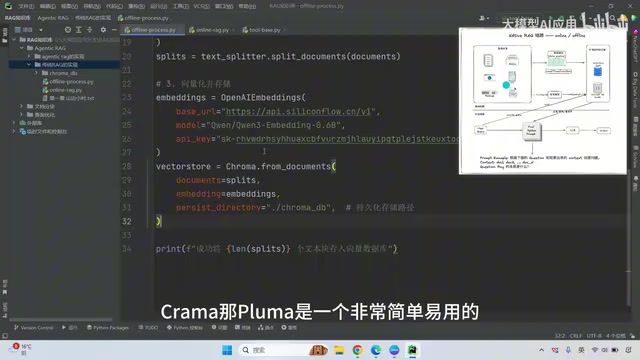
The first pipeline in traditional RAG is offline processing, independent of user interaction. The core workflow is as follows:
- Document Loading: Read documents (PDF, Word, TXT, etc.) into memory
- Document Chunking: Since documents can contain tens of thousands of characters and cannot be fed to the LLM all at once, they need to be split into fixed-length segments (e.g., 256 characters), with some overlap between segments to maintain semantic coherence
- Vectorization: Use an Embedding model (e.g., Qwen Embedding 0.6B) to convert each segment into a fixed-dimensional vector. The Embedding model maps text to points in a high-dimensional vector space, where semantically similar texts are closer together—this is the mathematical foundation for subsequent similarity retrieval
- Storage: Store vectors in a vector database (e.g., ChromaDB). ChromaDB is an open-source vector database that supports multiple similarity metrics including cosine similarity and Euclidean distance, and provides persistent storage and metadata filtering capabilities, making it a mainstream choice for lightweight RAG deployments
In terms of code implementation, you can complete chunking by setting chunk_size and chunk_overlap parameters using LangChain's recursive splitter, then vectorize with the Embedding model and store in ChromaDB. The entire process requires only three parameters: the split text chunks, the Embedding model, and the storage path.
Online Pipeline: Retrieval → Assembly → Generation
The online pipeline is the core of user interaction:
- Query Rewriting: The user's original question may not be suitable for direct retrieval and needs to be rewritten and optimized first
- Dual-Path Retrieval: Simultaneously use BM25 keyword retrieval and vector similarity retrieval to obtain relevant chunks. BM25 is a classic keyword retrieval algorithm based on term frequency statistics that complements vector retrieval—vector retrieval excels at capturing semantic similarity (e.g., "automobile" and "car"), while BM25 excels at exact keyword matching (e.g., product model numbers, proper nouns). Combining both in hybrid search significantly improves recall and compensates for the blind spots of either approach alone
- Merge and Reranking: Merge results from both retrieval paths and perform reranking to select the most relevant Top-K chunks
- Prompt Assembly and Generation: Inject the selected chunks into the Context section of a prompt template and pass it to the LLM for final answer generation
Traditional RAG prompt templates are typically simple: "You are a professional assistant, please answer based on the following question and retrieved documents," plus Context and Question.
The core problem is: the entire process is unidirectional, fixed, and one-shot. If the first retrieval round fails to hit useful information, the model cannot re-retrieve, search in a different way, or proactively supplement context. This is exactly the fundamental pain point that Agentic RAG aims to solve.
Agentic RAG: From Pipeline to Intelligent Closed Loop
Core Idea: Turning Retrieval Capabilities into Tools
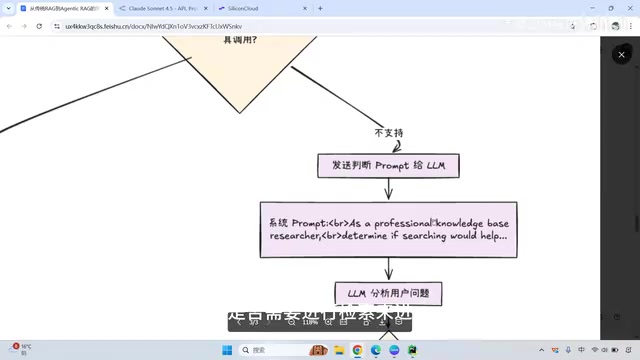
Agentic RAG is a fundamental upgrade to traditional RAG. It encapsulates each component of RAG—query rewriting, vector retrieval, keyword search, file reading, etc.—as callable tools, allowing the LLM to perform autonomous decision-making, multi-turn invocations, and dynamic adjustments before generating an answer.
In other words, Agentic RAG is no longer a straight line from start to finish, but an agent-driven closed loop: Think → Call Tool → Observe Result → Think Again → Act Again, until the final answer is generated. This decision-making paradigm originates from the ReAct (Reasoning + Acting) framework proposed by Google Research in 2022—it interleaves the LLM's reasoning process (Thought) with external tool calls (Action) to form an iterative loop. The key difference from traditional RAG is that the model is no longer a passive "content generator" but an active "problem solver" that can dynamically adjust subsequent action strategies based on intermediate results.
The model needs three core capabilities:
- Planning Ability: Manifested in Chain of Thought reasoning, planning how to solve problems step by step
- Tool Calling Ability: Being able to invoke different retrieval and reading tools as needed. This relies on the standardized Function Calling interface provided by model vendors at the API level—major vendors including OpenAI, Anthropic, and Alibaba Cloud all support this capability
- Multi-Step Iteration Ability: Being able to make multiple tool calls before the final answer, progressively refining information
Key Differences from Traditional RAG
| Dimension | Traditional RAG | Agentic RAG |
|---|---|---|
| Workflow | Fixed, unidirectional | Dynamic, cyclical |
| Retrieval Count | Once | Multiple iterations |
| Decision Maker | Preset rules | Model's autonomous judgment |
| Failure Handling | Returns "not found" directly | Rewrites query and retries |
| Model Involvement | Generation stage only | Participates from input onward |
In traditional RAG, the LLM is only used at the final generation stage. In Agentic RAG, the LLM participates in decision-making from the moment the user inputs a question—determining whether retrieval is needed, choosing which tool to call, and evaluating whether results are sufficient.
Enterprise-Grade Implementation: ChatBox Source Code Breakdown
Four Core Tool Designs
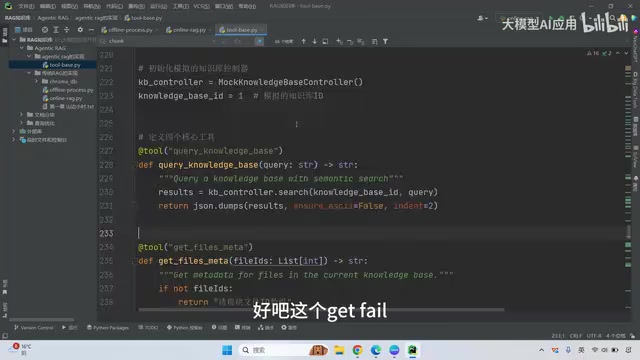
The open-source project ChatBox's Agentic RAG implementation provides an excellent reference. It designs four core tools:
-
Search Query (Semantic Retrieval): The most fundamental vector similarity retrieval tool, searching the knowledge base for document chunks most relevant to the query
-
List Files (File Listing): Lists the files in the knowledge base. This is an important fallback tool—traditional RAG cannot answer questions like "What documents are in the knowledge base?" because it can only retrieve partial content. With this tool, the model can obtain file counts and listings
-
Read File Chunk (Precise Reading): Reads specific text chunks precisely by document ID. It has two major advantages: first, it can precisely locate specific chunks; second, when information is incomplete, the model can proactively read adjacent chunks to supplement context, no longer relying solely on semantic similarity retrieval. This design compensates for an inherent flaw of vector retrieval—high vector similarity doesn't equal information completeness, and adjacent chunks often contain critical connecting content
-
Get File Metadata (Metadata Reading): Reads file metadata information, used less frequently but valuable in specific scenarios
Intelligent Decision Flow
ChatBox's implementation adopts a "trading time for intelligence" strategy:
- Check Model Capabilities: First detect whether the model supports tool calling (Function Calling)
- When Tool Calling Is Not Supported: Use a prompt to determine whether the question requires retrieval. If not, reply directly; if so, perform semantic search then generate an answer. This is superior to telling the model to ignore irrelevant context in the prompt, because it uses two model decisions
- When Tool Calling Is Supported: Register all tools with the model, letting the model autonomously decide which tools to call, forming a complete Agent loop
Code Implementation Highlights
ChatBox implements Agentic RAG based on LangGraph's create_react_agent. LangGraph is a framework within the LangChain ecosystem specifically designed for building stateful, multi-step Agent workflows. Its create_react_agent function encapsulates the complete ReAct loop logic—including tool call routing, result passing, and termination condition detection—developers only need to define tools and prompts to get an Agent with multi-turn reasoning capabilities. The core code is surprisingly concise:
# 1. Define tool list
tools = [search_query, list_files, read_file_chunk, get_file_metadata]

# 2. Write system prompt to guide model tool usage
system_prompt = "You are an Agentic RAG assistant, step 1...step 2...step 3..."

# 3. Create React Agent
agent = create_react_agent(
    model=llm,           # Large language model
    tools=tools,         # Tool list
    system_prompt=prompt  # System prompt
)

# 4. Run Agent
result = agent.invoke({"messages": [user_query]})
It's particularly important to note that the system prompt must strictly constrain the model's response format, otherwise the model may strip quotes or brackets, causing tool calls to fail.
Practical Results Comparison
Here's a concrete example illustrating the difference between traditional RAG and Agentic RAG:
Traditional RAG: User query → vector retrieval → results retrieved → directly generate answer. If retrieval results are irrelevant, the model can only answer "I don't know."
Agentic RAG:
- First search round: Uses Search Query for retrieval, finds very low hit rate
- Observation and reflection: Model determines the query needs to be rewritten
- Second search round: Retrieves again with the rewritten query, hits relevant chunks
- Third round supplement: Reads adjacent chunks via Read File Chunk to supplement context
- Final generation: Generates a complete, accurate answer based on sufficient information
Summary and Reflections
The core value of Agentic RAG can be summarized in one sentence: Tools grant capability; intelligence lies in choice. True Agentic RAG begins with retrieval but succeeds through decision-making.
From a technical implementation perspective, the core logic of Agentic RAG isn't complex—with frameworks like LangGraph, you can build a basic framework in just a few dozen lines of code. The real challenges lie in:
- Tool Design: How to design a reasonable tool set that covers edge cases like retrieval failure and incomplete information
- Prompt Engineering: How to guide the model to use tools correctly, avoiding format errors that cause call failures
- Offline Pipeline Optimization: Document chunking strategies, Embedding model selection, query rewriting strategies, etc.—these determine the quality ceiling of the Context
For LLM application developers, understanding the evolution from traditional RAG to Agentic RAG is not just a technology stack upgrade, but a mindset shift—from "preset workflows" to "granting models autonomous decision-making authority."
Key Takeaways
- Traditional RAG follows a fixed unidirectional workflow (retrieve → assemble → generate) and cannot handle retrieval failures or incomplete information scenarios
- Agentic RAG encapsulates retrieval, file reading, and other capabilities as tools, granting LLMs autonomous decision-making and multi-turn iteration abilities, forming an intelligent Think-Act-Observe closed loop
- ChatBox implements enterprise-grade Agentic RAG through four core tools: Search Query, List Files, Read File Chunk, and Get File Metadata
- The core implementation of Agentic RAG is based on LangGraph's create_react_agent—the code logic is concise yet unleashes the model's autonomous decision-making capability
- The real technical challenges lie not in framework setup, but in tool design, prompt engineering, and Context quality optimization in the offline pipeline
Related articles
 Tutorials
Cursor + Codex Dual-IDE Collaboration: A Practical Methodology for Open-Source Project Customization
A complete methodology for open-source project customization based on real-world experience, detailing the Cursor+Codex dual-IDE workflow, seven-stage process, MVP validation, and AI source code reading techniques.
 Tutorials
Cursor Multi-Agent in Practice: Building a Full-Stack Next.js Blog in 50 Minutes
Build a full-stack blog in 50 minutes using Cursor IDE's multi-Agent mode with Next.js, Clerk auth, and Supabase. Learn the 4-phase AI Agent workflow and key integration pitfalls.
 Tutorials
Building an AI Software Factory from Scratch: A Cursor Engineer's Hands-On Experience with Multi-Agent Collaboration
Cursor engineer Eric shares practical insights on building an AI software factory: automation levels, guardrail design, parallel Agent management, and scaling to 1000+ Agents for 24/7 development.