Gemini Live Image Creation Feature Explained: Real-Time Conversational Image Generation and Editing
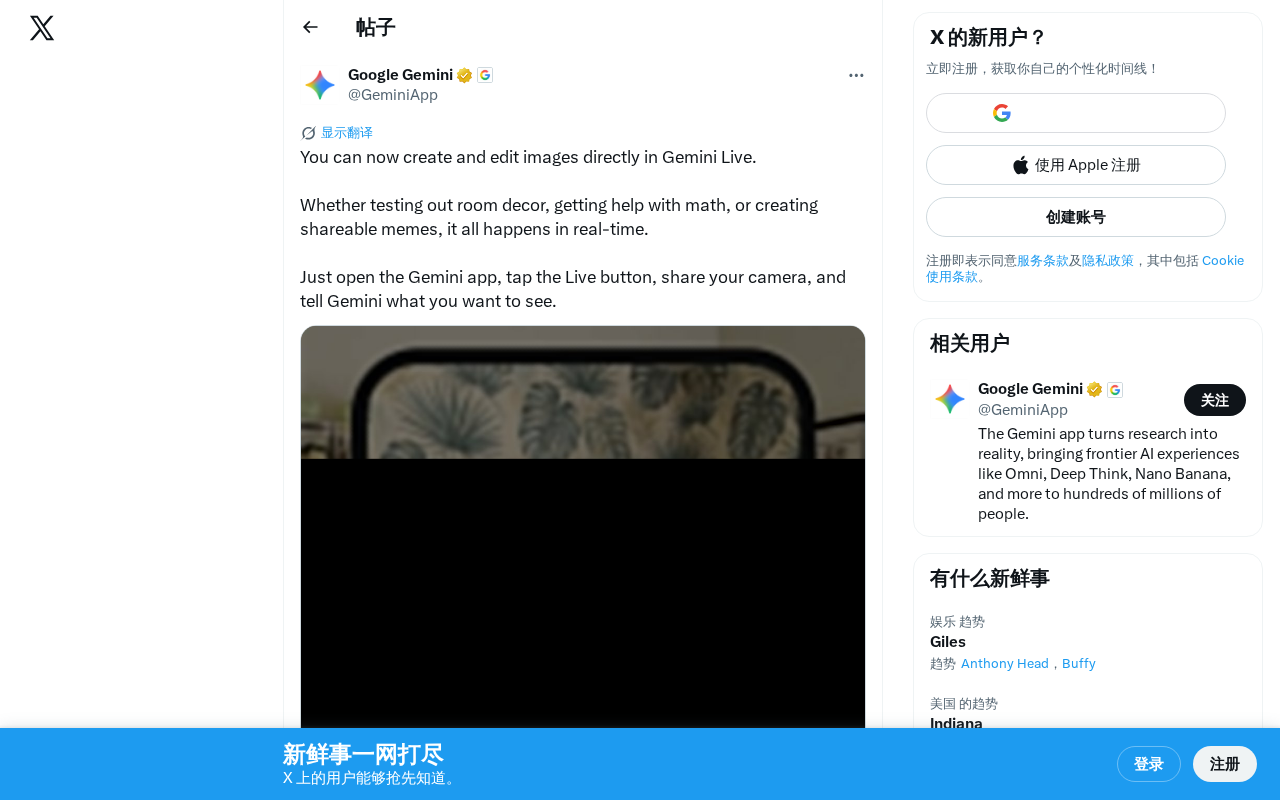
Gemini Live now lets users create and edit images in real-time through natural conversation.
Google's Gemini Live now supports real-time image creation and editing within conversations. Users can generate images through voice commands and camera sharing, with applications ranging from interior decoration testing to math assistance and meme creation. Built on Gemini 2.0's native multimodal architecture, the feature eliminates the need for complex prompt engineering, intensifying competition with OpenAI's GPT-4o in the multimodal AI space.
Gemini Live Image Creation Feature Overview
Google recently announced that Gemini Live now supports creating and editing images directly within conversations. This addition means users can leverage AI through real-time dialogue to complete various visual creative tasks—from testing interior decoration schemes to solving math problems to creating memes—all accomplished through real-time interaction.
Gemini Live is a real-time conversational AI feature launched by Google in 2024. Initially supporting only voice interaction, it has gradually expanded to multimodal capabilities. It's built on Google's Gemini large language model family, particularly the Gemini 2.0 series. Unlike earlier approaches that simply stitched together separate models for different modalities, Gemini 2.0 natively supports multimodal input and output from training, enabling it to understand and generate text, images, audio, and other content types within a unified representation space, resulting in smoother cross-modal interaction experiences.
Gemini Live Image Feature Highlights
Real-Time Image Generation and Editing
The core advantage of Gemini Live lies in its "real-time" nature. Unlike traditional image generation tools, users don't need to switch applications or wait through lengthy processing times. Instead, they can create and modify images directly within a real-time conversation with Gemini. This interaction approach significantly lowers the barrier to using AI image tools, making them accessible to everyday users.
Real-time image generation relies on inference acceleration techniques for Diffusion Models. Traditional image generation models like Stable Diffusion require dozens of denoising steps, taking several seconds or longer. Google has compressed generation latency to conversationally acceptable ranges through techniques such as model distillation, step compression, and dedicated hardware acceleration (like TPU v5e). Additionally, Streaming Generation technology allows the model to begin returning partial results before completing full inference, further improving perceived response speed for users.
Multi-Scenario Applications
Google officially demonstrated several typical use cases:
- Interior Decoration Testing: Users can share their current room view through the camera, then have Gemini generate renderings in different decorative styles to help with purchasing decisions
- Math Assistance: Show math problems to Gemini, and it can not only solve them but also present the solution process visually through images
- Meme Creation: Generate shareable fun images and memes in real-time, meeting social media content creation needs
Extremely Simple Workflow
The usage method is very intuitive: open the Gemini app, tap the Live button, share your camera feed, then tell Gemini what you want to see using your voice. The entire process requires no complex prompt engineering—natural language communication is all it takes.
Prompt Engineering refers to the technique of carefully designing input text to achieve desired AI output. In traditional image generation tools like Midjourney, users often need to master specific keyword combinations, parameter settings, and style descriptors to get satisfactory results, creating a significant learning curve. Gemini Live dissolves this barrier through conversational interaction—users can describe their needs in everyday language, gradually refining through multiple conversation turns, while the AI handles the work of converting vague intentions into precise generation instructions. This paradigm shift expands the audience for AI image creation from tech enthusiasts to ordinary consumers.
Industry Significance of Gemini Live's Image Feature
Intensifying Multimodal AI Competition
This update marks Google's continued push in the multimodal AI space. Previously, OpenAI's GPT-4o had already demonstrated powerful image generation capabilities, and Google's integration of image creation and editing directly into Gemini Live's real-time conversation flow creates a differentiated advantage in interaction experience.
The current competitive landscape in multimodal AI has formed a multi-party contest. OpenAI's GPT-4o was first to demonstrate native multimodal capabilities in 2024, with its image generation feature triggering viral spread of Studio Ghibli-style images on social media. Meta's Llama series is also actively expanding multimodal capabilities, while Anthropic's Claude excels in document understanding. Google's differentiation strategy lies in deeply binding multimodal capabilities with real-time interaction, leveraging its mobile ecosystem advantage (Android) to seamlessly integrate hardware sensors like cameras and microphones with AI capabilities, creating end-to-end experiences that competitors find difficult to replicate.
Real-time is the keyword. Compared to the traditional workflow of "input prompt → wait for generation → view results → modify prompt," Gemini Live offers an experience closer to human-to-human collaboration—you can see results as you speak and adjust direction at any time.
From Tool to Assistant
Combining real-time camera feeds with image generation means AI is no longer just a passive generation tool, but an active assistant that can "see" your environment and provide visual suggestions accordingly. This capability holds enormous commercial potential in scenarios like interior design, outfit recommendations, and product visualization.
This capability involves two key technologies: Visual Understanding and Visual Grounding. Visual Understanding requires the model to recognize objects, spatial relationships, lighting conditions, and other information in the scene. Visual Grounding requires the model to map users' language instructions to specific regions in the image. Google has deep expertise in this area, with predecessor technologies including Google Lens object recognition and ARCore spatial awareness. The fusion of these capabilities enables Gemini to understand complex instructions containing spatial references like "change that wall to blue," truly achieving the leap from passive tool to active assistant.
Future Outlook
With the launch of Gemini Live's image feature, multimodal real-time interaction will become the core battleground for the next phase of AI assistant competition. For everyday users, the barrier to AI image creation continues to be lowered; for developers and creators, the API-ification of such capabilities is also worth anticipating.
This feature is now live in the Gemini app, and users can experience it directly. It's worth watching whether Google will extend this capability to more platforms and scenarios, and whether it will open related interfaces to developers through enterprise platforms like Vertex AI to drive broader ecosystem application adoption.
Key Takeaways
Related articles
AI Aggregator Platforms Tested: A Complete Guide to Using GPT 5.5 and Other Top Models for Free
A hands-on guide to using GPT 5.5, Gemini 3.1 Pro, and Grok 4.2 for free via AI aggregator platforms, covering cross-model context memory, account pool mechanisms, and key security risks.
Vibe Coding in Practice: A Junior Student Uses Cursor to Build a Multi-Agent System with 51 AI Officials Based on the Three Departments and Six Ministries Framework
A junior student uses Cursor and Vibe Coding to build a multi-agent system with 51 AI officials modeled on China's Three Departments and Six Ministries, featuring task distribution, approval workflows, and Token cost visualization.
How to Connect Codex to DeepSeek Models: Free Switching via CC Switch
Learn how to connect OpenAI Codex to DeepSeek models via CC Switch, enabling free switching between DeepSeek and GPT with complete setup and routing guide.