Gemma 4 Complete Guide: The Apache 2.0 Open-Source Agent Powerhouse

Google's open-source Gemma 4 model evaluation and selection guide: outstanding Agent capability but lopsided performance
Google releases the Apache 2.0 open-source Gemma 4 series featuring three tiers: 31B (strong coding, high Token efficiency), 26B MOE (optimal for Agents, fast inference), and 14B/12B (on-device voice). This article provides detailed evaluations of each version's pros and cons, deployment solutions for Windows/Linux/Mac, and a hands-on LoRA fine-tuning workflow using MS-Swift, helping developers select the right model for their specific use case.
Google's newly released Gemma 4 model series makes a stunning debut under the Apache 2.0 fully open-source license, completely removing all commercial use restrictions. This move is not only a technological breakthrough but also a major win for the open-source ecosystem. Real-world testing shows that Gemma 4 demonstrates dominant performance in Agent capabilities and workflow construction, but the performance gap between different model sizes is significant, requiring careful selection. This article provides a complete Gemma 4 usage guide covering model evaluation, deployment solutions, and fine-tuning practice.
Three Models Ranked: Each Has Strengths, but Severely Lopsided
Gemma 4 launches in multiple size variants, covering all scenarios from cloud to edge. But as a Bilibili content creator noted in hands-on testing, this is an "extremely lopsided Agent powerhouse" — stunning in certain dimensions, yet with obvious shortcomings in others.
31B Flagship (Large): Code Master, Token Efficiency King
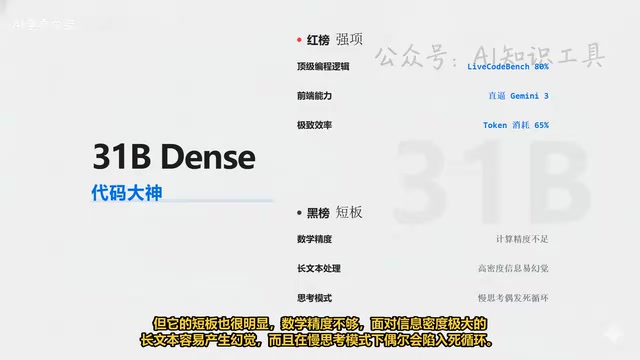
The 31B version is Gemma 4's flagship model, positioned as a "code master." Its programming logic capability is extremely strong, achieving 80% on LiveCodeBench benchmarks, with frontend HTML generation quality rivaling Gemini 3.
The core competitive advantage lies in Token efficiency — completing the same tasks with only 65% of the Token consumption compared to competitors. This advantage is particularly critical in local Agent workflows requiring high-frequency calls, delivering both faster speed and significantly lower costs.
However, the weaknesses are equally apparent: insufficient mathematical precision, hallucinations when facing long texts with extremely high information density, and occasional infinite loops in slow-thinking (Thinking) mode.
26B MOE Value Pick (Medium): The True Agent Powerhouse
The 26B MOE version is arguably the biggest surprise of this release, praised as the "true Agent powerhouse." For local developers, it's a godsend for 24GB VRAM GPUs — although the total parameter count reaches 25.2B, thanks to the MOE (Mixture of Experts) architecture, only about 3.8B parameters are activated during inference, achieving a real-world inference speed of 60 tokens per second.
Combined with a 256K ultra-long context window, it's perfectly suited for loading complex system prompts to build local autonomous agents. For developers who need to run complex Agent workflows on limited hardware resources, this version is currently the optimal choice.
However, its text generation quality is a weak point: Chinese writing performance is mediocre, and some developers report that its generated content tends to be "padded" with low information density.
14B and 12B Edge Models (Small): The Voice Ace for Edge Devices
The 14B and 12B small-size models target edge device scenarios. The most impressive feature is native support for on-device voice input, supporting up to 30 seconds of audio. This means no external ASR (Automatic Speech Recognition) model is needed — offline English speech transcription is nearly perfect, making them ideal for building IoT voice interaction devices.
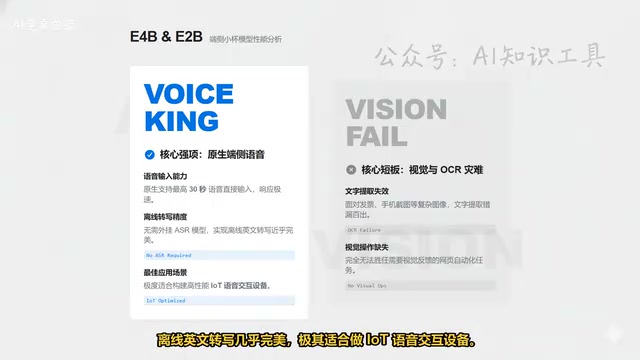
However, note that these two models' vision and OCR capabilities are a "disaster zone" — when facing invoices or phone screenshots, text extraction is riddled with errors and omissions, completely unable to handle web automation tasks requiring visual operations. Be sure to weigh your actual needs when selecting.
Deployment Solutions: Optimal Approaches for Three Platforms
Deployment strategies for Gemma 4 differ across operating systems and use cases. Here are verified recommended approaches.
Windows Users: One-Click Launch with Ollama
Windows users are recommended to use Ollama directly. After installation, simply execute one command in the terminal to launch the Gemma 4 31B version, with an extremely low barrier to entry.
Linux / WSL2 Users: vLLM for High-Concurrency Deployment
If you need to deploy high-concurrency services in Linux or Windows WSL2 environments, vLLM framework is strongly recommended. The 4-bit quantized version is advised to significantly reduce VRAM pressure and improve response speed. Two key parameters to note during deployment:
- Port: Confirm that port 8000 is not occupied
- Maximum model length: Set to 6000 to ensure stable service operation
Mac Users: Stick with Ollama for Now
Currently, the MLX framework's adaptation for Gemma 4 is not yet perfect. The most reliable approach for Mac users at this stage remains using Ollama.
Fine-Tuning Practice: From Environment Setup to Model Upload
For developers looking to adapt Gemma 4 to specific business scenarios, fine-tuning is essential. Here's the complete fine-tuning workflow based on the MS-Swift framework.
Environment Preparation: MS-Swift Framework Installation
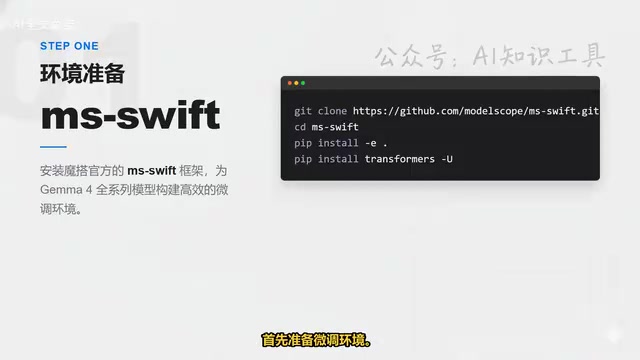
First, install ModelScope's official MS-Swift framework, which already supports the entire Gemma 4 model series from day one. The steps are straightforward: clone the repository, enter the directory, execute the installation command, and update the Transformers library to the latest version.
Core Training: LoRA Quantized Fine-Tuning Approach
Taking 12B vision fine-tuning as an example, the recommended approach is LoRA quantized fine-tuning. By setting LoRA Rank to 8, only a minimal number of parameters are updated, dramatically reducing compute requirements while maintaining effectiveness.
Two critical Freeze parameters require special attention:
- VIT Freeze: Protects the model's original visual encoding capability
- Aligner Freeze: Protects the multimodal alignment layer from being corrupted
For efficient operation in multi-GPU environments, enabling DeepSpeed Zero 2 for memory optimization is recommended. After executing the training command, the framework automatically loads the LaTeX OCR dataset for training.
Validation and Custom Dataset Preparation
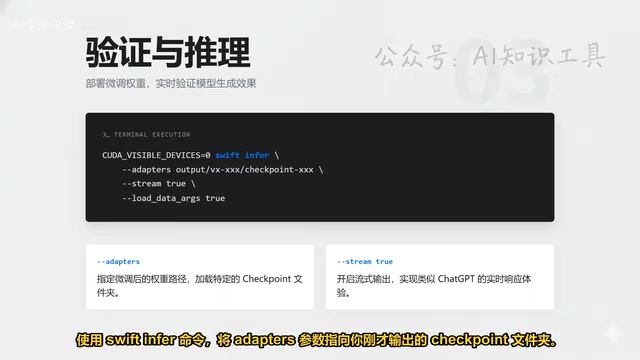
After training is complete, use the swift infer command for validation. Point the Adapter parameter to the output Checkpoint folder to view the model's generation results in real-time.
If you want to fine-tune with your own data, prepare files in JSONL format:
- Pure text mode: Standard conversation message list (messages format)
- Image multimodal: Add an
imagesfield alongside messages, pointing to image paths - Audio multimodal: Add an
audiofield, pointing to audio file paths
This ensures the model correctly associates multimodal inputs with text responses.
Model Upload: One-Click Push to ModelScope Cloud
The final step is pushing the fine-tuned adapter to ModelScope. Execute the swift export command, fill in the model ID and SDK Token, and your local weights will be uploaded to the cloud Hub for quick access across different devices.
Selection Recommendations and Summary
The release of Gemma 4 marks a major strategic shift for Google in the open-source LLM space. The adoption of the Apache 2.0 license maximizes commercial friendliness. Based on actual performance:
- Building local Agent workflows: The 26B MOE version is the top choice with unbeatable value
- Code generation and development assistance: Choose the 31B flagship for top-tier programming capability
- Edge device voice interaction: The 14B/12B edge versions are the best choice
- Chinese writing and visual OCR: Gemma 4 is currently not the optimal choice; consider waiting for future updates
Overall, Gemma 4 is a "specialist" — excelling in Agent capabilities, code, and Token efficiency, but with room for improvement in mathematical precision, Chinese quality, and visual OCR. Developers should select precisely based on specific scenarios rather than blindly pursuing the largest parameter count.
Related articles
 Tutorials
Cursor + Codex Dual-IDE Collaboration: A Practical Methodology for Open-Source Project Customization
A complete methodology for open-source project customization based on real-world experience, detailing the Cursor+Codex dual-IDE workflow, seven-stage process, MVP validation, and AI source code reading techniques.
 Tutorials
Cursor Multi-Agent in Practice: Building a Full-Stack Next.js Blog in 50 Minutes
Build a full-stack blog in 50 minutes using Cursor IDE's multi-Agent mode with Next.js, Clerk auth, and Supabase. Learn the 4-phase AI Agent workflow and key integration pitfalls.
 Tutorials
Building an AI Software Factory from Scratch: A Cursor Engineer's Hands-On Experience with Multi-Agent Collaboration
Cursor engineer Eric shares practical insights on building an AI software factory: automation levels, guardrail design, parallel Agent management, and scaling to 1000+ Agents for 24/7 development.