Getting Started with Claude Code: 5 Core Advantages Over Regular AI Coding Tools
Getting Started with Claude Code: 5 Co…
Claude Code is an AI Agent coding assistant that executes operations directly in your local project.
Claude Code is an AI coding assistant from Anthropic that operates as an AI Agent, capable of reading code, modifying files, and executing commands directly in your local project. Compared to regular AI chat, it leads across five dimensions: interaction mode, context understanding, execution power, memory (via CLAUDE.md), and tool invocation (via MCP protocol), representing a major evolution in AI coding from conversational suggestions to actual execution.
What Is Claude Code?
Claude Code is an AI coding assistant developed by Anthropic, but it's fundamentally different from the AI chat tools we're familiar with, like ChatGPT or DeepSeek. Put simply, it doesn't just chat — it can actually do things for you.
From a technical perspective, Claude Code falls under the category of AI Agent. Unlike traditional Q&A-style large language models, an AI Agent can perceive its environment, formulate plans, invoke tools, execute actions, and iterate based on feedback. The core of this paradigm is the "Tool Use" mechanism — the model doesn't just output text but can call predefined function interfaces to interact with the external world. Claude Code brings this mechanism to life in development scenarios: the file system, terminal commands, Git, and more all become "tools" it can invoke. This evolution from LLM to Agent is widely regarded as a critical leap toward making AI truly practical.
All you need to do is tell it what you want in natural language, and it can understand your project structure and automatically complete a series of operations like writing code, creating files, and executing commands. To use an analogy: regular AI chat is like calling a remote consultant on the phone — they know everything, but you have to do the work yourself. Claude Code, on the other hand, is like having an assistant sitting right next to you who can browse through your folders and modify code on their own.
Five Core Differences Between Claude Code and Regular AI Chat
To better understand Claude Code's advantages, let's compare it with regular web-based AI chat across five key dimensions.
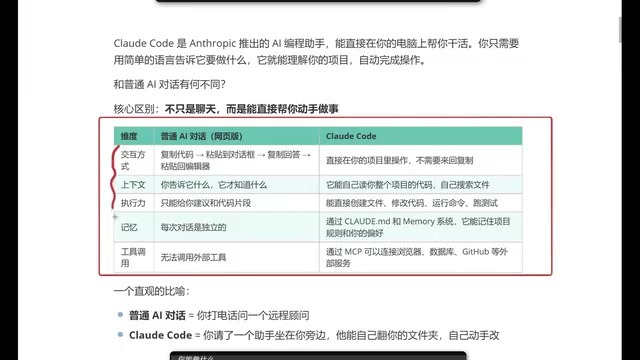
1. Interaction Mode: Say Goodbye to Copy-Paste
When using regular AI chat tools, the workflow typically looks like this: copy code → paste into the chat box → wait for a response → copy the response → paste it back into your editor. While not overly complex, this process is genuinely tedious, especially during frequent debugging sessions.
Claude Code runs directly in your project directory, with all operations completed locally, completely eliminating the back-and-forth copy-paste steps. This seamless experience delivers a qualitative improvement in development efficiency.
2. Context Understanding: Automatic Project-Wide Reading
Regular AI chat context depends entirely on the information you provide — it only knows what you tell it. This means you need to manually describe your project structure, paste relevant code, and even explain dependencies between files.
Claude Code is completely different. It can automatically read your entire project's code, proactively search for relevant files, and understand the overall project architecture. Notably, it doesn't crudely stuff all files into the context window. Instead, it uses intelligent retrieval to read only files relevant to the current task — one reason its token consumption is more efficient. When you make a request, it already has a clear understanding of the full project picture, naturally producing more precise solutions.
3. Execution Power: From Suggestions to Action
Regular AI can only give you suggestions or code snippets — it can't provide complete project-level solutions. After all, a real project consists of numerous files and complex code structures, and isolated code snippets are often difficult to use directly.
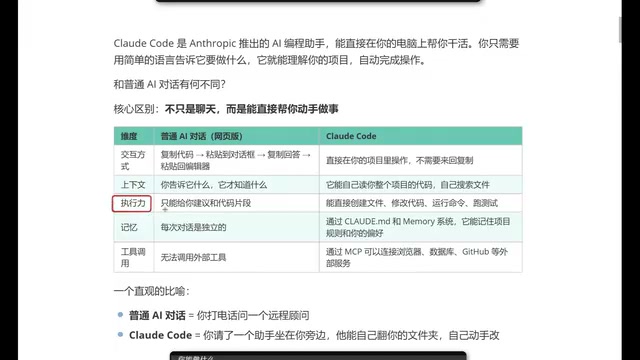
Claude Code excels here. It can directly create files, modify code, run commands, and execute tests, truly making the leap from "giving advice" to "doing the work for you."
4. Memory: Remembering Your Coding Style
Regular AI chat memory is ephemeral — once you close the window or start a new conversation, all previous context is lost. Every conversation is independent.
Claude Code, through configuration files (like CLAUDE.md), can remember your project rules and personal preferences, including your coding style, tech stack choices, naming conventions, and more.
The working principle of CLAUDE.md is worth understanding in depth: it's a Markdown-format text file placed in your project's root directory that gets automatically injected into the model's context window at the start of each session, acting as a "system prompt." This design cleverly works around the limitation that large language models don't have persistent memory — rather than making the model "remember," it simply re-tells the key information every time. A similar approach is used in other AI coding tools, such as Cursor's .cursorrules file, and has become an industry convention for AI coding tools. As you continue refining your CLAUDE.md over time, it will increasingly "understand you," and the code it outputs will align more closely with your habits.
5. Tool Invocation: Connecting External Services via MCP Protocol
Regular web-based AI chat has limited tool invocation capabilities. While products like GPT already support some external tools, configuration is cumbersome and some features require payment.
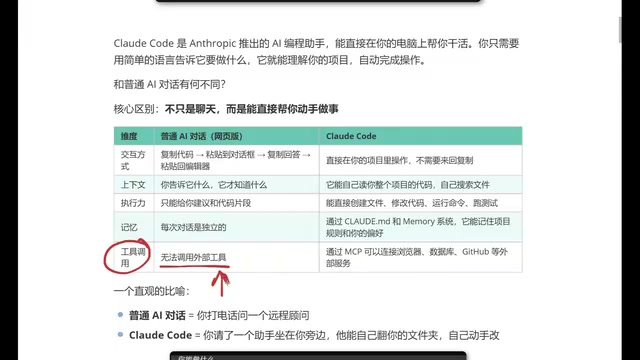
Claude Code, through MCP (Model Context Protocol), can directly connect to browsers, databases, GitHub, and other external services, achieving true toolchain integration.
MCP is a standardized protocol open-sourced by Anthropic in November 2024, designed to solve the fragmentation problem of connecting AI models with external data sources. Drawing inspiration from the Language Server Protocol (LSP), it defines a unified client-server communication specification: the AI model acts as the client, while various external services expose standardized interfaces as MCP Servers. Developers only need to implement an MCP Server once for it to be callable by all AI tools that support MCP. Currently, MCP has gained support from multiple mainstream AI companies including OpenAI and Google DeepMind, and is becoming the de facto standard for AI tool ecosystem interoperability. This greatly expands Claude Code's capability boundaries, no longer limited to code itself.
What Can Claude Code Do? A Comprehensive Feature Breakdown
From a practical usage perspective, Claude Code's capabilities cover multiple aspects of development work:
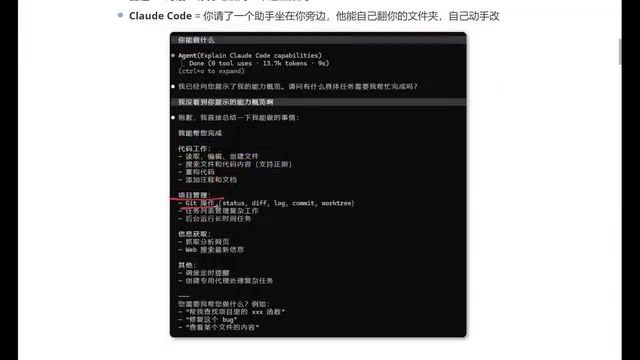
Code Work:
- Read, edit, and create files
- Search files and code content
- Code refactoring, adding comments and documentation
Project Management:
- Git operations (commits, branch management, etc.)
- Task list management
- Running long-duration tasks in the background
Information Retrieval:
- Fetching and analyzing web content
- Web searching for the latest information
Other Capabilities:
- Scheduling timed reminders
- Creating dedicated agents for complex tasks
For programmers, this covers the vast majority of daily development scenarios.
Claude Code vs Cursor: How to Choose?
This is a question many developers care about. As two of the hottest AI coding tools available today, each has its strengths. Based on practical experience, here are some points worth considering:
- Token Consumption: Tokens are the basic unit of measurement for how large language models process text, and the cost of AI coding tools is directly tied to token consumption. Claude Code is relatively more token-efficient because it has stronger task planning capabilities and more precise context retrieval, reducing wasteful multi-round revisions caused by misunderstandings and the unnecessary sending of irrelevant code. For high-frequency users, this difference shows up significantly on monthly bills, making long-term costs more manageable.
- Output Quality: Especially in front-end development scenarios, code generated by Claude Code tends to better match developer expectations.
- Feature Coverage: Things Cursor can do, Claude Code can generally do as well.
Of course, this doesn't mean you have to choose one over the other. If you're already proficient with Cursor, you can absolutely continue using it. But if you're looking for a new AI coding tool, Claude Code is definitely worth trying.
Conclusion
Claude Code represents an important evolutionary direction for AI coding assistants: moving from "conversational suggestions" to "actual execution." It's no longer just a clever Q&A chatbot — it's a coding partner that can truly understand your project, remember your preferences, and get work done for you. Behind this evolution is the collective maturation of AI Agent technology, tool invocation mechanisms, and open protocols like MCP, marking the upgrade of AI-assisted development from a "reference tool" to a "collaborative partner."
For programmers looking to boost their development efficiency, spending half an hour getting to know and trying out Claude Code is absolutely a worthwhile time investment.
Related articles
 Tutorials
Cursor + Codex Dual-IDE Collaboration: A Practical Methodology for Open-Source Project Customization
A complete methodology for open-source project customization based on real-world experience, detailing the Cursor+Codex dual-IDE workflow, seven-stage process, MVP validation, and AI source code reading techniques.
 Tutorials
Cursor Multi-Agent in Practice: Building a Full-Stack Next.js Blog in 50 Minutes
Build a full-stack blog in 50 minutes using Cursor IDE's multi-Agent mode with Next.js, Clerk auth, and Supabase. Learn the 4-phase AI Agent workflow and key integration pitfalls.
 Tutorials
Building an AI Software Factory from Scratch: A Cursor Engineer's Hands-On Experience with Multi-Agent Collaboration
Cursor engineer Eric shares practical insights on building an AI software factory: automation levels, guardrail design, parallel Agent management, and scaling to 1000+ Agents for 24/7 development.