Getting Started with Claude Code: 5 Key Differences from Traditional AI Chatbots
Claude Code goes beyond chat — it reads your project, executes code, and remembers your preferences.
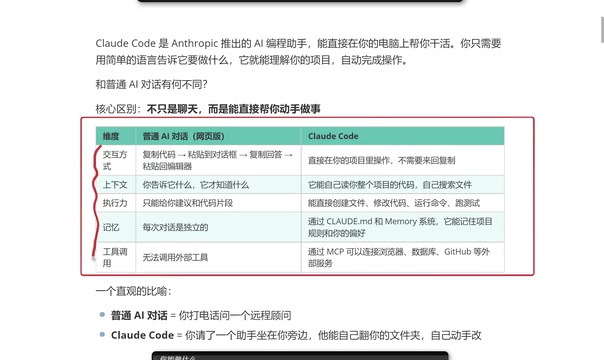
Claude Code differs from traditional AI chat tools in five critical ways: it operates directly in your project directory (no copy-pasting), automatically understands your full codebase, executes real actions like creating files and running tests, remembers your coding preferences via config files, and integrates with external services through MCP. This shifts AI-assisted development from 'I ask, you answer' to 'I say, you do.'
What Is Claude Code?
Claude Code is an AI programming assistant from Anthropic that has been generating significant buzz in the developer community. Unlike familiar AI chat tools such as ChatGPT or DeepSeek, Claude Code's defining feature is that it doesn't just chat — it actually does the work for you.
Here's an intuitive analogy: Traditional AI chat is like calling a remote consultant over the phone — they know everything, but you still have to do the work yourself. Claude Code, on the other hand, is like having an assistant sitting right next to you who can browse through your files and modify code on their own.
This fundamental difference is what gives Claude Code its productivity edge in real-world development scenarios.
Claude Code vs Traditional AI Chat: A Deep Dive Across Five Dimensions
Based on hands-on experience, we can understand the differences between Claude Code and traditional AI chat tools across five key dimensions.
1. Interaction Model: No More Copy-Pasting
When using traditional AI chat tools (like the ChatGPT web interface) for coding assistance, the workflow typically looks like this: copy code → paste into the chat box → wait for a response → copy the answer → paste it back into your editor. While not overly complex, this process becomes tedious with frequent use.
Claude Code works entirely differently — it runs directly inside your project directory, with all operations happening locally, eliminating the back-and-forth copy-paste routine. This may seem like a minor improvement, but it significantly boosts efficiency in practice.
2. Context Understanding: Automatic Project-Wide Awareness
Traditional AI chat relies entirely on what you explicitly provide — it only knows what you tell it. This means you spend considerable time describing project structure, relevant file contents, and dependency relationships.
Claude Code takes a fundamentally different approach: it can automatically read your entire project's codebase and proactively search for relevant files. This means when you make a request, it already understands the overall architecture, coding style, and dependencies — naturally producing more precise suggestions.
3. Execution Power: From Suggestions to Action
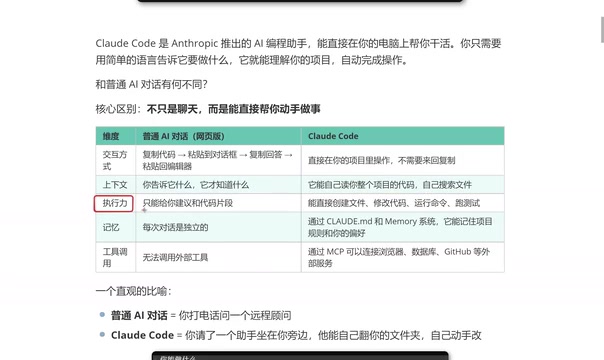
This is the most critical difference between Claude Code and traditional AI chat tools. Traditional AI can only give you code snippets or suggestions — it can't deliver complete project-level solutions, since real projects consist of numerous files and complex code structures.
Claude Code has genuine execution capabilities:
- Create files: Generate new files directly in your project
- Modify code: Automatically locate and edit existing code
- Run commands: Execute build, test, and other commands
- Run tests: Verify that changes work correctly
This leap from "giving suggestions" to "doing the actual work" is Claude Code's most revolutionary feature.
4. Memory: Remembering Your Preferences and Style
Traditional AI chat has short-lived memory — close the window or start a new conversation, and all previous context is lost. You have to re-explain your requirements and preferences every time.
Claude Code uses a configuration file mechanism to persistently remember your project rules and coding preferences. Whether you prefer functional programming style or a specific naming convention, Claude Code remembers and maintains consistency across interactions. This coding style memory is crucial for maintaining codebase consistency.
5. Tool Integration: Connecting to External Services
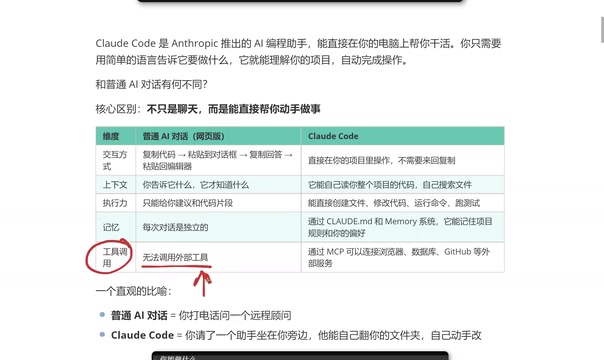
Traditional AI web interfaces have limited tool-calling capabilities. While products like ChatGPT are experimenting with external tool integrations, they often have a high barrier to entry and may require additional fees.
Claude Code uses the MCP (Model Context Protocol) to directly connect to browsers, databases, GitHub, and other external services. This means it can not only write code but also seamlessly collaborate with your entire development toolchain.
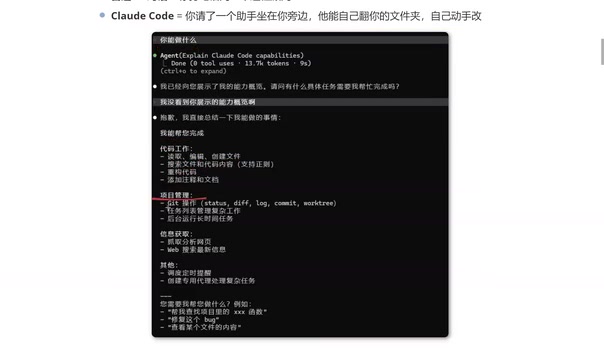
Claude Code's Complete Capability Map
Based on real-world testing, Claude Code's capabilities can be grouped into the following categories:
Code Work:
- Read, edit, and create files
- Search files and code content
- Code refactoring
- Adding comments and documentation
Project Management:
- Git operations (commits, branch management, etc.)
- Task list management
- Background execution of complex workflows
- Running long-duration tasks
Information Retrieval:
- Fetching and analyzing web content
- Web search for up-to-date information
Advanced Features:
- Scheduling and timed reminders
- Creating dedicated agents for complex tasks
Claude Code vs Cursor: How to Choose?
This is a question many developers care about. Based on practical experience, each has its strengths:
- Cursor: Exists as an IDE plugin with a user-friendly visual interface, ideal for developers who prefer graphical workflows
- Claude Code: A command-line tool that is more token-efficient, and often produces results that better match expectations in frontend development scenarios
A noteworthy point: anything Cursor can do, Claude Code can generally handle as well. Claude Code's advantage in token efficiency means you can accomplish more work within the same budget. For frontend developers, Claude Code may have an edge in code quality and style consistency.
That said, there's no absolute right or wrong in tool selection — use whichever one you're most proficient with. The two aren't mutually exclusive, and you can freely switch between them depending on the scenario.
Summary
Claude Code represents an important evolutionary direction for AI programming tools: moving from "conversational suggestions" to "direct execution." Through project-level context understanding, genuine code execution capabilities, persistent preference memory, and external tool integration, it delivers a complete AI programming assistant experience.
For developers, Claude Code's value lies not just in boosting coding efficiency, but in fundamentally changing how humans collaborate with AI — from "I ask, you answer" to "I say, you do." This paradigm shift may profoundly reshape the future of software development workflows.
Related articles
Building a Complete Mini Program with Codex: A Full-Process Walkthrough from Zero to Launch
A detailed walkthrough of building a complete WeChat Mini Program from scratch using OpenAI Codex, covering seven image tool features, membership system, WeChat Pay integration, and AI-assisted development strategies.
OpenAI Codex Deep Dive: The AI Develop…
OpenAI Codex Deep Dive: The AI Development Tool That Makes Programming Feel Like Flying
Deep dive into how OpenAI Codex redefines programming. From real developer feedback to the Time to Fly project, analyzing Codex's strengths in code generation, context understanding, and the AI coding tool competitive landscape.
Claude Code + DeepSeek Setup Guide: Budget-Friendly AI Coding Solution
Step-by-step guide to configuring Claude Code with DeepSeek for budget AI-assisted coding. Covers Node.js setup, CCSwitch configuration, VS Code integration, and real-world demo — all for just pennies a day.