Claude Code + DeepSeek Setup Guide: Budget-Friendly AI Coding Solution
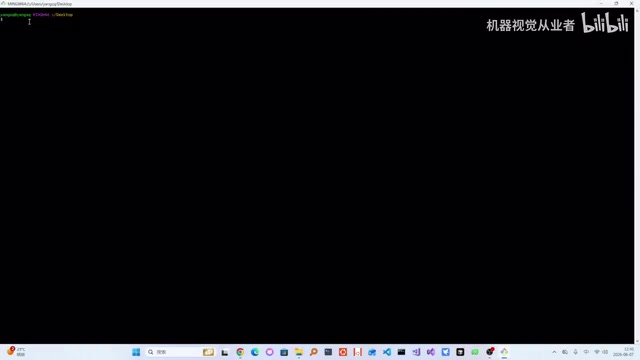
Configure Claude Code with DeepSeek for powerful AI coding at a fraction of the usual cost.
This guide walks you through setting up Claude Code paired with DeepSeek as a cost-effective AI coding solution. It covers installing Node.js and Git, configuring CCSwitch to redirect API calls to DeepSeek, integrating with VS Code, and demonstrates building a scientific calculator. The combo delivers a Cursor-like experience at under ¥30/month.
Why Choose the Claude Code + DeepSeek Combo
As AI coding tools become increasingly widespread, many developers are asking: how can I get an efficient coding experience at minimal cost? This article introduces a high-value solution: using Claude Code as your AI Agent paired with China's DeepSeek model for a smooth AI-assisted programming workflow.
Claude Code is a command-line AI coding assistant from Anthropic, built on an Agent architecture that can understand project context, read and write files, execute commands, and complete complex programming tasks through multi-turn conversations. Unlike traditional code completion tools (like GitHub Copilot's inline suggestions), Agent mode means the AI can autonomously plan task steps, invoke tool chains, and iteratively correct based on execution results. This gives it a workflow close to a human developer's, capable of handling the full development pipeline from file creation to debugging.
DeepSeek's advantages include:
- Extremely low cost: Daily usage costs just a few yuan — less than a cup of bubble tea
- No access restrictions: Unlike Anthropic, OpenAI, and other foreign models that are often restricted in China, DeepSeek is fully accessible
- Solid model quality: Among the top tier of Chinese-made large language models
DeepSeek is a large language model series developed by DeepSeek AI. DeepSeek-V3 achieves performance comparable to GPT-4 across multiple benchmarks, while the DeepSeek-Coder series is specifically optimized for code generation tasks. Crucially, DeepSeek's API follows the OpenAI-compatible format, meaning any client supporting the OpenAI API protocol can call DeepSeek models through simple base_url and API Key configuration. This compatibility design significantly lowers the barrier to migration and integration.
Environment Setup: Installing Required Tools
Installing Node.js
Claude Code requires a Node.js runtime environment. Node.js is a JavaScript runtime built on Chrome's V8 engine that allows JavaScript to run on the server side outside of browsers. Claude Code is distributed as an npm package, using Node.js under the hood to handle API communication, file system operations, and terminal interactions.
- Go to the Node.js official website and download the installer (the LTS version is recommended for better stability)
- During installation, you can customize the install path (D: drive recommended)
- Keep all other options at their defaults
- Critical step: After installation, configure environment variables by adding the Node.js installation path to the system PATH. The PATH environment variable is the list of directories the operating system searches for executable programs — only by adding the Node.js directory to it can you run
nodeandnpmcommands from any location in the command line.
To verify the installation, type node -v in the command line to check the version number.
Installing Git for Windows
Git is currently the most popular distributed version control system. Git for Windows not only provides Git functionality but also includes Git Bash — a terminal tool that emulates a Linux Bash environment on Windows. We need Git Bash because some Claude Code features depend on a Unix-like shell environment.
- Download Git for Windows (select the x86 platform version)
- Install with default options
- After installation, a Git Bash option will appear in the right-click context menu
Installing Claude Code
Open a Git Bash window and run the official installation command:
npm install -g @anthropic-ai/claude-code
The -g flag means global installation, making the claude command available in any directory on your system rather than just the current project. npm (Node Package Manager) is Node.js's package management tool, responsible for downloading, installing, and managing JavaScript package dependencies.
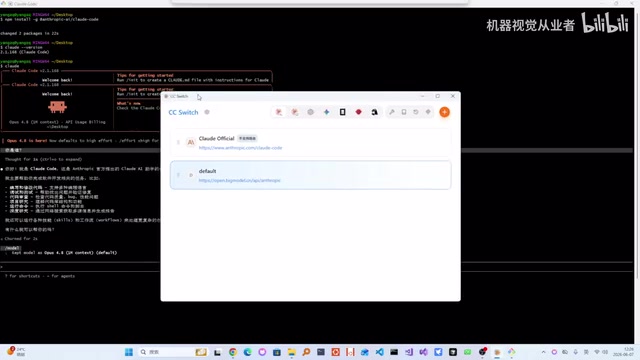
The installation takes roughly 22 seconds. Once complete, it will display the version info (e.g., 2.1.168).
Core Configuration: Switching to DeepSeek with CCSwitch
Claude Code defaults to Anthropic's official models, which come with various limitations (including requiring overseas network access, higher API costs, and potential rate limiting). To switch to DeepSeek, you'll need the open-source tool CCSwitch.
CCSwitch works by setting environment variables to override Claude Code's default API endpoint configuration. When Claude Code starts, it reads specific environment variables (such as ANTHROPIC_BASE_URL, API_KEY, etc.). CCSwitch provides a graphical interface to help users manage these configurations and redirect requests to third-party compatible API providers. This approach requires no modifications to Claude Code's source code — it's a non-invasive configuration solution.
Download and Install CCSwitch
- Go to CCSwitch's GitHub page
- Click Releases and download the Windows version
- Install locally (D: drive recommended)
Obtain a DeepSeek API Key
- Log in to the DeepSeek website and navigate to the API management page
- Create a new API Key (e.g., name it "test")
- Copy the generated Key
An API Key is an authentication credential that allows the service provider to identify the caller, meter usage, and handle billing. Be sure to keep it secure and never commit it to public code repositories.
Complete Model Configuration in CCSwitch
- Open CCSwitch and click "Add"
- Select DeepSeek as the model provider
- Paste the copied API Key into the corresponding field
- Since Claude Code calls an Anthropic-compatible API format, select "Follow context" to enable compatibility mode. Compatibility mode means an intermediate layer converts Anthropic's Messages API request format (containing role markers like system, human, assistant) into the OpenAI format that DeepSeek understands, ensuring communication protocol consistency.
- Click Save, then enable the model configuration
- Restart Claude Code — you should see it has switched to the DeepSeek model
IDE Integration: Using Claude Code in VS Code
Claude Code is inherently a command-line tool, but we can integrate it into VS Code for a better development experience. VS Code (Visual Studio Code) is a lightweight code editor developed by Microsoft that has become one of the world's most popular development tools thanks to its rich extension ecosystem. Through extension integration, Claude Code can appear directly as a panel in the editor's sidebar, eliminating the need to constantly switch between terminal and editor.
Installing the VS Code Extension
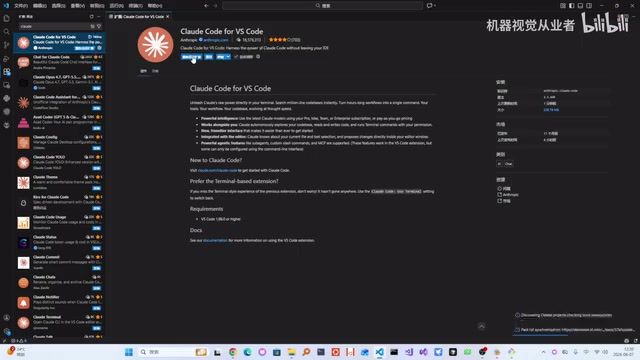
- Open VS Code and go to the Extensions marketplace
- Search for Anthropic's official Claude extension
- Important: Make sure to select the extension published by Anthropic (verify the publisher identifier). Third-party imitation extensions may exist in the marketplace, and using unofficial extensions could pose security risks.
- After installation, click "Restart Extension" to activate it
The extension essentially embeds an interface layer within VS Code that communicates with the Claude Code CLI. It automatically detects the locally installed Claude Code instance and its configuration (including the DeepSeek model setup we configured through CCSwitch), so no duplicate configuration is needed.
Hands-On Demo: Building a Scientific Calculator with AI
With everything configured, let's test the actual results.
Creating the Project
- Create a new folder on your desktop (e.g.,
test_claude) - Open it in VS Code
- Click the Claude Code panel and start a conversation
Generating Code
First, ask the AI to create a src folder, then request a calculator program. The AI generates code quickly — the experience is similar to using Cursor. Claude Code's Agent workflow is: receive user instruction → analyze requirements → plan file structure → progressively create files and write code → execute code to verify results when necessary. This end-to-end automation makes the transformation from requirement description to runnable code highly efficient.
Issues Encountered and Solutions
During testing, a Chinese character garbling issue appeared: the AI-generated code used UTF-8 encoding, but the IDE defaulted to displaying in GBK encoding.
The root cause lies in character encoding standard inconsistency. UTF-8 is the internationally universal Unicode encoding scheme, using 1-4 bytes per character and supporting all world languages. GBK is China's national standard for Chinese encoding, using double bytes for Chinese characters. When a file is saved in UTF-8 but read as GBK, multi-byte Chinese characters are incorrectly parsed according to GBK encoding rules, resulting in garbled display.
The fix is to reopen the file with UTF-8 encoding. For a long-term solution, change the files.encoding default to utf8 in VS Code settings and enable files.autoGuessEncoding to let the editor automatically detect file encoding.
The final scientific calculator works well, correctly computing scientific constants like π (3.1415926). The overall result is quite satisfying.
Tips and Best Practices
- If clicking "Yes" to confirm every operation feels tedious, you can enable auto-confirm mode. Claude Code defaults to requiring user confirmation for each file operation (create, modify, delete) as a safety measure against AI mistakes. With auto-confirm enabled, the AI can execute multiple steps continuously without interruption — suitable for scenarios where you have reasonable trust in the AI's output.
- DeepSeek's API costs are extremely low (roughly ¥1/million tokens for input, ¥2/million tokens for output), so you can use it freely for everyday development. For reference, a complete code generation conversation typically consumes thousands to tens of thousands of tokens, costing just a few cents.
- This solution offers an experience similar to Cursor but at lower cost with fewer limitations. Cursor is a code editor with built-in AI features, with a Pro plan around $20/month, while this solution using DeepSeek's API typically averages under ¥30 per month.
- Consider creating a
.claudeconfiguration file orCLAUDE.mdfile in your project root to inform the AI about your project's tech stack, coding conventions, and directory structure. This helps the AI generate code that better matches your project requirements.
Conclusion
The Claude Code + DeepSeek combination provides Chinese developers with a low-cost, unrestricted AI coding solution. While the setup process involves installing multiple tools, each step is straightforward. Once configured, you'll have a powerful AI coding assistant that significantly boosts efficiency whether you're doing rapid prototyping or everyday coding.
The core value of this approach lies in leveraging Claude Code's mature Agent framework and tool chain capabilities, combined with DeepSeek's low-latency and low-cost advantages within China, creating an AI programming workflow that balances capability with affordability. As domestic large language models continue to improve, this "overseas framework + domestic model" combination pattern will be adopted by an increasing number of developers.
Related articles

iOS 27 New Details Leaked: Major Notification Center Gesture Changes, Find My Interface Redesign
iOS 27 leaks reveal major changes: Notification Center gesture moves to upper left with new animations, Find My visual redesign, Photos Clean Up improvements, and under-the-hood security upgrades.
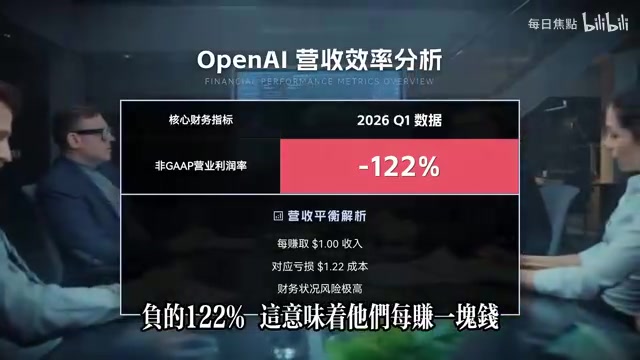
Deep Dive into the AI Bubble: The Death Spiral of Losing $1.22 for Every $1 Earned
Deep analysis of the AI industry bubble: OpenAI's -122% profit margin, enterprise token budgets burned in months, NVIDIA's shell game, and collapsing software quality.

WWDC 2026 Preview: Major Siri Overhaul and Comprehensive Apple Intelligence Upgrade
Deep analysis of WWDC 2026 Apple AI strategy: standalone Siri app, iOS 27 as an AI-native OS, and Apple Intelligence 2.0 rebuilt from the ground up.