Getting Started with Vibe Coding: A Zero-to-One Guide for Product Managers
Getting Started with Vibe Coding: A Ze…
Vibe Coding lets non-programmers describe requirements in natural language to drive AI-powered development.
Vibe Coding, proposed by Andrej Karpathy, shifts programming from "how to write code" to "how to describe requirements," letting AI act as the programmer. Product managers' requirements communication skills are a natural fit for this paradigm, closely aligned with prompt engineering. This article covers Vibe Coding's technical foundations, the concept of virtual environments, and step-by-step instructions for setting up a Python development environment using Miniconda.
What Is Vibe Coding?
If you've ever had a brilliant app idea flash through your mind, only to shelve it because you can't write code, then Vibe Coding is a concept worth your serious attention.
The Origin of Vibe Coding: This concept was introduced by OpenAI co-founder Andrej Karpathy in early 2025 on social media. He described an entirely new programming experience: developers fully immerse themselves in expressing intent, delegating all code implementation to AI (such as GitHub Copilot, Claude, GPT-4, and other large language models), and only need to verify whether the results match expectations. The concept quickly sparked widespread discussion in both tech communities and product circles, marking a new stage where AI-assisted development evolved from "code completion" to "intent-driven development."
The core philosophy of Vibe Coding is remarkably simple: You don't need to be a programmer—you just need to be an excellent communicator. It's not about writing code yourself; it's about clearly and accurately describing the effect and feel you want to AI, turning it into your dedicated 24/7 programmer.

The word "Vibe" itself means "atmosphere" and "feeling"—it sounds abstract and vague, but this is precisely what product managers excel at. Think about your daily work when a boss or client describes requirements to you—they're essentially operating in a "Vibe Product" mode. Now, you can communicate requirements to AI in exactly the same way.
It's worth noting that the technical foundation enabling Vibe Coding is the breakthrough progress of Large Language Models (LLMs) in code generation. Modern LLMs represented by GPT-4, Claude 3, and Gemini, through pre-training on massive code corpora, can already understand natural language descriptions and generate high-quality, runnable code. On code capability benchmarks like HumanEval, top models have achieved pass rates exceeding 90%. This means that for most common use cases—web pages, data processing scripts, automation tools—AI-generated code already has remarkably high usability. This is the core pillar supporting Vibe Coding's transition from theory to practice.
From "How to Write Code" to "How to Describe Requirements"
Traditional Programming vs. Vibe Coding
Use a construction analogy to understand this shift:
- Traditional Programming: You are the construction worker yourself, needing to lay every brick to build the entire thing—high learning cost, grueling process.
- Vibe Coding: AI takes on the worker's role, while you play the blueprint designer—and even the blueprint can be delegated to AI. What you truly need to be is the person who initiates the entire project—the "boss" or "client."

All you need to tell AI is: What style of product do I want? Is it minimalist or retro? How should the page be laid out? How should features interact? The clearer your description, the closer AI's final implementation will be to your expectations. Even if your description isn't precise enough, it's no big deal—just have AI iterate a few more rounds.
The Fundamental Shift in Work Focus
This means the core of work shifts from "How to Code" to "How to Describe." For product managers, this is a natural advantage—your daily work already revolves around requirements communication, solution description, and outcome definition.
In the AI field, the ability to "describe requirements" has a more professional corresponding term—Prompt Engineering. Effective prompts typically contain several key elements: a clear objective (what to do), constraints (what not to do), output format (how to present it), and reference examples (what style to emulate). Research shows that structured, specific prompts can improve AI code generation accuracy by 30%-50% compared to vague descriptions. For product managers, this aligns perfectly with the logic of writing high-quality PRDs (Product Requirements Documents): user stories, acceptance criteria, boundary conditions—these core elements of product documentation happen to be the building blocks of excellent AI prompts.
This cognitive shift is the essence of the entire Vibe Coding methodology.
Environment Setup: Building a Python Virtual Environment
Before formally using tools for Vibe Coding, there's one foundational concept you must understand—virtual environments.
Why Do You Need Virtual Environments?
Here's an analogy: Your computer is your home, and each project needs certain tools (compilers, third-party libraries, etc.). If you pile all project tools in the living room, it quickly becomes a mess—tools that Project A and Project B depend on get mixed together, version conflicts arise, and they "fight" each other.

Technical Principles of Virtual Environments: The underlying logic of Python virtual environments is to isolate the Python interpreter path and third-party library installation directories, giving different projects their own independent dependency trees. Python officially provides the venv module for basic virtual environments, while Conda (including Miniconda and Anaconda) goes further—it can manage not only Python packages but also the Python interpreter version itself, and even non-Python system-level dependencies (such as CUDA, C libraries, etc.). This is particularly important for AI/ML projects, as different deep learning frameworks often have strict version requirements for Python versions and underlying libraries. Conda's cross-language dependency management capability makes it the de facto standard tool in data science and AI development.
The role of virtual environments is to create an independent "room" for each project:
- Project A needs Python 2.0? Give it a dedicated environment.
- Project B needs Python 3.0? Create another independent environment.
- Project C needs Python 3.1 plus specific libraries? Isolate and manage it the same way.
This way, each project runs without interfering with others, your computer system stays cleaner, and management becomes much easier.
Installing Miniconda: Detailed Step-by-Step Guide
We recommend using Miniconda to manage Python virtual environments. There's a selection logic worth understanding here: Anaconda is a Python distribution for data science that comes pre-installed with over 250 scientific computing packages, with an installer typically exceeding 3GB; Miniconda is its minimal version, containing only the Conda package manager and the Python interpreter itself, at under 100MB. For Vibe Coding beginners, choosing Miniconda is more sensible—it avoids having tons of unused pre-installed packages taking up disk space, while building the good habit of "installing dependencies on demand." This perfectly aligns with the workflow where AI automatically generates installation commands based on project needs.
Here are the specific installation steps:
Step 1: Download the Installer
Search for "Miniconda" in your search engine and find the official Anaconda website (green circle logo). Once on the site, click "Download" and find the "Miniconda Installer" section on the download page. Note the distinction between the Anaconda installer on the left and the Miniconda installer on the right—choose the installer matching your system version.
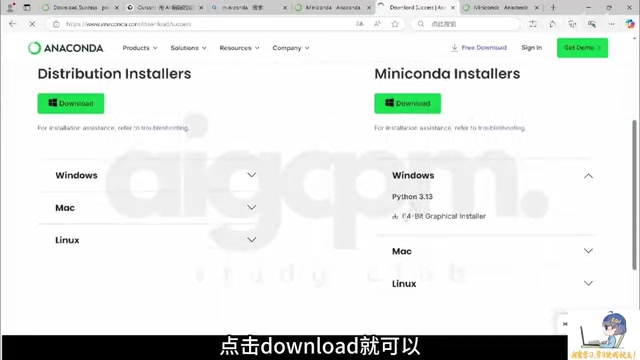
Step 2: Installation Configuration
Windows users will get a graphical installation interface—just follow the default options throughout. However, there's one critical setting that requires special attention:
⚠️ Make sure to check the option "Register Miniconda as the system Python interpreter", otherwise various IDEs may not be able to find Python later.
Step 3: Verify Successful Installation
After installation, open the Start menu and you'll find two new terminal entries:
- Conda terminal in CMD mode
- Conda terminal in PowerShell mode
Open either one and enter the following command:
python --version
If you can see a Python version number (e.g., 3.13.5) that matches the Conda version you downloaded, the installation was successful.
Four Core Benefits of Product Managers Learning Vibe Coding
From a practical application perspective, here are the key benefits for product managers learning Vibe Coding:
- Lower Technical Barriers: No need to spend years learning programming—use natural language to drive AI to complete development work.
- Rapidly Validate Ideas: Product ideas in your head can become runnable prototypes in extremely short timeframes—no more "think of it and shelve it."
- Leverage Professional Strengths: A product manager's requirements description and communication abilities happen to be the most critical skills in Vibe Coding—and the natural foundation for prompt engineering.
- Improve Collaboration Efficiency: After understanding the basic logic of how code runs, communication with development teams becomes much smoother.
Final Thoughts
Vibe Coding represents not just a new way of programming, but a paradigm shift in human-machine collaboration. When AI takes on the work of "how to implement," humans can focus their energy on higher-level questions like "what to implement" and "why to implement it."
For product managers, this means leaping from "writing PRDs and waiting for development scheduling" to "quickly building prototypes yourself to validate ideas." Setting up the environment is just the first step—the real value lies in how you subsequently use clear descriptions to drive AI and turn the product blueprint in your mind into reality.
Key Takeaways
- Vibe Coding, proposed by Andrej Karpathy, centers on shifting from "how to write code" to "how to describe requirements," letting AI serve as your dedicated programmer
- Product managers' requirements communication skills are a natural fit for Vibe Coding, which is highly aligned with Prompt Engineering—the clearer the description, the closer AI's output matches expectations
- Virtual environments are the foundation for stable code execution; Conda creates independent Python environments for each project by isolating interpreter paths and dependency directories
- Compared to the bulky Anaconda, Miniconda is better suited for Vibe Coding beginners—installing dependencies on demand perfectly aligns with AI-driven development workflows
- When installing Miniconda, make sure to check "Register as system Python interpreter" to avoid IDEs being unable to find Python later
- Vibe Coding enables product managers to quickly turn ideas into runnable prototypes, dramatically lowering the technical implementation barrier
Related articles
 Tutorials
Cursor + Codex Dual-IDE Collaboration: A Practical Methodology for Open-Source Project Customization
A complete methodology for open-source project customization based on real-world experience, detailing the Cursor+Codex dual-IDE workflow, seven-stage process, MVP validation, and AI source code reading techniques.
 Tutorials
Cursor Multi-Agent in Practice: Building a Full-Stack Next.js Blog in 50 Minutes
Build a full-stack blog in 50 minutes using Cursor IDE's multi-Agent mode with Next.js, Clerk auth, and Supabase. Learn the 4-phase AI Agent workflow and key integration pitfalls.
 Tutorials
Building an AI Software Factory from Scratch: A Cursor Engineer's Hands-On Experience with Multi-Agent Collaboration
Cursor engineer Eric shares practical insights on building an AI software factory: automation levels, guardrail design, parallel Agent management, and scaling to 1000+ Agents for 24/7 development.