GitHub Copilot SDK Deep Dive: Core Features and Practical Guide
A comprehensive guide to GitHub Copilot SDK's core features, orchestration patterns, and practical usage.
This article provides a comprehensive breakdown of the GitHub Copilot SDK, now officially GA. It covers the Bounded CLI architecture, Agent Loop decision engine, Hooks for lifecycle control, Custom Agents with four orchestration patterns, reusable Skills modules, Remote Sessions for cross-device access, and local LLM integration via Ollama — complete with practical demos.
At the Microsoft Build //localhost:Shanghai event, a Microsoft Foundry MVP delivered an in-depth session on the core concepts, key features, and live demos of the GitHub Copilot SDK. With the Copilot SDK officially reaching GA during the Build conference, developers can now embed the AI intelligence engine behind Copilot into custom applications via programmatic interfaces. This article provides a systematic overview of the key takeaways from that session.
What Is the Copilot SDK?
Microsoft has released multiple product forms around Copilot: Coding Agent runs in GitHub's cloud-hosted environment, handling tasks like pulling code, analyzing tasks, and modifying code; Copilot CLI provides AI assistance through command-line interaction; and Copilot SDK allows developers to embed the same AI engine behind Copilot CLI into custom applications via programmatic interfaces.
Currently, the Copilot SDK supports six programming languages including Python, .NET, Go, and TypeScript. From its initial release in January to its official GA during the Build conference, it went through roughly six months of iteration.
Bounded CLI Integration Approach
The core architecture of the Copilot SDK adopts a Bounded CLI approach — bundling the Copilot CLI directly into your application. Developers don't need to worry about the complexity of integrating underlying AI services, and users can start using it immediately after installation. Here's how it works: the application launches a CLI process through the SDK Client, the two communicate via standard input/output, and the CLI then acts as a proxy to interact with the cloud-based Copilot service.
This approach delivers four key advantages:
- All-in-one delivery: The CLI is bundled with the application — no extra installation needed
- SDK version management: Unified dependency version control
- Flexible authentication strategies: Support for multiple authentication methods
- User-level session management: Independent session context for each user
The entire integration flow is remarkably concise — create a client, create a session, send a request, handle the response — all in just a few lines of code.
Agent Loop: The Decision Engine of Intelligent Agents
The Agent Loop is the core mechanism of Copilot CLI, defining how an agent thinks and acts. You simply tell it the goal, and it autonomously formulates plans, invokes tools, reflects on results, and continues looping until the task is complete.
System Architecture and Tool-Use Loop
The Agent Loop consists of four components:
- App: The application entry point that initiates requests
- SDK: The messenger responsible for passing messages
- Copilot CLI: The orchestrator that coordinates all activities
- Large Language Model: The intelligent brain that makes key decisions
At its core is the tool-use loop. Each iteration represents a complete LLM API call, where the model decides based on the current context whether to continue calling tools for more information or to provide a final answer directly.
This introduces an important concept — Turns: one turn equals one complete LLM API call plus its subsequent tool executions. For example, when you ask a complex question about a codebase, Copilot might need multiple turns: the first turn searches for files, the second reads core content, the third reads dependency files, and the fourth finally delivers the answer.
Event Stream and Completion Mechanisms
Each turn starts with turn_start and ends with turn_end, containing internal events like assistant_message (LLM response) and execution_start/tool_execution_complete (tool execution tracking). After all turns are complete, a session.idle event is emitted.
Regarding completion signals, there are two to distinguish:
- session.idle: A mechanical signal meaning "I'm idle now" — triggered whenever the loop ends, regardless of whether the task is actually complete
- session.taskComplete: A semantic signal meaning "I believe the task has been fully completed" — only triggered when the LLM proactively calls a specific tool
Hooks: Fine-Grained Control Over Session Lifecycle
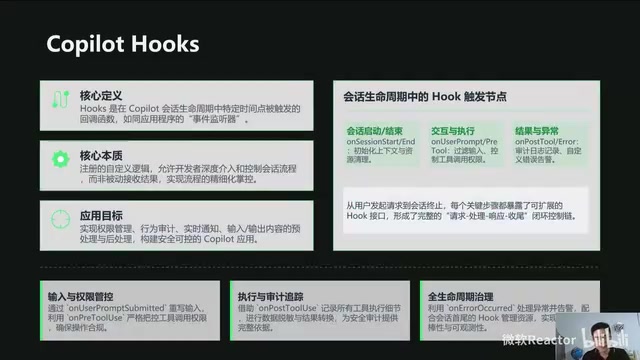
Hooks are callback functions triggered at specific points during the session lifecycle. From session start to end, every key step has a corresponding Hook, giving developers fine-grained control over the process flow.
Four Practical Use Cases
- Permission control: Use
onPreToolUseto create read-only agents that only allow safe read tools - Audit compliance: Combine multiple Hooks to log every action from session start to end, generating structured audit logs
- Real-time notifications: Monitor agent execution status and push notifications
- Error handling: Catch exceptions and provide graceful degradation strategies
Best practices for using Hooks include: keeping Hook execution fast, making explicit return decisions, and managing state properly.
Remote Sessions: Cross-Device Agent Access
Remote Sessions enable a "remote desktop"-like capability for Copilot sessions. The SDK connects to GitHub's Mission Control service, generates a unique URL after authentication, and you can access and control locally running Copilot sessions from a browser or mobile device.
In the SDK, simply set the remote option to true when creating a client, and all sessions will automatically enable remote access. The SDK also recommends converting the remote URL into a QR code for convenient mobile device scanning.
Custom Agents: Specialized Agent Orchestration
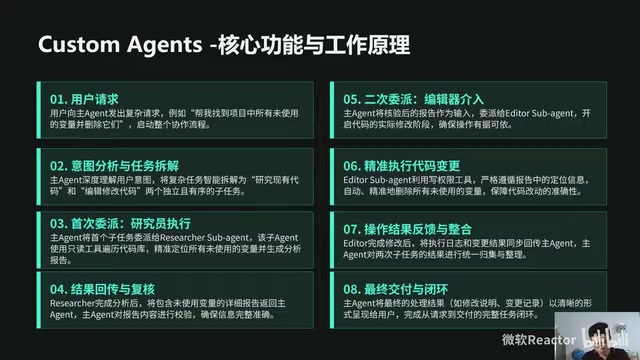
Custom Agents are a critically important feature of the Copilot SDK. Each Agent can be thought of as a specialist with a specific role, tools, and knowledge.
Four Orchestration Patterns Explained
- Pipeline pattern: Sequential processing like a factory assembly line — ideal for tasks with clear sequential dependencies
- Parallel orchestration: Multiple Agents work simultaneously, significantly improving processing efficiency
- Supervisor pattern: A central Agent coordinates everything — suitable for complex scenarios requiring global coordination
- Handoff pattern: Agents dynamically decide who handles the next step — offering maximum flexibility
There are two ways to define an Agent: programmatically through the SDK, or declaratively through Markdown files. Key configuration parameters include name, description, tools, and MCP Server settings.
Agent Design Best Practices
- Follow the Single Responsibility Principle — let each Agent focus on doing one thing well
- Write precise
descriptionfields — these are the key basis for agent routing decisions - Strictly follow the Principle of Least Privilege — only grant access to necessary tools
- Design tools to be model-friendly — keep interfaces simple and parameters standardized
Skills: Reusable Prompt Modules
Skills are essentially Markdown files containing specific instructions — think of them as intelligent plugins. Their core value lies in:
- Encapsulating expert tacit knowledge into executable instructions
- Cross-project sharing for improved reusability
- Organizing complex AI configurations
- Flexible enabling or disabling
Building Skills follows a "convention over configuration" principle: create a skills directory, create a subdirectory for each skill, and place a skills.md file inside. The file starts with YAML front matter defining the name and description, with the body containing the instruction set written in Markdown.
Skills can be combined with Custom Agents, preloading specific domain expertise when an Agent starts up. They can also complement MCP servers, enabling AI to operate external tools.
Hands-On Demos: From Basics to Advanced
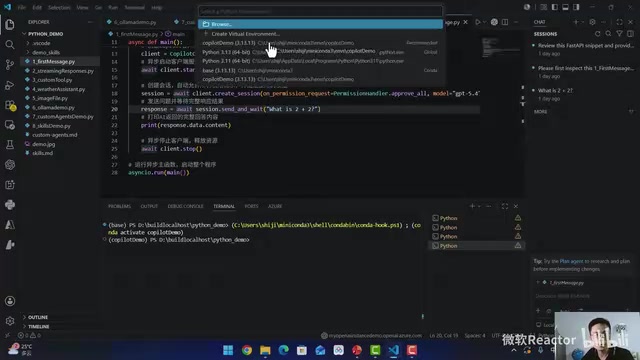
The presenter demonstrated multiple practical scenarios in a VS Code environment:
Basic Sessions and Streaming Output
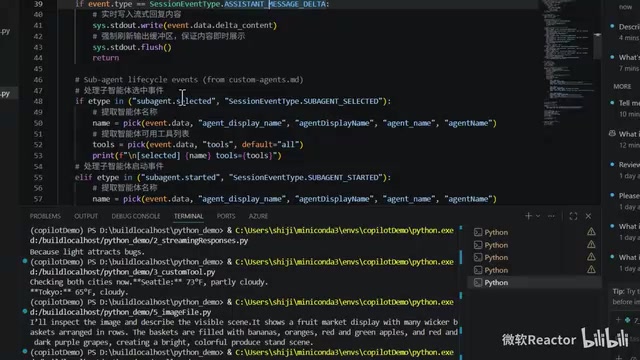
The most basic usage requires just a few steps: import the Copilot Client, create and start a client instance, create a session (specifying permissions and model), and send prompts via send_and_wait to get responses. Streaming output is achieved by listening to SessionEventType's SystemMessageData events for real-time content display.
Custom Tools and Image Input
Custom tools are registered via DefineTool — the demo implemented a weather query tool (with simulated data). Image input supports both file paths and Base64 encoding, with the SDK automatically handling file reading, encoding, and resizing.
Local LLM Integration
A noteworthy highlight is the ability to switch the backend model from cloud-based GPT to a local Ollama platform. Simply specify the local model name in create_session, set the Provider to OpenAI, and point the BaseURL to the Ollama service address. This means you can also use models deployed on other PCs within your local network, meeting data privacy and offline usage requirements.
FastAPI Web Integration
The demo also showcased wrapping the Copilot SDK as a FastAPI web application, providing a more user-friendly interaction experience through a web interface, including features like model selection and image upload analysis.
Conclusion
The official GA of the GitHub Copilot SDK marks a milestone where developers can more flexibly embed AI intelligence engines into custom applications. From the Agent Loop's autonomous decision-making cycle, to Hooks' fine-grained control, to Custom Agents' specialized orchestration and Skills' knowledge reuse, the SDK provides a complete toolchain. Combined with Remote Sessions' cross-device access capabilities and the flexibility of local model integration, developers can build truly "ubiquitous" intelligent agent applications.
Related articles
NVIDIA ACE SDK: On-Device AI Inference for Intelligent Game NPC Companions
Deep dive into NVIDIA ACE Game Agent SDK's integration with Unreal Engine 5, exploring how on-device AI inference enables low-latency, privacy-safe intelligent NPC dialogue and behavior.
Sakana AI Launches Marlin: An AI Agent…
Sakana AI Launches Marlin: An AI Agent That Autonomously Completes Strategic Research in 8 Hours
Sakana AI launches Marlin, its first commercial product — an autonomous strategic research assistant that completes deep research in 8 hours, targeting finance, consulting, and think tanks.
NVIDIA Halos Explained: Full-Stack Functional Safety System Architecture for Physical AI Robots
Deep dive into NVIDIA Halos for Robotics' full-stack functional safety architecture, covering hardware redundancy, safety runtime, behavior monitors, and how safety envelopes constrain AI uncertainty for scalable physical AI deployment.