Godot MCP + Codex in Practice: Using AI to Auto-Generate an Endless Runner Game
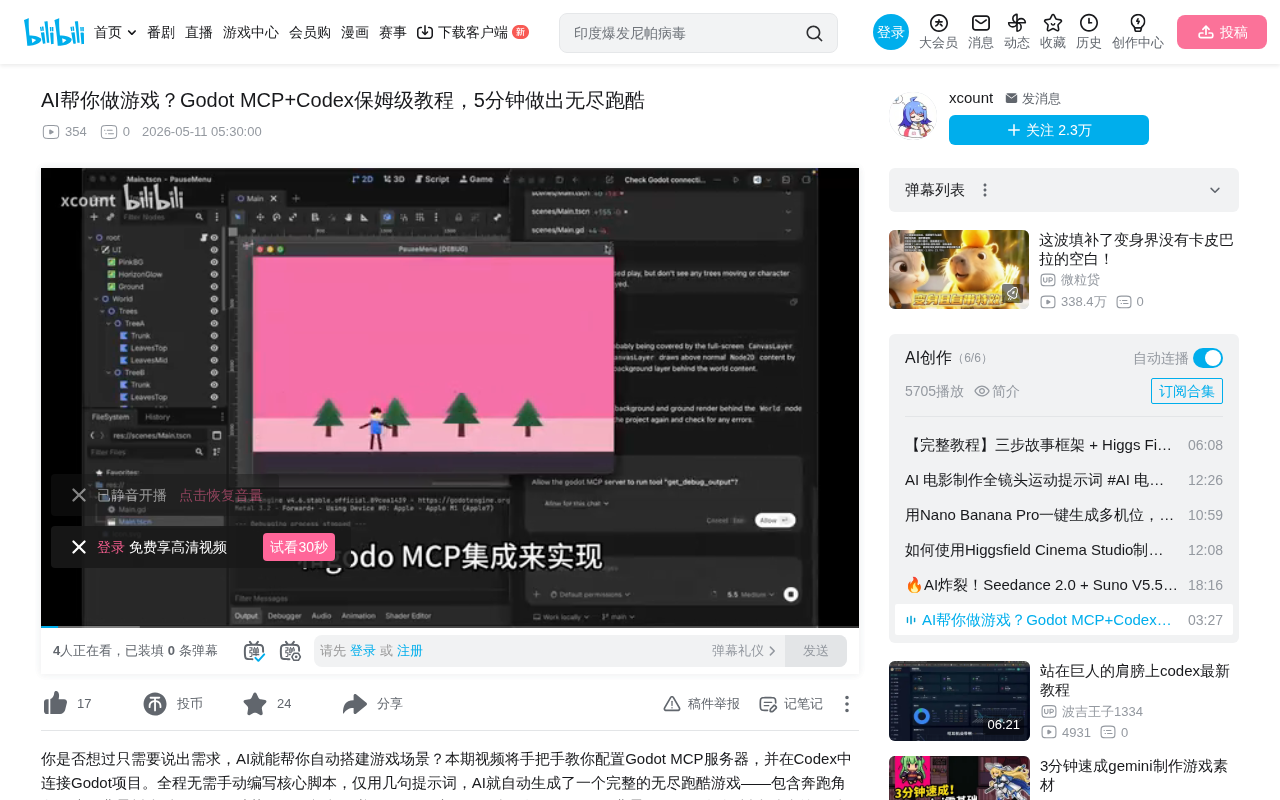
Integrate Codex with Godot Engine via MCP protocol to auto-generate game scenes using natural language.
This article introduces a new development paradigm integrating OpenAI Codex with the Godot game engine through the MCP protocol. Developers simply describe requirements in natural language, and AI directly reads and writes Godot project files to auto-generate characters, backgrounds, and animations, with context-aware debugging capabilities. In practice, just a few prompts were needed to build a complete endless runner scene and fix rendering issues — ideal for rapid prototyping, though complex projects still require human involvement.
When AI Meets Game Engines: A Whole New Development Paradigm
Imagine not having to write a single line of script code — just describing the game scene you want in natural language, and having AI directly control the game engine to generate characters, backgrounds, and animations for you. This isn't a future vision; it's a workflow you can run right now.
By integrating OpenAI's Codex with the Godot game engine's MCP (Model Context Protocol), developers can let AI directly read, inspect, and modify Godot project files, enabling rapid iteration from "describing requirements" to "running the game." This article breaks down the toolchain configuration and real-world results in detail.
Understanding the Core Technologies: MCP, Codex, and Godot
Before diving into hands-on work, it's important to understand the three key components behind this workflow.
MCP (Model Context Protocol) is a standardized protocol proposed and open-sourced by Anthropic in late 2024, designed to solve the fragmentation problem of integrating AI models with external tools. Before MCP, every AI application needed custom adapters for different tools, making maintenance costs extremely high. MCP defines a unified client-server communication specification that allows AI models to invoke any external tool in a standardized way — whether it's a file system, database, or game engine. Its core architecture has three layers: MCP Host (AI clients like Codex), MCP Client (the protocol communication layer), and MCP Server (the specific tool adapter implementation). Godot MCP is a concrete implementation within this ecosystem — it wraps Godot engine's project manipulation capabilities into standard MCP interfaces, enabling any MCP-compatible AI client to directly control Godot projects.
OpenAI Codex was originally launched in 2021 as a language model specifically targeting code generation and served as the underlying technology behind GitHub Copilot. The version relaunched in 2025 is fundamentally different from the earlier one: it's no longer just a code completion tool, but an Agent system capable of autonomously executing multi-step programming tasks in a sandboxed environment. Built on the o-series reasoning models, it has a complete work cycle of planning, execution, and verification. Unlike embedded assistants like GitHub Copilot, Codex runs as a standalone client, making it naturally suited for deep integration with external tools via the MCP protocol.
Godot Engine is a fully open-source, MIT-licensed cross-platform game engine that charges no royalties or subscription fees. Godot uses a unique Scene Tree and Node architecture, with the entire project stored in plain text formats such as .tscn (text scene) and .gd (GDScript) files — this characteristic is crucial. It's precisely because text formats are easier for AI to parse and modify than binary formats that Codex can directly read and write project files through MCP.
Environment Setup: Three Steps to Configure the MCP Server
Step 1: Install Prerequisites
Before starting, make sure the following tools are installed on your system:
- Godot Engine: The latest stable version will work
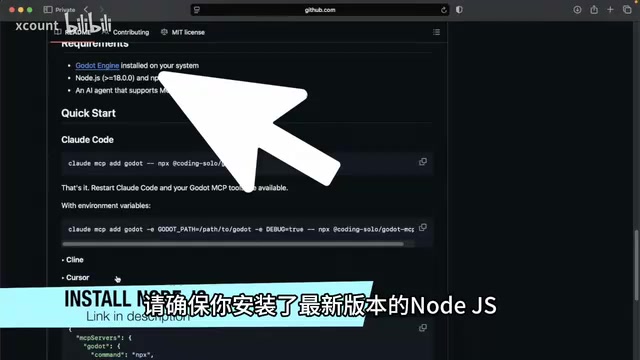
- Node.js: The MCP server depends on Node.js — the latest LTS version is recommended
- Codex Application: OpenAI's Codex client
Step 2: Configure the MCP Server
After opening the Codex application, press Ctrl+, (Windows) or Cmd+, (Mac) to enter the settings panel. Find the MCP Servers tab and click the Add Server button.
Next, open the Godot MCP GitHub page and scroll to the "Other MCP" section where you'll find the server configuration information. Fill in the following fields in Codex one by one:
- Server Name: Any custom name will do
- Command: Copy the command field from the GitHub page
- Arguments: Copy the parameters exactly as shown on the page
- Environment Variables: Set
GODOT_PATHto your Godot engine executable path, then add an environment variable namedDEBUG
After filling everything in, click save, then restart Codex — this step is critical; the configuration won't take effect without a restart.
Step 3: Connect to the Godot Project
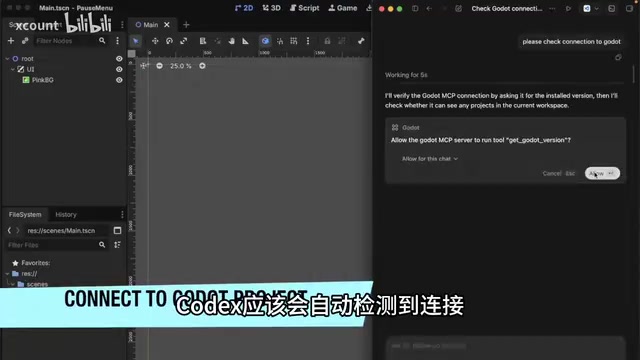
After reopening Godot, the MCP connection will be established automatically. Once the system confirms the connection status, it begins scanning the Godot project. When prompted for the project path, provide your Godot project directory so Codex can properly access the project files.
Hands-On Demo: From Pink Background to Endless Runner
First Test: AI Diagnosing a Rendering Issue
With configuration complete, start with a simple test — a pink background had already been created in the project, but it wasn't visible when the game ran. So the question was posed to Codex, asking it to inspect the scene file.
Codex automatically began troubleshooting and quickly identified a display layer bug, then fixed it. Running the game again, the pink background finally displayed correctly in the game window.
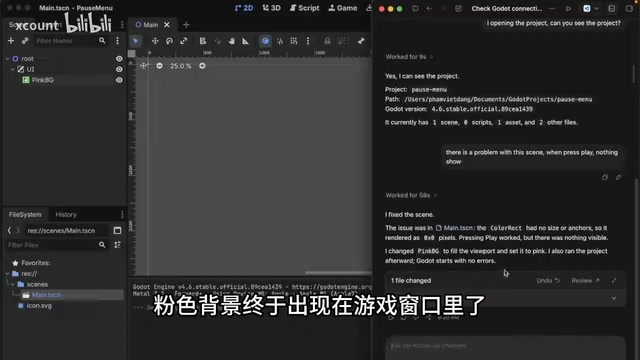
This small test validated an important capability: Codex can not only generate code but also understand the current state of a Godot project and debug it. This is far more powerful than a simple code generation tool.
Core Task: Generating an Endless Runner Scene
Now for the main event. The following prompt was sent to Codex:
"I can see the pink background is displaying correctly now. I'd like to add a simple character that runs endlessly in front of the background. You can add some trees behind him and have them continuously scroll so we know the character is running."
The Endless Runner is one of the most classic game genres from the mobile gaming era. Its core technology typically employs two mechanisms: Parallax Scrolling and Object Pool. Parallax scrolling moves background elements at different layers at different speeds to create a sense of depth; object pooling reuses elements that have moved off-screen (like trees) to avoid the performance overhead of frequently creating and destroying objects. Notably, the AI needs to simultaneously understand the game design intent ("make the player feel the character is running") and the technical implementation path (scrolling the background rather than actually moving the character). This ability to map from natural language requirements to specific technical solutions is the core value of AI-assisted development.
From just this natural language description alone, Codex began automatically generating the entire endless runner scene. A few minutes later, it reported the task was complete.
Iterative Fixes: Resolving Rendering Layer Issues
On the first run, the background did change, but the character and trees were nowhere to be seen. This is a common z-order (rendering layer) issue in game development.
Z-order determines the drawing order of elements in 2D games: nodes with higher z values are drawn later and appear in the foreground; lower z values are drawn earlier and appear in the background layer. In Godot, every Node2D node has a z_index property — child nodes can calculate their layer relative to parent nodes or use absolute global layers. If the layers for background, characters, and UI elements are set incorrectly, visual anomalies occur such as characters being occluded by backgrounds or elements disappearing — exactly the problem encountered here.
After feeding the issue back to Codex, it immediately investigated the rendering layer settings and updated the z-order values for the trees and character.
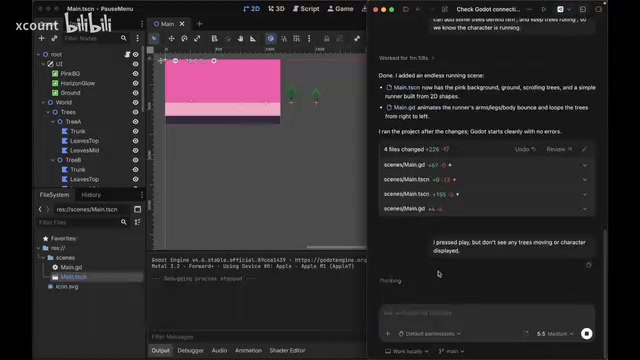
After the fix, pressing F5 to run the game showed the character continuously running in the foreground with trees smoothly scrolling in the background — a complete endless runner scene was born. The entire process took just a few prompts and a few minutes of waiting.
Workflow Analysis: Why This Approach Deserves Attention
Core Advantages
The Codex + Godot MCP workflow is powerful for the following key reasons:
-
Direct project file manipulation: Unlike ordinary AI code assistants that can only generate code snippets for you to manually paste, Codex can directly read and write Godot project files through the MCP protocol, including scene trees, scripts, and resource configurations. Godot's design choice of storing project files in plain text format plays a critical role here.
-
Context-aware capabilities: Codex can inspect the complete current state of the project, understand scene structure, node hierarchy, and rendering settings, enabling precise modifications. This is thanks to the "tool calling" capability that the MCP protocol grants AI models, freeing them from being limited to static knowledge in training data.
-
Natural language iteration: Developers can continuously propose requirements and report issues in a conversational manner, and the AI will keep iterating on the existing foundation rather than starting from scratch each time.
Current Limitations
Of course, this approach also has clear limitations:
- It's currently better suited for prototyping and simple scene construction; complex game logic and performance optimization still require human intervention
- The quality and architectural design of AI-generated code may not meet production standards
- For large projects, MCP's context window may become a bottleneck
Summary and Outlook
The Godot MCP + Codex combination demonstrates an important direction for AI-assisted game development: making AI not just a code completion tool, but an intelligent assistant capable of understanding and manipulating entire projects. The MCP protocol, as a standardized bridge connecting AI with external tools, has significance beyond game development — it represents a new software development paradigm where AI upgrades from "advisor" to "executor." For indie developers and small teams, this means they can rapidly validate game ideas at extremely low cost, freeing up more energy for core gameplay design.
As the MCP protocol continues to mature and AI model capabilities keep improving, the game development process will likely undergo fundamental transformation in the future. And right now is the perfect time to start experimenting.
Key Takeaways
- By integrating OpenAI Codex with the Godot engine through the MCP protocol, AI can directly read, inspect, and modify game project files
- With just a few natural language prompts, AI can automatically generate a complete endless runner scene with characters, backgrounds, and scrolling trees
- Codex has context-aware capabilities that can diagnose issues like rendering layer problems and fix them automatically, going beyond simple code generation
- Setup requires Node.js, Godot Engine, and the Codex client, with connection established through MCP Servers settings
- This approach is currently best suited for rapid prototyping and idea validation; complex projects still require deep human involvement
Related articles
 Tutorials
Cursor + Codex Dual-IDE Collaboration: A Practical Methodology for Open-Source Project Customization
A complete methodology for open-source project customization based on real-world experience, detailing the Cursor+Codex dual-IDE workflow, seven-stage process, MVP validation, and AI source code reading techniques.
 Tutorials
Cursor Multi-Agent in Practice: Building a Full-Stack Next.js Blog in 50 Minutes
Build a full-stack blog in 50 minutes using Cursor IDE's multi-Agent mode with Next.js, Clerk auth, and Supabase. Learn the 4-phase AI Agent workflow and key integration pitfalls.
 Tutorials
Building an AI Software Factory from Scratch: A Cursor Engineer's Hands-On Experience with Multi-Agent Collaboration
Cursor engineer Eric shares practical insights on building an AI software factory: automation levels, guardrail design, parallel Agent management, and scaling to 1000+ Agents for 24/7 development.