GStack Tutorial: 23 Commands That Give One Person an Entire AI Development Team
GStack Tutorial: 23 Commands That Give…
GStack is an open-source AI workflow system by YC's president that gives one person team-level dev efficiency.
GStack is an open-source AI software factory toolkit by YC President Gary Tan, built on Claude Code. Through 23 slash commands, it covers the entire lifecycle from product decisions to code releases. Core commands include Office Hours (product validation), Plan CEO Review (strategic review), Review (code review), QA (dynamic testing), CISO (security auditing), and SHIP (one-click release). It doesn't conflict with Copilot or Cursor, positioning itself as an AI team operating system for full-process management. MIT-licensed and free, it's ideal for solo developers and technical founders.
What Is GStack?
GStack is an open-source AI software factory toolkit created by YC President Gary Tan. It's not just a simple code completion plugin—it's a complete workflow system that transforms Claude Code into your CEO, engineer, QA, and even release manager through 23 slash commands, giving a single person the development efficiency of an entire team.
About Claude Code: Claude Code is a command-line AI programming tool from Anthropic, built on the Claude large language model. Unlike plugins such as Copilot, Claude Code operates in Agent mode—it can autonomously read and write files, execute terminal commands, and call external tools to complete complex cross-file programming tasks. GStack is built on top of this Agent capability, extending its role boundaries through slash commands and upgrading a single programming assistant into a virtual team covering the entire product lifecycle.
This toolkit is open-sourced under the MIT License, completely free to use—you only need to pay for Claude Code's API costs. The MIT License is one of the most permissive open-source software licenses, allowing anyone to freely use, copy, modify, and even incorporate it into commercial products, with the sole requirement of retaining the original copyright notice. Gary Tan's choice of the MIT License means developers can freely integrate GStack into commercial projects or create derivative works, greatly reducing legal concerns for enterprise adoption. The barrier to entry is also low—as long as you have basic command-line and Git skills (knowing how to use git clone and cd), you can get started easily.
Who Is GStack For?
GStack has a clear target user profile:
- Technical founders: Need to handle full-stack development, product, and operations single-handedly
- Experienced Claude Code users: Want to upgrade AI programming into a structured workflow
- Technical leads: Need standardized processes for code review and security audits
However, if you're unfamiliar with the command line and Git, or just want an auto-complete code plugin, this tool is overkill for you. GStack's value lies in process management, not point-solution assistance.
GStack Installation and Configuration Guide
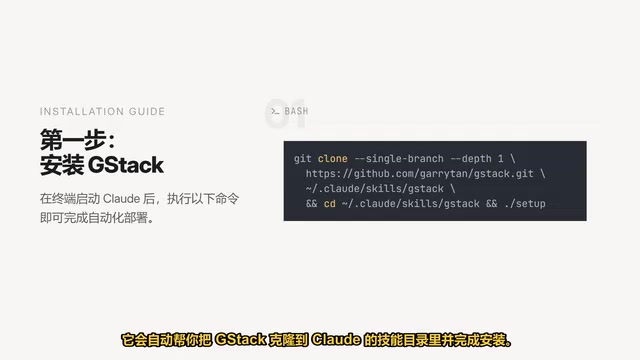
Before installation, ensure your environment has Claude Code, Git, Bash, and Node.js. The setup steps are very straightforward: launch Claude in your terminal, then paste and execute the installation command—it will automatically clone GStack to Claude's skills directory and complete the installation.
If you want to enable team mode in your project repository so all collaborators can use it, simply run an initialization command that automatically configures the team environment and commits the necessary files to the Git repository.
Core Commands Explained: From Product Decisions to Code Releases
GStack's 23 commands cover the entire lifecycle from product decisions to code releases. Here are the most essential ones:
Office Hours: Soul-Searching Before Product Decisions
This isn't a yes-man AI assistant—it challenges your product assumptions through six core questions, like a co-founder would. Its purpose is to help you course-correct, ensuring your product direction is truly viable before you invest in development. For solo developers, this feature is especially valuable—it fills the gap of not having a co-founder to bounce ideas off of.
Plan CEO Review: Strategic Review from a Founder's Perspective
This set of commands lets you examine your project plan from a founder's perspective, providing four review modes to help you make strategic decisions. For example, determining whether your current plan should scale further or whether you should decisively cut unnecessary features.
Review: Intelligent Code Review
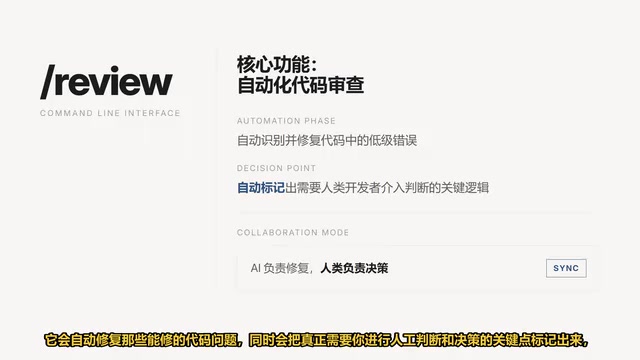
The Review command automatically fixes code issues that can be fixed, while flagging the critical points that truly require human judgment and decision-making. This design philosophy is worth learning from: let AI handle deterministic problems, let humans focus on core logic decisions.
QA: Dynamic Automated Testing
You simply input your application's URL, and the QA command opens a real browser to simulate actual user interaction paths. It can discover runtime bugs that static code analysis would miss, and attempts to fix them automatically. This covers far more real-world scenarios than traditional unit testing.
CISO: Professional-Grade Security Auditing
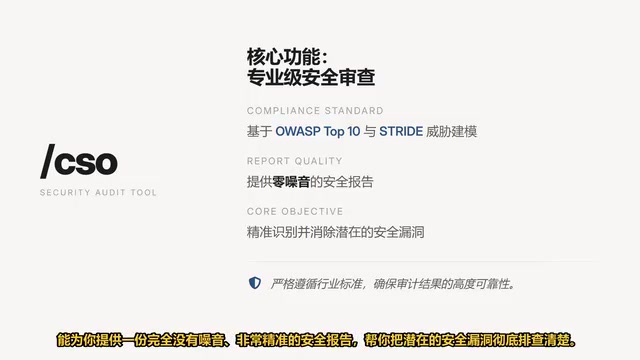
The CISO command strictly follows OWASP TOP 10 and STRIDE threat modeling standards, delivering a precise, noise-free security report that helps you thoroughly identify potential security vulnerabilities.
About OWASP TOP 10 and STRIDE: OWASP TOP 10 is the world's most authoritative list of web application security risks, regularly updated by the Open Web Application Security Project, covering the most common vulnerability types including injection attacks, broken authentication, and sensitive data exposure—it's the industry benchmark for security audits. STRIDE is a threat modeling framework proposed by Microsoft that systematically identifies security threats across six dimensions: Spoofing, Tampering, Repudiation, Information Disclosure, Denial of Service, and Elevation of Privilege. Used together, they cover the major security risk surfaces from code level to architecture level, forming the standard operating procedure for enterprise security teams.
For startups without a dedicated security team, the CISO command is practically essential—it compresses work that would normally require days of professional auditing into a single command.
SHIP: One-Click Automated Release
When you're ready to go live, the SHIP command automatically handles the tedious work of syncing code, running tests, checking coverage, and finally opens a PR for you, completing the entire delivery loop.
About CI/CD: The SHIP command essentially chains the core steps of CI/CD (Continuous Integration/Continuous Delivery) together via an AI Agent. CI/CD is a core practice in modern software engineering—continuous integration requires developers to frequently merge code into the main branch with automated testing, while continuous delivery automatically deploys tested code to production. Traditional CI/CD requires configuring dedicated tools like Jenkins or GitHub Actions, which presents a high barrier for solo developers. GStack's SHIP command encapsulates this process into a single command, letting solo developers enjoy industrial-grade release process guarantees without needing deep knowledge of DevOps toolchains.
Complete Practical Workflow: From Idea to Launch
When you have a product idea, GStack provides a clear end-to-end workflow:
- Office Hours → Redefine the problem, validate product assumptions
- Plan CEO Review → Review scope, make strategic decisions
- Plan & Review → Lock down architecture, AI auto-generates code after approval
- Review → Code review, focus on core logic
- QA → Open browser for dynamic testing
- SHIP → One-click release to production
The design philosophy behind this workflow is crystal clear: think before you build, review before you release. It systematically incorporates the steps most commonly overlooked by solo developers (requirements validation, security auditing, automated testing) into the workflow.
How Does GStack Differ from Cursor and Copilot?
GStack doesn't conflict with Cursor or Copilot—they operate on different dimensions:
| Tool | Positioning | Core Capability |
|---|---|---|
| Copilot | Code completion | Line/block-level code suggestions |
| Cursor | AI editor | Intelligent editing and refactoring |
| GStack | AI team operating system | Full lifecycle management |
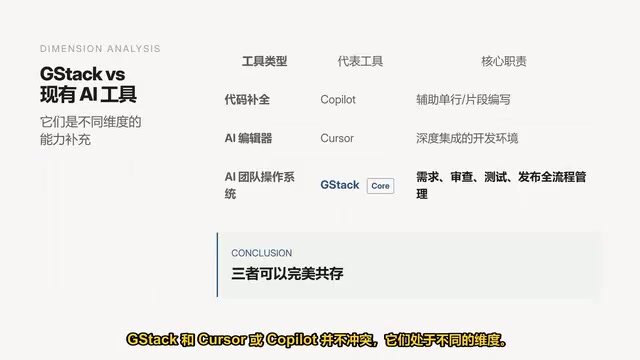
Copilot helps you write code, Cursor helps you edit code, and GStack handles full lifecycle management from requirements gathering and code review to testing and release. All three can coexist, each serving its own purpose.
Conclusion: Why Solo Developers Should Try GStack
GStack represents an important trend in AI-assisted development: moving from point tools to systematic workflows. It's not about having AI write more code for you—it's about having AI play different roles on your team, covering every critical stage of product development.
The Evolution of AI Agent Workflows: An AI Agent is an AI system capable of perceiving its environment, autonomously planning, and executing multi-step tasks—distinct from traditional LLMs that can only handle single-turn Q&A. Since 2023, Agent frameworks like AutoGPT and LangChain have emerged, but early products had limited practicality due to high hallucination rates and low task completion rates. With the significant improvement in reasoning capabilities of models like Claude 3.5 and GPT-4o, Agent reliability in the coding domain has markedly improved. GStack represents the latest form of this evolution: rather than pursuing fully autonomous AGI-style Agents, it embeds AI into human-led workflow nodes—automating deterministic tasks while assisting decisions on judgment calls. This "human-AI collaboration" architecture is currently considered the most practically valuable deployment path.
For solo developers and small teams, GStack's value lies in condensing enterprise engineering practices (code review, security auditing, automated testing, CI/CD) into a set of simple commands. You no longer need to build a complete team to achieve development quality and process guarantees approaching those of a professional team.
If you want to experience this "one person equals a team" development efficiency, I recommend installing GStack now and running Office Hours first—let AI challenge your product assumptions. That might be the most valuable first step.
Key Takeaways
- GStack is an AI workflow system open-sourced by YC President Gary Tan, covering the entire lifecycle from product decisions to code releases through 23 slash commands
- Core commands include Office Hours (product validation), Plan CEO Review (strategic review), Review (code review), QA (dynamic testing), CISO (security auditing), and SHIP (one-click release)
- GStack operates on a different dimension from Copilot and Cursor—all three can coexist: Copilot handles code completion, Cursor handles intelligent editing, and GStack handles full-process management
- Completely free and open-source under the MIT License, requiring only Claude Code API costs, ideal for solo developers and technical founders
- GStack represents the trend of AI-assisted development evolving from point tools to systematic workflows, condensing enterprise engineering practices into simple commands
Related articles
 Tutorials
Cursor + Codex Dual-IDE Collaboration: A Practical Methodology for Open-Source Project Customization
A complete methodology for open-source project customization based on real-world experience, detailing the Cursor+Codex dual-IDE workflow, seven-stage process, MVP validation, and AI source code reading techniques.
 Tutorials
Cursor Multi-Agent in Practice: Building a Full-Stack Next.js Blog in 50 Minutes
Build a full-stack blog in 50 minutes using Cursor IDE's multi-Agent mode with Next.js, Clerk auth, and Supabase. Learn the 4-phase AI Agent workflow and key integration pitfalls.
 Tutorials
Building an AI Software Factory from Scratch: A Cursor Engineer's Hands-On Experience with Multi-Agent Collaboration
Cursor engineer Eric shares practical insights on building an AI software factory: automation levels, guardrail design, parallel Agent management, and scaling to 1000+ Agents for 24/7 development.