Hands-On Tutorial: Building an AI Trending News Dashboard from Scratch with Claude Code
Build an AI trending news dashboard from scratch using Claude Code with zero coding experience.
This hands-on tutorial walks you through building an AI-powered trending news dashboard using Claude Code, requiring zero programming knowledge. It covers installing and configuring CC, connecting domestic LLMs like Zhipu GLM 5.2, and developing a full-stack application — backend, frontend, and AI analysis — all through natural language instructions.
What Is Claude Code? Understanding Its Essence in One Sentence
Claude Code (CC for short) is essentially an AI agent that can directly operate your computer. You tell it what you want in natural language, and it gets to work — reading files, writing files, running commands, searching the web, writing and modifying code — all without requiring you to know how to program.
The term "AI Agent" here refers to one of the most important directions in artificial intelligence today. Unlike traditional conversational AI, an Agent has the ability to perceive its environment, make autonomous decisions, and execute actions. It can not only understand natural language instructions but also decompose complex tasks into multiple sub-steps and sequentially invoke tools to complete them. Claude Code is a quintessential product of this concept — it combines the comprehension capabilities of large language models with OS-level execution capabilities, forming a complete "understand → plan → execute → feedback" loop.
Many people confuse Claude Code with ChatGPT or Cursor, but the differences are actually significant:
- ChatGPT: Like a consultant behind glass — you ask, it answers, but it can't see your computer or modify your files. At best, it gives you text to copy and paste yourself.
- Cursor: Like a code editor with an AI assistant — it can modify files, but you need to understand code and keep an eye on what it's writing.
- Claude Code: A true hands-on agent that can read, modify, and execute on its own, completing entire tasks based on your instructions.
In one sentence: ChatGPT and Cursor can only "talk" — CC is the one that actually "does the work" for you.
CC's capabilities go far beyond writing code. It can help you build software, create web pages, organize notes, read long documents and generate summaries, analyze data and create charts, write documentation and copy, and even batch-process repetitive tasks. If it's repetitive manual work you can do on your computer, there's a good chance you can hand it off to CC.
Four Core Concepts Every Beginner Must Understand
Conversation Is Control
You don't need to learn any command syntax — just describe your needs as if you're chatting. For example, "Build me a webpage for viewing trending topics" or "Generate some statistics from this data," and CC will understand and execute. Behind this interaction style is the powerful intent-understanding capability of large language models — CC converts your natural language description into a concrete technical plan and execution steps. This process is completely transparent to the user; you only need to focus on "what you want," not "how to do it."
A Folder Is Your Workspace
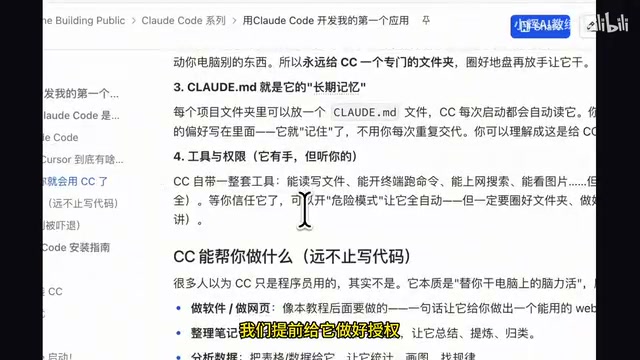
Claude Code requires you to specify a folder when it starts — this becomes its workspace. It only reads and writes within this folder and won't touch anything else on your computer. Just give CC a dedicated folder for each project. This sandboxed design is a security measure — confining the AI's operations to a specific directory prevents accidental damage to your system and keeps files from different projects isolated, maintaining clear project boundaries.
CLAUDE.md Is Long-Term Memory
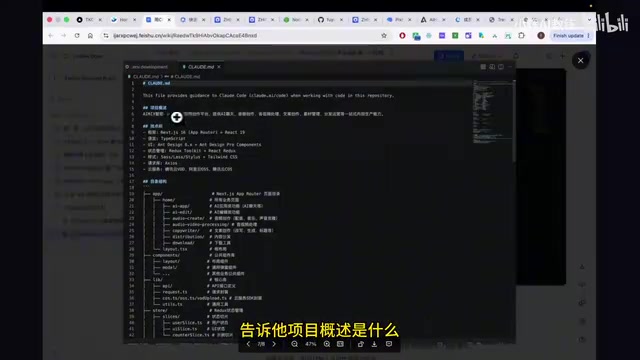
Each project folder can contain a CLAUDE.md file that CC reads every time it starts up. You can include project descriptions, tech stack details, directory structure, development conventions, and more — essentially establishing a "project constitution" for CC so you don't have to repeat yourself every session.
The design philosophy behind CLAUDE.md stems from the emerging concept of "Context Engineering." A large language model's context window is limited, and how you provide the most critical information within a finite token budget directly determines the quality of AI output. CLAUDE.md is essentially a structured System Prompt that allows developers to persistently store core project constraints, technical specifications, and collaboration rules, avoiding the need to repeat background information in every conversation. This dramatically improves the efficiency and consistency of multi-turn interactions. A well-written CLAUDE.md can multiply CC's performance on a project several times over.
Tools and Permission Management
CC comes with a complete toolkit: reading/writing files, executing commands, web searching, viewing images, and more. By default, it asks for your approval before each operation. Once you trust it, you can enable "dangerous mode" (--dangerously-skip-permissions) to let it execute automatically without asking for authorization each time. Note that while "dangerous mode" significantly boosts efficiency, it also means CC can delete files, install packages, and run scripts without confirmation. Beginners should only enable this mode after becoming thoroughly familiar with CC's behavior patterns, and should ensure there's no irreplaceable critical data in the working directory.
Installing Claude Code: Configuration from Scratch
Installing the Node.js Environment
Whether you're on Windows or Mac, you first need to install Node.js. Visit the Node.js official website, select the Long-Term Support (LTS) version for your operating system, and download and install it. After installation, type node -v in your terminal — if you see a version number, your environment is ready.
Node.js is a JavaScript runtime environment built on Chrome's V8 engine that allows JavaScript to run on the server side, beyond the browser. npm (Node Package Manager) is the package manager bundled with Node.js, hosting over 2 million open-source packages — making it the world's largest software registry. Claude Code is built on Node.js precisely because of npm's rich ecosystem — installing CC itself requires just one command, and CC can conveniently leverage various npm libraries to accomplish complex tasks.
Installing Claude Code Itself
Run the npm install command in your terminal, then type claude --version to verify. If a version number appears, the installation was successful.
Configuring a Domestic Model to Drive CC
Since Claude Code has strict restrictions for users in China, it's currently more practical to use domestic large language models as the driver. The recommended first-tier models include:
- Zhipu GLM 5.2 (latest reasoning version)
- MiniMax M3.0
- Kimi
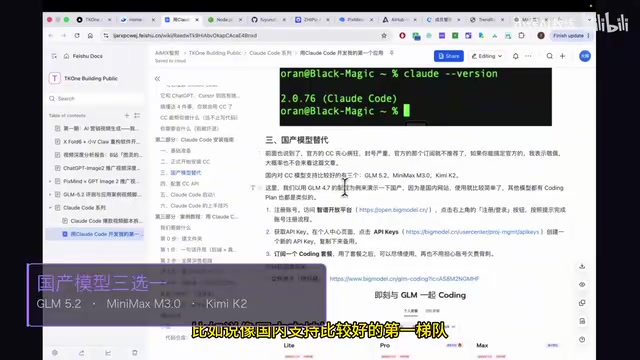
The reason domestic models can seamlessly replace Anthropic's native Claude model to drive CC is that these platforms widely adopt API interface specifications compatible with OpenAI. This means Claude Code can switch its underlying model through simple environment variable configuration without modifying any upper-level logic. This "model-agnostic" architecture is key to CC's adoption in China and allows users to flexibly choose the most cost-effective model for different scenarios.
Taking Zhipu GLM 5.2 as an example, you need to visit the Zhipu Open Platform to register an account, obtain an API Key, and subscribe to a Coding Plan. The Pro plan is suitable for regular development, while the Lite plan works for non-technical users with occasional needs. Zhipu also provides an automated configuration assistant — after installing it in the terminal, simply follow the prompts to select Chinese, the domestic version, and enter your API Key to complete the setup.
Hands-On: Building an AI Trending News Dashboard
Defining Project Requirements
We're building a trending news dashboard application with these core features:
- Multi-platform data sources: Using the Uzhna open platform to pull real-time trending data from 11 platforms including Weibo, Zhihu, Douyin, Bilibili, and more
- Topic subscriptions: Customizable topics of interest, such as AI, large language models, DeepSeek, Claude, etc.
- Visual presentation: Chart-based display of trending topics with a dark tech-themed design
- AI-powered analysis: Trend interpretation and content suggestions based on current hot topics
For the tech stack: HTML + Chart.js for the frontend, Node.js + Express for the backend, and GLM for the AI model. But you don't need to understand any of this — just tell CC what you want.
Here's a brief explanation of the tech stack selection logic: Express is the most popular web application framework in the Node.js ecosystem, known for being lightweight and flexible, with millions of projects built on it worldwide. Chart.js is an open-source JavaScript charting library that supports line charts, bar charts, pie charts, and many other visualization types, generating beautiful interactive charts with minimal configuration. This combination is a classic approach for rapid prototyping — Express handles the data API while Chart.js handles the frontend display. CC's choice of this tech stack demonstrates its sound judgment in technology selection, automatically opting for mature, stable tools with strong community support.
Step 1: Build the Backend with a Single Instruction
After creating the project folder HotspotDashboard, launch Claude Code in the terminal and paste your requirements: tell it you want a web application with a dark tech theme, Node.js Express backend, the data source API address, request header configuration, subscription topic list, 5-minute data caching, and so on.
The "5-minute data caching" mentioned here is an important performance optimization strategy. Trending data APIs typically have rate limits — if every user visit directly hits the upstream API, it would not only slow down responses but could also trigger throttling or even bans. By setting up a cache layer on the server side that temporarily stores API responses for 5 minutes and serves local data during the cache validity period, you reduce dependency on the upstream API and dramatically improve user experience. This is a very fundamental yet critically important design pattern in backend development, and CC's ability to automatically understand and implement this requirement demonstrates its deep understanding of engineering practices.
After receiving the instructions, CC automatically analyzes the requirements, creates files, and writes the backend code — all without any manual intervention.
Step 2: Frontend Interface Development
Once the backend is complete, continue telling CC about the frontend requirements: dark theme, layout style, chart styling, etc. You can even send CC screenshots of websites you like and ask it to replicate the look.
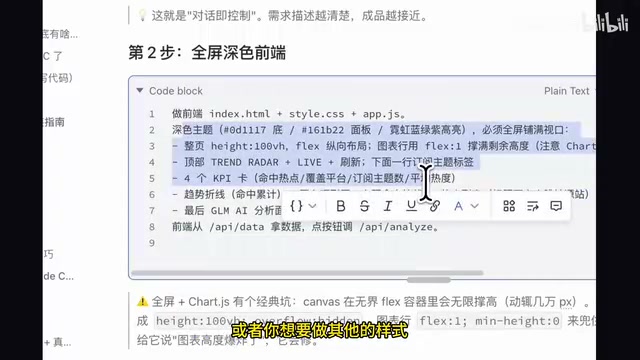
This "screenshot-driven development" approach works because modern multimodal large language models have powerful image understanding capabilities. CC can identify layout structures, color schemes, component styles, and other visual information from screenshots, then convert them into corresponding HTML and CSS code. This is far more efficient than describing UI requirements in pure text and much less prone to misunderstandings.
CC will automatically open Chrome for debugging, generate the complete frontend interface, and correctly render data into the charts.
Step 3: Integrating AI Analysis
The final step is integrating Zhipu GLM's AI analysis capabilities. After configuring the API Key and model version in the .env file, CC will automatically implement the AI analysis feature. The .env file is a widely used environment variable configuration method in software development that separates sensitive information like API keys and database addresses from the code. This facilitates deployment across different environments and avoids the security risk of hardcoding keys in source code.
Notably, during the development process, CC demonstrated strong autonomy — it tested the data on its own, discovered issues, and automatically fixed them without any human prompting. This "self-debugging" capability is a core characteristic that distinguishes AI Agents from simple code generation tools: it can not only write code but also run it, observe the output, determine whether it meets expectations, and autonomously locate and fix problems when errors occur. This shows that while CC driven by GLM 5.2 may be slightly slower, its execution results are quite accurate.
The final result: clicking the "AI Analysis" button triggers the large language model to provide trend interpretations and content suggestions based on the currently subscribed trending data. Insights like "Doubao loses tens of millions daily while revenue remains under one million" are extremely practical for content creators.
Advanced Tips and Summary
After completing the basic version, you can continue asking CC to iterate and optimize:
- Add scheduled refresh functionality to keep data updated in real time
- Connect more data sources to cover a wider range of trending channels
- Modify the UI theme to create a personalized dashboard
- Edit
topics.jsonto change subscription topics to areas you're interested in
The core takeaway from this entire development process is: Claude Code is redefining the barrier to "development." You don't need to know how to code — you just need to clearly describe your requirements, give CC a working folder, and it handles the rest. Combined with domestic large language models (like Zhipu GLM 5.2), you can smoothly use CC for application development even in network-restricted environments.
From a broader perspective, Claude Code represents a paradigm shift toward "natural language programming." Traditional software development requires developers to master programming languages, frameworks, toolchains, and a whole series of specialized skills, while CC encapsulates all this technical complexity behind a natural language interface. This doesn't mean professional developers will be replaced — quite the opposite, technically skilled people can use CC more efficiently because they can provide more precise instructions and more reasonable architectural constraints. But for non-technical users, CC truly opens an unprecedented door.
For non-technical users, Claude Code's greatest value isn't in writing code itself, but in shortening the distance from "idea to product" to just a few lines of conversation.
Related articles
The Complete Guide to OpenAI Codex CLI: From Installation and Configuration to Enterprise-Level Practice
In-depth guide to OpenAI Codex CLI: covering installation, agents.md design, multi-agent collaboration, MCP protocol integration, and a RAG customer service project.
Decoding Google's AI Control Roadmap: A Defense Framework for When AI Goes Off the Rails
Google releases its AI Control Roadmap, a new safety paradigm that assumes alignment may fail and builds defenses at the system architecture level.
Agent Factory: Voice-Driven AI Coding — A Hands-On Guide to Building Apps for Free
Agent Factory wraps Claude Code into a voice-driven AI coding tool with dozens of free models, letting you build apps, games, and websites through conversation.