The Complete Guide to OpenAI Codex CLI: From Installation and Configuration to Enterprise-Level Practice
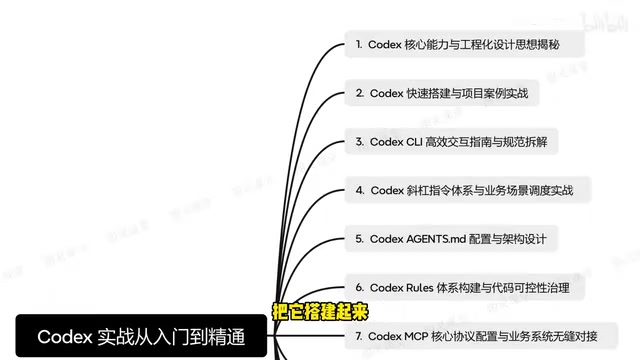
A complete guide to OpenAI Codex CLI from setup to enterprise-level RAG project development.
This article provides a comprehensive walkthrough of OpenAI's open-source Codex CLI, an AI programming agent that runs in the terminal. It covers installation, three interaction modes, agents.md configuration best practices, multi-agent collaboration with Sub-Agents, MCP protocol integration for enterprise systems, custom plugin development, and a capstone RAG intelligent customer service project.
What Is OpenAI Codex CLI? Core Capabilities Explained
OpenAI's open-source Codex CLI is generating widespread buzz in the developer community. As an AI programming agent that runs directly in the terminal, Codex CLI can understand natural language instructions and translate them into code operations, all backed by a comprehensive engineering design framework. The term "AI programming agent" distinguishes it from traditional code completion tools as a next-generation development assistance system — traditional tools like GitHub Copilot primarily complete code snippets based on cursor-position context, whereas a programming agent possesses task planning, environment awareness, tool invocation, and autonomous decision-making capabilities. This concept originates from the AI Agent research paradigm, which emphasizes a system's ability to autonomously perceive its environment, formulate plans, and execute multi-step operations to accomplish complex goals. Codex CLI is a concrete implementation of this paradigm in the field of software engineering. A Bilibili creator recently published a comprehensive Codex hands-on tutorial series covering the entire pipeline from beginner-level installation to enterprise-grade project development. This article provides a systematic overview of its core content.
More Than Just a Code Generator
Codex CLI is fundamentally different from traditional AI code completion tools. It's not merely a "Q&A-style" code generator — it's a programming agent with full-fledged engineering thinking. Its core capabilities include:
- Natural language-driven development: Describe your requirements in everyday language, and Codex automatically translates them into executable code solutions
- Context awareness: Understands project structure, dependency relationships, and code style
- Sandboxed safe execution: All code operations run in an isolated environment to ensure system security. A sandbox is a security isolation technology that creates a restricted execution environment at the OS level, preventing programs running inside it from accessing or modifying critical resources on the host system. The sandbox mechanism used by Codex CLI is similar to Docker containers or macOS App Sandbox — it uses file system isolation, network access control, and process permission restrictions to ensure that AI-generated and executed code won't accidentally delete important files, leak sensitive data, or cause irreversible damage to the system. This is especially important for Full Auto mode.
- Multi-model support: The underlying model can be switched to different OpenAI models to suit tasks of varying complexity
Key Engineering Design Philosophy
The tutorial places special emphasis on Codex's engineering design philosophy — it's not about AI replacing developers, but about building a "human-AI collaborative" development paradigm. Developers handle architectural decisions and requirements definition, while Codex handles code implementation and repetitive work at the execution level. This division of labor can significantly boost development efficiency in real-world projects.
Codex CLI Installation and Environment Setup
Prerequisites
The installation process for Codex CLI is fairly straightforward, but you need to ensure the following environment is ready:
- Node.js environment: v18 or above recommended
- OpenAI API Key: A valid API key is required
- Terminal environment: Supports macOS/Linux terminals; Windows users should use WSL. WSL (Windows Subsystem for Linux) is a Linux compatibility layer built into Windows 10/11 that allows users to run Linux binaries natively on Windows. WSL2 is based on lightweight virtual machine technology, providing full Linux kernel support with significantly better file system performance and system call compatibility than WSL1. Since Codex CLI's sandbox mechanism relies on native security features of Linux/macOS (such as namespace isolation), Windows users need WSL for full functionality.
The installation command is very straightforward:
npm install -g @openai/codex
Once the API Key is configured, you're ready to go. The tutorial specifically mentions that users in China may need to configure a proxy or use a compatible API endpoint — a common stumbling block for beginners.
CLI Interaction Modes and Slash Command System
Three Interaction Modes Explained
Codex CLI offers three interaction modes with different security levels, allowing developers to choose flexibly based on the scenario:
- Suggest mode (default): Only suggests code without auto-executing — ideal for first-time use
- Auto Edit mode: Automatically edits files but requires manual confirmation before executing commands
- Full Auto mode: Fully automated execution — suitable for high-trust, repetitive scenarios
The design of these three modes embodies a "progressive trust" security philosophy — developers can start with the most conservative Suggest mode and gradually increase the level of automation as they become more familiar with and confident in the tool's behavior, finding the optimal balance between efficiency and safety.
Built-in Slash Commands
Codex includes a comprehensive slash command system that is key to boosting daily productivity. Common commands cover file operations, context management, model switching, and more. The tutorial emphasizes that mastering these commands can multiply development efficiency — they essentially encapsulate complex multi-step operations into one-click shortcuts.
agents.md Configuration: The AI Agent's Playbook
The Role of agents.md
agents.md is the core configuration file in a Codex project, serving as the AI agent's "playbook." It defines Codex's behavioral guidelines, code style preferences, tech stack constraints, and other critical information for the current project. From a technical standpoint, the content of agents.md is injected into the system prompt for every interaction with the model, essentially setting a persistent role definition and behavioral boundary for the AI. This design draws from the configuration concepts of similar tools like Cursor's .cursorrules and Windsurf's .windsurfrules, but Codex standardizes it in Markdown format, making it easier for version control and team collaboration.
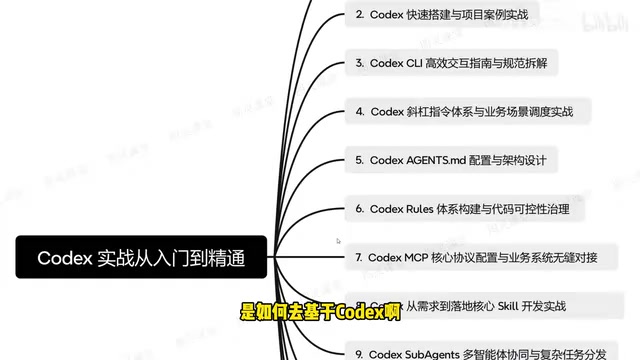
Best Practices for agents.md Architecture Design
A high-quality agents.md should include the following layers:
- Project overview: Tech stack, architectural patterns, and core dependency descriptions
- Code standards: Naming conventions, file organization structure, and commenting requirements
- Business constraints: Specific business logic rules and boundary conditions
- Security rules: List of prohibited operations and sensitive information handling procedures
The core principle for writing a good agents.md is "be specific and explicit" — vague descriptions lead to inconsistent AI output, while precise constraints can dramatically improve the quality of Codex's results.
Multi-Agent Collaboration: Strategies for Decomposing Complex Tasks
Sub-Agents Collaboration Mechanism
The most forward-looking part of the tutorial covers Codex Sub-Agents and multi-agent collaboration. When facing complex enterprise-level tasks, a single agent often falls short, but multi-agent collaboration enables intelligent task decomposition and parallel processing.
Multi-Agent Systems (MAS) are a core research direction in distributed artificial intelligence, originating from distributed AI research in the 1980s. The core idea is to decompose complex tasks among multiple autonomous agents with specialized capabilities, achieving overall objectives through coordination, negotiation, and communication mechanisms. In software engineering, this philosophy aligns closely with microservices architecture — each agent functions like a dedicated microservice with a single responsibility but powerful collaborative potential. In recent years, frameworks like AutoGen and CrewAI have driven the engineering adoption of multi-agent programming, and Codex's Sub-Agents mechanism brings this capability directly into the CLI tool.
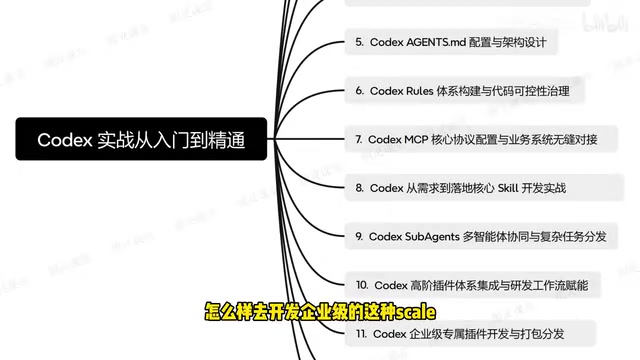
A complex task can be decomposed among multiple specialized agents:
- Architecture agent: Responsible for system design and module partitioning
- Coding agent: Responsible for concrete code implementation
- Testing agent: Responsible for unit testing and integration testing
- Documentation agent: Responsible for API documentation and comment generation
This division of labor simulates the collaboration patterns of a real development team, with each agent focusing on its area of expertise and a coordination mechanism integrating the final output.
MCP Protocol Configuration: Connecting to Enterprise Business Systems
The Core Value of MCP
MCP (Model Context Protocol) serves as the bridge between Codex and external systems. MCP was proposed and open-sourced by Anthropic in late 2024 to address the connectivity problem between AI models and external data sources and tools. It adopts a client-server architecture and defines a unified communication interface, enabling AI applications to access databases, file systems, API services, and other resources in a standardized way. Think of MCP as the USB-C port of the AI world — one protocol to connect all tools. OpenAI's support for MCP in Codex CLI signals that the industry is moving toward interoperability standards for tool invocation. Developers only need to write an MCP Server once, and it can be called by multiple AI clients including Codex, Claude Desktop, and more.
Through MCP configuration, Codex can seamlessly integrate with an enterprise's existing databases, API services, CI/CD pipelines, and other infrastructure.
The tutorial provides detailed instructions on configuring the MCP protocol, enabling Codex to:
- Directly query databases to retrieve business data
- Call internal APIs to perform specific business operations
- Deeply integrate with version control systems
Enterprise-Level Plugin Development and Team Distribution
Custom Plugin Development
For enterprise users, standard features often can't meet every need. The tutorial specifically covers how to develop enterprise-specific plugins that encapsulate particular business logic into tools callable by Codex. Plugins are essentially business-oriented wrappers around MCP Servers — developers can write custom tool functions in TypeScript or Python, define input/output schemas, and expose them to Codex through standard interfaces. This extensible architecture allows Codex to adapt to virtually any enterprise-specific workflow.
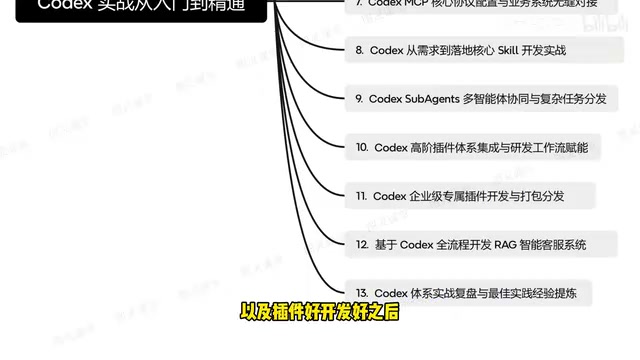
Plugin Packaging and Distribution
After plugin development is complete, the distribution problem still needs to be solved. The tutorial covers how to package plugins into standard formats, supporting internal team sharing and even publishing to the web for broader use. This is an extremely practical capability for large R&D teams.
Hands-On Project: Building a RAG-Powered Intelligent Customer Service System with Codex
The tutorial's capstone content is building a complete RAG (Retrieval-Augmented Generation) intelligent customer service system from scratch. RAG is the mainstream technical approach for addressing the knowledge timeliness and hallucination problems of large language models. Its core idea is to retrieve document fragments relevant to the user's question from an external knowledge base before the model generates an answer, injecting these fragments as context into the prompt so the model generates responses based on real data. A RAG system typically involves four core stages: document chunking, vector embedding (converting text into high-dimensional vector representations), similarity retrieval (finding the most relevant documents using algorithms like cosine similarity), and answer generation. It is widely used in enterprise knowledge base Q&A, intelligent customer service, and similar scenarios.
This project comprehensively applies knowledge from all previous chapters:
- Requirements analysis: Using Codex to assist in organizing functional requirements and technical solutions
- Architecture setup: Defining project standards and code constraints through agents.md
- Core development: Leveraging multi-agent collaboration to complete coding for each module
- System integration: Connecting to knowledge bases and business systems via the MCP protocol
- Testing and deployment: Automated testing and deployment workflows
This hands-on case fully demonstrates Codex's workflow in a real project, with deep AI agent involvement at every step from requirements to delivery.
Conclusion: The Value of Codex CLI and Learning Recommendations
Codex CLI represents an important evolutionary direction for AI programming tools — moving from "code completion" to "engineering collaboration." It's no longer just about helping you write a few lines of code; it aims to participate in the entire software development lifecycle.
For developers, mastering Codex CLI isn't about memorizing every command — it's about understanding the engineering mindset behind it: how to define a good agents.md, how to decompose tasks effectively, and how to build controllable automation workflows. These skills will become core competencies in the era of AI-assisted programming.
It's worth noting that Codex CLI, as an open-source tool, is completely free to use (you only need to cover API call costs). Compared to many paid AI programming tools, it offers clear advantages in both feature depth and customizability. For developers with a solid technical foundation, now is the perfect time to get hands-on experience.
Related articles
Claude Code's Hidden Advantages Explained: Design Choices Every AI Coding Tool Should Copy
Deep dive into Claude Code's leading design in agentic coding: skill script execution, CLAUDE.md imports, remote control, dynamic workflow orchestration, and why Cursor, Codex and others should adopt these features.

Agent Harness: The Paradigm Leap from Prompt Engineering to Harness Engineering
Deep dive into Agent Harness: tracing the paradigm evolution from Prompt Engineering to Context Engineering to Harness Engineering, and how loop-based architectures solve context loss in AI coding agents.
OpenAI Codex CLI Practical Guide: From Installation and Configuration to Enterprise-Level Development
A deep dive into OpenAI Codex CLI's core capabilities and practical usage, covering setup, agents.md configuration, slash commands, MCP protocol, multi-agent collaboration, and RAG system development.