OpenAI Codex CLI Practical Guide: From Installation and Configuration to Enterprise-Level Development
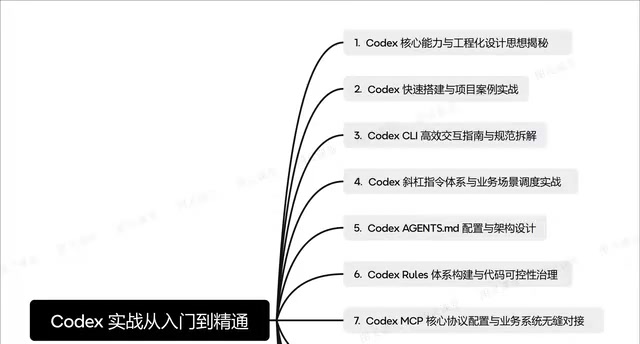
A comprehensive guide to OpenAI Codex CLI from installation to enterprise-level AI-assisted development.
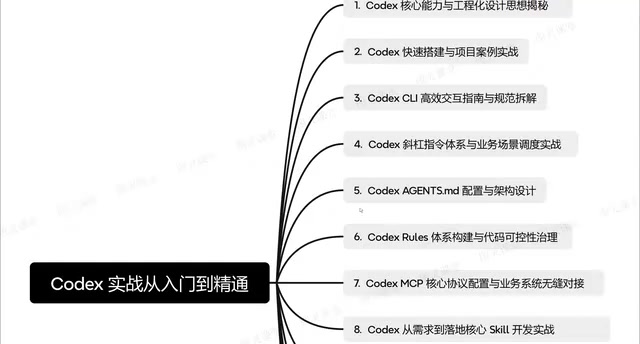
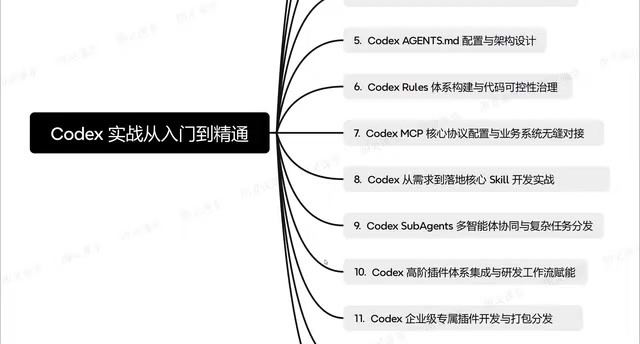
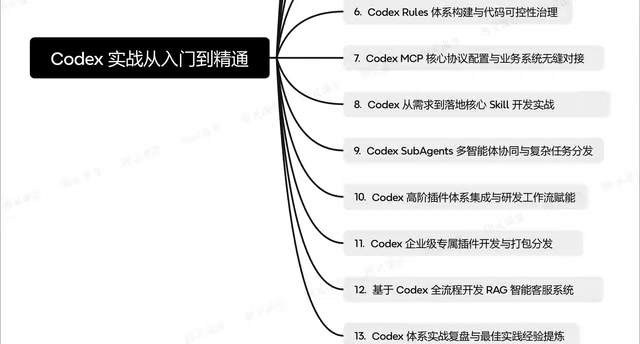
This guide covers OpenAI Codex CLI's full workflow from environment setup to enterprise deployment. It explains core concepts including agents.md configuration for project context, the slash command system for efficient interaction, MCP protocol for business system integration, multi-agent collaboration for complex tasks, and a hands-on RAG intelligent customer service system project that ties everything together.
Introduction: Why Codex CLI Deserves Your Attention
OpenAI Codex CLI, an AI programming assistant designed for developers, is redefining how we approach daily coding. It's not just a code completion tool—it's a complete development platform integrating multi-agent collaboration, MCP protocol connectivity, and a plugin ecosystem. This article systematically covers the complete knowledge framework from installation and configuration to enterprise-level project deployment, based on a comprehensive Codex hands-on tutorial, helping developers quickly get started and deeply master this tool's core capabilities.
Codex CLI Core Capabilities and Engineering Design Philosophy
More Than a Code Generator
Codex CLI's core positioning isn't as a simple code generation tool, but rather as an AI development assistant with engineering-oriented design thinking. It can understand project context, follow coding standards, and provide continuous support throughout the entire development lifecycle.
To understand Codex CLI's value, we need to examine it within the evolutionary trajectory of AI programming tools. From the earliest IDE auto-completion (like IntelliSense), to statistical model-based code suggestions (like early versions of TabNine), to the LLM-driven code generation paradigm pioneered by GitHub Copilot, AI programming tools have gone through three generations of evolution. Copilot solved the problem of "line-level code completion," but it's essentially still a passive, reactive tool—developers write code, AI completes code. Codex CLI represents the fourth-generation paradigm: AI no longer just completes code snippets but participates as an intelligent agent with project-level context understanding, actively engaging in architecture design, code review, test generation, and other engineering tasks. This leap from "code snippet tool" to "engineering platform" is the key context for understanding Codex CLI's value.
From a capability perspective, Codex CLI covers several key aspects:
- Code Generation and Completion: Generating high-quality code based on natural language descriptions
- Project Understanding: Comprehending project architecture and business logic through agents.md configuration files
- Workflow Integration: Seamlessly connecting with existing development processes rather than being an isolated standalone tool
- Multi-Agent Collaboration: Supporting decomposition and parallel distribution of complex tasks
Engineering Thinking in Practice
Unlike other AI programming tools, Codex CLI emphasizes "engineering"—it doesn't encourage developers to dump everything onto AI. Instead, through standardized configuration systems (like agents.md and the Rules system), it constrains AI's behavioral boundaries to ensure generated code meets team standards.
Codex CLI Environment Setup and Quick Start
Installation and Configuration Steps
Codex CLI installation is relatively straightforward, but environment configuration is the key step to truly unleashing its capabilities. After installation, developers need to focus on the following configuration items:
- API Key Configuration: Bind your OpenAI account to ensure proper access permissions
- Project Initialization: Create necessary configuration files in the project root directory
- agents.md Authoring: This is the core file for Codex to understand your project, which we'll cover in detail later
Hands-On Project from Scratch
The tutorial emphasizes an important principle: the best way to learn Codex CLI isn't reading documentation—it's using it to build a complete project. By building a project from scratch, developers can intuitively experience how Codex intervenes at different development stages and its practical value.
CLI Efficient Interaction Guide and Slash Command System
Interaction Modes and Prompt Writing Standards
Codex CLI provides rich interaction modes, allowing developers to have efficient conversations with AI through the command line. The key is mastering proper prompt writing techniques—the more precise the description, the higher quality the output.
Built-in Slash Commands Explained
Codex includes a complete slash command system covering common development scenarios:
- Code Review and Optimization: Quickly identifying potential issues and providing improvement suggestions
- Test Case Generation: Automatically generating unit tests based on business logic
- Documentation Auto-Generation: Creating standardized comments and documentation for functions and modules
- Refactoring Suggestions: Identifying code smells and providing refactoring solutions
The design philosophy behind this command system is to standardize developers' high-frequency operations, reduce repetitive prompt input, and significantly improve interaction efficiency.
agents.md Configuration Deep Dive: Making AI Truly Understand Your Project
Why agents.md Is So Important
agents.md is arguably one of Codex CLI's most differentiating designs. It's essentially a project-level AI configuration file that tells Codex:
- What the project's tech stack and architecture are
- What coding standards and naming conventions to follow
- What the core concepts in the business domain are
- What constraints AI should follow when generating code
The design philosophy of agents.md stems from a core insight in Prompt Engineering: the output quality of large language models is highly dependent on the quality and structure of contextual information. In traditional AI programming interactions, developers need to repeatedly describe project background, tech stack, and coding standards in every conversation, which is not only inefficient but also prone to output quality fluctuations due to inconsistent descriptions. agents.md essentially elevates Prompt Engineering from "improvised conversation" to "engineered configuration"—solidifying project context through a persistent, version-controllable configuration file. This aligns with the software engineering approach of .editorconfig for unifying editor behavior and .eslintrc for unifying code style, representing a critical step in bringing AI collaboration into the engineering management system.
Best Practices for agents.md Architecture Design
A well-crafted agents.md should have a clear hierarchical structure:
- Project Overview Layer: Describing project background, objectives, and core functionality
- Technical Specification Layer: Defining tech stack, dependency versions, and architectural patterns
- Coding Convention Layer: Defining code style, naming conventions, and error handling strategies
- Business Semantics Layer: Explaining domain models and business rules
The key to writing good agents.md is being "specific enough without being overly verbose," enabling AI to work within the correct context and generate code that meets expectations.
Rules System and Code Controllability Governance
Codex's Rules system is another line of defense for ensuring code quality. By defining explicit rules, developers can control the boundaries of AI-generated code and prevent output that doesn't meet project standards.
This "controllability governance" approach is highly instructive—the more powerful AI becomes, the more it needs explicit constraint mechanisms to ensure output quality. This concept aligns closely with the software engineering principle of "Convention over Configuration": by pre-defining a rule system, uncertainty in each interaction is reduced. The Rules system works in tandem with agents.md to form a dual guarantee for Codex CLI's code quality management—agents.md provides contextual awareness, Rules provide behavioral constraints, and both are indispensable.
MCP Protocol Configuration and Business System Integration
Core MCP Protocol Configuration Methods
MCP (Model Context Protocol) is the core protocol for Codex to interface with external systems. MCP was originally proposed and open-sourced by Anthropic in late 2024, aiming to solve interoperability issues between large language models and external tools and data sources. Before MCP, every AI tool's integration with external systems required customized solutions, leading to massive amounts of redundant development work.
MCP's core design adopts a client-server architecture: AI applications act as MCP clients to initiate requests, while external tools and data sources expose their capabilities by implementing the MCP server interface. The protocol defines three core primitives—Resources (resource reading), Tools (tool invocation), and Prompts (prompt templates)—covering the main scenarios of AI-external system interaction. OpenAI's adoption of MCP protocol in Codex CLI signals that this protocol is becoming the de facto standard for the AI tool ecosystem, similar to HTTP for the Web and LSP (Language Server Protocol) for IDEs.
Through MCP protocol, Codex can:
- Access enterprise internal APIs and data sources
- Integrate with existing CI/CD pipelines
- Connect to databases, documentation systems, and other infrastructure
Seamless Business System Transformation Solutions
The tutorial particularly emphasizes how to perform minimal modifications to existing business systems for seamless integration with Codex. This is especially important for enterprise application scenarios—it's not about starting over, but progressively incorporating AI capabilities into existing technical systems. Specifically, enterprises only need to implement the MCP server interface for existing systems, allowing Codex CLI to directly invoke existing business capabilities without any modifications to core business logic.
Multi-Agent Collaboration and Enterprise-Level Case Studies
Codex Multi-Agent Collaboration Mechanism
Codex supports multi-agent collaborative working modes, meaning complex tasks can be decomposed into multiple subtasks processed in parallel by different AI Agents.
Multi-agent collaboration is a cutting-edge direction in current AI system architecture, with its core philosophy derived from distributed computing and microservices architecture design. In single-Agent mode, one AI model needs to handle all types of tasks, easily leading to context window overflow and attention dispersion from task switching. Multi-agent architecture decomposes complex problems into multiple subtasks through Task Decomposition, with each Agent focusing on a specific domain (such as frontend generation, backend logic, test writing), coordinated through an Orchestrator for task scheduling and result aggregation. The core advantage of this architecture is: each Agent can have more focused system prompts and context, reducing the cognitive burden on a single model; meanwhile, subtasks can be executed in parallel, significantly shortening the overall processing time for complex projects.
This architecture is particularly suitable for:
- Parallel Frontend and Backend Development: Frontend and backend Agents progress simultaneously, improving overall efficiency
- Multi-Module Simultaneous Refactoring: Multiple Agents responsible for refactoring different modules
- Large-Scale Code Migration: Breaking migration work into parallelizable subtasks
Enterprise-Level Plugin Development and Distribution
For enterprises with customization needs, Codex provides a plugin development framework. Developers can:
- Develop proprietary plugins based on enterprise-specific requirements
- Package plugins in standard formats
- Distribute and reuse them internally or externally
This plugin ecosystem design gives Codex CLI strong extensibility, enabling it to adapt to different enterprises' differentiated needs.
RAG Intelligent Customer Service System Development
The tutorial's final hands-on project is developing a RAG (Retrieval-Augmented Generation) intelligent customer service system from scratch. RAG is the mainstream technical solution for addressing LLM "hallucination" problems and knowledge timeliness issues. Its working principle consists of two phases: in the retrieval phase, the system converts user queries into vector representations through an Embedding model and retrieves the most semantically relevant document fragments from a pre-built vector database (such as Pinecone, Milvus, FAISS, etc.); in the generation phase, retrieved document fragments are injected as context into the LLM's prompt, and the model generates answers based on this "evidence." Compared to directly fine-tuning models, RAG's advantage is that the knowledge base can be updated in real-time without retraining the model, and answers can be traced back to specific source documents for verification and auditing.
This project comprehensively applies all previously covered knowledge:
- Using agents.md to define project architecture and business rules
- Connecting to enterprise knowledge bases through MCP protocol
- Leveraging multi-agent collaboration to handle complex user queries
- Ensuring code quality and output consistency based on the Rules system
In enterprise customer service scenarios, RAG architecture typically needs to interface with product documentation, FAQ knowledge bases, ticket history, and other data sources—this is precisely the typical scenario where MCP protocol shines. Through standardized protocol interfaces, Codex can seamlessly access these heterogeneous data sources without writing customized integration code for each one.
This end-to-end project practice is the best way to verify your mastery of Codex CLI and provides developers with reusable project templates.
Summary and Reflections
Codex CLI represents an important evolutionary direction for AI programming tools: moving from "code completion" to "engineering-oriented AI development assistant." Its core value lies not in the speed of code generation, but in systematically integrating AI capabilities into the entire software development lifecycle through mechanisms like agents.md, the Rules system, and MCP protocol.
For developers, the key to mastering Codex CLI isn't memorizing every command—it's understanding the engineering philosophy behind it: how to collaborate with AI in a structured way, and how to find the balance between efficiency and controllability. This shift in thinking may be more valuable than the tool itself.
Key Takeaways
Related articles

AI API Relay Startup's First Month: Open Books Reveal Just ¥16K Profit on ¥290K Revenue
A 3-person team shares their AI API relay startup's first month: ¥290K revenue, 95% spent on API costs, only ¥16.7K book profit. A deep dive into adjusted margins, cost structure, and competition.
Trae Hands-On Tutorial: Build a Full-Stack Website with Just 3 Prompts
Learn how to use ByteDance's AI coding tool Trae to build a full-stack website with just 3 prompts—covering frontend, backend API, and admin panel.
AI Progress Demands a More Nuanced Examination: A Rational Framework Beyond Hype and Panic
Current AI discourse is trapped in polarization. This article explores how to rationally assess AI's real progress, analyzes the gap between benchmarks and actual capabilities, and offers a pragmatic evaluation framework.