Hermes Agent Deployment Guide: Building a Mobile AI Coding Workflow with Telegram
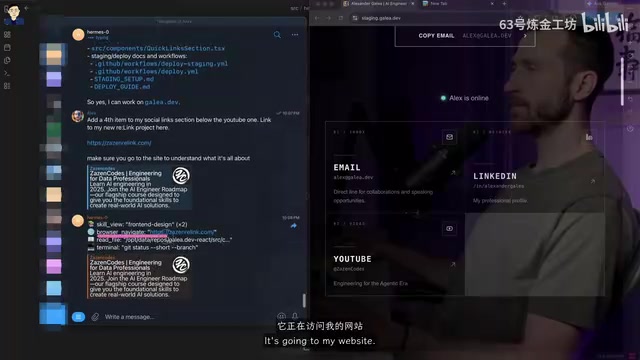
Deploy Hermes Agent on a VPS and use Telegram to code and deploy from your phone.
This guide details how to deploy Hermes Agent on a VPS and connect it via Telegram Bot for a fully mobile AI coding workflow. It covers the Docker-based architecture, model provider selection, Telegram Bot security configuration, GitHub integration with least-privilege access, and automated CI/CD deployment through GitHub Actions, along with a comparison to OpenClaw.
Introduction: Let AI Write Code for You During Your Commute
Imagine chatting with an AI on your phone while riding the subway, and it writes code on a real project, then deploys it to production. This isn't science fiction — it's the daily workflow of a developer based in Toronto.
This article walks through how to deploy Hermes Agent on a VPS and use Telegram for AI-powered coding collaboration anytime, anywhere. The core value of this workflow is simple: you don't need to open your laptop. With just a phone, you can have AI handle the entire pipeline from coding to deployment.
Technical Architecture: From Telegram to Production
The overall system architecture is straightforward: the user sends instructions via Telegram → Hermes Agent on the VPS receives and executes them → code is pushed to GitHub → GitHub Actions automatically deploys to production.
The specific tech stack includes:
- Agent Engine: Hermes Agent (built by Nous Research)
- Runtime Environment: VPS + Docker container
- Communication Interface: Telegram Bot
- Code Management: GitHub CLI
- Deployment: GitHub Actions CI/CD
The biggest advantage of this architecture is that the VPS ensures 24/7 availability without depending on a local machine. Docker containerization guarantees environment consistency and maintainability. Specifically, Docker solves several key problems in this setup: environment isolation prevents Agent dependencies from conflicting with other services on the VPS; image portability means you can quickly reproduce the same environment on any Docker-capable server; and volume mounts decouple Agent state (memory, skills, configuration) from the container lifecycle, so even if a container is rebuilt, the Agent's learned knowledge is preserved. The docker-compose.yaml file defines the service orchestration rules, allowing the entire system to be started and stopped with a single command.
GitHub Actions plays an equally critical role as the CI/CD layer. When Hermes Agent pushes code to a specific branch (like staging or main), pre-configured workflow files automatically trigger build, test, and deployment pipelines. This design decouples "writing code" from "deploying code" — the Agent only needs to finish writing code and run git push, while the subsequent build, packaging, server deployment, and health checks are handled by GitHub Actions. This reduces Agent complexity and improves security.
Hermes Agent vs. OpenClaw: Why Choose Hermes
Hermes Agent is developed by Nous Research, an AI research organization focused on open-source large language models. They're best known for releasing the Hermes series of fine-tuned models. The Hermes model family was originally instruction-tuned on the LLaMA architecture and gained widespread recognition in the open-source community for its excellent instruction-following and function-calling capabilities. Hermes Agent is the productization of these capabilities — it's not just a chat model, but an autonomous agent framework with skill loading, tool execution, and persistent memory.
Compared to OpenClaw, Hermes has several notable advantages:
- Greater Transparency: In the Telegram chat, you can see in real time which skills the Agent is loading, which commands it's executing, and which files it's inspecting. OpenClaw doesn't offer this level of visibility.
- More Pragmatic: Hermes behaves more pragmatically on actual programming tasks. It's not necessarily better than OpenClaw — just a different style.
- Self-Repair Capability: When issues arise, you can simply ask Hermes to fix itself. It has permission to run all necessary commands.
- Persistent Memory: It features a self-improvement loop, continuously learning and optimizing with use.
Hands-On Deployment: Setting Up Hermes Agent from Scratch
VPS Environment Setup
The deployment process has three layers: VPS → Docker container → Hermes Agent. Hostinger's one-click deployment can skip most manual configuration, but understanding the underlying structure is important.
After SSH-ing into the VPS, you can find the Hermes Agent configuration in the Docker directory:
docker-compose.yaml: Defines the Docker image and volume mounts.envfile: Stores authentication credentials for web accessdatafolder: The Agent's "brain," containing memory, skills, and authentication context

Choosing a Model Provider
During setup, you'll need to select a model provider. Nous Portal or Codex is recommended for their relatively low pricing. If you choose Anthropic, costs will be very high. The demo in the video uses GPT 5.5, with the highest intelligence tier selected.
Model selection directly affects the Agent's capability ceiling and operating costs. API pricing varies dramatically across providers — take Claude (Anthropic) as an example, where input/output token prices are far higher than API services for open-source models. In agent scenarios, token consumption is typically dozens of times higher than regular conversations (because the agent repeatedly reads files, executes commands, and analyzes results), so choosing a cost-effective model provider is crucial for long-term use.
Telegram Bot Configuration Steps
Creating a Bot through Telegram's BotFather is straightforward:
- Search for BotFather (look for the blue verified badge)
- Send the
/newbotcommand - Set the Bot name and username
- Copy the Token and enter it into the Hermes configuration
The Telegram Bot API offers two ways to receive messages: Long Polling and Webhook. In a VPS deployment scenario, Webhook mode is typically used — the Telegram server proactively pushes user messages to a preset HTTPS endpoint, allowing the Agent to respond instantly without continuous polling. BotFather is Telegram's official Bot management tool, and each Bot created through it receives a unique API Token that serves as the Bot's identity credential and access key.
Critical Security Step: You must restrict the Bot to respond only to your own Telegram user ID. If you skip this step, anyone can chat with your Bot and control your server. You can get your Telegram ID via UserInfoBot. Restricting the Bot to respond only to a specific user ID is implemented by filtering the chat_id at the code level — unauthorized messages are simply discarded, preventing unauthorized access.
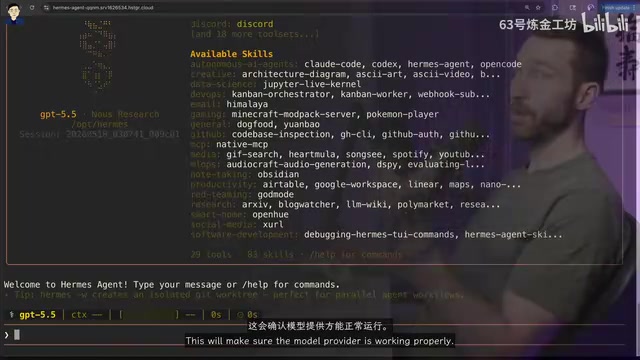
GitHub Integration and Permission Management
Hermes comes with a built-in GitHub CLI skill — no additional installation needed. During setup, Hermes will guide you through the GitHub authentication flow. An important security practice: create a dedicated GitHub account for the Agent and grant it access only to specific repositories, rather than giving it full permissions on your main account.
This Principle of Least Privilege is especially important in AI Agent scenarios. An Agent might execute unintended operations due to model hallucinations or instruction misinterpretation. If it holds full permissions on your main account, the potential blast radius becomes uncontrollable. By using a separate account with repository-level Collaborator permissions, even in a worst-case scenario, the impact is contained to specific repositories.
Live Demo: From Telegram Chat to Automated Deployment
Building a Blog Feature
Send an instruction in Telegram: "Build a blog for my website and deploy it to staging." Hermes' execution process is fully visible:
- Loads the code inspection skill, locates project files
- Analyzes existing code structure and design style
- Uses Codex to generate blog images (no additional API charges)
- Writes the blog page code
- Runs
git push origin stagingto trigger deployment - Monitors GitHub Actions execution status
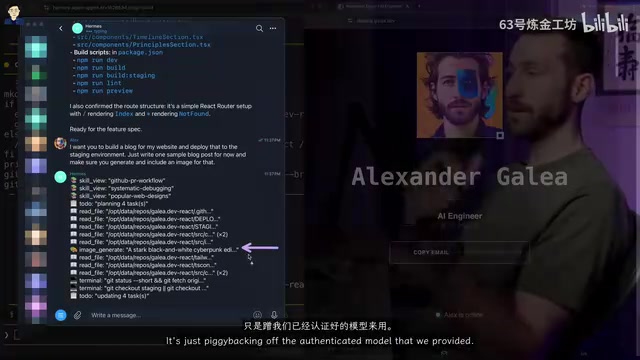
Throughout the process, Hermes demonstrates strong contextual understanding of the project — the generated blog page is highly consistent with the website's overall design style. This contextual understanding comes from the Agent proactively reading existing code, style files, and component structures in the project before executing the task, using them as reference for generating new code rather than creating from scratch.
Mobile Experience
Sending "Add a blog post about Hermes Agent" from a phone, the Agent automatically loads relevant skills, writes content, generates images, pushes code, and triggers deployment. The entire process requires no manual intervention, except for approving high-risk commands in Telegram.
This Human-in-the-Loop design pattern is widely adopted in the current AI Agent landscape. It preserves the efficiency of automation while adding safety valves at critical decision points. For low-risk operations (reading files, running tests, git commit), the Agent executes automatically; for high-risk operations (deleting files, force pushing, modifying production configs), execution is paused pending human confirmation. This tiered authorization mechanism is a key design for making AI Agents practical at this stage.
Current Limitations and Areas for Improvement
Despite the impressive experience Hermes Agent delivers, there are some issues worth noting:
-
High Token Consumption: Hermes tends to "overthink," running numerous commands and search operations, leading to high token usage and longer response times. Token consumption is a common challenge facing all AI Agents today. Each time the Agent executes a task, it needs to feed system prompts, conversation history, tool call results, and file contents into the model as context — all of which count toward token consumption. More exploratory searching means higher task success rates but also greater costs. As the Agent accumulates project memory, the amount of searching in subsequent tasks decreases significantly — this is its "self-learning ability" in action.
-
Learning Curve: On first use, the Agent needs extensive searching to locate project files, but its self-learning capability improves this progressively. Hermes' persistent memory mechanism stores project structure, commonly used file paths, code style preferences, and other information in the data directory, allowing subsequent tasks to directly access these memories without re-exploration.
-
CI/CD Prerequisites: GitHub Actions deployment workflows need to be pre-configured — this falls outside Hermes' automation scope. Developers need to write YAML configuration files under the
.github/workflows/directory in advance, defining build steps, deployment targets, and trigger conditions. -
Security Considerations: Keeping deployment keys managed by GitHub rather than exposing them to Hermes is the safer approach. GitHub Actions' Secrets feature can securely store SSH keys, API Tokens, and other sensitive information. These are injected as environment variables during workflow execution, and the Agent itself cannot read the plaintext values of these keys.
Conclusion
Hermes Agent represents an important direction in AI-assisted development: rather than embedding an AI assistant inside an IDE, it positions AI as an independently running "developer" that receives instructions through a messaging interface and autonomously completes tasks. This model is particularly well-suited for scenarios where you have clear requirements but can't sit in front of a computer to code.
From a broader perspective, this architectural pattern hints at a possible evolution of the software development workflow: the developer's role shifts from "personally writing every line of code" to "defining requirements, reviewing results, and maintaining quality control." The Agent handles the execution layer, while humans focus on the decision layer — deciding what to do and verifying it was done correctly. This isn't about replacing developers, but freeing them from repetitive coding so they can work at a higher level of abstraction.
For developers looking to try this workflow, the recommendation is to start with simple features, gradually build an understanding of the Agent's capability boundaries, and then expand to more complex development tasks.
Related articles
Vibe Coding Beginner's Guide: A Complete Roadmap to Building Software with AI — No Coding Experience Required
Vibe Coding lets anyone build software using plain language instructions with AI. Learn what it is, when to use it, which tools to pick, and how to get started.
Beginner's Guide to Vibe Coding: Turn Ideas into Products with AI — No Coding Experience Required
Vibe Coding lets anyone build software products through natural language conversations with AI — no programming skills required. Learn the concept, top tools (Cursor, Claude Code, Codex), and how to get started.
Codex in Action: One Prompt, 47 Minutes, a Complete Algorithm Research Paper
Testing OpenAI Codex: one detailed prompt generates a complete algorithm paper in 47 minutes, including working code, figures, and LaTeX manuscript. Covers prompt design, quality assessment, and real submission experience.