How AI Development Platforms Unify Database Script Management: From Chaos to Standardization
How AI Development Platforms Unify Dat…
AI development platforms automate database script generation, archiving, and version control.
Traditional database script management suffers from scattered files, version chaos, and error-prone deployments. AI development platforms address these issues through unified directory archiving, standardized automatic script generation, and intelligent incremental upgrade detection. Combined with GitOps review workflows and repository-based version management, they enable a complete closed-loop system where every database change is generatable, reviewable, traceable, and rollbackable.
Introduction
In software development, managing database scripts has long been a pain point for team collaboration. Scattered scripts, version chaos, deployment errors… these problems only get worse as teams grow. With the rise of AI-assisted development platforms, database script management is being redefined and resolved.
Based on Lesson 12 of the "ZiKai AI Development Platform" course series, this article takes a deep dive into how AI can unify database script management to boost development efficiency and code quality.
Five Major Pain Points of Traditional Database Script Management
In traditional development workflows, database script management faces numerous challenges that become especially pronounced as team size increases:
- Scattered scripts with no categorization: Every developer has their own script files scattered across different locations with no unified storage conventions, leading to chaotic project structures.
- Difficult version management: Script changes lack effective version tracking mechanisms, making it hard to trace back to a specific version of the database state.
- Error-prone deployments: Due to poor script management practices, scripts are frequently missed or executed in the wrong order during deployment, causing production issues.
- Missing rollback scripts: When rollbacks are needed, there are no corresponding rollback scripts available, increasing operational risk.
- Multi-environment sync relies on manual effort: Database synchronization across development, testing, staging, and production environments depends entirely on manual operations — inefficient and error-prone.
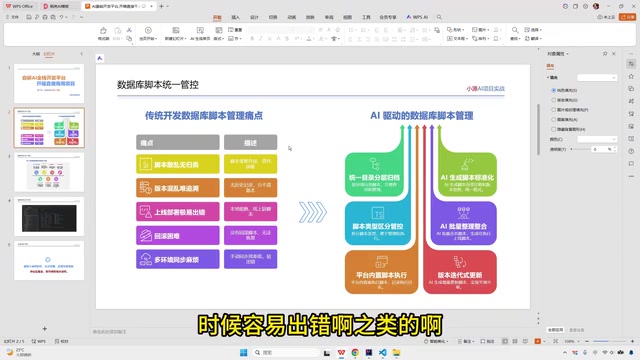
It's worth noting that the industry has long had dedicated database migration tools like Flyway and Liquibase that attempt to solve these problems. The core approach of these tools is to assign a unique version number to each database change and execute migration scripts in sequence, enabling version tracking and rollback capabilities. However, these tools require developers to manually write migration files in specific formats and maintain the integrity of version sequences. The learning curve is relatively steep, and version conflicts can still easily arise during multi-person collaboration. AI development platforms take things a step further — automating the generation, classification, and version management of scripts entirely, fundamentally reducing the need for manual intervention.
These problems are all too common in real-world projects. Especially under fast-paced agile development, database script management often becomes a bottleneck that slows down delivery.
AI-Driven Database Script Management Solutions
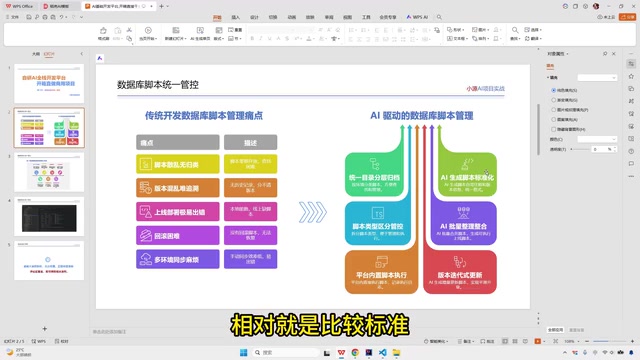
Unified Directory and Layered Archiving
The first core improvement of AI development platforms is unified directory management. All database scripts are stored centrally under a fixed directory structure, with AI automatically performing layered archiving. Every time AI generates code, the related database scripts are automatically archived to their corresponding locations.
The advantage of this approach is clear: developers don't need to manually organize script files. AI automatically categorizes and stores them by module and function type, ensuring the project structure remains clean and orderly at all times.
Standardized Automatic Script Generation
Since scripts are generated uniformly by AI, their standardization is significantly improved:
- Table structure standards: Every table has complete comment descriptions, and field naming follows unified naming conventions.
- Clear script categorization: AI automatically distinguishes script types — menu scripts, business scripts, data dictionary scripts, authorization scripts, etc. — each filed in its proper place.
- Batch consolidation capability: During iterations, some scripts may change. AI can automatically scan existing scripts and perform merge processing to avoid duplication or conflicts.
The scripts generated for each module include a complete set of supporting files: table structure definitions, data dictionaries, menu configurations, permission grants, and more — forming a comprehensive database change package.
Version Iteration and Smooth Upgrades
Database scripts generated by AI are essentially a form of code, so they can be incorporated into code repositories for version management. This enables several key capabilities:
- Version tracking: Every script change has a complete version record that can be traced back at any time.
- Automatic iteration handling: When database upgrades are needed during development (e.g., adding a new field), AI automatically checks the existing table structure and generates incremental change scripts rather than regenerating the entire CREATE TABLE statement.
- Synchronized code and database upgrades: AI ensures that application code changes and database structure changes stay in sync, preventing situations where code has been updated but the database hasn't.
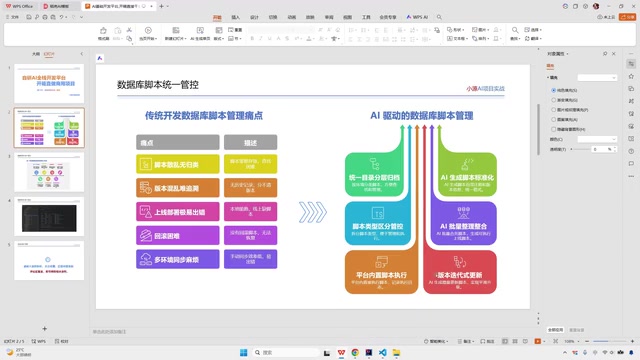
This smooth upgrade capability is extremely important in real-world projects, and it involves the precise selection of database DDL (Data Definition Language) operations. Take adding a new field as an example: AI automatically analyzes the existing table structure and generates an ALTER TABLE ... ADD COLUMN statement rather than re-executing a CREATE TABLE statement. This distinction is critical — CREATE TABLE will throw an error or overwrite data when the table already exists, while ALTER TABLE can safely modify the table structure while preserving all existing data. In production environments, misusing CREATE TABLE could cause irreversible data loss. AI's ability to automatically identify and select the correct DDL statement is one of its most essential safety values in database change management.
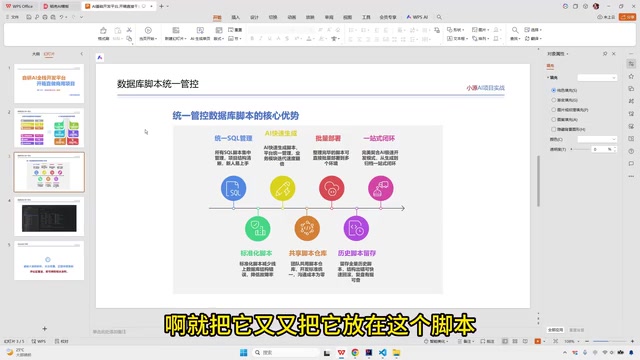
Six Core Advantages of AI-Managed Database Scripts
Overall, AI-unified database script management offers the following significant advantages over traditional approaches:
- Unified management: All scripts are centrally managed, eliminating scattered and disorganized states.
- Standardized output: AI-generated scripts have consistent formatting, complete comments, and standardized naming.
- Rapid generation: AI automatically generates scripts, dramatically reducing the time cost of manual writing.
- Repository-based management: Scripts are incorporated into code repositories, facilitating team sharing, collaboration, and review.
- Batch deployment execution: Supports batch deployment across multiple environments, reducing the risk of manual operations.
- Complete historical archiving: All historical scripts have complete archive records, forming a closed-loop management system.
Practical Implementation Recommendations
For teams considering adopting AI-assisted development, here are some recommendations for database script management:
- Define script standard templates: Pre-configure naming conventions, comment requirements, and directory structures in the AI platform so that AI generates scripts according to team standards from the very beginning.
- Maintain a manual review step: Although AI can automatically generate and manage scripts, manual review before execution is still recommended to ensure changes align with business expectations. The platform currently adopts a "generate, review, then execute" model rather than directly connecting to the database for automatic execution. This model aligns closely with the GitOps philosophy emerging in software engineering — GitOps advocates storing all infrastructure configurations (including database change scripts) as code in Git repositories, using Pull Request workflows for team review and discussion, and triggering automated deployment only after approval. This workflow of "every change is traceable and must be reviewed" preserves the efficiency advantages of automation while safeguarding change quality through human review — a key component of current DevOps best practices.
- Leverage version management: Manage database scripts in the same code repository as application code, using tools like Git to track the context of every change. The benefit goes beyond version tracking — Git's commit history can link database changes to corresponding feature requirements and code modifications, making it easier to reconstruct the complete change context when troubleshooting issues later.
Conclusion
Database script management may seem like a small part of the development workflow, but it directly impacts deployment efficiency and operational stability. AI development platforms transform this traditional pain point into a standardized, controllable engineering practice through automated script generation, categorized archiving, version management, and incremental upgrades.
From early migration tools like Flyway and Liquibase to today's AI development platforms deeply integrated with the GitOps philosophy, the evolution of database change management clearly points toward a single goal: making every database change generatable, reviewable, traceable, and rollbackable. As AI-assisted development tools continue to mature, more development management challenges like this will be resolved one by one. If your team is struggling with database script management, consider leveraging an AI development platform to establish a standardized management workflow.
Related articles
 Tutorials
Cursor + Codex Dual-IDE Collaboration: A Practical Methodology for Open-Source Project Customization
A complete methodology for open-source project customization based on real-world experience, detailing the Cursor+Codex dual-IDE workflow, seven-stage process, MVP validation, and AI source code reading techniques.
 Tutorials
Cursor Multi-Agent in Practice: Building a Full-Stack Next.js Blog in 50 Minutes
Build a full-stack blog in 50 minutes using Cursor IDE's multi-Agent mode with Next.js, Clerk auth, and Supabase. Learn the 4-phase AI Agent workflow and key integration pitfalls.
 Tutorials
Building an AI Software Factory from Scratch: A Cursor Engineer's Hands-On Experience with Multi-Agent Collaboration
Cursor engineer Eric shares practical insights on building an AI software factory: automation levels, guardrail design, parallel Agent management, and scaling to 1000+ Agents for 24/7 development.