Inventory-Free Game Design and Godot Sprite Occlusion Sorting: A Practical Tutorial
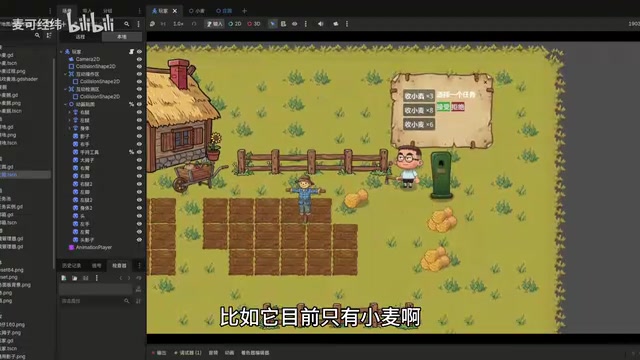
Inventory-free game design meets Godot sprite sorting fixes and AI shader generation.
This tutorial explores an inventory-free game design approach where all item interactions happen through mouse dragging in the scene, eliminating traditional inventory UI. It covers a common Godot engine pitfall where Z-index settings break Y-sort occlusion for character sprites, and presents the correct solution of unifying Z-index values. The article also demonstrates using AI to generate Godot shader code for effects like swaying wheat.
Introduction
In indie game development, an inventory system is almost a standard feature. But what if we took a different approach — completely removing the inventory and handling all item interactions through mouse dragging within the scene? What kind of gameplay experience would that create? A Bilibili content creator demonstrated an inventory-free design approach in their "AI Game Development" series, while also sharing practical tips on sprite occlusion sorting in the Godot engine — insights well worth exploring for game developers.
Going Inventory-Free: Interaction Design That Returns to Physical Intuition
Core Concept
In traditional games, players pick up items and store them in an inventory, retrieving them when needed. The core idea behind this "inventory-free" approach is: all item transportation relies entirely on mouse dragging, and players can only move items within a limited operational range.
The Inventory System is one of the most classic UI paradigms in game design. From the grid-based inventory of early Diablo to the item slots in The Legend of Zelda, virtually every game with item collection mechanics adopts some form of inventory. However, in recent years, some indie games have begun challenging this paradigm: Getting Over It completely eliminates the item system, Noita makes all physics interactions happen in real-time within the scene, and Overcooked creates strategic depth by limiting the number of items a player can hold simultaneously. Inventory-free design is essentially a trade-off between "abstracted convenience" and "physicalized immersion" — when you remove the abstraction layer of an inventory, players are forced to think about logistics in physical space, which can actually give rise to entirely new gameplay dimensions.
Specifically, this manifests as:
- The mouse can only drag items within a certain distance; items beyond that range cannot be manipulated
- Tools like hoes also have operational distance limits and can only affect nearby tiles
- Crops like wheat can be swept together and merged into piles after harvesting for easier transport
This design makes game interactions feel closer to physical intuition — you need to move things to their destination bit by bit, just like in real life, rather than stuffing them into an infinite-capacity "pocket dimension."
Supporting Quest System
To complement the inventory-free design, the creator also implemented a streamlined quest system. When players approach an NPC, a quest panel pops up — for example, "Collect 6 wheat." Players must manually drag the wheat to the delivery area, where the system automatically counts and collects the required amount, leaving any excess items in place.
While this mechanism is simple, it aligns perfectly with the core inventory-free philosophy — all operations take place in the visible scene space, with no hidden UI layers. As the variety of items increases over time, this design could introduce richer strategic elements, such as requiring players to plan transport routes and item placement.
AI-Assisted Development: Generating Godot Shaders with Natural Language
The creator mentioned a highly practical AI use case in the video: using AI to generate Godot shader code.
When adding a dynamic swaying effect to wheat, the creator simply described the requirement in plain natural language ("add a swaying shader to the wheat"), and the AI directly generated usable shader code. The only caveat is that Godot shader comments need to be written in English, though the description prompt can be in Chinese.
A Shader is a small program that runs on the GPU, controlling the final appearance of each pixel or vertex in the graphics rendering pipeline. The Godot engine uses its own shader language (a simplified version based on GLSL), supporting two main types: Vertex Shader and Fragment Shader. The wheat swaying effect is typically achieved through a Vertex Shader — applying a time-based sine function offset to the vertex's X coordinate, while setting different offset amplitudes based on the vertex's Y coordinate (height), so the plant's base remains fixed while the top sways the most, simulating a natural wind-blown effect. This kind of effect traditionally requires developers to have foundational knowledge in computer graphics, but AI intervention allows developers to simply describe the desired visual effect and receive usable shader code.
This demonstrates an efficient application pattern for AI in game development: for standardized, pattern-based technical implementations (such as common shader effects), AI can significantly lower the development barrier, allowing developers to focus their energy on creativity and design.
Godot Sprite Occlusion Sorting: Common Pitfalls with Z-index and Y-Sort
The Problem
In 2D game development, when a character walks behind a scene object, occlusion relationships often break — the body is correctly occluded, but the feet or hands poke through.
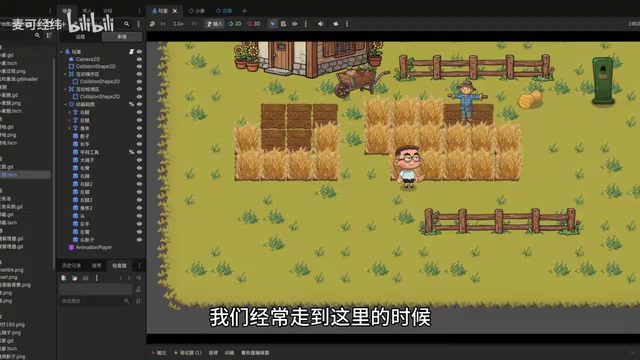
The root cause of this problem lies in improper Z-index settings for sprites. Many tutorials place character limb parts (like the left foot or left hand) as child nodes of their corresponding limb nodes (like the left leg), then control the front-to-back relationships between limbs by setting child node Z-index values to -1 or -2.
Rendering Principles: The Conflict Between Z-index and Y-Sort
To understand this problem, you first need to understand how two key concepts in 2D rendering work. Z-index (also known as Z-order or draw order) determines the front-to-back layering of sprites — sprites with higher values are drawn later and occlude sprites with lower values. Y-Sort is a special automatic sorting mechanism that dynamically adjusts the draw order based on a node's Y coordinate (vertical position) on screen — objects with larger Y values (closer to the bottom of the screen) are drawn later, creating a pseudo-3D perspective effect where "nearer objects occlude farther ones." This is the standard technique for simulating depth in 2D top-down and isometric games.
The critical point is that Godot's rendering pipeline first sorts by Z-index into layers, then performs Y-sort within the same Z-index layer. If different limb parts of a character are assigned different Z-index values, they get placed on different rendering layers and cannot participate in unified Y-sort comparisons with other objects in the scene (like wheat), causing incorrect occlusion.
Why the Traditional Approach Fails
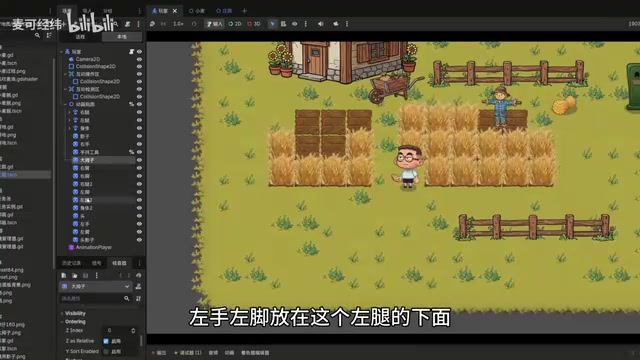
When you make the left foot a child node of the left leg and set its Z-index to -1, the occlusion relationships between limbs are indeed correct, but the Y-sort relationship with other objects in the scene (like wheat) gets broken. This is because sprites on different Z-index layers don't participate in the same layer's Y-sort calculations.
The Correct Solution: Unified Z-index with Y-Sort
The creator's solution is: place all limb part textures on the same hierarchy level, with Z-index uniformly set to 0.
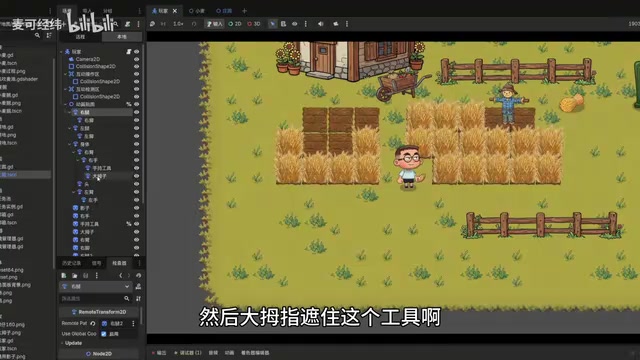
Specific steps:
- Move all texture nodes — left foot, right foot, left hand, right hand, body, head, etc. — to the same hierarchy level
- Set all nodes' Z-index to 0
- Enable Y-Sort on the scene's root node
- Use Godot's node ordering to control the front-to-back relationships between limbs
The Godot engine uses a Scene Tree architecture where all game objects are organized as Nodes in a tree-like hierarchy. Child nodes inherit their parent node's transforms (position, rotation, scale) by default, which is very convenient when creating character skeletal animations — the left foot as a child of the left leg automatically follows the left leg's movement. However, rendering order is also affected by node hierarchy: a child node's Z-index is calculated relative to its parent by default. Therefore, the creator's solution cleverly decouples the "logical hierarchy" from the "rendering hierarchy": on the rendering side, all limbs are placed on the same level to ensure correct Y-sorting, while the movement-following relationships between limbs are maintained through node references in code (such as RemoteTransform2D nodes or position synchronization in scripts).
The key insight is: although the node hierarchy in the editor has changed, the logical parent-child relationships can be maintained through node references. For example, the left foot still follows the left leg's movement, but on the rendering side they're on the same Z-layer, so they correctly participate in Y-sort calculations.
This way, the character's limb parts can correctly perform Y-axis occlusion calculations with wheat, fences, and other objects in the scene, completely solving the "body is hidden but feet poke through" problem.
Current Progress and Outlook
This AI-assisted game development project is still in its early stages:
- The only crop type is wheat
- Only a small interactive area of the scene has been completed
- Surrounding buildings and decorations have correct occlusion relationships but are all static and non-enterable
However, based on what's been implemented so far, the inventory-free design concept is quite innovative, and the sprite sorting technical solution is very practical. As more content is added, this project is worth following.
Conclusion
Although this installment isn't lengthy, it's packed with information. The inventory-free design philosophy offers indie games a differentiated interaction approach; AI-generated shaders demonstrate the possibilities of low-cost development; and the sprite occlusion sorting solution is practical knowledge for Godot developers. For developers using AI to assist in game creation, these experiences are well worth learning from.
Related articles

Key Takeaways from Andrew Ng × OpenAI's Prompt Engineering Course: Two Core Principles Explained
Deep dive into Andrew Ng & OpenAI's ChatGPT Prompt Engineering course: Base LLM vs instruction-tuned models, two core prompting principles, and API-first development thinking for developers.

The Absurd Parable of AI Economics: How the Capital Bubble Gets Inflated
A brilliant AI economics satire exposes the absurd capital loop in AI investment: investment becomes revenue, valuations are conjured, and media becomes complicit.
12 Practical Tips for Vibe Coding with Trae SOLO: From Getting Started to Efficient Collaboration
12 practical tips for vibe coding with Trae SOLO covering agent selection, Plan mode, context management, custom rules, and more to build an efficient AI programming workflow.