LangChain Few-Shot Prompt Templates in Practice: A Complete FewShotPromptTemplate Tutorial

LangChain few-shot prompt templates guide LLMs with examples to reduce hallucinations.
This article covers LangChain's FewShotPromptTemplate, which embeds a small number of examples into prompts to guide LLM outputs and reduce hallucination rates. It explains core parameters (Examples/ExampleSelector, ExamplePrompt, Prefix, Suffix, etc.), distinguishes between implementations for text completion models and chat models, and demonstrates a practical batch file renaming use case.
Why You Need Few-Shot Prompt Templates
Large language models frequently produce inaccurate outputs or hallucinations in real-world applications. Hallucination refers to the model generating content that appears plausible but is actually incorrect or entirely fabricated. The root cause lies in the fact that models are fundamentally probability-based text generators — they optimize for the conditional probability distribution of the next token, not factual accuracy. Without clear constraints and guidance, models tend to drift from expectations during "free-form generation."
LangChain's FewShotPromptTemplate is designed specifically to address this pain point. Based on the principle of Few-Shot Learning, it embeds a small number of examples into the prompt to guide the LLM in understanding the task intent, ensuring outputs meet expectations.
Few-shot learning originates from the field of Meta-Learning, with the core idea of enabling models to quickly adapt to new tasks using very few labeled samples. In traditional machine learning, models typically require thousands of training samples to achieve good results, while few-shot learning attempts to simulate the human cognitive ability to "generalize from a few examples." The GPT series of papers were the first to systematically combine In-Context Learning with Few-Shot approaches, demonstrating that large language models can adapt to tasks solely through examples in the prompt — without gradient updates or fine-tuning. This capability is considered one of the key manifestations of Emergent Abilities in large models.
Few-shot prompting provides specific input-output mapping examples, effectively establishing a "local constraint space" during inference. This anchors the model's output patterns within the paradigm defined by the examples, significantly reducing the probability of hallucinations caused by unconstrained generation. Research shows that few-shot approaches can reduce hallucination rates by 40%-70% in formatted output, classification tasks, and rule-following scenarios.
This method is particularly well-suited for complex task scenarios such as translation, text classification, and logical reasoning. Compared to Zero-Shot direct questioning, few-shot approaches can significantly improve the accuracy and consistency of model outputs.
FewShotPromptTemplate Core Parameters Explained
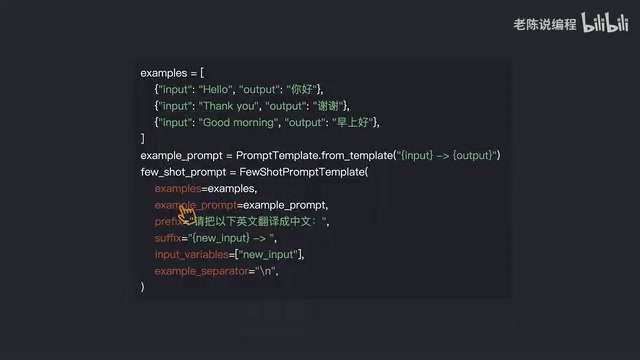
When creating a FewShotPromptTemplate, you need to understand the following key parameters:
Required Parameters (Choose One)
- Examples: Directly pass in a list of example data
- ExampleSelector: Dynamically select examples through a selector
It's important to note that these two parameters are mutually exclusive, and exactly one must be provided — passing both or neither will cause an error. In simple scenarios, the Examples parameter is typically used to pass in example data directly.
ExampleSelector is a dynamic example selector provided by LangChain. When the example library is large (dozens or even hundreds of examples), including all examples in the prompt leads to excessive token consumption or may even exceed the context window limit. ExampleSelector uses strategies such as semantic similarity (based on vector embeddings), Maximum Marginal Relevance (MMR), or length constraints to select the most relevant examples from the library for the current input. Common implementations include SemanticSimilarityExampleSelector (retrieves the most similar examples via a vector database) and LengthBasedExampleSelector (dynamically adjusts the number of examples based on token budget). This mechanism essentially applies the RAG (Retrieval-Augmented Generation) concept to the example selection process.
Other Important Parameters
- ExamplePrompt: The formatting template for examples, defining how each example is presented
- Prefix: Introductory text placed before all examples, used to describe the task context
- Suffix: The user input prompt placed after all examples, typically containing placeholder variables
- Input Variables: A list of user input variables corresponding to the placeholders in the Suffix
- ExampleSeparator: The delimiter between examples, defaults to a newline
Few-Shot in Practice with Text Completion Models
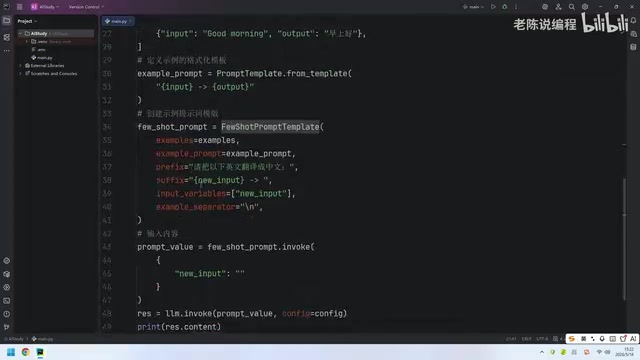
For text completion models (such as text-davinci-003), you can use FewShotPromptTemplate directly. Text completion models follow a unidirectional text generation paradigm — they receive a continuous text as input and generate the continuation. Their API accepts a string-type prompt parameter, so FewShotPromptTemplate ultimately concatenates all content (Prefix, examples, Suffix) into a single complete string.
The basic workflow is as follows:
- Define example data (e.g., English-to-Chinese translation pairs)
- Create an ExamplePrompt formatting template
- Assemble the FewShotPromptTemplate with Prefix, Suffix, and other parameters
- Pass in user input to generate the final prompt
Development Tip: During development and testing, always print out the complete generated prompt to verify that the format and content meet expectations. This is a crucial technique for debugging prompt engineering.
Few-Shot for Chat Models: FewShotChatMessagePromptTemplate
For chat models (such as GPT-3.5/4), you need to use FewShotChatMessagePromptTemplate, a few-shot template specifically designed for conversational formats.
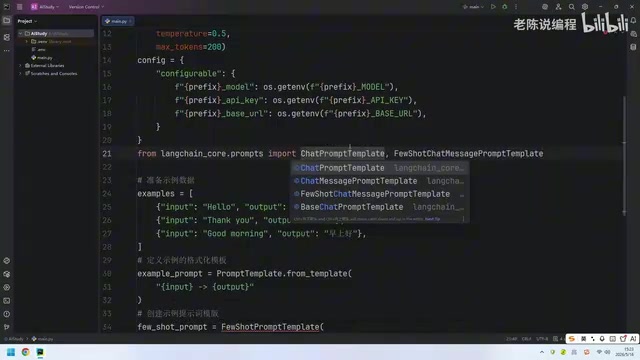
Key Differences from Text Completion Models
Chat Models like GPT-3.5-turbo and GPT-4 use a conversation turn structure, where the input is a messages array composed of three role types: system, user, and assistant. This structured input format enables the model to better understand conversational context and role positioning. Therefore, in LangChain, the two model types correspond to different prompt template classes to accommodate their respective input format requirements.
Unlike text completion models, the example formatting template for chat models must use the ChatPromptTemplate.from_messages() method, with role and content defined internally through dictionaries. This conforms to the chat model's message format specification. Each example is converted into a user-assistant message pair, simulating real conversational interaction history and allowing the model to learn task patterns from "conversation memory."
Implementation Steps
- Create the example template using
ChatPromptTemplate.from_messages() - Wrap the example template and example data with
FewShotChatMessagePromptTemplate - Merge the few-shot template with system prompts and user input into a complete ChatPromptTemplate
- Call the
invoke()method with variables to generate the final message list
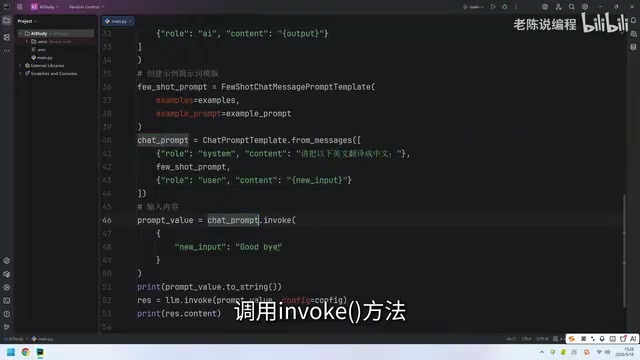
After testing, the chat model also accurately completed the translation task, validating the effectiveness of few-shot templates in conversational scenarios.
Practical Scenario: Batch File Renaming with Few-Shot Prompts
The tutorial concludes with a highly practical application — integrating few-shot functionality into an AI application interface built with PySide6 to implement batch file renaming.
PySide6 is the official Qt for Python binding library, maintained by the Qt Company under the LGPL license, which permits commercial use. It provides a rich set of GUI components for building cross-platform desktop applications. Integrating LangChain's few-shot capabilities into a PySide6 application represents an "AI capability localization" development paradigm — packaging the intelligent reasoning capabilities of large models into desktop tools so that non-technical users can benefit from AI assistance through a graphical interface.
Through few-shot examples, you can teach the LLM to generate filenames according to specific rules. For instance, by providing several pairs of "original filename → standardized filename" examples, the model can understand the naming rules and process files in batch. Users simply provide a few naming examples in the interface, and the backend constructs prompts via FewShotPromptTemplate to call the LLM, which automatically infers the naming rules and applies them in bulk. The advantages of this approach include:
- Build once, use forever: When rules change, just modify the examples — no code changes needed
- High flexibility: Different naming rules only require swapping out the example set
- Reduced maintenance costs: Non-technical personnel can adjust behavior by modifying examples
Summary and Best Practices
When using LangChain's few-shot prompt templates, follow these principles:
- Prioritize example quality: 2-5 high-quality, representative examples outperform a large number of low-quality ones. Research shows that example diversity and boundary coverage matter more than quantity
- Format consistency: Ensure all examples follow the same input-output format. Inconsistent formatting confuses the model and degrades output quality
- Debug first: Always print the complete prompt during development to verify that token consumption is within budget and formatting is correct
- Match the model type: Use FewShotPromptTemplate for text completion models and FewShotChatMessagePromptTemplate for chat models. Mixing them up will cause format errors
- Dynamic selection: When the example library is large, consider using ExampleSelector to dynamically select the most relevant examples based on input — saving tokens while improving relevance
Related articles
 Tutorials
Cursor + Codex Dual-IDE Collaboration: A Practical Methodology for Open-Source Project Customization
A complete methodology for open-source project customization based on real-world experience, detailing the Cursor+Codex dual-IDE workflow, seven-stage process, MVP validation, and AI source code reading techniques.
 Tutorials
Cursor Multi-Agent in Practice: Building a Full-Stack Next.js Blog in 50 Minutes
Build a full-stack blog in 50 minutes using Cursor IDE's multi-Agent mode with Next.js, Clerk auth, and Supabase. Learn the 4-phase AI Agent workflow and key integration pitfalls.
 Tutorials
Building an AI Software Factory from Scratch: A Cursor Engineer's Hands-On Experience with Multi-Agent Collaboration
Cursor engineer Eric shares practical insights on building an AI software factory: automation levels, guardrail design, parallel Agent management, and scaling to 1000+ Agents for 24/7 development.