Liberal Arts Grad's Vibe Coding Journey: How a Simple Link Aggregation Page Earned 10K+ Views
Liberal Arts Grad's Vibe Coding Journe…
Liberal arts grad uses Gemini AI to build a concert seat view site, proving Vibe Coding success hinges on ideas, not tech.
A creator with a liberal arts background used only Gemini's conversational AI to build a concert seat view lookup website in a single afternoon — essentially a link aggregation page that earned 15,000 views by precisely addressing the seat selection pain point. Her experience shows that the core of getting started with Vibe Coding is finding an idea that's simple enough with real demand, repeatedly simplifying features to the minimum viable solution, avoiding over-preparation like PRDs, and shipping first before iterating.
A creator with a liberal arts background used Gemini's conversational AI to complete her very first Vibe Coding project — a concert seat view lookup website. The functionality was extremely simple, yet it garnered 15,000 views and 2,000+ interactions on Xiaohongshu (China's Instagram-like platform). Her experience reveals a truth many overlook: The key to getting started with Vibe Coding isn't technical skill — it's finding an idea that's simple enough yet hits a real pain point.
What is Vibe Coding? This concept was coined by AI researcher Andrej Karpathy in early 2025. The core philosophy is "fully surrendering to the vibes, forgetting that code even exists" — developers describe desired functionality in natural language, AI generates all the code, and humans are only responsible for defining requirements and accepting results. The fundamental difference from traditional programming: you don't need to understand how code works, you just need to know what you want. The rise of this paradigm is driven by the qualitative leap in large language models' code generation capabilities, enabling non-technical people to drive complete software development workflows through conversation.
Why a "Link Aggregation Page" Went Viral
The website's functionality is surprisingly simple: a concert venue seating chart with clickable hotspot buttons for each section. Clicking a button redirects users to a Xiaohongshu "AI Ask" summary link, where they can view photos and user reviews of the view from that section.
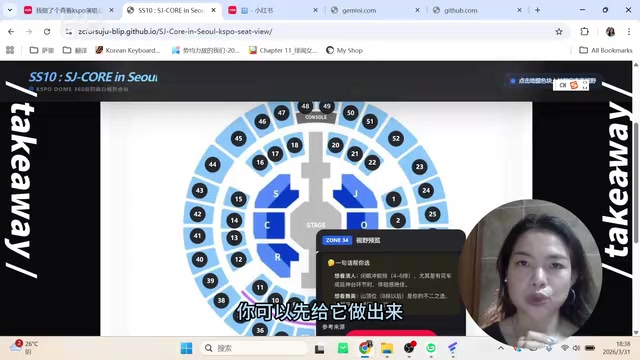
At its core, it's just a link aggregation page. But this seemingly zero-tech product precisely hit the core pain point of concert-goers — wanting to know what the actual view looks like from each seat section before buying tickets. On Xiaohongshu, countless users share real photos from various seats at different venues (called "view contributions"), but the information is scattered and costly to find. This website strings together dispersed information using a visual seating chart, instantly elevating the experience by an order of magnitude.
Notably, Xiaohongshu's "AI Ask" feature had already done the heavy lifting of information aggregation — it automatically crawls platform posts related to specific keywords, uses large language models to summarize and organize them, and generates structured answer pages with original citations. The creator's clever move was recognizing this existing "information infrastructure" and layering a visual seating chart as a navigation interface on top of it, achieving significant UX improvement at virtually zero content production cost.
Core insight: The idea matters a hundred times more than the technology. No matter how simple the functionality, if it addresses a real need, users will embrace it.
How to Trim "Impossible" Down to "Doable"
The creator's original vision was far more complex than the final version. Her requirement simplification process is well worth studying:
- First concept: Click a seat to display a 3D VR panoramic view → Extremely high technical barrier, even large companies struggle with this — decisively abandoned
- Second concept: Display real photos from that seat → Requires collecting and curating massive amounts of images, enormous workload — continue simplifying
- Third concept: Link directly to Xiaohongshu AI Ask summary pages → Zero content production cost, AI has already done the summarization
- Interaction simplification: Originally planned a three-level navigation of "section → seat number → view" → Cut down to a single-level "section → view" redirect
Each simplification followed the same principle: Get from 0 to 0.1 in the simplest way possible. Build it first, get the flow working, validate the idea, then consider iterating. This mindset is especially important for beginners building their first website.
No Need for Cursor — Gemini Conversations Are Enough
Many people hear "Vibe Coding" and immediately think of professional tools like Cursor or Claude Code, instantly raising the psychological barrier. But this creator completed the entire AI programming process using only Google Gemini's chat interface.

Gemini Canvas is Google's interactive creation feature, similar to Anthropic Claude's Artifacts. Its core is a "what you see is what you get" split-panel interface: the left side shows AI-generated code, while the right side renders a real-time preview. You don't need to set up a local development environment, don't need to install any software — just converse with AI in your browser to see what the webpage actually looks like and make instant adjustments.
The specific workflow is remarkably simple:
- Describe your requirements in natural language within Gemini: what website you want to build, what features it should have, what interactions you need
- Gemini generates code directly through the Canvas feature — code on the left, live preview on the right
- If you're not satisfied with the result, continue the conversation to make adjustments
- Finally, copy the code to a text file and save it as an
.htmlfile - Upload to GitHub Pages for free deployment
GitHub Pages is a static website hosting service provided by Microsoft's GitHub platform, completely free. Users simply upload HTML and other static files to a GitHub repository, enable the Pages feature, and receive a publicly accessible URL. For Vibe Coding beginners, this is the lowest-barrier publishing channel: no need to purchase servers, configure domains, or understand backend deployment — the entire launch process can be completed in under 10 minutes.
Don't let imagined difficulties become psychological barriers. Many people (including this creator herself) kept bookmarking tutorials but never took action, simply because they assumed those professional tools "must be hard." It turned out that the conversational AI they use daily can handle the entire Vibe Coding workflow.
Pitfalls Encountered: Requirement Documents and Coordinate Mapping
The creator took two detours during her practice, which yielded the most valuable lessons learned.
Detour One: Writing a PRD
Influenced by Silicon Valley bloggers and tech KOLs, she first had AI generate a complete PRD (Product Requirements Document), including version numbers, dates, target users, background analysis, and more.

A PRD (Product Requirements Document) is a standard deliverable in traditional software development, used to align requirements between product managers, designers, and engineers. It typically contains feature lists, interaction logic, acceptance criteria, and more. In AI programming workflows, some tech bloggers recommend having AI generate a PRD before coding begins, theoretically helping AI better understand the full project scope — but this methodology is fundamentally designed for complex multi-person collaborative projects.
For this kind of minimal project, a PRD is completely unnecessary. Those bloggers need PRDs because they're building complete MVP products using multiple AI tools in collaboration. For a single-page HTML website, the structural overhead introduced by a PRD far exceeds its value, and actually traps beginners in a "preparation trap" — consuming energy and confidence before they ever start building. Simply describing requirements in natural language is sufficient.
Detour Two: Manually Mapping Seat Coordinates
The AI-generated PRD required her to provide seat coordinate data in JSON format. So she spent over an hour using various online annotation tools to manually select 50+ regions and name them one by one. Many tools required payment and offered terrible user experiences.
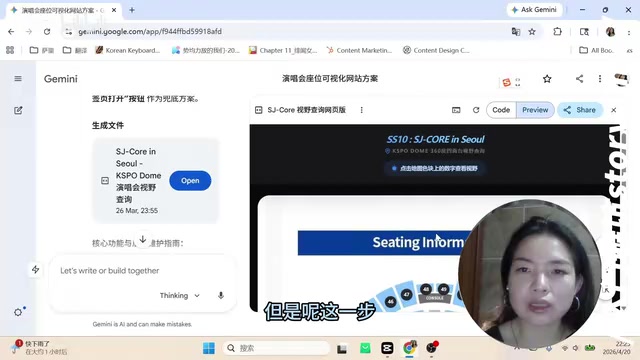
In the end, she abandoned the annotation approach entirely and simply sent her requirement description to Gemini — and the AI generated a page with clickable regions on its own. While the positions weren't perfectly precise, the basic functionality was achieved. Images couldn't be recognized through direct upload, but the issue was ultimately resolved by providing online URL links to the images.
Core lesson: Don't over-invest in the preparation phase. Execute directly first, see if the simplest approach works, then decide whether those "preparatory steps" are actually needed. Many prerequisites you assume are mandatory may not be necessary at all.
Action Checklist for Vibe Coding Beginners
Based on this experience, here are the most practical tips for zero-experience users:
- Find ideas from your own interests and pain points: You understand user needs, you'll stay motivated, and you're less likely to give up halfway
- Cut features until there's nothing left to cut: One page, one core function, no design requirements — that's the perfect first project
- Don't be intimidated by tools: Conversational AIs like Gemini and ChatGPT can write code — you don't need to start with Cursor
- Build first, don't over-prepare: Skip the PRD, skip coordinate mapping, skip design mockups — just tell the AI what you want
- Ship fast, get feedback: GitHub Pages offers free deployment — publish as soon as you're done and validate value with real data
This creator's experience proves that the barrier to Vibe Coding has dropped to "liberal arts background + Gemini + one afternoon" being enough to produce a product with real user value. What truly holds most people back has never been technology — it's the first step they keep refusing to take.
Key Takeaways
- The key to getting started with Vibe Coding is finding an idea that's simple enough yet addresses a real pain point — not mastering complex technology
- The entire website was built using only Gemini's conversational AI, with no need for professional coding tools like Cursor
- Features must be repeatedly simplified: from 3D VR views → real photos → Xiaohongshu link aggregation — cut down to the minimum viable solution
- Don't over-prepare: prerequisites like PRD documents and coordinate mapping may be completely unnecessary — execute first, iterate later
- A single-page website with nothing but link aggregation earned 15,000 views by precisely addressing the concert seat selection pain point
Related articles
 Tutorials
Cursor + Codex Dual-IDE Collaboration: A Practical Methodology for Open-Source Project Customization
A complete methodology for open-source project customization based on real-world experience, detailing the Cursor+Codex dual-IDE workflow, seven-stage process, MVP validation, and AI source code reading techniques.
 Tutorials
Cursor Multi-Agent in Practice: Building a Full-Stack Next.js Blog in 50 Minutes
Build a full-stack blog in 50 minutes using Cursor IDE's multi-Agent mode with Next.js, Clerk auth, and Supabase. Learn the 4-phase AI Agent workflow and key integration pitfalls.
 Tutorials
Building an AI Software Factory from Scratch: A Cursor Engineer's Hands-On Experience with Multi-Agent Collaboration
Cursor engineer Eric shares practical insights on building an AI software factory: automation levels, guardrail design, parallel Agent management, and scaling to 1000+ Agents for 24/7 development.