LinCTX: The Open-Source Tool That Saves 99% of Tokens for AI Coding Assistants

LinCTX drastically cuts AI coding assistant token waste through smart compression and caching.
AI coding assistants repeatedly read the same files in every conversation, causing massive token waste. The open-source tool LinCTX acts as a middleware layer, using semantic-aware smart summary compression and cache reuse to reduce repeated file reads to just 13 tokens. It supports 10 file read modes and 95 command compression patterns, is compatible with 24 mainstream AI tools including Cursor and Claude Code, runs locally for security, and can reduce token consumption by 60%-99%.
The Hidden Cost of AI Coding Assistants: How Bad Is Token Waste?
When writing code with AI tools like Cursor or Claude Code, few people notice a hidden cost — every time the AI reads a file or executes a command, it consumes a significant number of tokens. Over the course of a day on a mid-sized project, simply re-reading the same files repeatedly could cost you tens of dollars extra.
It's worth explaining the concept of tokens and their cost implications. A token is the basic unit that large language models use to process text — it's not simply "one character" or "one word." For English, one token corresponds to roughly 4 characters or 0.75 words; for Chinese, a single character is typically split into 1–2 tokens. Major AI APIs (such as OpenAI GPT-4o and Anthropic Claude) charge by token count, with separate pricing for input and output. Taking Claude 3.5 Sonnet as an example, input costs approximately $3 per million tokens, and output around $15. A mid-sized project's codebase might contain tens of thousands of lines of code, and each full transmission to the AI means tens or even hundreds of thousands of tokens consumed. This makes token cost an easily overlooked yet significantly impactful hidden expense when using AI coding tools.
The root of the problem is that AI coding assistants read file contents "as-is" every single time. A configuration file with thousands of lines gets transmitted in full regardless of whether the AI has already seen it. This brute-force approach creates enormous token waste. The reason lies in the context window mechanism of large language models. The context window is the maximum number of tokens a model can "see" in a single conversation, currently ranging from 128K to 200K tokens for mainstream models. But the critical issue is this: with each new conversation turn or request, the model doesn't automatically "remember" file contents it read before — it needs all relevant context placed back into the window. This means that when a developer iteratively modifies and debugs code within a session, the AI assistant may need to fully reload the same batch of files into context repeatedly, with each reload generating new token consumption. This architectural redundancy in data transmission is exactly the core pain point that LinCTX aims to solve.
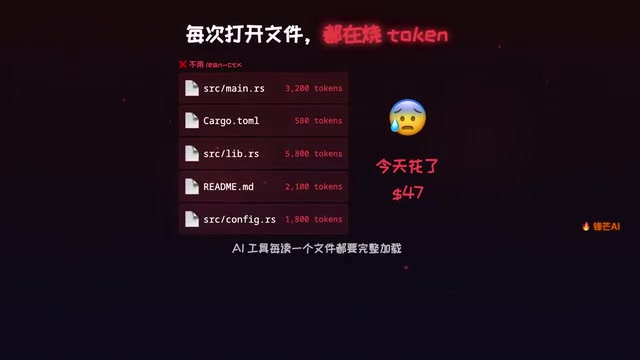
The open-source tool we're introducing today, LinCTX, was built precisely to address this problem. Described on GitHub as a "Context OS for AI Development," it has already earned 1,600+ stars. Written in Rust, it can help you save between 60% and 99% of your token consumption.
How LinCTX Works: Smart Compression + Cache Reuse
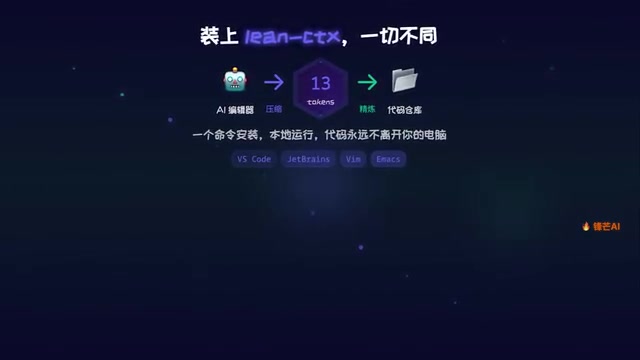
LinCTX's design is remarkably clever — it acts as a middleware layer installed between you and your AI coding tool, automatically applying intelligent compression to every file read and command output.
Smart Summary Compression: Massive Reduction on First Read
When the AI reads a file for the first time, LinCTX doesn't transmit the full content as-is. Instead, it compresses it into a structured summary. A file that originally required thousands of tokens might only need a few hundred after compression, while preserving the key information the AI needs to understand the code.
This smart summary compression isn't simple text truncation or zip-style compression — it's a structured extraction based on code semantics. For source code files, it parses the code's Abstract Syntax Tree (AST), extracting function signatures, class definitions, interface declarations, import relationships, and other skeletal information, while omitting the specific implementation details inside function bodies. This approach is like giving the AI a "table of contents" rather than the "full text" — the AI can use it to understand the file's overall structure and API interfaces, then fetch specific functions on demand when needed. This philosophy aligns with the software engineering principle of "separation of concerns": most of the time, the AI doesn't need to read every file's complete implementation line by line. It just needs to know "what modules exist, what interfaces are exposed, and what the type definitions are" to accomplish most programming assistance tasks.
Caching Mechanism: Only 13 Tokens on the Second Read
This is LinCTX's most powerful capability. When the same file is read a second time, thanks to caching, only 13 tokens need to be transmitted. A file that originally required thousands of tokens drops to just 13 on the second read — a compression ratio that's nothing short of staggering.
In real-world development, AI assistants repeatedly reading the same batch of files is an extremely common scenario — for example, repeatedly checking configuration files, utility functions, type definitions, and so on. The caching mechanism delivers enormous cost savings in these high-frequency scenarios.
Coverage: 10 Read Modes + 95 Command Compression Patterns
LinCTX doesn't just handle file reads — it also covers compression of commonly used command outputs during development.
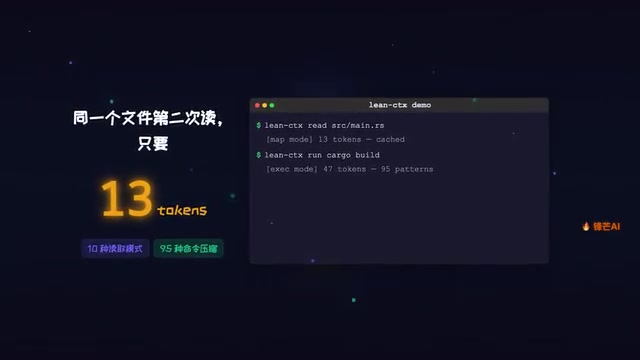
Specifically:
- 10 file read modes: Different compression strategies for different file types (source code, configuration files, documentation, etc.)
- 95 command compression patterns: Covering output compression for nearly all everyday development commands including
git,npm,cargo, and more
During development, command-line tool outputs often contain massive amounts of redundant information. Take npm install as an example — a single installation might output hundreds of lines of dependency resolution logs, version negotiation information, and progress bar characters, but what the AI actually needs to focus on might just be "whether the installation succeeded" and "what warnings or errors occurred." Similarly, git log might return thousands of lines of commit history, and cargo build outputs detailed compilation processes. LinCTX's 95 command compression patterns apply customized processing for each command's output format, extracting key information (such as error codes, warning messages, final status) while discarding noise data. This targeted compression is more efficient than generic text compression because it understands the semantic structure of each command's output.
Whether you're a frontend developer frequently using npm or a Rust developer relying on cargo, LinCTX can intelligently compress command outputs and reduce unnecessary token consumption.
Compatibility and Security
Compatible with 24 Mainstream AI Coding Tools
LinCTX offers impressive compatibility, supporting today's mainstream AI coding tools:
- Cursor — The most popular AI code editor
- Claude Code — Anthropic's command-line coding tool
- GitHub Copilot — Microsoft/GitHub's AI coding assistant
- Windsurf — The AI IDE from Codeium
With a total of 24 compatible AI tools, it achieves virtually comprehensive coverage.
Runs Locally, Your Code Never Leaves
On the security front, LinCTX runs locally and can be installed with a single command. All compression and caching operations are performed locally — your code never leaves your machine. For developers working on sensitive projects or enterprise codebases, this is an important reassurance.
Project Activity and Community Status

Since its launch, LinCTX has quickly achieved impressive numbers:
- 1,600+ GitHub stars
- 20 code contributors
- 172 version releases
This update frequency is remarkable — 172 versions means there are multiple updates nearly every day, indicating that the project team is extremely active in refining the product.
LinCTX's choice of Rust as its development language is no accident. Rust is a systems-level programming language initiated by Mozilla Research, renowned for its "zero-cost abstractions" and memory safety. Through its unique Ownership and Borrow Checker mechanisms, it eliminates common bugs like null pointers and data races at compile time, guaranteeing memory safety without a garbage collector. For a tool like LinCTX that needs to intercept and process large volumes of file I/O operations as a middleware layer, Rust's high performance and low latency are critical — they ensure that compression and caching operations themselves don't become bottlenecks in the development workflow. In recent years, Rust adoption in the developer tools space has grown rapidly, with well-known projects like Turbopack, SWC, and Ruff all choosing Rust to replace traditional JavaScript or Python implementations for orders-of-magnitude performance improvements.
Is LinCTX Worth Installing?
If you use AI coding assistants daily, LinCTX is almost a "can't lose" tool. Its value proposition is clear:
- Save money — Reduce token consumption by 60%–99%. For heavy AI coding users, this could mean saving hundreds of dollars per month
- Seamless integration — Runs as a middleware layer with no changes needed to your existing development habits
- Safe and controllable — Runs locally, open-source and transparent, your code never leaves your machine
Of course, the "99% token savings" figure should be viewed rationally — it represents the extreme scenario of cache hits. Actual savings depend on your project size, file re-read frequency, and other factors. But even a conservative estimate of 60% savings is already quite substantial for daily development.
At a time when the cost of using AI coding tools is drawing increasing attention, LinCTX offers an elegant solution: instead of making the AI do less, it makes the AI smarter about how it retrieves information.
Related articles
 Product Reviews
Qoder vs Cursor Real-World Comparison: Which $20/Month AI IDE Is Better?
Hands-on comparison of Qoder vs Cursor AI IDEs: Agent autonomy, human interaction count, and architecture decisions. Qoder needed only 2 interactions vs Cursor's 8.
 Product Reviews
Cursor Cloud Agent Demo: Eliminating Bottlenecks Across the Entire Software Development Lifecycle
Deep analysis of Cursor's Cloud Agent demo showing how cloud VMs, automated test artifacts, and a full-chain control plane systematically eliminate human bottlenecks across the software development lifecycle.
 Product Reviews
Cursor 3.0 Deep Dive: Multi-Agent Parallelism, Design Mode, and Best-of-N Model Comparison
Cursor 3.0 evolves from an AI coding assistant into an Agent fleet command center. Explore multi-agent parallelism, Design Mode, and Best-of-N model comparison.