Low-Cost Solution for Using GPT Models with Claude Code: Build an AI Programming Workflow for ~$1.50/Month
Low-Cost Solution for Using GPT Models…
Claude Code + local proxy + Codex Team enables AI-assisted programming for under $1.50/month
This article presents a low-cost AI programming solution that leverages Claude Code's command-line interaction experience while routing requests through ClipRoxyAPI, a local proxy service, to GPT Codex Team accounts. The result is an AI programming workflow costing under 10 RMB (~$1.50)/month with ample quota and no third-party data routing. Requirements include a VPN, a GPT account registered with a foreign email, and preferably a Codex Team service with after-sales guarantee.
Solution Overview
For heavy users of AI programming tools, expensive subscription fees and frequent account bans have always been core pain points. This article introduces a practically verified low-cost solution: leveraging Claude Code's excellent command-line programming interaction experience while routing requests through a local proxy service to GPT models, achieving an AI programming experience that costs under 10 RMB (~$1.50) per month with virtually unlimited quota.
The core logic of this solution is straightforward:
- Claude Code handles the interaction experience (command-line programming interface)
- Local proxy service (ClipRoxyAPI) handles request forwarding and usage management
- Codex Team account provides GPT model API access
This solution is suitable for two groups: individual developers frustrated by AI programming tool subscription fees or account bans, and small teams that want one account to cover the entire team without routing data through third-party intermediaries.
Technical Background: Why Can Claude Code Swap Its Underlying Model? Claude Code is Anthropic's command-line AI programming assistant with an agentic architecture that can directly read/write the file system, execute shell commands, invoke git operations, and maintain context coherence across multi-step tasks. The key insight is that it follows the OpenAI-compatible API specification (i.e., the
/v1/chat/completionsendpoint). This design makes it possible to replace the underlying model via a local proxy—as long as the proxy service can convert the request format to one accepted by the target model, Claude Code's frontend interaction experience is fully preserved, and users won't notice the underlying model switch.
Step 1: Account Preparation
GPT Account Registration
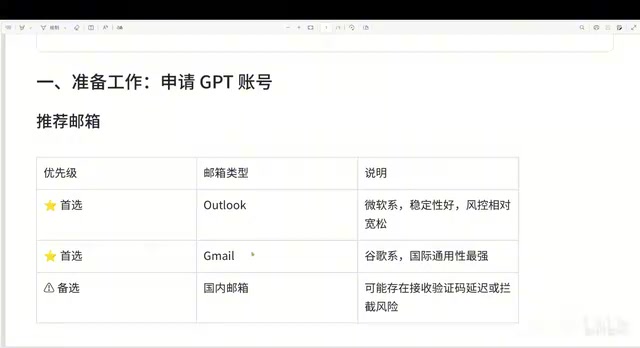
When registering a GPT account, prefer using a Microsoft email (Outlook/Hotmail) or Gmail. The reason is simple—accounts registered with foreign email addresses have a significantly lower probability of being banned. Accounts registered with Chinese domestic email addresses have been experiencing frequent bans recently, especially when performing Codex-related operations.
Technical Causes of Account Bans OpenAI's risk control system evaluates account anomalies based on multiple signals, primarily including: consistency between IP address geolocation and email registration region, device fingerprinting (User-Agent, browser characteristics), account behavior patterns (high-volume API calls in short periods), and payment information sources. Accounts registered with domestic Chinese emails have higher ban rates because the registration behavior itself conflicts with regional restrictions in OpenAI's terms of service, and the risk control model has a lower confidence threshold for such accounts. The advantage of using Microsoft email (Outlook/Hotmail) is that Microsoft has a deep investment partnership with OpenAI, and the Microsoft account system itself carries strong real-name credit endorsement, resulting in relatively higher tolerance from the risk control system.
Obtaining Codex Team Access
Codex essentially uses GPT's API, and the Team version supports multi-person collaboration with higher call quotas. The Team version includes 5 hours of high-frequency quota plus additional allowances—more than enough for daily programming and development.
Relationship Between Codex and GPT API, and Team Version Quota Mechanism OpenAI Codex was originally a language model series specifically trained for code generation, whose capabilities were later integrated into the GPT-4 series. The current "Codex" refers more to OpenAI's programming capability entry point for developers rather than an independent model. The core differences between Team and individual versions are: higher TPM (Tokens Per Minute) rate limits, shared quota pools among team members, and more stable Service Level Agreements (SLA). The 5-hour high-frequency quota refers to priority queue permissions for high-speed model calls within a specific time window—after exceeding this, speed is throttled rather than service being cut off entirely. This is very friendly for continuous programming scenarios, as it won't suddenly interrupt your workflow.
For procurement channels, you can search for relevant keywords on e-commerce platforms. Important recommendation: prioritize sellers who offer after-sales service. After-sales service means that if the Team account gets banned within a month, the seller can reactivate it, giving your investment some protection. Otherwise, an account purchased for a few yuan might get banned within a day.
Another approach is purchasing a Team "parent account"—one parent account can host 5 sub-accounts (a currently discovered bug even allows more sub-accounts), with the total price generally under 10 RMB.
Verifying Account Status
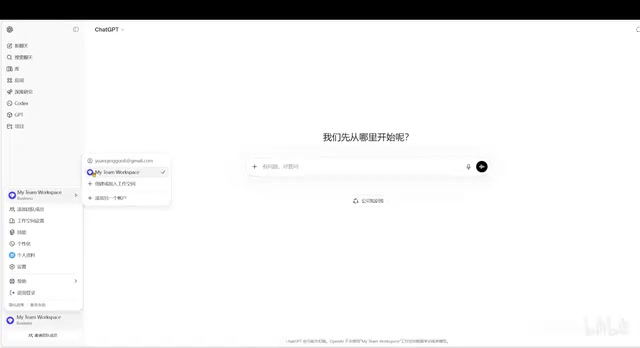
After purchase, log into the GPT account to verify:
- Confirm you've joined a Team (not a personal account)
- Confirm you can select multiple models (including advanced models like GPT-4)
- Try switching to the target model for a conversation test
Step 2: Deploy the Local Proxy Service
ClipRoxyAPI Introduction
ClipRoxyAPI's core function is to unify various model APIs into a local interface and forward requests to target services. Think of it as a bridge between various AI model APIs, enabling request forwarding and usage management.
Technical Principles of the Local Proxy ClipRoxyAPI essentially works as a Protocol Adapter. It listens locally for standard OpenAI-compatible API requests and performs three core operations: Identity Injection (attaching the user's OAuth Token to request headers), Model Mapping (mapping Claude model names to GPT model names), and Traffic Routing (forwarding to OpenAI servers through the configured proxy address). The OAuth authentication flow uses the PKCE (Proof Key for Code Exchange) mechanism, avoiding plaintext password storage locally. Instead, it exchanges short-term authorization codes for long-term refresh tokens—this is why authorization credentials can be persistently managed. Local deployment means all requests only pass through the user's own machine, eliminating the risk of third-party service providers intercepting conversation content.
Once deployed, it provides the following functional modules:
- Dashboard: View overall usage status
- Configuration Panel: Manage AI providers (supports mainstream models on the market)
- Authentication File Management: Manage authorization credentials for each account
- Quota Management: View weekly limits, 5-hour quotas, etc.
- Usage Statistics: Detailed call records
Download and Installation
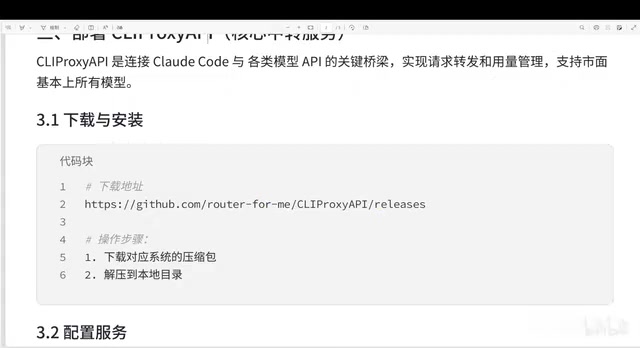
Go to GitHub to download ClipRoxyAPI Plus and select the version for your platform. For Windows, download the AMD64 version and extract it to a local directory.
Configuration File Modification
After extraction, perform the following key configurations:
- Copy the
config.examplefile and rename it to the official configuration file - Modify the Plus URL: Due to network restrictions, configure a proxy address—you can proxy it to your local VPN port (e.g., local port 10808)
- Enable the admin panel URL: Activate the web management interface
- Set the admin password: You can write it in plaintext during configuration; it will be automatically encrypted to ciphertext on startup
Starting the Service
There are two startup methods:
- Command-line startup: Directly run the executable
- Double-click startup: Place the configuration file in the same directory and double-click to run
To avoid a CMD window occupying your screen long-term, it's recommended to use a VBS script for silent background startup—the service will run directly in the background without affecting daily operations.
Implementation Principle of VBS Silent Startup Windows VBScript (VBS) can start processes in hidden window mode through the
Runmethod of theWScript.Shellobject by setting the second parameter to0. The difference from directly double-clicking the exe is: double-clicking creates a visible CMD host process, while the VBS method mounts the process as a background service process that doesn't occupy the taskbar or affect Alt+Tab switching. For proxy services that need to run long-term, this approach is lighter than registering as a Windows service and doesn't require administrator privileges—very suitable for individual developers' daily use scenarios.
Step 3: Initialize Authorization
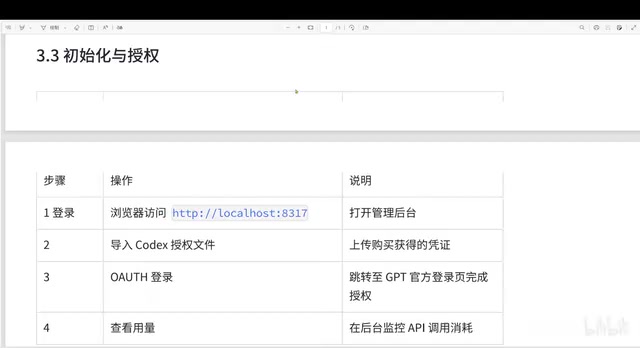
After the service starts, visit localhost:8317 to access the admin panel.
Import Codex Authorization Credentials
Two authorization methods are available:
Method 1: Command-line Login
clipproxyapi.exe codex login
After execution, it will redirect to a webpage for OAuth authentication. Once completed, it automatically calls back to confirm successful authorization.
Method 2: Web Interface Login (Recommended)
Select OAuth login in the admin panel. The system will generate a link that redirects to the GPT login page. After entering your email, password, and verification code to complete authentication, the authorization credentials are automatically imported into the system.
After successful authorization, you can see the newly added credentials in the authentication file list, and quota information will be displayed synchronously.
Step 4: Configure Claude Code
With the service started and running, the Claude Code client needs to be configured to communicate with the proxy service through port 8317. This step involves setting the appropriate endpoint configuration when installing the Claude Code client, pointing API requests to the local proxy address localhost:8317.
Once configured, all model requests from Claude Code will be forwarded through the local proxy to GPT Codex Team, preserving Claude Code's interaction experience while enjoying GPT model capabilities and cost advantages. The complete data path is: Claude Code → localhost:8317 (ClipRoxyAPI) → Local VPN proxy → OpenAI servers—no third-party intermediaries throughout the entire chain.
Solution Advantages Summary
| Dimension | Description |
|---|---|
| Cost | Under 10 RMB (~$1.50)/month |
| Quota | More than enough for daily programming |
| Stability | Relatively stable with after-sales guarantee |
| Privacy | Data doesn't pass through third parties |
| Collaboration | Supports multi-person team usage |
Important Notes
- VPN is required: This is a prerequisite for the entire solution—it won't work without a network proxy tool
- Prioritize accounts with after-sales service: Reduce losses from account bans and ensure your investment is protected
- Register with foreign email addresses: Microsoft email or Gmail can effectively reduce ban probability
- Silent background startup: Use VBS scripts to avoid CMD windows occupying your desktop long-term
- Regularly check quotas: Monitor weekly quota reset times and allocate usage reasonably
This solution combines Claude Code's excellent programming interaction experience with GPT's powerful model capabilities, achieving a low-cost, high-efficiency AI-assisted programming workflow through a local proxy. For daily development work, paired with appropriate programming plugins, it can significantly boost development efficiency—making it one of the most cost-effective AI programming solutions currently available.
Key Takeaways
- The combination of Claude Code + local proxy + Codex Team account achieves an AI programming solution for under 10 RMB (~$1.50)/month
- ClipRoxyAPI serves as a protocol adapter layer handling request forwarding and usage management, supporting multiple mainstream models with no third-party data routing
- Codex Team version provides ample call quotas (including 5-hour high-frequency priority queue), supports multi-person collaboration, and is more than sufficient for daily programming
- The solution is ideal for individual developers frustrated by subscription fees and small teams concerned about data privacy
- Requirements include a VPN, a GPT account registered with a foreign email, and preferably a Codex Team service with after-sales guarantee
Related articles
 Tutorials
Cursor + Codex Dual-IDE Collaboration: A Practical Methodology for Open-Source Project Customization
A complete methodology for open-source project customization based on real-world experience, detailing the Cursor+Codex dual-IDE workflow, seven-stage process, MVP validation, and AI source code reading techniques.
 Tutorials
Cursor Multi-Agent in Practice: Building a Full-Stack Next.js Blog in 50 Minutes
Build a full-stack blog in 50 minutes using Cursor IDE's multi-Agent mode with Next.js, Clerk auth, and Supabase. Learn the 4-phase AI Agent workflow and key integration pitfalls.
 Tutorials
Building an AI Software Factory from Scratch: A Cursor Engineer's Hands-On Experience with Multi-Agent Collaboration
Cursor engineer Eric shares practical insights on building an AI software factory: automation levels, guardrail design, parallel Agent management, and scaling to 1000+ Agents for 24/7 development.