Machine Learning for Absolute Beginners: A Complete Learning Path from Overview to Practice

A complete beginner's machine learning tutorial covering five modules from concepts to hands-on practice.
This comprehensive machine learning tutorial is designed for absolute beginners, organized into five modules: ML overview, environment setup, Matplotlib visualization, NumPy numerical computing, and Pandas data analysis. The foundational portion takes about three days. Through three demonstration cases—Quick Draw doodle recognition, YOLO object detection, and neural style transfer—learners gain intuitive understanding of AI capabilities. The course follows a "concepts first, tools next, practice last" teaching philosophy to help learners systematically enter the AI field.
Course Overview
This is a comprehensive machine learning tutorial designed for absolute beginners, covering a complete learning path from foundational concepts to hands-on practice. The course uses scientific computing libraries as an entry point, systematically explaining the core knowledge system of machine learning through five major modules. The foundational portion takes approximately three days to complete.
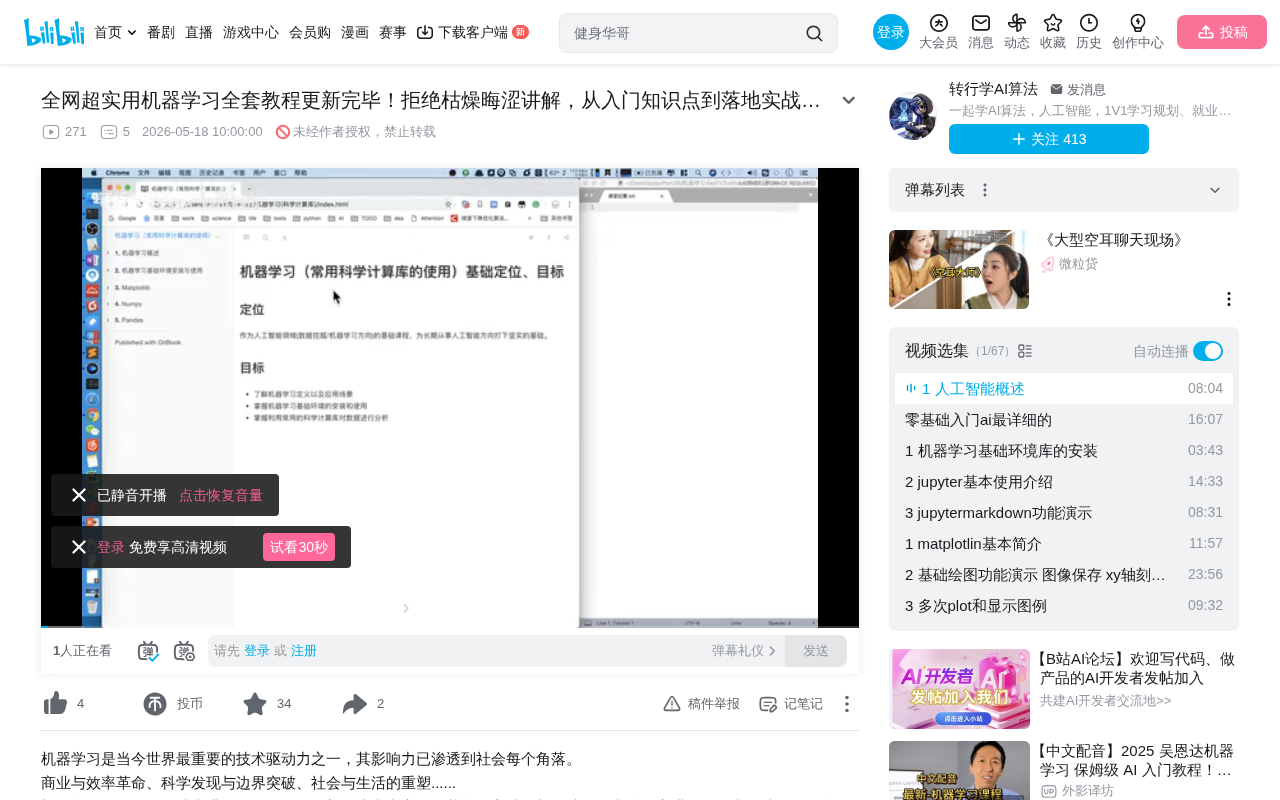
Five Core Modules Explained
Module 1: Machine Learning Overview
The course begins by helping learners build a holistic understanding of artificial intelligence and machine learning from a macro perspective. This section primarily answers three key questions:
- What is artificial intelligence? What can AI do?
- How does machine learning work? What are the learning mechanisms and principles?
- What is the machine learning workflow? The complete pipeline from data to model
Machine learning is a core branch of artificial intelligence. Its fundamental idea is to let computers automatically learn patterns from data, rather than completing tasks through manually written explicit rules. The traditional programming paradigm is "input rules + data → output results," while the machine learning paradigm is "input data + expected results → output rules (model)." This paradigm shift enables computers to handle complex tasks that are difficult to describe with explicit rules, such as image recognition, speech understanding, and natural language processing. Machine learning is typically divided into three major categories: supervised learning, unsupervised learning, and reinforcement learning, corresponding respectively to classification/regression tasks with labeled data, clustering/dimensionality reduction tasks with unlabeled data, and decision-making tasks that obtain reward signals through environmental interaction.
This module takes approximately half a day and doesn't involve writing code—it focuses primarily on conceptual understanding. The course also uses an experimental platform called "Arrow" to let learners experience machine learning effects firsthand.
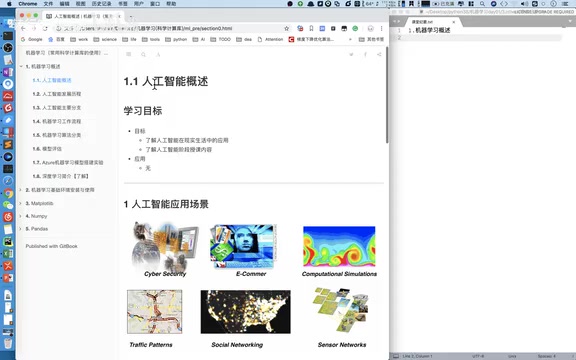
Module 2: Environment Installation and Configuration
As the saying goes, "A craftsman must first sharpen his tools." This section guides learners through setting up the machine learning development environment, including installing the Python interpreter, Jupyter Notebook, and other tools, laying the foundation for subsequent programming practice.
Jupyter Notebook is an interactive computing environment that allows users to mix code, execution results, visualizations, and Markdown text within a single document. Its name derives from the combination of three core programming languages: Julia, Python, and R. In the fields of data science and machine learning, Jupyter Notebook has become the de facto standard development tool because it supports step-by-step execution of code cells, facilitating experimental programming and result verification. Researchers can complete the entire workflow of data loading, preprocessing, model training, and result visualization within a single Notebook, greatly improving the efficiency of exploratory data analysis.
Module 3: Matplotlib Data Visualization
Matplotlib is one of the most important plotting libraries in the Python ecosystem. Mastering data visualization is a fundamental skill for understanding data distributions and evaluating model performance. Presenting data patterns intuitively through charts helps learners better understand the logic behind algorithms.
Matplotlib was originally created by John D. Hunter in 2003, inspired by MATLAB's plotting capabilities. It adopts an object-oriented architecture and provides a rich variety of chart types, from simple line plots to complex 3D visualizations. In the machine learning workflow, Matplotlib is commonly used to plot loss function curves to observe model convergence, draw confusion matrices to evaluate classification performance, and create scatter plots to observe data distributions and feature relationships. More advanced visualization libraries like Seaborn and Plotly are built on top of Matplotlib, so mastering Matplotlib is the foundation for understanding the entire Python visualization ecosystem.
Module 4: NumPy Numerical Computing
NumPy is the cornerstone of scientific computing, providing efficient multi-dimensional array operations. The extensive matrix computations and vector operations in machine learning all rely on NumPy—mastering it is a prerequisite for entering the deep learning field.
NumPy (Numerical Python) was created by Travis Oliphant in 2005 by consolidating two earlier libraries, Numeric and Numarray. Its core data structure, ndarray (N-dimensional array), uses contiguous memory storage and C-language underlying implementation, making it tens to hundreds of times faster than native Python lists for numerical operations. This performance advantage stems from two key mechanisms: vectorized operations avoid the loop overhead of the Python interpreter, and the broadcasting mechanism allows implicit expansion operations between arrays of different shapes. The tensor concept in deep learning frameworks like TensorFlow and PyTorch directly inherits from NumPy's multi-dimensional array design philosophy, making proficiency in NumPy's array operations, indexing and slicing, and linear algebra operations an essential prerequisite for entering the deep learning field.
Module 5: Pandas Data Analysis
Pandas focuses on processing and analyzing structured data and is an indispensable tool during the data preprocessing stage. From data cleaning to feature engineering, Pandas runs through the entire data preparation process in machine learning.
Pandas was developed by Wes McKinney in 2008 out of practical needs in financial data analysis, with its name derived from "Panel Data." It provides two core data structures: the one-dimensional Series and the two-dimensional DataFrame, the latter being similar to a database table or Excel spreadsheet. During the data preprocessing stage of machine learning, Pandas handles critical tasks such as missing value treatment, outlier detection, data type conversion, feature encoding, and data merging and group aggregation. Feature engineering—constructing meaningful input features for models from raw data—is the key step that determines the upper bound of model performance, and Pandas' flexible data manipulation capabilities make this process efficient and controllable.
AI Application Case Demonstrations
The course uses several vivid cases to give learners an intuitive sense of AI's capabilities and boundaries.
Case 1: Quick, Draw! Image Recognition Game
This is a doodle recognition game launched by Google. Users draw a specified object within a time limit, and the AI system guesses what you're drawing in real time.
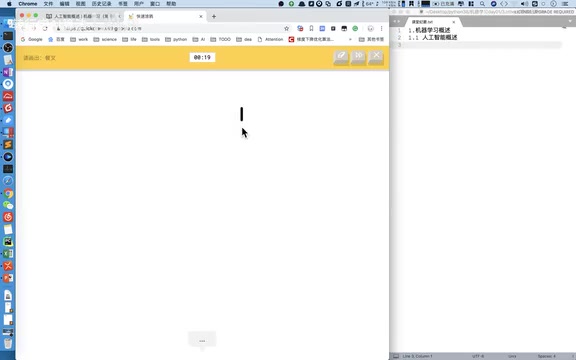
Google's Quick, Draw! project was released in 2016 as a doodle recognition system based on Recurrent Neural Networks (RNN). Unlike traditional image recognition, the system not only analyzes the final image pixels but also uses the temporal information of user-drawn strokes (stroke order, speed, direction) to assist recognition. To date, the project has collected over 1 billion doodles from users worldwide, covering 345 categories, forming one of the largest doodle datasets currently available. This project is also a classic case of crowdsourced data collection—through gamification, millions of users voluntarily contributed massive amounts of labeled training data while being entertained.
From the demonstration results, AI has relatively high recognition accuracy for simple shapes but still faces challenges with complex or abstract drawings. The underlying principle is that the system trains on large amounts of user-drawn doodle data, learning stroke feature patterns of different objects.
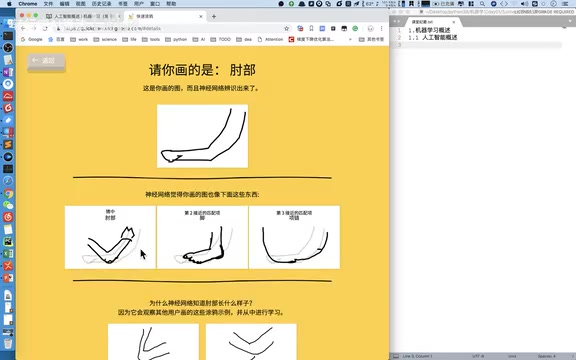
Interestingly, the AI's guesses provide multiple candidate answers with confidence rankings. For example, when drawing an "elbow," the system might simultaneously suggest "foot," "necklace," and other candidates, reflecting the characteristic of classification models outputting probability distributions. The multiple candidate answers and confidence scores output by the model are essentially the result of the Softmax function converting the raw scores (logits) from the network's final layer into a probability distribution—the probabilities of all categories sum to 1, and the category with the highest probability is the model's final prediction.
Case 2: Video Object Detection (YOLO Algorithm)
The second case demonstrates real-time object detection in video. The system can identify pedestrians, vehicles, and various other objects in a video stream, marking them with bounding boxes.
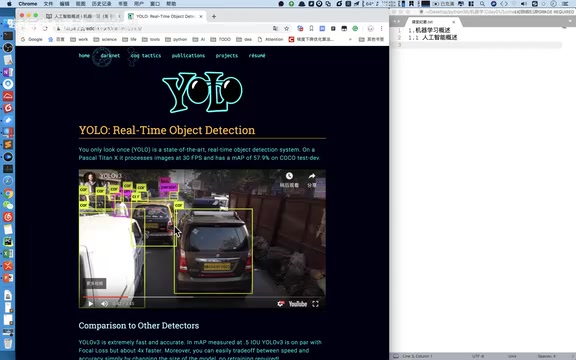
This uses the YOLO (You Only Look Once) algorithm from deep learning. YOLO was proposed by Joseph Redmon et al. in 2016 and represents a milestone in the object detection field. Before YOLO, mainstream detection methods like the R-CNN series adopted a "two-stage" strategy—first generating candidate regions, then classifying each region—which was relatively slow. YOLO's innovation was redefining object detection as a single regression problem: dividing the input image into a grid, with each grid cell simultaneously predicting bounding box coordinates and class probabilities, requiring only one forward pass to complete detection, thus achieving real-time processing speeds. From YOLOv1 to the current YOLOv8/YOLO11, this algorithm series has continuously optimized in both accuracy and speed.
The instructor specifically pointed out an industry pain point: the cost of data annotation is extremely high. Training a high-quality detection model requires manually annotating every object in thousands of images—an extremely time-consuming and labor-intensive task. Taking the commonly used COCO dataset as an example, it contains 330,000 images and over 2.5 million annotated instances, requiring thousands of person-hours of annotation work. Every target object in each training image needs manually annotated precise bounding box coordinates and category labels, and annotation quality directly determines the model's final performance.
This also leads to an important insight: the core value of AI engineers lies in designing and optimizing algorithms, not in repetitive data annotation work.
Case 3: Style Transfer
The third case is image style transfer—fusing the content of one image with the artistic style of another. For example, converting an ordinary photo into Van Gogh's painting style, or combining a black-and-white photo with a specific color style to generate entirely new artistic effects.
Neural Style Transfer was first proposed by Gatys et al. in 2015. Its core idea is to use Convolutional Neural Networks (CNN) to separate and recombine the "content" and "style" of images. Specifically, shallow feature maps of a CNN capture style information such as textures and colors, while deep feature maps encode content information such as object shapes and spatial structures. By defining Content Loss and Style Loss, gradient descent is used to optimize the generated image so that it simultaneously matches the deep features of the content image and the shallow feature statistics (Gram matrix) of the style image. Subsequent fast style transfer methods (such as Johnson et al.'s work) trained feed-forward networks to reduce inference time from several minutes to milliseconds, making real-time video style transfer and mobile applications (like Prisma) possible. This technology has broad application prospects in creative design and digital art.
Practical Advice for Absolute Beginners
For beginners just getting started with machine learning, the following suggestions are worth considering:
- Build a global understanding first: Don't rush into writing code—first understand the overall framework and workflow of machine learning
- Solidly master the three core libraries: NumPy, Pandas, and Matplotlib are the foundation for all subsequent advanced content
- Practice hands-on: Use the experimental platforms and case links provided by the course to experience AI effects firsthand
- Progress step by step: The foundational portion takes about three days—don't skip it, as weak conceptual understanding will affect subsequent learning
It's worth adding that the complete machine learning workflow typically includes the following stages: problem definition → data collection → data preprocessing → feature engineering → model selection → model training → model evaluation → model tuning → deployment. After mastering the basic tools, beginners should have a clear understanding of this complete workflow and the role and relationships of each stage, so that when learning specific algorithms later, they'll know where each technical point fits within the overall process.
Summary
This tutorial series is designed with the philosophy of "concepts first, tools next, practice last," making it suitable for learners with absolutely no machine learning background. Starting from a macro understanding of artificial intelligence and gradually diving into specific technical tools and algorithm implementations, it offers a relatively gentle learning curve. For those who want to enter the AI field, systematically mastering these foundational concepts is an essential path.
Key Takeaways
- The course is divided into five major modules: ML overview, environment setup, Matplotlib visualization, NumPy numerical computing, and Pandas data analysis
- Three cases—Quick Draw doodle recognition, YOLO video object detection, and style transfer—intuitively demonstrate AI capabilities
- The foundational portion takes about three days, with the first half-day being pure conceptual explanation without code
- Emphasizes that high data annotation costs are an industry pain point, and the core value of AI engineers lies in algorithm design rather than repetitive annotation
- Suitable for absolute beginners, adopting a teaching path of concepts first, tools next, and practice last
Related articles
 Tutorials
Cursor + Codex Dual-IDE Collaboration: A Practical Methodology for Open-Source Project Customization
A complete methodology for open-source project customization based on real-world experience, detailing the Cursor+Codex dual-IDE workflow, seven-stage process, MVP validation, and AI source code reading techniques.
 Tutorials
Cursor Multi-Agent in Practice: Building a Full-Stack Next.js Blog in 50 Minutes
Build a full-stack blog in 50 minutes using Cursor IDE's multi-Agent mode with Next.js, Clerk auth, and Supabase. Learn the 4-phase AI Agent workflow and key integration pitfalls.
 Tutorials
Building an AI Software Factory from Scratch: A Cursor Engineer's Hands-On Experience with Multi-Agent Collaboration
Cursor engineer Eric shares practical insights on building an AI software factory: automation levels, guardrail design, parallel Agent management, and scaling to 1000+ Agents for 24/7 development.