MCP Apps Deep Dive: AI Tools Move from Text Exchange to Interactive Collaboration

MCP Apps enables AI tools to return interactive UIs, reversing the paradigm to embed apps into AI
MCP Apps is the first official extension of the MCP protocol, jointly driven by Anthropic and OpenAI. It solves the "context gap" problem where traditional MCP tools could only return plain text, enabling AI tools to deliver interactive interfaces within conversations. Through service-oriented architecture and iframe sandbox rendering, a single UI codebase runs across all AI clients. This marks a paradigm shift from "embedding AI into applications" to "embedding applications into AI."
On January 26, 2026, MCP (Model Context Protocol) received its first official extension — MCP Apps. Anthropic and OpenAI joined forces to elevate a community project into an industry standard. From this day forward, AI tools are no longer limited to returning text — they can return interactive user interfaces. What does this mean? Let's break it down step by step.
MCP Protocol: From Fragmented Integration to a Unified Standard
MCP (Model Context Protocol) is an open protocol released by Anthropic in November 2024, designed to standardize communication between AI models and external tools and data sources. Before MCP, every AI application needed custom integration code for each external tool, creating massive duplication — the "M×N" integration problem. M AI clients multiplied by N tools meant each combination required independent maintenance. MCP defines a unified client-server architecture that allows any MCP-compatible AI client to invoke tools from any MCP server, reducing integration complexity from M×N to M+N. This foundation solved the tool interoperability problem, but as usage deepened, a new bottleneck emerged.
MCP's "Context Gap" Problem
The MCP protocol lets AI models call external tools — querying databases, reading files, calling APIs — but tools always return plain text or JSON. When you ask "check quarterly revenue," the tool returns 500 rows of data, and the model can only summarize it into a few paragraphs. Want to filter? Another round of conversation. Want to sort? Another round. Want to see a trend chart? Yet another round. Every single "let me see" costs a full conversation turn.
MCP's creators call this the Context Gap — the model knows the data, but the user can't see or touch it.
Here's a concrete comparison:
- Traditional MCP tool: You ask "show me Q1 revenue," the tool returns data, the model summarizes it into text. Want to view by region? Another round. Want to sort? Again. Want a bar chart? Yet again. Five conversation turns, 30 seconds of latency, static text every time.
- MCP Apps approach: Same question, but the tool directly returns an interactive dashboard with a bar chart right in the conversation window. You can click, filter, sort, and drill down — one question, all exploration happens within the UI.
Similar scenarios abound. For deployment configuration, a tool directly displays a configuration form where selecting a production environment automatically reveals security options (TLS, WAF, audit logs) — dependency relationships and cascading logic that are hard to express in text conversation become immediately clear in a UI. For contract review, a contract PDF is embedded directly in the conversation with key clauses highlighted and "Approve" and "Flag" buttons alongside. You click flag, the model immediately knows you have concerns about that clause and automatically drafts revision suggestions.
How MCP Apps Work
The MCP Apps mechanism can be broken down into four steps:
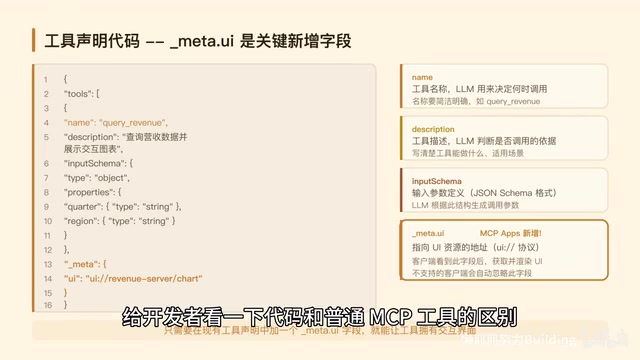
Step 1: Tool Declaration. When defining a tool, developers add a meta.ui field pointing to a UI address. This single field transforms an ordinary tool into an App.
Step 2: LLM Invocation. The model reads the tool's description, determines it needs to call it, and sends a request to the MCP server.
Step 3: Host Rendering. Clients like Claude and ChatGPT fetch the HTML file at the UI address and render it in a sandboxed iframe. The "sandboxed iframe" is a mature web security mechanism — iframes (inline frames) use HTML5's sandbox attribute to restrict embedded content permissions, providing process-level isolation. MCP Apps chose iframes over WebComponents or Shadow DOM precisely because even if embedded content has security vulnerabilities, it cannot breach the host page's security boundary.
Step 4: Bidirectional Communication. The UI and host communicate bidirectionally via PostMessage and JSON-RPC. PostMessage is a browser-provided cross-origin messaging API that allows secure communication between windows of different origins; JSON-RPC is the same lightweight remote procedure call protocol that MCP itself uses, making messages structured and auditable. The UI can call other tools and can also inform the model about user actions.
Key Changes at the Code Level
The only difference from a regular MCP tool is adding meta.ui.resourceUri in the tool definition, pointing to a UI address. name is the tool name (the LLM uses it to decide when to invoke), description is the tool description, and inputSchema defines input parameters. The critical new field is meta.ui, which points to an HTML bundle address. With this field, the host knows this isn't an ordinary text tool but an App with a UI.
The UI-side code uses the @anthropic/mcp-ext SDK, with three core methods:
onToolResult: Receives data returned by the tool — for example, when query results arrive, use it to render chartscallServerTool: Calls other tools on the server from the UI — for example, when a user clicks "View Details," the UI directly invokes the details toolupdateModelContext: Silently informs the model about user actions — for example, when the user selects "Asia-Pacific region," the model's next response will focus on Asia-Pacific data
All communication uses standard PostMessage, with no lock-in to any frontend framework.
Security Architecture: Four Layers of Protection
Running code from third-party servers within AI conversations makes security paramount. MCP Apps implements a four-layer protection mechanism:
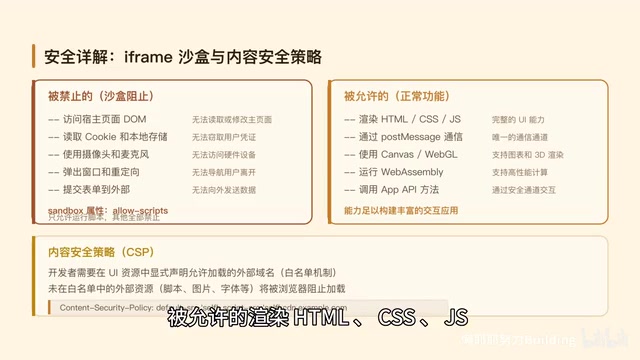
Layer 1: iframe Sandbox Isolation. UI code runs in a restricted iframe, unable to access the host page's DOM, cookies, or LocalStorage. Prohibited operations include: accessing the host page, reading cookies, using camera/microphone, and opening new windows. Permitted operations include: rendering HTML/CSS/JS and communicating with the host via PostMessage.
Layer 2: Pre-render Inspection. The host can inspect HTML content before rendering and block suspicious code outright.
Layer 3: Auditable Message Channel. All communication uses JSON-RPC, and every message can be logged, traced, and audited. JSON-RPC 2.0 is the foundational specification for MCP protocol's underlying communication, and its structured request/response format naturally supports logging and security auditing.
Layer 4: User Authorization Confirmation. When the UI wants to call a tool, it requires explicit user consent via click.
It's worth noting that the MIME type was ultimately set to text/html; profile=mcp-app. The original proposal specified a custom type, but community review found this violated media type syntax standards, so they adopted RFC 6906's Profile parameter mechanism — RFC 6906 is an IETF specification that allows attaching profile parameters to standard media types to describe additional semantic constraints on resources. This complies with RFC 2045's media type syntax rules while conveying the semantic information that "this is an MCP App." This reflects the rigor of standardization: finding balance between innovation and internet standards compatibility.
True Human-in-the-Loop
The most core value of MCP Apps is achieving true Human-in-the-Loop. Human-in-the-Loop is a core concept in AI system design, referring to preserving nodes for human judgment and intervention within automated workflows. Traditional HITL is typically a linear checkpoint model: AI executes → human reviews → continue execution. MCP Apps upgrades this to a continuous loop model — not simply "AI outputs, human says yes or no," but a continuously running state cycle:
- User asks a question → Agent calls tool → Returns data and UI
- User sees interactive interface → Clicks to interact
- UI notifies Agent → Agent calls next tool accordingly → Another cycle
Every UI interaction by the human becomes an input signal for Agent decision-making, forming a true human-machine collaboration loop.
You might ask: isn't this just embedding a webpage in a conversation? Not quite. An MCP App has critical capabilities for interacting with the Agent that ordinary iframes lack. A regular iframe can render HTML but is completely isolated from the outside — it doesn't know what the conversation is about and can't influence it. An MCP App can call server tools, update model context, send follow-up messages, open links in the browser, and log debug information. Every user action in the UI can drive the entire conversation flow.
Production Cases: Monday.com and Excalidraw
Monday.com's Project Management Scenario
Monday.com has built MCP Apps into ChatGPT and Claude. A product manager asks in ChatGPT "How's the Q2 product launch progress?" and a project progress bar appears in the conversation — green represents 45% completed, yellow represents 30% in progress, red represents 15% blocked. Click the red area and the task list expands; click "Database Migration" and the Agent automatically checks emails and calendar, suggesting assignment to the DBA. Three clicks, from discovering the problem to finding a solution.
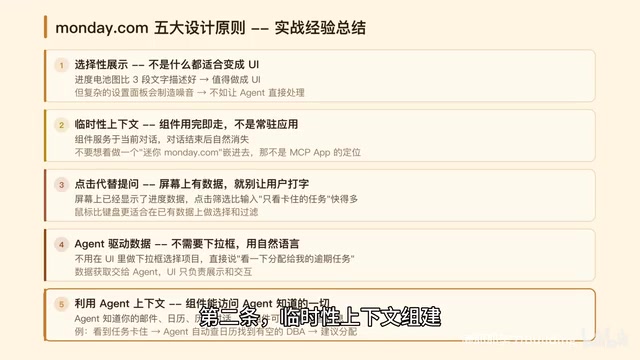
The Monday.com team summarized five design principles:
- Selective Display — not all responses need a UI
- Ephemeral Context — components serve the current conversation, then disappear
- Clicks Replace Questions — reduce user input cost
- Agent-Driven Data Flow — UI doesn't handle business logic
- Leverage Agent Context — fully utilize conversation history
They also encountered plenty of production pitfalls: incomplete streaming data (solved with 300ms debouncing), model not knowing which tool to select (tool descriptions must explicitly state "this is a UI display tool"), inconsistent behavior across clients (built a thin adapter layer to unify interfaces), and more.
Excalidraw's Whiteboard Scenario
You say in Claude or ChatGPT "Draw an architecture diagram: User → Load Balancer → Three API Services → Redis Cache → PostgreSQL Database," and an Excalidraw canvas appears directly in the conversation window. Boxes and arrows are drawn one by one in a streaming animation, as if someone is drawing in real-time. You can drag boxes, double-click to edit text, and add new elements. Even cooler, you can continue the conversation with "Make the database bigger and add read-write separation," and the AI modifies the existing diagram without starting over.
Deployment is remarkably simple — one codebase runs across all clients: Claude, ChatGPT, VS Code, Goose, with zero client-specific code. This is the core value of a service-oriented architecture: UI hosted as independent static resources at a URL, fetchable and renderable by any client supporting the MCP Apps standard.
From MCP UI to MCP Apps: A Critical Architectural Shift
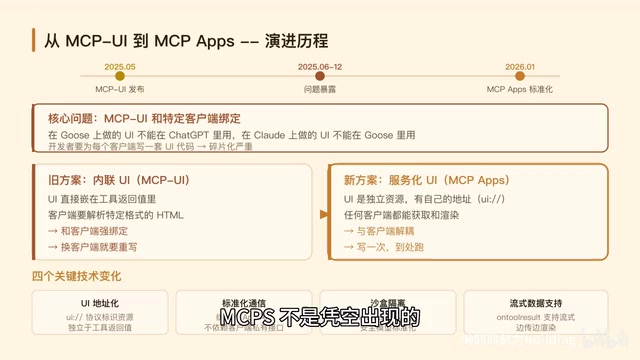
MCP Apps didn't appear out of nowhere. In May 2025, Ido Salomon released MCP UI, initially running only in Block's open-source agent framework Goose. It proved that AI tools could return interactive UIs, but quickly hit a problem — UIs built for Goose couldn't work in ChatGPT.
The core issue was that MCP UI embedded the UI directly in tool return values (inline mode), tightly coupling UI format to the client. This is similar to early web development where styles were written directly in HTML tags — functional but not reusable. MCP Apps' solution was to switch to a service-oriented mode — UI hosted as independent resources at URLs, fetchable and renderable by any client. This borrows from microservices and CDN design philosophy: decoupling UI providers from consumers, a separation of concerns principle proven effective over thirty years of web technology. From "returning UI" to "serving UI" — this architectural shift made cross-client compatibility possible.
Clients currently supporting MCP Apps include: Claude (web and desktop), ChatGPT (via Apps SDK), VS Code (Insiders build), Goose (the earliest supporter), with JetBrains, AWS Kero, Postman, and others exploring integration.
Paradigm Reversal: Applications Embedded in AI
Block's Goose team said something particularly insightful: The industry embedded AI assistants into individual applications, creating fragmented experiences. MCP reverses this — applications become pluggable components within the Agent.
The old model embedded AI into applications — Word has Copilot, Excel has Copilot, each application doing its own thing, with fragmented AI experiences. The new model embeds applications into AI — Excalidraw in Claude, Monday.com in ChatGPT, applications becoming pluggable components within the Agent, unified and composable.
Monday.com's Omri Levy said: Conversation is becoming the place where work happens.
This is the significance of MCP Apps — it marks the AI tool ecosystem's transition from text exchange to an era of interactive collaboration. As MCP protocol's first official extension, MCP Apps not only solves the technical problem of the "context gap" but represents a paradigm shift: AI is no longer an auxiliary feature embedded in applications — it has become the platform where applications run.
Key Takeaways
- MCP Apps is the first official extension of the MCP protocol, jointly driven by Anthropic and OpenAI, enabling AI tools to return interactive UIs instead of plain text
- The core architecture adopts a service-oriented model: UI hosted as independent resources at URLs, rendered via iframe sandboxing, enabling one codebase to run across all AI clients
- A four-layer security system (iframe isolation, pre-render inspection, auditable message channels, user authorization confirmation) ensures safe execution of third-party code
- Production cases like Monday.com and Excalidraw validate MCP Apps' practical value in project management and visualization scenarios
- Paradigm reversal: from "embedding AI into applications" to "embedding applications into AI" — conversation is becoming the place where work happens
Related articles
 Deep Dives
Deep Dive into How OpenClaw (Open-Source Crayfish) AI Agent Works
Deep analysis of OpenClaw AI Agent internals: System Prompt, tool calling, SubAgents, Skill system, memory, and Context Engineering explained.
 Deep Dives
Demystifying Transformer: A Word-Continuation Function, Deconstructed
Understand Transformer through the lens of word continuation. Breaking down language generation into Embedding, Transformer Block, and Probability output modules for intuitive understanding.
 Deep Dives
Five Core Differences Between Claude Code and Regular AI Chat
A detailed comparison of Claude Code vs regular AI chat across five dimensions: interaction, context understanding, execution, memory, and tool integration.