Multi-Agent Communication & Collaboration in Feishu: A Complete Guide to Configuration and Group Chat Orchestration
Configure Open Cloud and Feishu group chats to enable multi-Agent communication and collaborative task orchestration.
This guide walks through the three essential Open Cloud configurations for multi-Agent communication — session_visibility, agent_to_agent enable toggle, and the whitelist mechanism — and demonstrates how to orchestrate multiple AI agents through Feishu group chats. It covers practical pitfalls like name spelling accuracy, cross-Agent task delegation, and advanced scenarios for building efficient human-AI hybrid teams.
In the previous lesson, we deployed multiple AI agents to the Feishu platform. But having multiple Agents working in isolation is meaningless — the real value lies in making them work together — like a project manager directing team members to fulfill their respective roles. This article provides a detailed walkthrough of how to enable inter-Agent communication and collaboration through Open Cloud configuration files, and how to build an efficient AI team using Feishu group chats.
Multi-Agent Systems (MAS) are not a new concept — they originated in distributed artificial intelligence research back in the 1980s. However, early multi-Agent systems were largely confined to academic simulations. It wasn't until the explosion of Large Language Models (LLMs) that multi-Agent collaboration truly moved from the lab to production environments. Since 2023, projects like Stanford's Generative Agents, Microsoft's AutoGen, and MetaGPT have emerged one after another, demonstrating the enormous potential of LLM-driven multi-Agent systems in software development, data analysis, content creation, and more. Open Cloud is an engineering-oriented implementation within this technological wave.
Core Configuration: Opening Communication Channels Between Agents
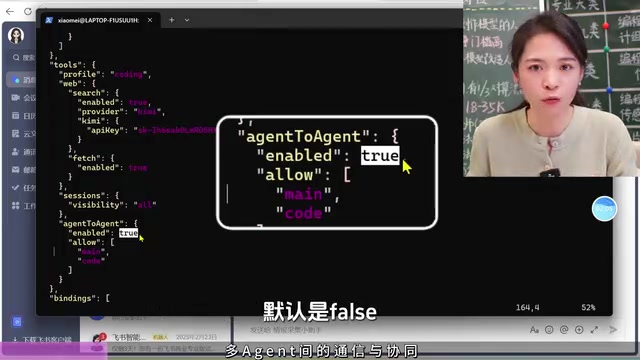
To allow multiple agents to "see" each other and collaborate, you need to modify Open Cloud's core configuration file OpenCloud.json. There are three critical configuration items that must be set correctly — all three are essential.
Session Visibility Setting
First, locate the tools section in the configuration file and set the value of session_visibility to o. Only with this configuration can Agents perceive each other's existence. This is the prerequisite for communication — if Agents can't even "see" each other, collaboration is impossible.
Session Visibility essentially addresses the "perception layer" problem in multi-Agent systems. In distributed systems theory, service discovery between nodes is the first step toward collaboration. Setting session_visibility to o (i.e., open) is equivalent to making each Agent visible in the system's service registry. This aligns with the design philosophy of service registries like Consul and Eureka in microservice architectures — services must first register and be discovered before they can be invoked. In the default isolated mode, each Agent can only perceive its own session context. While this ensures privacy and security, it also blocks the possibility of collaboration.
Agent-to-Agent Communication Toggle
Next, in the agent_to_agent configuration item, change enable to true (the default is false). This is a global switch that controls whether inter-Agent communication is enabled.
Whitelist Mechanism
There's an important security design here: the whitelist mechanism. Not all Agents can communicate freely — only Agents listed in the whitelist can interact with each other. This means you can precisely control which Agents can collaborate, avoiding unnecessary interference.
The whitelist mechanism reflects the application of the Principle of Least Privilege in multi-Agent systems. If all Agents could communicate freely, several risks could arise: first, "prompt injection" — maliciously crafted messages could cause an Agent to perform unintended operations; second, "cascading failures" — one Agent's abnormal behavior could spread through communication links to the entire system; third, resource waste — frequent communication between unrelated Agents consumes computing and network resources. The whitelist mechanism makes the communication topology explicit. Administrators can precisely define communication relationships between Agents — much like drawing a network topology diagram — striking a balance between collaboration capability and system security.
After completing the configuration, you must restart the gateway for the new settings to take effect. This is an easily overlooked step.
Hands-On Demo: Main Agent Directing the Intelligence Assistant
In the current environment, there are three agents: the Main Agent (the "general manager"), the Code Agent, and the Collector (intelligence gathering) Agent. Let's test how the Main Agent directs the Collector to complete a task.
Issuing a Cross-Agent Task
In the Main Agent's chat window, enter the following instruction:
"Notify the intelligence gathering assistant to create a file in its own working directory, write a bubble sort program in it, and report back to me when it's done."
The beauty of this instruction is that you only need to talk to the Main Agent, which then dispatches other Agents to execute specific tasks and reports back to you upon completion. It's as natural as a project lead assigning tasks to team members.
Behind the scenes, the Main Agent directing other Agents involves inter-Agent message passing protocols and task delegation patterns. In classical multi-Agent communication theory, this falls under the domain of FIPA ACL (Agent Communication Language), which includes standard semantics such as Request, Inform, and Confirm. Open Cloud encapsulates these complex communication semantics at the configuration layer — developers only need to issue instructions in natural language, and the framework automatically handles message serialization, routing, delivery, and callbacks. The Main Agent plays the role of an "Orchestrator" in this process, analogous to how a Kubernetes Controller schedules Pods, or how an enterprise ESB's process orchestration engine works.
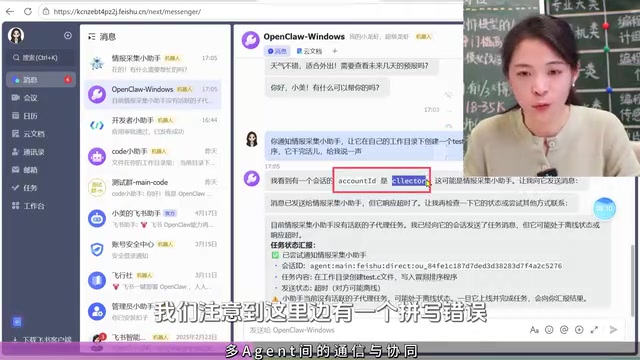
Pitfall Alert: Agent Names Must Be Spelled Exactly Right
During actual testing, we encountered a typical issue — the Main Agent reported that the intelligence assistant was "not available." After investigation, the cause turned out to be a spelling error in the Agent name within the whitelist. After correcting the name to collector and restarting the gateway, the task executed successfully.
This detail is crucial: Agent names in the whitelist must exactly match the names defined in the configuration file — even a single letter difference will cause communication failure.
Task Execution and Verification
After the correction, we issued the instruction again. The Main Agent successfully dispatched the intelligence assistant to complete the task and reported back with the file location. Opening the generated test.c file reveals a well-structured bubble sort C program with complete comments. The Main Agent even thoughtfully asked "Would you like me to compile and test it?" — demonstrating excellent task closure awareness.

Advanced Techniques: Team Collaboration via Feishu Group Chat
One-on-one Agent dispatching is already powerful, but pulling multiple Agents into the same group chat takes efficiency to the next level.
Choosing Feishu as the interaction interface for multi-Agent collaboration is no accident. Enterprise instant messaging tools naturally provide the infrastructure needed for multi-Agent collaboration: group chats offer a container for multi-party communication, the @mention mechanism provides precise addressing, persistent message storage provides contextual memory, and the permission system provides access control. Compared to developing a dedicated Agent management panel, leveraging mature platforms like Feishu significantly reduces the development cost of the interaction layer. Meanwhile, having human members and AI Agents coexist in the same conversation space enables a "human-AI hybrid team" collaboration model — this is currently the most pragmatic path for AI application deployment, rather than pursuing fully autonomous pure-AI systems.
Creating a Group and Adding AI Members
Here are the steps:
- In Feishu, click the plus icon and select "Create Group"
- Set the group name (e.g., "Dev Team 1") and click Create
- Go to group settings and select "Group Bots"
- Add the agents you want to collaborate (e.g., the intelligence gathering assistant)
Interestingly, the group bot entry point on the Feishu web client may not be very obvious. The mobile app offers a more intuitive experience — you can directly see the "Add" button in group settings. Once added, messages sync perfectly across all devices.
Multi-Agent Interaction in Group Chat
In the group chat, you can use @ to designate a specific Agent to execute a task. For example, @Intelligence Gathering Assistant followed by the question "What is the concept behind quicksort?" — and it will provide a professional and comprehensive answer.
The advantages of this approach include:
- Information transparency: All Agents and human members can see the conversation context
- Flexible dispatching: You can
@different Agents at any time to handle different tasks - Efficient collaboration: Multiple Agents can relay-complete complex tasks within the same conversation flow
Application Scenarios for Multi-Agent Collaboration
With inter-Agent communication and group chat collaboration mastered, you can build many practical application scenarios:
- Daily industry intelligence briefing: An intelligence Agent automatically collects data, an analysis Agent compiles summaries, and a push Agent sends them on schedule
- Xiaohongshu brand promotion: A content Agent generates copy, a review Agent checks compliance, and a publishing Agent schedules posts
- Multi-device orchestration: Different Agents manage different devices or services, unified through a Main Agent
- Security hardening: A security Agent continuously monitors, an alerting Agent sends real-time notifications, and a remediation Agent responds automatically
Summary and Outlook
The core of multi-Agent collaboration comes down to three configuration essentials: set session_visibility to o, set agent_to_agent's enable to true, and properly maintain the communication whitelist. Always remember to restart the gateway after modifying configurations.
The transition from single-Agent to multi-Agent collaboration is essentially an upgrade from a "personal assistant" to an "AI team." When you can skillfully orchestrate multiple specialized Agents to collaborate within Feishu group chats, your work efficiency will see a qualitative leap. Mastering multi-Agent orchestration tools like Open Cloud will become one of the core competencies for AI engineers.
Related articles

Five Common Claude Code Mistakes — How Many Are You Making?
Five common Claude Code mistakes developers make: copy-pasting code, skipping CLAUDE.md, inefficient prompting, ignoring docs, and poor context management — with fixes.

Andrew Ng's New Course Explained: A Practical Guide to Using OpenAI's O1 Reasoning Model
Deep dive into Andrew Ng and OpenAI's Reasoning with O1 course covering test-time scaling, new prompting paradigms, multi-model orchestration, and practical applications for developers.

Learning AI After College Entrance Exams: A Complete Path from Zero to Freelancing
How to efficiently learn AI skills during summer break after exams? A complete path from mastering prompts and hands-on projects to freelancing on platforms.