Multi-Model Hot-Swap Architecture: Switch AI Models at Minimal Cost
Multi-Model Hot-Swap Architecture: Swi…
Design a model abstraction layer to enable one-minute AI model hot-swapping.
This article addresses the high cost of switching AI models in production projects by proposing a three-layer decoupled hot-swap architecture: business logic layer, model abstraction layer, and configuration management layer. The core steps include using AI tools to map the project's model layer, designing a frontend visual configuration page with backend persistent storage for hot reload, and establishing a standard error-fixing workflow. By applying the Adapter Pattern to unify SDK differences across providers, model switching is compressed from a week of code changes to a one-minute form submission.
Introduction: Switching Models Shouldn't Be a Nightmare
When the AI model you're using suddenly raises prices or gets rate-limited, and you need to switch your project to a different model — do you spend a week rewriting code, or fill in three fields on a web page and finish in one minute without even restarting the service?
The answer depends on whether your project architecture includes a model abstraction layer. This article breaks down the complete pipeline for multi-model engineering adaptation, helping you compress "switching models" from a week of engineering work into a single action.

The True Cost of Hardcoding Model Names
Many developers (myself included) started multi-model projects with a misconception: switching models is just changing an API endpoint name.
It's not until you actually need to switch from one model to another that you open the codebase and realize the mess:
- Model names are scattered across dozens of places, hardcoded everywhere
- Prompt templates have their own customized versions in every module, creating a domino effect when you change one
- The frontend and backend are even coupled on response format assumptions — changing one place breaks another
The most painful scenario: a stakeholder says, "This response isn't as good as before — can we switch back?" — and you stare at the dozens of files you just modified, speechless.
Why Is Hardcoding Technical Debt So Expensive?
Hard coding means embedding values that should be configurable directly into source code. In software engineering, hardcoding is a classic form of technical debt whose cost grows exponentially over time. For AI model names, the problem is especially acute: model versions iterate frequently (e.g., GPT-4 → GPT-4o → GPT-4.1), and vendors may deprecate old versions at any time. Pricing changes and rate-limiting policy shifts can force emergency switches. Every reactive switch forces developers to bear the full cost of codebase-wide scanning, regression testing, and redeployment — costs that could have been eliminated once and for all at the architecture design stage.
The lesson I eventually learned: multi-model adaptation was never an engineering problem — it's an architecture problem. The ability to swap models at any time should be designed in before writing the first line of code.
Three Steps to Build a Multi-Model Hot-Swap Architecture
The entire multi-model engineering adaptation pipeline boils down to three things: locating the model layer, designing frontend configuration, and establishing an error-fixing feedback loop.
Step 1: Use AI Tools to Map Your Project's Model Layer
Taking OpenAI and Claude as examples, the first step isn't rushing to write code — it's letting Claude Code (or a similar AI coding tool) map out which models your project currently supports.
The key approach: reference your project documentation and let the AI locate the model layer and provide ready-made integration paths, instead of digging through source code yourself. The benefits:
- AI can quickly scan the entire codebase and find all model-related call sites
- Automatically generate a topology of current model dependencies
- Provide standardized abstraction layer integration recommendations

Step 2: Frontend Configuration Page + Backend Persistent Storage
The core of this step is designing a web-based configuration page that turns model switching into a simple form-filling operation.
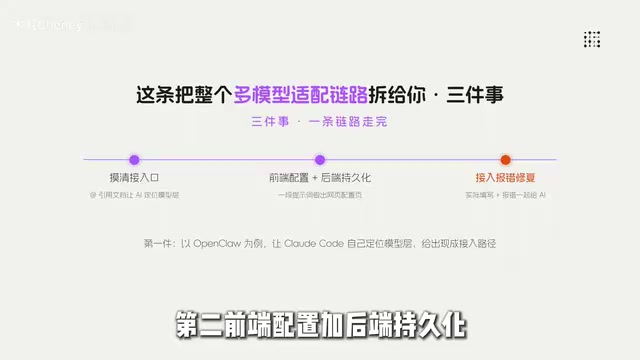
Specifically, you need to craft a clear prompt that describes your requirements and have the AI generate:
- Frontend configuration page: Including fields for model selection, API Key, Base URL, model parameters, etc.
- Backend persistence logic: Storing configurations in a database or config file with hot-reload support
- Model adapter pattern: A unified calling interface that automatically routes to different model SDKs under the hood
Why Hot Reload Instead of Restarting the Service?
Hot reload means dynamically updating runtime configuration without restarting the service process. Common approaches include: storing configurations in a database or Redis, loading them into memory at startup, and triggering memory refresh via message queues or polling when configurations change; or using filesystem watchers (like Node.js's
fs.watch) to detect config file changes in real time. For AI model switching scenarios, hot reload means no redeployment after switching models and zero service interruption — critical for high-availability business scenarios.
For mainstream model integration, the core fields typically include:
| Field | Description |
|---|---|
| Provider | Model provider (OpenAI/DeepSeek/Claude/Gemini/Qwen) |
| API Key | Authentication key |
| Base URL | API endpoint address |
| Model Name | Specific model version |
| Temperature | Temperature parameter |
| Max Tokens | Maximum output length |
Why Do the Same "Fill in API Key" Fields Mean Different Things for Different Models?
Different AI vendors have significant differences in API design — this is precisely why the model abstraction layer exists. For authentication, OpenAI and DeepSeek use Bearer Tokens, Claude uses the
x-api-keyheader, and some domestic providers require additional signing mechanisms. For response formats, OpenAI places content inchoices[0].message.content, Claude incontent[0].text, and Gemini incandidates[0].content.parts[0].text. For streaming output, each vendor's SSE (Server-Sent Events) data format is also different. If these differences aren't handled uniformly at the adapter layer, they'll seep into every corner of your business code, making "form-based switching" a pipe dream.
Once these fields are filled in, you have a ready-to-use integration checklist — no more guessing what to fill in or where.

Step 3: A Standard Error-Fixing Workflow for Configuration Issues
Errors are par for the course when integrating a new model. But the key isn't throwing a vague "it's broken" at the AI — you need to provide your actual configuration along with the error message.
This is the prerequisite for the AI to locate the issue in one shot and fix it correctly. Here's the process:
- Capture the complete error message: Not just the error code, but also the request parameters and response body
- Include your configuration: Let the AI compare the configuration against the error
- State your expected behavior: Tell the AI what the correct result should look like
Three common categories of configuration errors and their fix strategies:
- Authentication failure (401/403): Usually an incorrect API Key format or wrong Base URL — key prefixes and URL formats vary significantly across providers
- Model not found (404): Model Name typo, or the Key doesn't have access to the specified model
- Response format parsing failure: Different models return different structures — the adapter layer needs to perform unified response format transformation
Core Design Principles of the Hot-Swap Architecture
Looking at the overall solution, the essence of a multi-model hot-swap architecture is three-layer decoupling:
- Business logic layer: Only cares about "I need an AI response" — doesn't care which model is underneath
- Model abstraction layer: Unified interface definitions that shield business code from SDK differences across models
- Configuration management layer: Frontend visual configuration + backend persistence, supporting runtime hot-swapping
Adapter Pattern: Let the "Translation Layer" Handle All Compatibility Work
The Adapter Pattern is one of the classic GoF design patterns. Its core idea is to establish a "translation layer" between incompatible interfaces. In multi-model scenarios, each AI vendor's SDK interface is designed differently: OpenAI uses
chat.completions.create(), Anthropic Claude usesmessages.create(), Google Gemini usesgenerateContent()— parameter naming, response structures, and streaming protocols all differ. The Adapter Pattern converges all these differences into a single unified internal interface. Business code only interacts with this internal interface, making underlying switches completely transparent to the upper layers. This is why, under this architecture, switching models doesn't require changing a single line of business code.
This architecture can accommodate over 80% of general business scenarios. Whether it's conversational, generative, or analytical applications, model switching requires zero changes to business code.
Conclusion: The Model Abstraction Layer Is Standard Equipment for Production AI Projects
Whether you design a "swap models anytime" layer before writing code determines whether the next price hike or rate limit means a week of rework or a one-minute switch.
Multi-model adaptation isn't something you do after problems arise — it's a standard capability for production-grade AI projects. Key takeaways:
- Never hardcode model names in business code
- Use the Adapter Pattern to unify calling interfaces across different models
- Make the configuration layer visually configurable on the frontend, persistable on the backend, and hot-reloadable at runtime
- When fixing errors, give the AI complete context — not just "it's broken"
The investment cost of this approach is low, but in today's rapidly evolving model ecosystem, the time and risk it saves is enormous.
Related articles
 Tutorials
Cursor + Codex Dual-IDE Collaboration: A Practical Methodology for Open-Source Project Customization
A complete methodology for open-source project customization based on real-world experience, detailing the Cursor+Codex dual-IDE workflow, seven-stage process, MVP validation, and AI source code reading techniques.
 Tutorials
Cursor Multi-Agent in Practice: Building a Full-Stack Next.js Blog in 50 Minutes
Build a full-stack blog in 50 minutes using Cursor IDE's multi-Agent mode with Next.js, Clerk auth, and Supabase. Learn the 4-phase AI Agent workflow and key integration pitfalls.
 Tutorials
Building an AI Software Factory from Scratch: A Cursor Engineer's Hands-On Experience with Multi-Agent Collaboration
Cursor engineer Eric shares practical insights on building an AI software factory: automation levels, guardrail design, parallel Agent management, and scaling to 1000+ Agents for 24/7 development.