The Complete Guide to Using O3 Mini for Free: 5 Zero-Cost Solutions
The Complete Guide to Using O3 Mini fo…
Five free methods to access OpenAI's O3 Mini model at zero cost.
OpenAI released the cost-effective O3 Mini model with API pricing at just $1.10 per million input tokens — significantly reduced under competitive pressure from DeepSeek. This guide covers five free access methods: Aider copy-paste mode, GitHub Models API, T3 Chat, Windsurf editor free credits, and AnyChat on Hugging Face (completely free and unlimited). O3 Mini slightly outperforms DeepSeek R1 on benchmarks, though R1 retains a unique edge thanks to its open-source nature.
OpenAI has officially released the O3 Mini model, but for many users, a paid subscription remains a barrier. The good news is that there are already several free or low-cost ways to experience this model. This article provides a systematic overview of O3 Mini's core highlights and walks through multiple free access methods to help developers and AI enthusiasts get started at zero cost.
O3 Mini Model Overview: Impressive Performance, Surprising Pricing
The backstory behind O3 Mini's release is quite interesting — OpenAI faced enormous competitive pressure after the DeepSeek model launch and accelerated the release of this long-previewed model. O3 Mini is now available through both ChatGPT and the API. API access is limited to Tier 3–5 users, while ChatGPT access covers Plus, Pro, and Team subscribers. Free users can also access it on a limited basis (by selecting the "Reasoning" option, with an estimated ~100 messages per week).
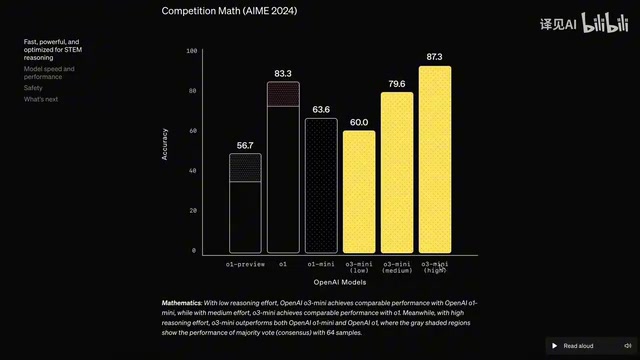
The model offers three reasoning modes — high, medium, and low — and has demonstrated outstanding results on benchmark tests. These three reasoning modes stem from the "Chain-of-Thought" reasoning architecture that OpenAI introduced in its O-series models. Unlike traditional GPT-series models that generate answers directly, O-series models perform multi-step internal reasoning — the model first breaks complex problems into sub-problems, progressively validates intermediate conclusions, and ultimately delivers more accurate answers. High reasoning mode means the model spends more computational resources on deep thinking, making it ideal for complex tasks like mathematical proofs and code debugging; low reasoning mode is closer to the response speed of traditional models, suitable for simple conversations. This adjustable reasoning depth design lets users flexibly trade off between response speed and answer quality.
API Pricing: A Sincere Offering Under the DeepSeek Effect
For developers, the most exciting news is the API pricing: just $1.10 per million input tokens and $4.40 per million output tokens — roughly three times cheaper than Claude 3.5 Sonnet, with no additional charges for reasoning steps.
It's worth explaining the concept of tokens here. A token is the basic unit that large language models use to process text. One token doesn't equal one word or character — in English, one token corresponds to roughly 4 characters or 0.75 words; in Chinese, a single character is typically encoded as 1–2 tokens. When we say "$1.10 per million input tokens," it means the prompts users send to the model are billed at this rate, while the model's generated responses are billed at the output token price. Notably, O3 Mini's reasoning steps incur no additional charges — meaning the tokens consumed by the model's internal "thinking process" are not added to the user's bill. This is a significant cost advantage among reasoning-class models.
This pricing strategy was clearly influenced directly by DeepSeek. Without DeepSeek's competitive pressure, the price would likely have been set around $15. DeepSeek's emergence essentially proved that mainstream models had been overpriced, forcing a price correction across the entire industry.
O3 Mini vs. DeepSeek R1: A Side-by-Side Comparison
On the Azure leaderboard (considered one of the benchmarks closest to real-world usage), O3 Mini scores slightly higher than DeepSeek R1. The leaderboard mentioned here is more precisely Chatbot Arena (operated by the LMSYS organization), which uses an ELO rating system — similar to chess rankings. Its core methodology involves having real users blindly rate responses from two models without knowing which model produced which answer. Compared to traditional benchmarks like MMLU and HumanEval (which use fixed test sets that can be specifically optimized for), Chatbot Arena scores more closely reflect real-world usage experience, making it one of the most reliable references for measuring overall model capability in the industry.
That said, DeepSeek R1 paired with Claude 3.5 Sonnet remains the best combination currently available. O3 Mini paired with R1 might yield even better results, but this remains to be verified.
DeepSeek R1 is an open-source reasoning model released by the Chinese AI company DeepSeek. Its core competitive advantage lies in being fully open-source — model weights, training methods, and technical reports are all publicly available. Open source means developers can deploy the model locally without relying on cloud APIs, gaining significant advantages in data privacy, custom fine-tuning, and long-term cost control. DeepSeek R1's release triggered a "catfish effect" in the industry: it proved that the training cost of high-performance reasoning models was far lower than the market had previously expected, directly challenging the pricing logic of closed-source vendors like OpenAI and Anthropic.
The overall assessment: DeepSeek R1 still has the edge due to its open-source nature, but considering price and ease of use, O3 Mini is also an excellent choice.
Five Ways to Use O3 Mini for Free
Below are several tested free solutions covering different use cases from chatting to coding.
Option 1: Aider Copy-Paste Mode + ChatGPT
Aider is a popular AI coding assistant, developed and maintained as open source by Paul Gauthier. Its core design philosophy is deep integration of large language models with Git version control — Aider can understand the structure of an entire code repository and automatically commit AI-generated code changes as Git commits, making it easy for developers to track and roll back changes. Aider supports multiple model backends (including OpenAI, Anthropic, local models, etc.), and its "clipboard mode" is a clever offline usage strategy. Here's how it works:
- Launch Aider with a free model (e.g., Gemini Flash)
- Add the files you need to process to Aider's context — the content is automatically copied to your clipboard
- Paste it into ChatGPT and use O3 Mini for processing
- Apply the changes by pasting ChatGPT's response back through Aider's paste command

This approach essentially formats the context and places it in the clipboard, letting users manually paste it into any AI interface to get a response, then paste the result back to apply code changes — thereby bypassing API payment restrictions. While it adds manual steps, it's completely free and ideal for cost-conscious individual developers.
Option 2: GitHub Models API Free Tier
If you have a GitHub account, you can use O3 Mini for free through the GitHub Models API. GitHub Models is a model hosting and trial service launched by GitHub in 2024, designed to let developers test and integrate various AI models directly within the GitHub ecosystem. While there are some rate limits, it's more than sufficient for daily testing and lightweight development. Additionally, if you already subscribe to GitHub Copilot, O3 Mini has been integrated into Copilot and can be used directly.
Option 3: T3 Chat Online Experience
T3 Chat is a third-party chat interface that currently offers free access to O3 Mini. If you simply need a straightforward conversation interface to experience the model's capabilities, this is one of the most convenient options.
Option 4: Windsurf Editor Free Credits
Windsurf (formerly Codeium) has integrated O3 Mini into its AI editor and offers new users 50 free credits as a trial. For programmers, this is a ready-to-use solution, and the subscription price after the trial is quite affordable.
Option 5: AnyChat + Hugging Face (Completely Free and Unlimited)
This is perhaps the most noteworthy option — AnyChat's Mini Artifacts feature is completely free with no usage limits.
Hugging Face is the world's largest open-source AI model community and hosting platform, often called the "GitHub of AI." Its Spaces feature allows developers to freely deploy and share AI application demos built with Gradio or Streamlit. AnyChat is an open-source project hosted on Hugging Face Spaces that aggregates APIs from multiple model providers to offer users a unified chat interface. Currently, the Hugging Face platform hosts over 1 million models and tens of thousands of datasets, making it a core piece of infrastructure for AI developers to access pre-trained models and share research.
Steps:
- Visit the AnyChat Space on Hugging Face
- Select the "OpenAI Coder" option
- Choose O3 Mini from the model list
- Start using it
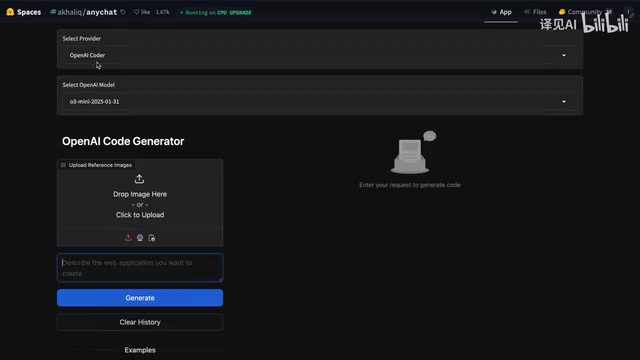
In testing, it was used to generate a playable synthesizer keyboard app with satisfying results — not only was the code generation correct, but the sound effects were fully functional. This option is especially well-suited for rapid prototyping and small application generation.
Building a Local AI Coding Environment with Roo Code
For developers who want to use O3 Mini extensively for programming, it can be combined with Roo Code (a VS Code extension). Roo Code (formerly Roo Cline) belongs to the rapidly emerging category of "AI Code Agents." Unlike GitHub Copilot, which primarily provides line-level code completion, Roo Code focuses more on task-level automation — it can understand developers' natural language instructions, automatically read and modify multiple files, and even execute terminal commands. VS Code, as the world's most widely used code editor (according to Stack Overflow's 2024 survey, over 73% of developers use it), provides a natural distribution channel for AI coding tools through its rich plugin ecosystem.
Configuration steps:
- Update Roo Code to the latest version
- Go to settings and create a new configuration profile
- Select OpenAI as the provider
- Enter your API key and select the O3 Mini model
- Optional: Set the reasoning effort parameter
If using it with Aider, simply export your OpenAI API key as an environment variable and launch with the appropriate command. While this approach requires API payment, the cost is extremely low given O3 Mini's current pricing.
Conclusion: Choose the O3 Mini Access Method That Suits You
The release of O3 Mini marks a new phase of price competition in the AI model market. DeepSeek's emergence has not only driven technological progress but, more importantly, broken down pricing barriers, making high-quality AI models more accessible to everyone.
Recommended solutions for different user needs:
- Casual users: Use T3 Chat or AnyChat directly — zero barrier to entry
- Light developers: GitHub Models API or Windsurf free credits
- Heavy coding users: Roo Code + O3 Mini API — exceptional value for money
- Zero-budget developers: Aider copy-paste mode — tedious but completely free
Before the API becomes fully open, these alternatives are sufficient for most use cases. And as competition intensifies, even more free and low-cost options will emerge in the future.
Key Takeaways
- O3 Mini API pricing is highly competitive: $1.10/million input tokens, $4.40/million output tokens — roughly three times cheaper than Claude 3.5 Sonnet
- Five free access methods: Aider copy-paste mode, GitHub Models API, T3 Chat, Windsurf editor, AnyChat on Hugging Face
- Competitive pressure from DeepSeek directly drove OpenAI's pricing strategy adjustment, and the entire industry is undergoing price reductions
- O3 Mini scores slightly higher than DeepSeek R1 on the Azure leaderboard, but DeepSeek retains a unique advantage due to its open-source nature
- Can be paired with Roo Code or Aider to build a low-cost local AI coding environment
Related articles
 Tutorials
Cursor + Codex Dual-IDE Collaboration: A Practical Methodology for Open-Source Project Customization
A complete methodology for open-source project customization based on real-world experience, detailing the Cursor+Codex dual-IDE workflow, seven-stage process, MVP validation, and AI source code reading techniques.
 Tutorials
Cursor Multi-Agent in Practice: Building a Full-Stack Next.js Blog in 50 Minutes
Build a full-stack blog in 50 minutes using Cursor IDE's multi-Agent mode with Next.js, Clerk auth, and Supabase. Learn the 4-phase AI Agent workflow and key integration pitfalls.
 Tutorials
Building an AI Software Factory from Scratch: A Cursor Engineer's Hands-On Experience with Multi-Agent Collaboration
Cursor engineer Eric shares practical insights on building an AI software factory: automation levels, guardrail design, parallel Agent management, and scaling to 1000+ Agents for 24/7 development.