OpenAI Codex App In-Depth Review: Streets Parallel Development and Five Core Features Explained
A comprehensive review of OpenAI Codex App's parallel development, Git integration, and AI skill features.
OpenAI's Codex App is a Mac desktop AI programming tool that shifts developers from writing code to describing requirements. Its standout features include Streets for parallel feature development, deep Git integration with PR automation, a reusable Skills system, time-based Automation tasks, and MCP support for external tool connectivity.
OpenAI recently launched Codex App, a desktop AI programming tool that evolved from the Codex command-line tool into a graphical programming application. Currently it only supports Mac, with Windows and Linux versions under development. This article provides a comprehensive analysis of the tool's features and real-world usage experience across five dimensions: Streets, Git integration, Skills system, Automation, and MCP.
The Evolution of Codex: From Command Line to Desktop App
Before Codex App, developers used Codex primarily in three ways: through web-based conversational programming, through terminal command-line operations (the most widely used), and via VS Code plugin. Codex App is a standalone desktop client that automatically loads project directories previously used through other methods when first opened.
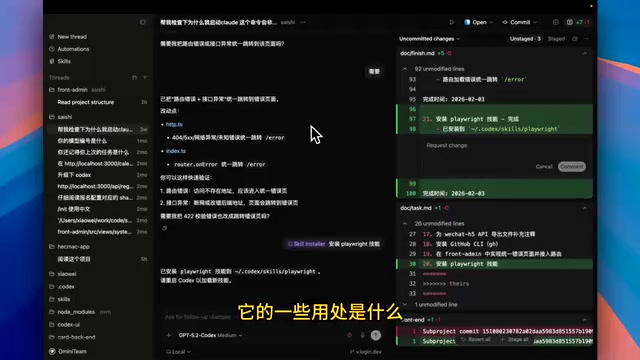
You might not have noticed, but Codex App's design philosophy is fundamentally different from traditional IDEs — you won't see any project files or code in the interface. It adopts a "conversational programming" paradigm where developers only need to focus on conversation content and Git change records, rather than directly manipulating code files.
Conversational Programming is a new human-computer interaction paradigm that has emerged in recent years as large language model capabilities have improved. Traditional IDEs center around file trees, code editors, and terminals as core interface elements, requiring developers to directly manipulate source code files. Conversational programming elevates the interaction layer to natural language, where developers drive code generation by describing their intent. This concept can be traced back to academic research in Natural Language Programming, but it only became practically viable after GPT-4-level models appeared. Codex App's design choice — completely hiding the file tree and code editor — is one of the most radical implementations of this paradigm, assuming that a developer's core value lies in requirements definition and architectural decisions, not writing code line by line.
While this design is radical, it points to a direction worth watching: shifting developers from "writing code" to "describing requirements."
Streets: Feature-Based Parallel Development Mode
Streets is the core interaction unit of Codex App, best understood as an independent conversation space centered around a "feature." When you want to develop a specific feature for your project, you can open a new Street and have a conversation with the AI to complete the development.
The first message in each Street automatically becomes its title, which you can manually modify for easier identification. For example, you can create an "Add CAPTCHA" Street and another "Add Search Box" Street, both running in parallel simultaneously. This parallel task execution capability is a major differentiator between Codex App and other AI programming tools.
Streets also support several practical features:
- Model Selection: Uses the o3 model by default, with the option to switch to o4-mini and other model sizes. o3 and o4-mini are part of OpenAI's reasoning model series, which differ from the traditional GPT series by employing a Chain-of-Thought reasoning mechanism that performs internal reasoning steps before generating the final answer. o3 is the most capable model in this series, excelling at complex multi-step programming tasks, mathematical reasoning, and code architecture design; o4-mini is the lightweight version that significantly reduces inference latency and computational cost while maintaining high code generation quality. Simple code modifications can be quickly completed with o4-mini, while tasks involving complex refactoring or architecture design are better suited for o3.
- Plan Mode: Ideal for complex feature development — the AI first analyzes existing code and outputs a planning document, then implements step by step according to the plan. Quickly toggle with the Ctrl+Tab shortcut.
- Permission Control: Requires manual permission confirmation by default; double-click to enable auto-mode with full permissions.
- Voice Input: Supports voice conversation with impressive recognition accuracy.
- Archive Management: Completed Streets can be archived and restored at any time to continue the conversation.
Deep Git Integration: A Version Control-Centric Workflow
Codex App's integration with Git is extremely deep — Git is essentially the backbone of the entire tool. All code changes are tracked and managed through Git records.
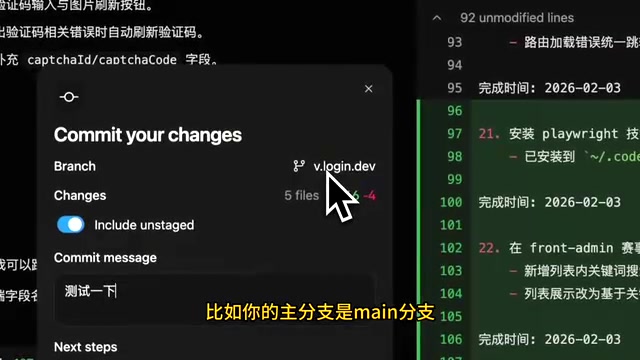
Regarding code rollback, Codex App's approach differs significantly from other AI programming tools. Instead of providing rollback buttons within conversations, it operates based on Git change records. Each code modification produced during a conversation generates a corresponding Git record, and you can perform a revert operation on any record to roll back code.
When committing code, Codex App offers three methods:
- Direct Commit: Commits locally only
- Commit + Push: Commits and pushes to the remote Git server
- Commit + Create PR: Commits code and automatically creates a Pull Request
When creating a PR, the AI automatically summarizes the changes to generate a commit message, then pushes to the Git server and creates a merge request. Pull Requests are a core workflow in modern software team collaboration — they're not just a code merging mechanism but also an important part of code review, knowledge sharing, and quality control. A high-quality PR typically needs to include a clear change description, impact scope explanation, and testing status. However, writing PR descriptions is tedious work for many developers, especially during rapid iteration in agile development. Codex App's AI-generated PR descriptions from code change summaries not only save time but also ensure completeness and consistency, creating a complete closed loop from code generation to PR creation.
Additionally, Codex App supports the Worktree feature. Git Worktree is a feature introduced in Git 2.5 that allows developers to check out multiple working directories simultaneously within the same repository, each corresponding to a different branch. In traditional Git workflows, switching branches means the entire working directory's file state changes — if you have uncommitted modifications, you need to stash or commit first. Worktree solves this problem: you can develop the feature-A branch in one directory while fixing the bugfix-B branch in another, with complete isolation between them. In the context of Codex App, Worktree perfectly aligns with Streets' parallel development philosophy: each Street can correspond to an independent Worktree, achieving complete isolation at the physical file level for multiple feature developments, avoiding code conflicts and state pollution. The project must be in a Git directory to use this feature, and you can choose to pull a Worktree from a specific branch for isolated development — especially valuable for parallel multi-feature development scenarios.
Skills System: Reusable AI Capability Modules
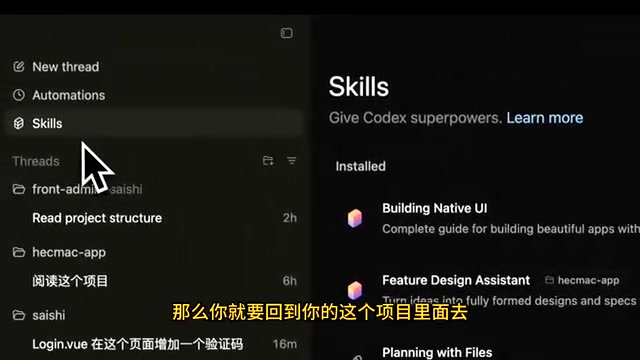
Skills is a well-designed feature module in Codex App. It provides a visual skill management interface that displays global skills and current project skills, and intelligently recommends applicable skills based on project characteristics.
Codex App's Skills system is essentially a productized encapsulation of Prompt Engineering. At the implementation level, each "skill" is actually a combination of structured prompt templates, workflow definitions, and context configurations. Traditional prompt engineering requires developers to manually write and manage complex prompts, while the Skills system makes this process visual and modular — developers can install, enable, disable, and share skills like managing software packages.
Skill Management
For installed skills, you can enable, disable, or uninstall them. When multiple skills conflict, you can temporarily disable certain skills and re-enable them when switching projects. This flexible management approach is very practical in real-world development.
Creating Custom Skills
There are two ways to trigger skill creation: using the $ symbol to invoke the Skill Creator command, or directly describing requirements in conversation. For example, you can create a "screenshot to webpage" skill — analyzing a screenshot, generating a description document, then developing based on that document.
After creation, you need to restart Codex App for it to take effect. There are also two ways to use skills: manually invoking via the $ symbol, or letting the AI automatically match and invoke through text descriptions in conversation.
Installing External Skills
Codex App supports three skill installation methods:
- Installing from the official OpenAI skill library via the
Secure Installcommand - Installing community skills via the
npx skills addcommand — currently the most universal method - Manually creating custom skills
The advantage of npx skills add is that it supports cross-tool installation through symlinks that map to different AI programming tools, solving the problem of inconsistent skill directories across tools. This borrows from the Node.js ecosystem's package management philosophy, meaning the same skill can be used simultaneously in Codex App, Cursor, Claude Code, and other AI programming tools, reducing ecosystem lock-in risk.
Automation: Time-Triggered Intelligent Tasks
Codex App's Automation feature is arguably one of its most innovative characteristics. If Hooks trigger operations at specific nodes in a conversation's lifecycle, then Automation is scheduled task dispatching based on the time dimension.
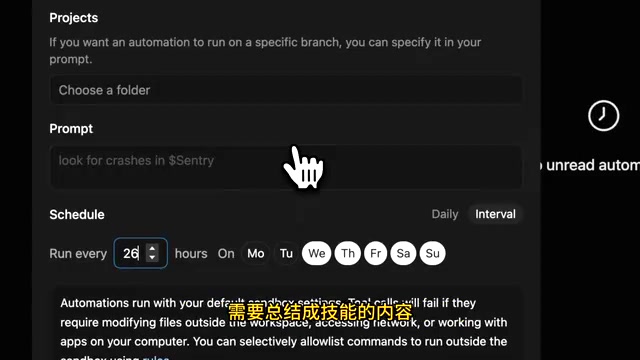
You can set a time interval (e.g., daily, every two hours) to have the AI periodically execute specific prompt tasks. The official documentation provides two typical use cases:
Scenario One: Auto-Learning Skills. Set it to scan project conversation records every two hours, extract content that can be summarized into skills, and automatically create new skills. This is essentially letting the AI continuously self-learn and evolve during the work process, constantly enriching the skill library.
Scenario Two: Auto-Summary Reports. Periodically summarize and archive project progress, generating development logs or progress reports.
Note that the Automation feature requires Codex App to remain running — scheduled tasks pause when the application is closed. This limitation means it's better suited as a background intelligent assistant during daily development.
Compared to Hooks' fine-grained control triggered at each specific event node, Automation provides more macro-level time-dimension management capabilities — the two complement each other.
MCP Support and Overall Assessment
Regarding MCP, Codex App provides an MCP management interface in settings, recommends a small number of official MCPs, and supports adding custom ones. MCP (Model Context Protocol) is an open standard protocol launched by Anthropic in late 2024, designed to provide AI models with a unified way to access external tools and data sources. Before MCP, each AI tool needed to write specialized integration code for different external services (such as databases, APIs, file systems), leading to severe ecosystem fragmentation. MCP defines a standardized client-server communication protocol that allows AI applications to flexibly connect to various external capabilities like plugins. For example, through MCP, Codex App can directly query Jira tasks, read Notion documents, or operate databases without developing separate integrations for each service. MCP has now gained support from major AI vendors including OpenAI and Google, and is becoming an infrastructure standard for the AI tool ecosystem. Codex App's current MCP functionality is relatively basic but meets fundamental extension needs.
Codex App Strengths
- Smooth Operation: The overall experience is silky smooth with excellent model capabilities
- Clean Interface: Similar in style to OpenCode, removing unnecessary complexity
- Developer-Friendly: The Git and Streets-based workflow is well-suited for feature-based agile development
- Lightweight Interaction: Oriented toward specific tasks and discussions rather than project directories
Current Limitations
- Terminal Restrictions: Each conversation can only open one terminal command line, which is inconvenient when you need to simultaneously manage Git manually and run local services
- No File Preview: Viewing any file requires jumping to a third-party editor (like Cursor), lacking built-in file preview functionality
- Limited Platform Support: Currently Mac-only, with Windows and Linux versions still in development
Overall, Codex App represents an entirely new AI programming tool philosophy — liberating developers from "code-oriented" to "requirements-oriented" work. While there are still some rough edges in the user experience, its Streets parallel development, deep Git integration, Skills system, and Automation tasks demonstrate a noteworthy evolutionary direction for AI programming tools.
Related articles

AI Aggregator Platforms Tested: A Complete Guide to Using GPT 5.5 and Other Top Models for Free
A hands-on guide to using GPT 5.5, Gemini 3.1 Pro, and Grok 4.2 for free via AI aggregator platforms, covering cross-model context memory, account pool mechanisms, and key security risks.
Vibe Coding in Practice: A Junior Student Uses Cursor to Build a Multi-Agent System with 51 AI Officials Based on the Three Departments and Six Ministries Framework
A junior student uses Cursor and Vibe Coding to build a multi-agent system with 51 AI officials modeled on China's Three Departments and Six Ministries, featuring task distribution, approval workflows, and Token cost visualization.
How to Connect Codex to DeepSeek Models: Free Switching via CC Switch
Learn how to connect OpenAI Codex to DeepSeek models via CC Switch, enabling free switching between DeepSeek and GPT with complete setup and routing guide.