OpenAI Codex Cloud Task Delegation: The Complete Workflow from VS Code to PR
Complete walkthrough of OpenAI Codex's cloud task delegation workflow from VS Code to Pull Request creation.
This article details the OpenAI Codex extension's cloud task delegation capabilities, showing how developers can initiate coding tasks from VS Code that execute in isolated cloud containers. It covers configuring cloud environments, handling local vs. remote code state, reviewing generated code changes, creating Pull Requests, and applying changes locally — all without leaving the IDE.
Overview
The OpenAI Codex extension doesn't just support local code generation — it also provides the ability to delegate tasks to the cloud for execution. Developers can initiate cloud tasks directly from VS Code, letting Codex remotely complete code generation in an isolated container, and then create a Pull Request once finished. This article provides a detailed walkthrough of this cloud task delegation workflow, covering the specific operations and real-world experience.
Switching from Local to Cloud Execution
Configuring the Cloud Runtime Environment
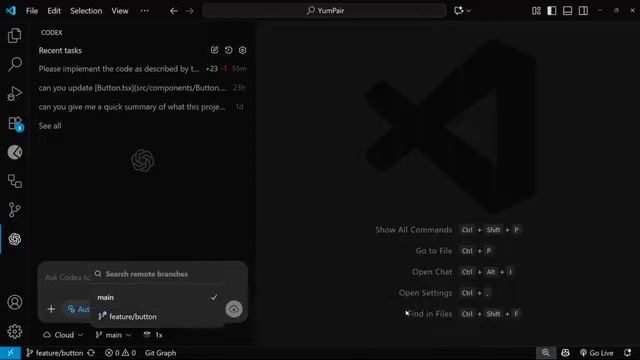
In the Codex extension panel, developers can switch the task execution mode from "local" to "run in the cloud." If you've configured multiple cloud environments for different repositories, you can also select which specific environment to run the task in.
There's a key prerequisite here: cloud execution depends on the code state of the remote repository. Git's distributed architecture means that local and remote repositories (such as those on GitHub or GitLab) can be in different states. If a developer has made local commits without running git push, those changes only exist locally. If you've been consistently pushing local changes to the remote repository, then the main branch is up to date. However, if you have unpushed local changes, you can tell Codex Cloud to use those changes as the working base by selecting your local branch. Codex solves the inconsistency between local and cloud code states by allowing branch selection, essentially syncing the local branch state to the cloud container as the working baseline.
Initiating a Cloud Task
Initiating a task is very intuitive — simply type a natural language instruction in the Codex panel. For example, enter "Can you implement a responsive dropdown nav bar" and press Enter. Codex sends this task to the cloud for remote execution in an isolated container.
Codex Cloud's isolated containers are based on a sandboxed execution environment, similar in concept to GitHub Codespaces or Docker containers. Each task runs in an independent container instance with its own file system, dependency environment, and runtime, completely isolated from other tasks. This architectural design has two core advantages: first, security — AI-generated code executes in a sandbox without affecting the developer's local environment or production systems; second, consistency — the container environment can be pre-configured with the project's required language runtimes, package managers, and build tools, avoiding the classic "works on my machine" problem. OpenAI borrows from CI/CD pipeline thinking here — each task starts fresh in a clean, reproducible environment.
The biggest advantage of this approach is: you don't need to switch to a browser to operate — the entire workflow is completed within VS Code.
Reviewing Results and Creating PRs
Post-Task Operations
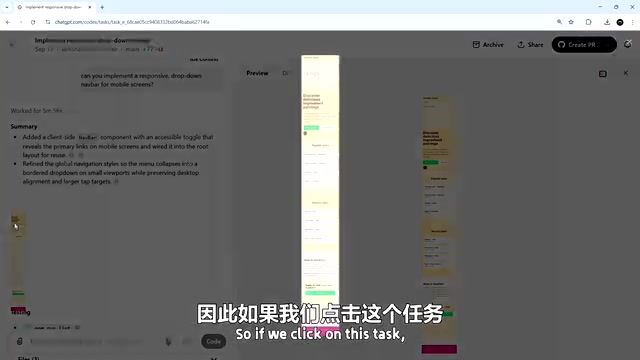
Once the cloud task completes (typically within just a few minutes), the finished task appears at the bottom of the Codex panel. Clicking on the task lets you view the code changes made to each file.
After confirming the code changes are correct, developers can directly click the "Create PR" button to create a Pull Request. Pull Requests (PRs) are the core collaboration mechanism in modern Git-based software development. Developers submit code changes to an independent branch, then request to merge those changes into the main branch via a PR. PRs aren't just the entry point for code merging — they're also the vehicle for Code Review, where team members can review code diffs line by line, add comments, and suggest modifications. Codex Cloud's design of directly generating PRs means that AI-produced code is subject to the exact same review process as human-written code. This is particularly important in enterprise development, ensuring traceability and quality control for AI-generated code. After the PR is created, you can also click a button to navigate to it for code review and merge operations.
Previewing Changes in VS Code
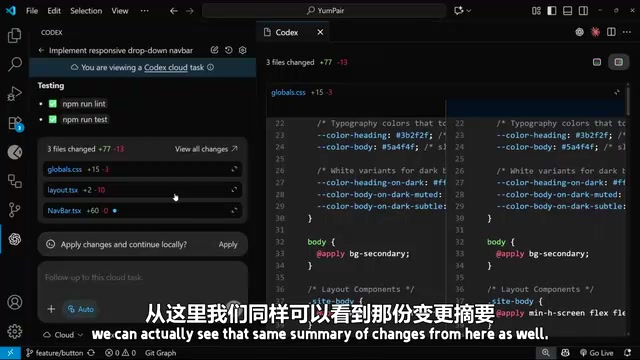
Even more conveniently, developers can view the complete results of cloud tasks without leaving VS Code. Clicking on the corresponding cloud task in the Codex panel reveals a change summary and specific code diffs.
Additionally, the panel provides an "Apply Changes" button that applies the cloud-generated code changes to your local workspace. Note that these changes are applied to your current branch. If you're not satisfied, you can also use the "Revert" button to undo everything with one click.
Verifying the Actual Results
In this demonstration, Codex Cloud generated a responsive dropdown navigation bar. Responsive Design is a web development methodology that enables web pages to automatically adjust their layout based on the user's device screen size. Its core technologies include CSS Media Queries, Flexbox, and CSS Grid. After applying the changes locally, a browser preview reveals:
- When the window shrinks to mobile dimensions, the hamburger menu icon correctly appears. The Hamburger Menu is a classic UI pattern in responsive design — full navigation links are displayed on desktop, but when the screen shrinks to mobile size, the navigation links collapse and are replaced by an icon consisting of three horizontal lines (resembling a hamburger). Clicking it expands the navigation menu. This seemingly simple component actually involves multiple technical layers including CSS transition animations, JavaScript event listeners, and accessibility (ARIA attributes)
- Clicking the menu icon properly displays the navigation links
- Clicking again collapses the menu
- Further reducing the window size, the layout remains intact
- Clicking navigation links, page navigation functions work correctly
The entire feature implementation is complete and meets expectations. After verification passes, the PR can be merged into the main branch.
Current Limitations and Future Outlook
From a practical experience standpoint, the collaboration between the Codex extension and Codex Cloud still has some rough edges. Specifically:
- The handoff between the two isn't smooth enough
- Some cloud features (such as creating PRs directly from the Codex panel) aren't fully integrated into the extension yet
- The overall product is still in its early stages
However, given that this is a rapidly iterating product, more feature improvements can be expected in the future. As a next step, Codex also supports parallel tasks — initiating multiple cloud tasks simultaneously to process different parts of the same codebase in parallel, further boosting development efficiency. The value of parallel tasks lies in breaking the serial bottleneck of traditional development — developers no longer need to wait for one feature to complete before starting the next. For example, you could simultaneously have Codex handle a frontend navigation component, backend API endpoints, and unit test writing. This pattern is similar to task decomposition and parallel execution in project management, but the executor shifts from humans to AI. It's worth noting that parallel tasks may involve code conflict issues — when multiple tasks modify the same region of the same file, conflicts need to be resolved manually during merging.
Summary
Codex's cloud task delegation feature provides developers with a "fire and forget" working model. You can quickly describe requirements in VS Code, let the cloud automatically complete the coding and generate a PR, then preview and merge locally. While the current experience still has room for optimization, this model of local IDE and cloud AI collaboration represents an important direction for AI-assisted development tools.
Key Takeaways
Related articles
NestJS + LangChain: A Practical Guide for Frontend Engineers Transitioning to AI Full-Stack Architecture
How can frontend engineers transition to AI full-stack? This guide covers NestJS + LangChain, TypeScript fundamentals, AI Agent development, local model deployment, and cross-language architecture skills.
Building a Complete Mini Program with Codex: A Full-Process Walkthrough from Zero to Launch
A detailed walkthrough of building a complete WeChat Mini Program from scratch using OpenAI Codex, covering seven image tool features, membership system, WeChat Pay integration, and AI-assisted development strategies.
OpenAI Codex Deep Dive: The AI Develop…
OpenAI Codex Deep Dive: The AI Development Tool That Makes Programming Feel Like Flying
Deep dive into how OpenAI Codex redefines programming. From real developer feedback to the Time to Fly project, analyzing Codex's strengths in code generation, context understanding, and the AI coding tool competitive landscape.