OpenAI Codex Complete Guide: Four Tools for Building an AI Programming Workflow
OpenAI Codex Complete Guide: Four Tool…
OpenAI Codex unifies four tools to build a full-workflow AI programming assistance ecosystem.
OpenAI has unified multiple AI programming tools under the Codex brand, comprising four core tools: IDE extension, CLI, Cloud service, and Review bot. Powered by the GPT-5 Codex model, they support Agentic Coding and seamlessly integrate to form an automated workflow from coding to review. Codex Cloud enables remote task initiation from any device with automatic PR creation, targeting developers with programming fundamentals. Free for ChatGPT Plus/Pro users.
OpenAI has recently unified its AI programming tools under the "Codex" brand, creating a comprehensive programming assistance ecosystem covering IDE, terminal, cloud, and code review. Based on Net Ninja's latest tutorial series, this article provides an in-depth analysis of Codex's four core tools and how they work together, helping developers understand how to integrate Codex into their daily development workflow.
What Is Codex? More Than Just a Single Tool
Many developers are confused about Codex's positioning because it's actually a collection of multiple tools. OpenAI is deliberately unifying these tools under the Codex name to eliminate user confusion.
At its core, Codex is OpenAI's AI programming assistant capable of autonomously completing coding tasks we assign to it. It's powered by the GPT-5 Codex model — a model specifically customized for Agentic Coding scenarios.
What Is Agentic Coding? Agentic Coding represents the third stage in AI programming tool evolution. The first stage was code completion (like early GitHub Copilot), the second was conversational code generation (like ChatGPT Q&A), and the third lets AI act as an autonomous agent independently planning and executing multi-step programming tasks. The agent no longer just "answers questions" — it can read files, run tests, fix bugs, commit code, and complete entire task loops. The GPT-5 Codex model is specifically optimized for this kind of multi-step, long-context autonomous execution scenario.
It's free to use with a ChatGPT Plus or Pro account — no additional payment required.
Unlike competitors such as Claude Code and GitHub Copilot, Codex's unique advantage lies in offering four different interaction methods covering developer needs across various scenarios. The current AI programming tool market shows a three-way competition: GitHub Copilot deeply integrates with the Microsoft/GitHub ecosystem, focusing on real-time completion within the IDE; Anthropic's Claude Code excels at code comprehension and terminal operations, catering to heavy command-line users; OpenAI Codex differentiates itself with a "multiple entry points, unified backend" strategy, attempting to cover all scenarios from local to cloud. This ecosystem-level approach differs from single-point tool competition logic and more closely resembles a platform-level product strategy.
Detailed Breakdown of the Four Core Tools
1. Codex IDE Extension
The Codex IDE extension can be installed in editors like VS Code, Cursor, or Windsurf, with functionality similar to GitHub Copilot. It provides a chat panel for interacting with the AI model while also supporting more autonomous AI-driven coding. For developers who prefer working within an IDE, this is the most intuitive entry point.
2. Codex CLI (Command-Line Tool)
Codex CLI is closer to Claude Code's usage pattern — interacting with the model and delegating tasks directly from the terminal. For developers who prefer command-line operations, this approach is more efficient, enabling quick modifications to local projects.
3. Codex Cloud
Codex Cloud is a browser-based tool that connects to GitHub repositories and accepts task assignments. When you initiate a task, Codex spins up an isolated code container remotely, runs code and makes modifications within it, then automatically creates a Pull Request on GitHub upon completion.
Technical Principles Behind Isolated Code Containers The "isolated code containers" used by Codex Cloud are essentially sandbox environments based on containerization technology (like Docker). When each task starts, the system creates a brand-new runtime environment completely isolated from other tasks, pre-installed with specified versions of language runtimes and dependency packages. The container is destroyed after task completion, ensuring both security and preventing environment pollution between different tasks. This design is similar in principle to GitHub Actions CI/CD runners — each workflow trigger executes in a fresh, clean environment, ensuring reproducibility and isolation.
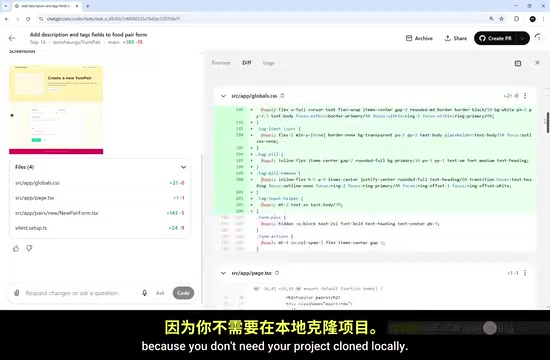
The core philosophy behind this design is: you can initiate coding tasks from anywhere — a laptop, phone, or even a public computer that doesn't have your project code. Because you don't need to clone the project locally, Codex Cloud remotely connects to your repository and handles everything on its own servers.
4. Codex Review (Code Review Tool)
This is an automated review bot that can be installed on GitHub. When a new Pull Request is submitted, it automatically performs code review. This provides an additional layer of assurance for code quality.
Tool Synergy: Not Patchwork, But Unity
The most impressive aspect of the four tools is their seamless integration. Here's a typical workflow scenario:
- Delegate a new task to Codex Cloud from within the IDE extension
- After Codex Cloud completes the task remotely, you can choose to pull changes back locally or create a PR directly on GitHub
- When the PR is created, the Codex Review Bot immediately steps in to automatically check code quality before merging
This design makes the four tools feel less like independent products and more like different windows into the same product. Developers can flexibly switch based on their current context without feeling like they're using completely different tools.
Hands-On: Setting Up the Codex Cloud Environment
Connecting Your GitHub Account
Using Codex Cloud requires a ChatGPT Plus or Pro account. After logging in, visit chatgpt.com/codex to access the Codex Cloud interface.
First, you need to connect your GitHub account. This can be done via the "Connect to GitHub" button on the dashboard or through the "Data Controls" option in the settings page.
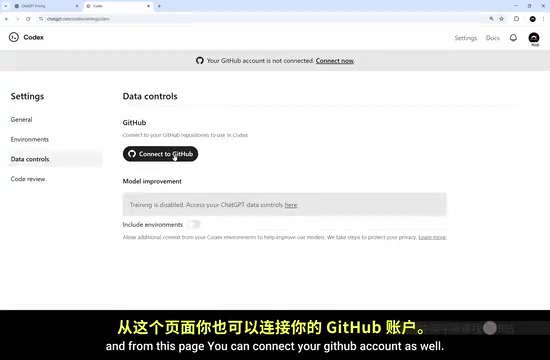
Creating a Work Environment
After connecting GitHub, you need to create an "Environment" — selecting a GitHub repository and configuring how Codex works on that project.
There are several key configuration options when creating an environment:
- Select GitHub repository: Browse or search all your repositories
- Automatic code review: Enable or disable automatic review of new PRs
- Network access: Decide whether to allow the coding agent to access the internet while working remotely
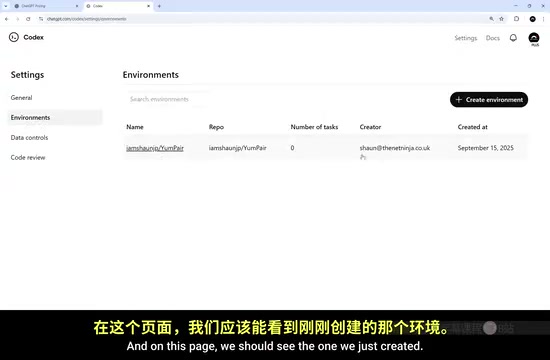
Advanced Environment Configuration
In the environment's edit page, there are more granular code execution options:
- Pre-installed package version management: The default container comes with Node, Python, Ruby, and other runtimes pre-installed, with customizable versions
- Environment variables: If the coding agent needs to access external APIs or services, you can add keys and other variables here
- Custom startup scripts: By default, installation commands like
npm installrun automatically, but you can also define your own initialization scripts
Who Is Codex For?
It's particularly important to emphasize that Codex is not a "Vibe Coding" tool designed for non-programmers. It's aimed at developers with programming fundamentals — whether beginners or senior engineers — who want to integrate an AI programming assistant into their existing workflow.
Especially critical is having a solid understanding of Git and GitHub before using Codex. The reason is practical: without version control protection, an AI coding agent can destroy your entire codebase in minutes.
Why Is Git More Critical Than Ever in the AI Programming Era? Git's branch and revert mechanisms have become core safety guarantees in the AI-assisted programming era. AI agents typically operate on independent branches when executing tasks, so even if they produce erroneous code, it won't pollute the main branch (main/master). The Pull Request mechanism provides a "last line of defense" for human review, giving developers the opportunity to inspect all of the AI's changes before code is merged. Without this layer of protection, AI's high-speed execution capability actually becomes a risk amplifier — it can write hundreds of erroneous changes into your project in the time it takes you to drink a cup of coffee. Git provides the safety net of rollback and branch isolation, which has become more critical than ever in the AI-assisted programming era.
Summary and Outlook
OpenAI Codex has built a complete AI programming ecosystem from local to cloud, from coding to review, through four synergistic tools. Compared to single-function competitors, this multi-entry-point, unified-backend architecture provides developers with greater flexibility.
For developers, Codex's value lies not only in its code generation capabilities but in elevating AI programming from "chat Q&A" to workflow-level automation — you can run multiple coding tasks in parallel in the cloud while focusing on architecture design and code review. This is perhaps the correct way to approach AI programming tools.
Key Takeaways
- OpenAI Codex includes four tools: IDE extension, CLI, Cloud service, and Review bot, covering the entire development workflow
- Codex Cloud can initiate coding tasks remotely from any device without local project cloning, automatically creating GitHub PRs upon completion
- The four tools seamlessly integrate to form an automated workflow from coding to review, supporting parallel multi-task processing
- Codex is powered by the GPT-5 Codex model and is free for ChatGPT Plus/Pro users with no additional fees
- Solid Git and GitHub knowledge is essential before using Codex, as AI agents can quickly destroy a codebase without proper version control
Related articles
 Tutorials
Cursor + Codex Dual-IDE Collaboration: A Practical Methodology for Open-Source Project Customization
A complete methodology for open-source project customization based on real-world experience, detailing the Cursor+Codex dual-IDE workflow, seven-stage process, MVP validation, and AI source code reading techniques.
 Tutorials
Cursor Multi-Agent in Practice: Building a Full-Stack Next.js Blog in 50 Minutes
Build a full-stack blog in 50 minutes using Cursor IDE's multi-Agent mode with Next.js, Clerk auth, and Supabase. Learn the 4-phase AI Agent workflow and key integration pitfalls.
 Tutorials
Building an AI Software Factory from Scratch: A Cursor Engineer's Hands-On Experience with Multi-Agent Collaboration
Cursor engineer Eric shares practical insights on building an AI software factory: automation levels, guardrail design, parallel Agent management, and scaling to 1000+ Agents for 24/7 development.