OpenAI Codex in Practice: Context References, Reasoning Levels, and TODO-to-Task Conversion Explained
Master OpenAI Codex's context references, reasoning levels, and TODO-to-task conversion for efficient AI coding.
This article explores three core features of the OpenAI Codex extension: using @ symbols and images to add context to prompts, adjusting AI reasoning levels to balance speed and quality, and converting TODO comments into automated Codex tasks. Together, these capabilities enable developers to work more efficiently with AI-assisted programming while maintaining code quality through version control best practices.
Introduction
The OpenAI Codex extension is far more than just a code generation tool — its deep integration into the developer workflow is where it truly shines. Based on Episode 8 of the official Codex tutorial series, this article provides a detailed breakdown of three core features: adding context to prompts, adjusting AI reasoning levels, and automatically converting TODO comments in code into Codex tasks. Used in combination, these features can significantly boost the efficiency and accuracy of AI-assisted programming.
Adding Context to Prompts
Referencing Files with the @ Symbol
Similar to Codex CLI usage, you can use the @ symbol in the Codex extension's chat window to reference files in your project and include them as context for your prompts. After typing @, start entering a filename, and Codex will automatically search for matching files in your project. A nice detail: you don't need to type the full file path — just a portion of the filename will do. For example, typing page will list all files containing that keyword for you to choose from.
In LLM-driven programming tools, the "context window" is a core concept. When generating code, an LLM can only reason based on the current prompt and the accompanying context — it doesn't automatically "see" every file in your entire project. Therefore, how precisely you provide relevant context to the model directly determines the quality of the generated output. The @ symbol reference is essentially a context injection mechanism — it serializes the contents of the specified file and appends them to the prompt, allowing the model to reference that file's structure, type definitions, and business logic when generating code. This pattern has become the mainstream interaction paradigm in the VS Code ecosystem, with tools like GitHub Copilot Chat and Cursor adopting similar designs.
Besides the @ symbol, you can also click the plus icon at the bottom of the chat window to search for and add file context, with exactly the same effect.
Images as Context Too
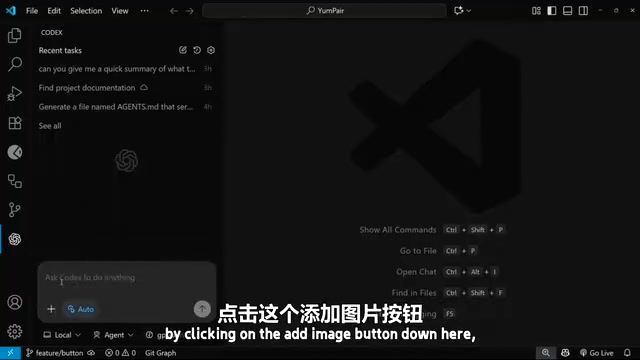
A highly practical feature is support for image context. Click the "Add Image" button at the bottom to select images from your local machine, or simply copy and paste images directly into the chat window.
This capability relies on the underlying model's multimodal processing ability. Multimodal models like GPT-4o can process both text and image inputs simultaneously, using a visual encoder to convert images into feature representations the model can understand, then performing joint reasoning with the text prompt. This is especially useful in frontend development scenarios: UI mockups from designers, competitor screenshots, or even hand-drawn sketches can all be used directly as input. The model will attempt to extract layout structure, color schemes, component styles, and other elements from the visual information and translate them into corresponding code implementations. This "what you see is what you get" interaction approach dramatically shortens the path from design to code.
The tutorial demonstrates a typical scenario: the author found a screenshot of a 3D button from a Google search, copied and pasted it into the chat, then entered the prompt:
Can you update @button.tsx to have a 3D bevel effect like in this image
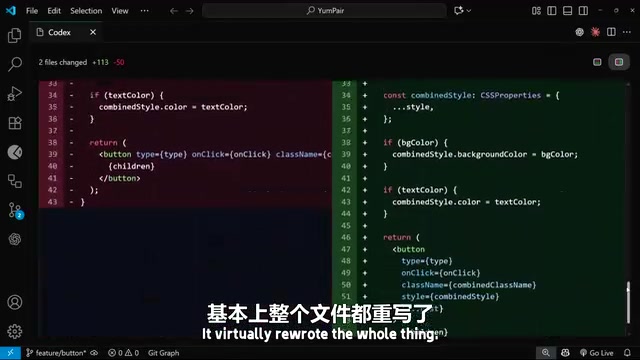
This prompt uses two types of context simultaneously — referencing the button.tsx component file via @ and attaching a screenshot of the target effect. After Codex finished processing, it not only modified the button.tsx file (virtually rewriting the entire component) but also added substantial CSS code, including a new button-bevel class.
Viewing Change Diffs
Once a task is complete, you can click on the changed files to view a diff comparison, clearly seeing which code Codex added, modified, and deleted.
Diff (difference comparison) is one of the most fundamental and important code review tools in software engineering, originating from the Unix diff command. It displays differences between two versions on a line-by-line basis: green marks additions, red marks deletions, and yellow or gray marks modifications. In AI-assisted programming scenarios, the importance of the diff view is amplified even further — because AI may modify a large number of files and lines of code in a single operation, developers must review these changes one by one through the diff view to ensure the AI hasn't introduced unnecessary modifications, deleted critical logic, or broken existing functionality. This is why the Codex extension makes diff viewing a core part of the interaction flow.
After previewing in the browser, the button did indeed display a 3D effect. While the colors might not perfectly match expectations (for example, the bottom was gray instead of dark green), the overall approach was correct. At that point, you simply need to prompt Codex again for fine-tuning.
AI Reasoning Levels: Balancing Speed and Quality
Three Reasoning Levels Explained
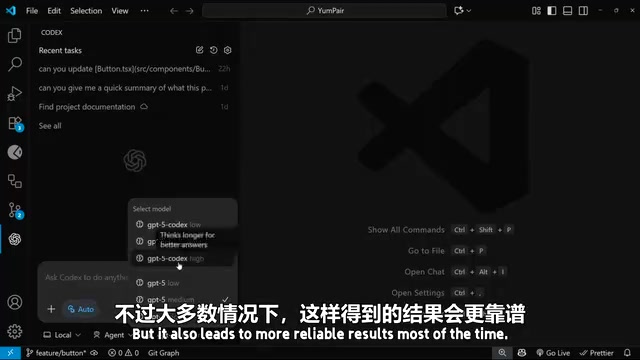
Codex offers multiple reasoning effort levels, accessible from the menu at the bottom of the chat window. The default is set to Medium, but you can adjust it flexibly based on task complexity:
| Level | Characteristics | Best For |
|---|---|---|
| Minimal / Low | Fast response, less time spent thinking and planning | Simple code edits, refactoring |
| Medium | Balance between speed and quality | Medium-scale feature development |
| High | More planning and thinking, takes longer | Complex tasks requiring edge case consideration |
The Technical Principles Behind Reasoning Levels
The concept of reasoning levels is closely related to OpenAI's o-series reasoning models. Models like o1 and o3 employ a Chain-of-Thought (CoT) reasoning mechanism, performing an internal step-by-step reasoning process before generating the final answer. Reasoning levels essentially control the amount of computation the model invests during this internal thinking phase: a low level means the model quickly provides an intuitive answer, while a high level allows the model to pursue longer reasoning chains, repeatedly verifying and correcting its thinking. This is similar to how humans solve problems — simple questions can be answered directly, while complex ones require working through multiple iterations on scratch paper. From an API perspective, higher reasoning levels consume more reasoning tokens, which, although not directly shown to the user, count toward costs and latency.
How to Choose the Right Reasoning Level
The core principle is that task complexity determines the reasoning level:
- Low reasoning levels offer the advantage of fast response times but may miss edge cases, resulting in lower reliability
- High reasoning levels involve more thorough planning and thinking, producing more reliable results, but consuming more tokens
- For simple tasks, avoid selecting high reasoning levels — it's an unnecessary waste of resources
The tutorial author recommends keeping Medium as the everyday default, as it provides a good balance for most tasks. Only when facing truly complex tasks that require extensive logical reasoning is it worth bumping the reasoning level up to High.
Automatic TODO-to-Task Conversion
One-Click from Comment to Implementation
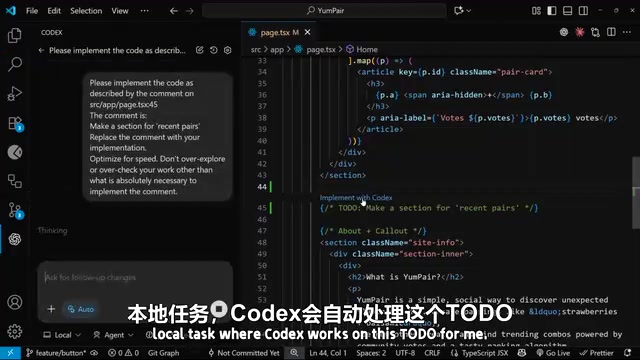
This is an exceptionally thoughtful feature in the Codex extension. In real-world development, we frequently leave // TODO comments in code to mark features that need to be completed later. With the Codex extension installed, an "Implement with Codex" option appears above every TODO comment.
TODO comments are a widely used code annotation convention in software development, part of technical debt management. Beyond TODO, other common markers include FIXME (known issues that need fixing), HACK (temporary workarounds), and XXX (dangerous code requiring special attention). In large projects, TODO comments tend to accumulate over time, becoming "forgotten promises." Many teams use VS Code plugins like TODO Highlight to visualize these markers, or track TODO counts through CI/CD pipelines as a code health metric. By directly connecting TODO comments with AI implementation capabilities, Codex effectively provides a new systematic approach to digesting technical debt — developers can batch-process backlogged TODO items instead of implementing them one by one manually.
The tutorial example features a comment in the homepage component:
// TODO: add a recent pair section here
After clicking "Implement with Codex," the extension automatically launches a new chat session, generates a prompt containing the TODO content, and instructs Codex to replace the comment with an actual implementation.
Results in Action
In the demonstration, Codex automatically completed the following work:
- Created a "Recent Pairs" data object array
- Wrote the logic to iterate over the data and render templates
- Generated a new section matching the existing "Popular Pairs" style but with a different background
The final result rendered in the browser was satisfying — the new "Recent Pairs" section was visually consistent with the existing "Popular Pairs" section, differing only in background color.
The value of this feature lies in the fact that developers can casually leave TODO markers during coding without needing to address them immediately, then let Codex implement them one by one when the time is right. This workflow aligns perfectly with real-world development rhythms.
Version Control: The Safety Net in the Age of AI Programming
The tutorial author repeatedly emphasizes the importance of version control, and this is by no means a redundant reminder. In AI-assisted programming scenarios, version control takes on even greater significance:
- Code Safety: Without version control, any AI coding agent could potentially wreck your codebase in a short period. Timely commits and pushes are the most basic protective measure.
- Codex Cloud Dependency: If you use Codex Cloud to run tasks remotely, it relies on an up-to-date GitHub repository. Keeping your repo in sync is a prerequisite for cloud-based tasks to run properly.
In traditional development, version control (such as Git) is primarily used for team collaboration and code history tracking. But in AI-assisted programming scenarios, version control takes on an entirely new role: serving as the "undo mechanism" and "safety boundary" for AI operations. AI coding agents (such as Codex, Devin, and Cursor Agent) have the ability to autonomously modify multiple files, with a single operation potentially involving changes across dozens of files. If these changes introduce subtle bugs or break the project structure, the absence of version control means there's no way to roll back. The industry has already developed several best practices: creating dedicated branches before launching AI tasks, automatically creating checkpoints after each AI operation, and reviewing AI-generated code through PR (Pull Request) workflows. These practices elevate version control from a passive historical record tool to an active AI governance tool.
It's recommended to make a commit after completing each feature or round of AI-assisted modifications, and push to GitHub once you're satisfied with the results.
Conclusion
The three features covered in this article — context references, reasoning level adjustment, and TODO-to-task conversion — represent the Codex extension's deep refinement of the developer experience. Context features help AI understand requirements more precisely, reasoning levels let developers flexibly trade off between speed and quality, and TODO-to-task conversion seamlessly embeds AI into everyday coding habits. Mastering the right combination of these features is key to using AI programming tools effectively.
Key Takeaways
Related articles
Wise Large Transfer Delayed Two Weeks: How Should Cross-Border Entrepreneurs Respond?
Wise Business users face 10-14 day delays on large transfers, sparking debate on whether fintech is repeating traditional banking mistakes. Analysis and practical tips for cross-border entrepreneurs.

Perplexity Partners with Intel: Local AI Models and Hybrid Inference Come to Laptops
Perplexity partners with Intel to bring local AI models and hybrid inference to Core Ultra Series 3 laptops. We break down the architecture, NPU capabilities, and the cloud-to-edge AI trend.

AI Large Model Learning Roadmap Breakdown: Three Stages from Application Development to Model Fine-Tuning
Deep breakdown of a popular AI large model learning roadmap covering LangChain, RAG, Agent, and LoRA fine-tuning across three stages, with analysis of its strengths and limitations for career changers.