OpenCode In-Depth Review: Hands-On with a Free Open-Source AI Coding Assistant
A hands-on review of OpenCode, a free open-source AI coding assistant supporting 75+ LLM providers.
This in-depth review explores OpenCode, a free open-source AI coding assistant with nearly 170K GitHub stars. We break down its three-layer architecture, walk through installation and configuration, and build a to-do app from scratch to test real-world performance. The review includes model comparisons between DeepSeek Flash and OpenCode Zen Super, highlighting how model choice impacts development speed and quality.
An Open-Source Alternative for AI Coding Assistants
In a world dominated by commercial AI coding tools like Cursor and Claude Code, an open-source AI coding assistant called OpenCode is quietly gaining momentum. It has already amassed nearly 170,000 stars on GitHub, with extremely active development — this isn't an abandoned side project, but a rapidly evolving ecosystem.
Today, we'll take a deep dive into OpenCode's core features and user experience, and put it to the test by building a to-do app from scratch.
What Is OpenCode? A Deep Dive into Its Three-Layer Architecture
At its core, OpenCode is an open-source agentic framework that connects large language models to real-world coding tasks. It can read files, plan modifications, edit code, run commands, and inspect results — if you've used Cursor or Claude Code, you've already been using a similar agentic framework.
The Three-Layer Architecture Explained
To understand how OpenCode works, you need to grasp its three-layer architecture:
- Tool Execution Layer: Handles concrete tasks like file operations, shell commands, MCP commands, and tests. This is the interface through which the agent interacts with the outside world.
- Provider Layer: Responsible for connecting models to the agentic system. OpenCode uses its own provider layer called "OpenCode Zen," allowing users to connect to over 75 LLM providers, including local models. By comparison, Cursor is tied to OpenAI and Claude Code is tied to Anthropic — far more limited in choice.
- Brain Layer (Model Layer): The large language models that actually perform reasoning, such as GPT-4, Claude Sonnet, DeepSeek, and others.
This architectural design means you're not interacting directly with the model — multiple layers work together behind the scenes to deliver a seamless coding experience. OpenCode's core advantage lies in the openness of its provider layer — you can choose any model you want.
Installation, Configuration & Interface Overview
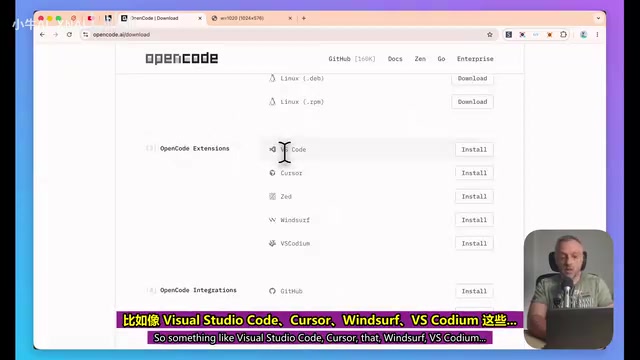
OpenCode offers multiple ways to use it: CLI, IDE plugins (supporting VS Code, Cursor, Windsurf, etc.), and a standalone desktop application. For most users, the standalone desktop app is the recommended choice, unless you have a specific reason to use the CLI or an IDE plugin.
Interface Layout at a Glance
The desktop app's interface is divided into several core areas:
- Left Panel: Project management, session list, chat window
- Right Panel: Code diff viewer, Git version control
- Bottom: Prompt input box, with support for adding files as context
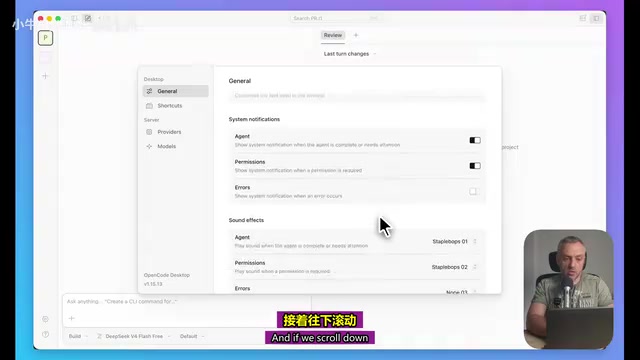
Key Settings Before You Start
Before diving in, there are several important settings to be aware of:
- Permission Management: Can be set to auto-accept or manual confirmation. It's recommended to keep manual confirmation initially to understand the tool's behavior patterns.
- Reasoning Summary: Controls whether the model's thought process is displayed. Recommended to enable so you can understand the model's decision-making logic.
- Session Progress Bar: Shows real-time task completion progress.
- Model Selector: Supports OpenCode series, Claude Opus/Sonnet, DeepSeek, Gemini, Grok, and many more models.
- Reasoning Mode: Five levels from Default to Low, Medium, High, and Maximum — adjust flexibly based on task complexity.
Hands-On Demo: Building a To-Do App with OpenCode
Step 1: Create a Development Plan Using Plan Mode
We started with a simple prompt: "Create a simple to-do web app with local storage."
After switching to Plan Mode, OpenCode's performance was impressive — it not only provided a detailed implementation plan but also proactively asked three key questions:
- Styling approach: Minimal CSS or Tailwind?
- File structure: Single HTML file or separate files?
- Extra features: Include inline editing and drag-and-drop sorting?
This interaction style is very similar to Codex — confirming requirements before writing code to avoid rework. You might not have noticed, but at this point you can check the context window status: the current provider, model, context limit (200K tokens), tokens used, and total cost.
Step 2: Switch to Build Mode to Execute
After switching to Build Mode, OpenCode began executing tasks step by step. The interface displays a real-time task checklist, giving you clear visibility into the current progress.
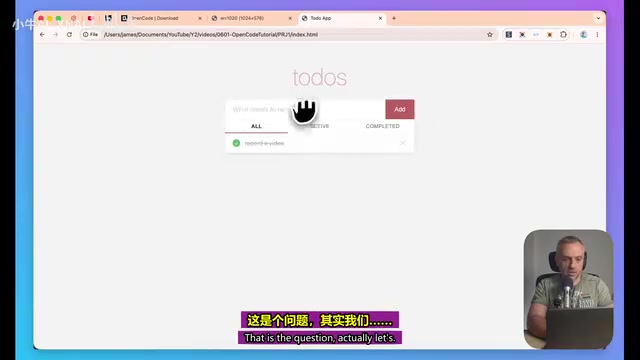
The app was built quickly, with features including:
- Add/delete to-do items
- Mark completion status (with strikethrough effect)
- Drag-and-drop sorting
- Local storage persistence
Step 3: Iterative Enhancements Across Multiple Rounds
Next, we tried several rounds of feature iterations:
Converting the list to a Kanban view: This led to an interesting model comparison experiment. After switching to the free "OpenCode Zen Super" model, thinking time increased noticeably — exploring a single file alone took nearly 30 seconds, and overall planning took almost two minutes. While the output quality was decent (it planned three status columns, drag-and-drop transitions, etc.), the speed difference was very apparent.
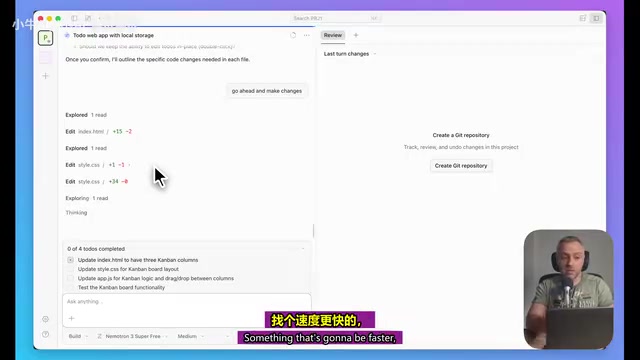
Switching back to the default DeepSeek Flash model, the same task was completed almost instantly, generating a beautiful and fully functional Kanban interface. Model selection has a massive impact on development efficiency.
Adding a delete confirmation dialog: This minor change was completed in about 1 second. OpenCode clearly showed which files were modified, which lines changed, and what was added — just three lines of confirmation dialog code.
Reverting changes: When you realize a feature isn't right and want to roll back, simply ask the model to "revert the last change," and it accurately undoes the specified modification.
Generating project documentation: Requesting an agents.md file (including dependency installation and run instructions) took only 9 seconds, consuming just 2% of the context limit.
Core Strengths & Usage Recommendations
OpenCode's Five Standout Advantages
- Completely free and open-source: No subscription fees, transparent and auditable code
- Extremely flexible model selection: Supports 75+ providers with free model switching
- Dual Plan/Build modes: Plan Mode provides detailed change previews (down to line numbers), Build Mode executes efficiently
- Real-time progress visualization: Task checklists, context consumption, and cost tracking at a glance
- Version control integration: Built-in Git support with clear change tracking
Practical Tips for Developers
- Model selection strategy: For everyday development tasks, prioritize fast models like DeepSeek Flash for the best cost-performance ratio; switch to more powerful reasoning models for complex architectural design.
- Reasoning mode adjustment: Use "Medium" mode for simple tasks to save resources; escalate to "High" or "Maximum" for complex tasks.
- Recommended workflow: Start with Plan Mode to confirm the approach, then switch to Build Mode for execution — avoid blindly generating code.
- Permission settings advice: Manually confirm each operation initially; consider enabling auto-accept only after you're familiar with the tool's behavior.
Verdict: Is OpenCode Worth Trying?
As an open-source AI coding assistant, OpenCode has reached a level of feature completeness and user experience that closely rivals commercial products. Its biggest differentiators are the freedom of model selection and the zero-cost barrier to entry. For developers on a budget who want to experience AI-assisted coding, or teams with specific model requirements, OpenCode is a choice worth serious consideration.
For building simple applications, the current experience is already quite smooth. However, when it comes to production-grade complex projects — involving thousands of lines of code and multi-system integrations — OpenCode's performance still needs further validation. That said, given its active development pace and massive community support, the future looks promising.
Related articles

How Wayfair Uses GPT Models to Process a Catalog of 40 Million Products
Deep dive into how Wayfair uses OpenAI GPT models for catalog enrichment across 40M SKUs, covering technical implementation, AI solutions for non-standardized product classification, and implications for e-commerce.
Codex AI Coding Agent Explained: What's the Real Difference from ChatGPT?
Deep dive into OpenAI's Codex coding agent, comparing Codex vs ChatGPT in programming scenarios and how AI agents are reshaping software development.
Databricks Open-Sources Omni: A Meta-Framework for Unified Management of All AI Agents
Databricks open-sources Omni under Apache 2.0 — a meta-framework unifying Claude Code, Codex & more AI Agents with shared sessions, cross-vendor review & enforced security policies.