Python Zero-to-Hero Systematic Tutorial: A Complete Guide from Basics to Real-World Projects

A comprehensive Python zero-to-hero tutorial covering basics, OOP, scraping, automation, and data analysis.
A systematic Python tutorial for absolute beginners has launched on Bilibili, divided into three modules: Fundamentals (environment setup, variables, control flow, functions, modules), Intermediate (OOP, regular expressions, file I/O, exception handling), and Hands-On Projects (web scraping, office automation, data analysis), with supporting study resources. The course structure is well-designed and suitable for beginners, but its claim of being "the most complete" should be taken with a grain of salt — solid mastery still requires 3–6 months of consistent practice.
Course Overview
A tutorial series recently launched on Bilibili claims to be the "most complete" Python course for absolute beginners, covering the entire learning path from environment setup to hands-on projects. The course took six months to produce and deconstructs the Python knowledge system from a beginner's perspective, combining theory with hands-on coding practice.
Python was first released by Guido van Rossum in 1991. Thanks to its design philosophy of being "elegant, explicit, and simple," it has consistently ranked at the top of the TIOBE Programming Language Index for years. Python embraces a "batteries included" approach — its standard library covers a wide range of common scenarios including file handling, network communication, and database operations. Combined with over 400,000 third-party packages on PyPI, Python has become the most beginner-friendly programming language that can also handle industrial-grade development.
This tutorial is divided into three major modules: Fundamentals, Intermediate, and Hands-On Projects, forming a complete learning path from "knowing nothing about programming" to "being able to independently develop projects." Let's take a detailed look at the course structure and its learning value.
Fundamentals: Building a Solid Python Foundation
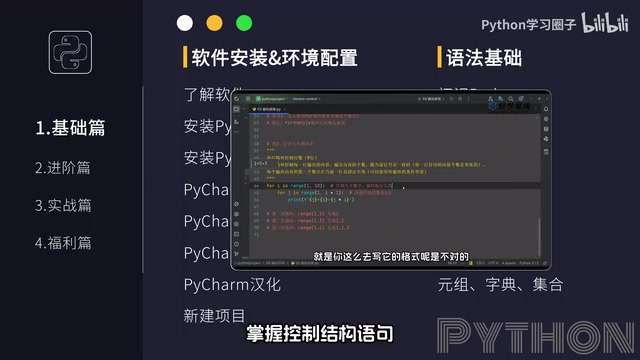
The Fundamentals module serves as the foundation for the entire course, covering the core topics every Python beginner must master:
- Environment Setup: Installing and configuring the Python development environment
- Variables and Data Types: Understanding Python's basic data structures
- Control Flow Statements: Program flow control including conditionals and loops
- Function Definitions: Code reuse and modular programming thinking
- Modules and Packages: Best practices for code organization and management
For absolute beginners, the most important thing at this stage isn't speed — it's truly understanding the logic behind each concept. What is a variable? Why do we need different data types? How do control structures make a program "think"? These seemingly simple questions often determine how far you can go in your learning journey.
It's worth noting that Python is a dynamically typed language — variables don't need to be declared with a type beforehand, as the interpreter infers types automatically at runtime. This lowers the barrier to entry, but it also requires learners to understand the characteristics and use cases of Python's data structures such as lists, dicts, tuples, and sets. Choosing the right data structure often improves program performance more than optimizing algorithms.
Study Tips
The recommended study period for the Fundamentals module is 2–4 weeks, with plenty of practice exercises for each topic. Watching videos without actually writing code is the most common mistake beginners make.
Intermediate: Object-Oriented Programming and Practical Skills
The Intermediate module takes learners from "being able to write code" to "being able to write good code," covering the following topics:
Object-Oriented Programming (OOP)
OOP is the watershed moment in Python learning. Understanding concepts like classes and objects, inheritance and polymorphism makes your code structure cleaner and easier to maintain. This is also the key step in transitioning from a "script writer" to a "software developer."
Object-oriented programming is a paradigm that encapsulates data (attributes) and the methods that operate on that data (behaviors) within a single unit (a class). In Python, everything is an object — even the integer 42 and the string "hello" are object instances under the hood. The four core OOP principles — encapsulation (hiding internal implementation details), inheritance (enabling code reuse), polymorphism (allowing the same interface to work with different types), and abstraction (extracting common behaviors) — together form the foundation for building scalable, large-scale systems. Once you master OOP, you'll find that the source code of Python's standard library and third-party frameworks (like Django and Flask) becomes much more readable, as they heavily leverage these design patterns.
Practical Skills Modules
- Regular Expressions: A powerful tool for text matching and replacement, indispensable in data cleaning and web scraping. Regular expressions are essentially a mini-language that uses special symbols to describe text patterns, and Python provides support through its built-in
remodule. While the learning curve is somewhat steep, once mastered, your efficiency in handling complex text will improve by orders of magnitude. - File I/O Operations: The fundamental ability to interact with external data
- Exception Handling: Making programs more robust by gracefully handling various error conditions. Python uses the
try/except/finallymechanism, which separates normal logic from error-handling logic — resulting in much more readable code compared to error-code-based approaches in other languages.
These skills may seem independent, but they're highly interconnected in real projects. For example, when building a web scraper, you'll need regular expressions to parse web content, file operations to save data, and exception handling to deal with unexpected situations like network timeouts.
Hands-On Projects: Turning Python Knowledge into Productivity
The Hands-On Projects module is the core selling point of this course, covering several of Python's most popular application areas:
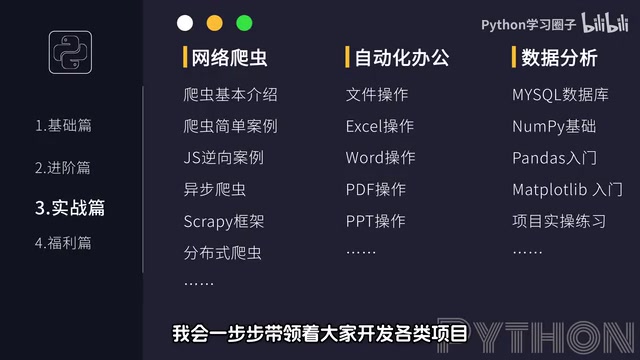
Web Scraping Development
Scraping images, videos, and other resources from websites is one of Python's most intuitive use cases. Through scraping projects, learners can quickly experience the efficiency gains that programming brings.
Python's web scraping tech stack is very mature: the requests library handles sending HTTP requests to fetch web content, BeautifulSoup and lxml are used to parse HTML document structures, and the Scrapy framework is suitable for building large-scale distributed crawling systems. For dynamically rendered pages, you can also use Selenium or Playwright to simulate browser behavior. It's especially important to note that web scraping should comply with the target website's robots.txt protocol and respect data copyright and user privacy laws and regulations.
Office Automation Projects
Using Python to process Excel, Word, PDF, and other office documents to automate repetitive tasks is one of Python's most practical workplace skills, directly boosting daily work efficiency. Commonly used libraries include openpyxl for Excel, python-docx for Word, PyPDF2 for PDF, and pandas for batch data processing. A simple Python script can often compress hours of manual work into just a few seconds.
Data Analysis and Mining
Data storage, analysis, and mining form a complete data processing pipeline. In the AI era, data processing skills have become a fundamental requirement across all industries. Python's data science ecosystem centers around three core libraries — NumPy (numerical computing), Pandas (data processing), and Matplotlib (visualization). For more advanced work, frameworks like Scikit-learn (machine learning), TensorFlow, and PyTorch (deep learning) extend the toolchain from data cleaning all the way to model deployment.
Supporting Resources and Study Planning
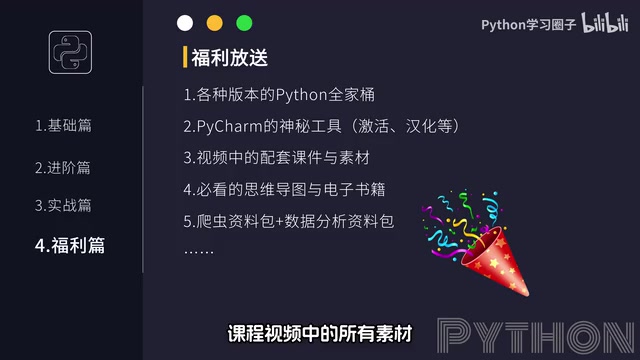
The course provides a fairly complete set of supporting resources, including:
- Python development environment setup resource pack
- Study plan schedule
- Course materials and e-books
- Lecture slides
The completeness of supporting resources is crucial for self-learners. A good study plan helps you allocate your time wisely, preventing you from getting stuck too long on one topic or skipping important content.
Objective Review and Course Selection Advice
Strengths
The course has a well-designed structure with a clear progression from fundamentals to intermediate topics to hands-on projects. For absolute beginners, this kind of "one-stop" tutorial genuinely reduces the time cost of switching between different resources.
Points to Keep in Mind
- Take the "most complete" claim with a grain of salt: No single course can cover every Python application scenario. Learners should selectively dive deeper based on their own goals.
- Depth of hands-on projects: Free courses typically feature beginner-level projects. If your goal is employment, you'll need to supplement with more complex project experience.
- Learning pace: Don't be misled by claims of "learning quickly." Solidly mastering Python requires at least 3–6 months of consistent practice.
Who Is This Course For?
- Absolute beginners who want a systematic introduction to Python
- Developers with experience in other languages who want to quickly learn Python syntax
- Working professionals who want to use Python to boost their work efficiency
Overall, as a free, systematic tutorial, it provides a relatively complete learning path for Python beginners. But the real learning outcome ultimately depends on how much practice time and deep thinking you invest.
Related articles
 Tutorials
Cursor + Codex Dual-IDE Collaboration: A Practical Methodology for Open-Source Project Customization
A complete methodology for open-source project customization based on real-world experience, detailing the Cursor+Codex dual-IDE workflow, seven-stage process, MVP validation, and AI source code reading techniques.
 Tutorials
Cursor Multi-Agent in Practice: Building a Full-Stack Next.js Blog in 50 Minutes
Build a full-stack blog in 50 minutes using Cursor IDE's multi-Agent mode with Next.js, Clerk auth, and Supabase. Learn the 4-phase AI Agent workflow and key integration pitfalls.
 Tutorials
Building an AI Software Factory from Scratch: A Cursor Engineer's Hands-On Experience with Multi-Agent Collaboration
Cursor engineer Eric shares practical insights on building an AI software factory: automation levels, guardrail design, parallel Agent management, and scaling to 1000+ Agents for 24/7 development.