Rainbond App Store: One-Click Dify Deployment Without the Command Line

Rainbond's app store makes deploying open source software as easy as installing a phone app.
This article introduces Rainbond's app store model, which simplifies complex open source software deployment to a one-click installation. Using the popular AI platform Dify as an example, it demonstrates how you can complete a multi-microservice deployment without any command-line operations — just click install, select a team, and wait for everything to be ready. Version upgrades are equally effortless, making it ideal for small teams and AI application explorers.
Say Goodbye to the Command Line — Open Source Deployment Enters the "App Store" Era
Are you still typing commands line by line in a Linux terminal to deploy open source software? Setting up environment variables, resolving dependencies, orchestrating Docker containers… these tedious tasks used to be an unavoidable rite of passage for every developer. Rainbond offers a completely new approach — deploy open source software as easily as installing an app on your phone, with just a single click.
In this article, we'll use Dify, a popular AI application development platform, as an example to demonstrate how Rainbond's built-in app store enables one-click installation, making complex deployments effortless.
Rainbond App Store: Hundreds of Open Source Apps Ready to Use
Rainbond features a rich built-in app store with hundreds of high-quality mainstream open source applications spanning multiple core domains:
- AI Agents & Applications: AI application development platforms like Dify, FastGPT, and more
- Business & Productivity Apps: Tools for everyday enterprise operations and business needs
- AI Development & Orchestration: Visual orchestration capabilities for AI workflows
- Development Tools & Environments: Coverage of mainstream programming languages and frameworks
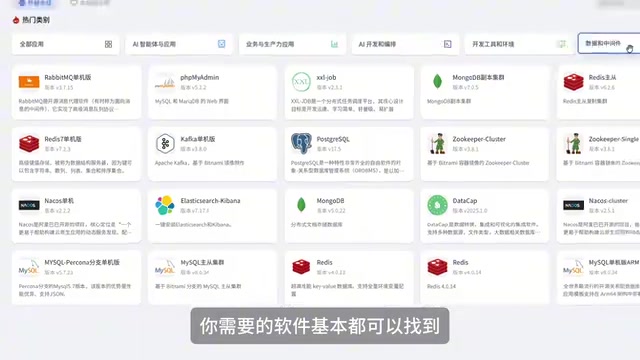
- Data & Middleware: Infrastructure components like databases, message queues, and more
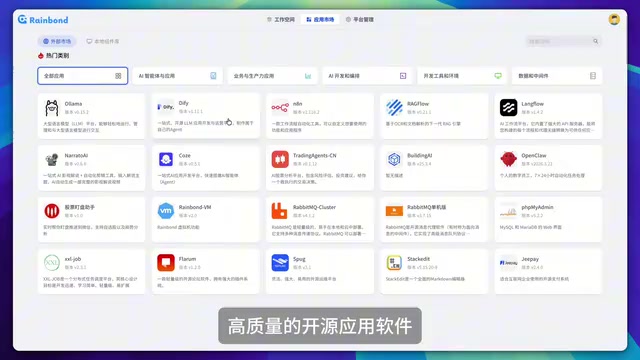
In short, virtually any software you need for day-to-day development and operations can be found in this store. The greatest value of this "app store" model lies in packaging complex deployment configurations into standardized installation bundles — users don't need to worry about underlying container orchestration, network configuration, or dependency management.
Hands-On Demo: One-Click Dify Installation Walkthrough
Dify is one of the hottest open source AI application development platforms right now, supporting rapid development of LLM-powered applications. Deploying Dify the traditional way requires configuring PostgreSQL, Redis, a vector database, and several other components — a fairly complex process. With Rainbond, the entire installation workflow is simplified to the extreme.
Step 1: Find the App and Click Install
Search or browse for Dify in the Rainbond App Store and simply click the "Install" button. The experience is virtually identical to downloading an app from your phone's app store.
Step 2: Select a Team and Confirm Deployment
The installation process is straightforward — select which team (Rainbond's resource isolation unit) you want to install it to, confirm, and Rainbond will automatically begin the deployment.

Here's a key point worth noting: you don't need to manually orchestrate or manage the relationships between components. Dify involves multiple microservice components (API service, web frontend, Worker, database, etc.), and Rainbond automatically handles the network communication, environment variable passing, and startup order between them. In traditional Docker Compose or Kubernetes deployments, this is often where things go wrong.
Step 3: Wait for Components to Be Ready and Access the App
Once all component statuses turn green, the application is up and running. Simply click the "Access" button to open Dify's web interface and start building your AI applications.

From clicking install to actually using the app, you never need to open a terminal or write a single configuration file — the entire experience is seamless.
Ongoing Maintenance: Version Upgrades Are Just as Easy
Deployment is just the beginning — version upgrades are often an even bigger headache. With traditional methods, upgrading a multi-component application means updating images one by one, checking configuration compatibility, handling data migrations… one misstep could lead to service downtime.
Rainbond simplifies this as well: when a new version is released, you don't need to redeploy from scratch. Simply select the new version in the application's "Upgrade" feature and click to complete the upgrade. Rainbond automatically handles rolling updates and configuration changes for each component, minimizing upgrade risks.
Use Cases & Value Analysis
Rainbond's app store model is particularly well-suited for the following types of users:
- Small and medium-sized teams: No dedicated ops personnel, but need to quickly set up various development and business tools
- AI application explorers: Want to quickly try out AI platforms like Dify and FastGPT without spending time on environment configuration
- Internal enterprise platforms: Need to provide standardized software delivery and management capabilities for their teams
Of course, this high level of encapsulation and convenience does come with some trade-offs in flexibility. Advanced users who need deep customization of deployment configurations may need to leverage Rainbond's custom configuration capabilities to meet specialized requirements.
Conclusion
From the command line to the app store, Rainbond represents an important trend in cloud-native application delivery: encapsulating complexity at the platform layer so users can focus on the value of the applications themselves. Taking Dify as an example, what might have taken 30 minutes or more to deploy can now be completed in just a few minutes. If you're looking for a more efficient way to deploy open source software, Rainbond's app store is well worth a try.
Related articles
 Tutorials
Cursor + Codex Dual-IDE Collaboration: A Practical Methodology for Open-Source Project Customization
A complete methodology for open-source project customization based on real-world experience, detailing the Cursor+Codex dual-IDE workflow, seven-stage process, MVP validation, and AI source code reading techniques.
 Tutorials
Cursor Multi-Agent in Practice: Building a Full-Stack Next.js Blog in 50 Minutes
Build a full-stack blog in 50 minutes using Cursor IDE's multi-Agent mode with Next.js, Clerk auth, and Supabase. Learn the 4-phase AI Agent workflow and key integration pitfalls.
 Tutorials
Building an AI Software Factory from Scratch: A Cursor Engineer's Hands-On Experience with Multi-Agent Collaboration
Cursor engineer Eric shares practical insights on building an AI software factory: automation levels, guardrail design, parallel Agent management, and scaling to 1000+ Agents for 24/7 development.