Introduction to Software Testing: A Complete Guide to Classification Systems and Core Concepts
Introduction to Software Testing: A Co…
A comprehensive breakdown of software testing fundamentals, classification systems, and core testing types.
This article systematically introduces the foundational knowledge of software testing. It first clarifies that software consists of programs, data, and documentation, then explains the definition and three purposes of testing (finding Bugs, reducing costs, improving quality). It covers multiple classification dimensions: by phase (unit, integration, system, and acceptance testing), by technique (black-box, white-box, and gray-box testing), and highlights three critical testing types—smoke testing, regression testing, and exploratory testing.
What Is Software? It's More Than Just a Program
Many beginners assume that software is the same as a program, but this is a common misconception. Software actually consists of three components: programs + data + documentation.
- Programs: The apps we use daily—Taobao, JD.com, WeChat, Alipay—are all concrete manifestations of programs.
- Data: Take QQ as an example. After logging in, the friend list, chat history, and account information you see are all part of the software's data. Different users see different data, but it's all an inseparable part of the software.
- Documentation: This includes user help documents, terms of service, contract clauses, and more. For instance, the user agreement you must accept when registering for QQ is documentation associated with the program.
Application Software vs. System Software
Software can be divided into two major categories: application software and system software.
- Application software: Programs developed to solve specific problems. JD.com and Taobao address shopping needs, Alipay handles payment needs, and WeChat fulfills communication needs—these are all application software.
- System software: Software that provides a runtime environment for other programs. Operating systems like Windows, Android, iOS, and Linux are all system software. Without system software, application software cannot run—just like a phone is useless without an operating system.
In practice, the vast majority of what we test is application software.
Definition and Purpose of Software Testing
Standard Definition
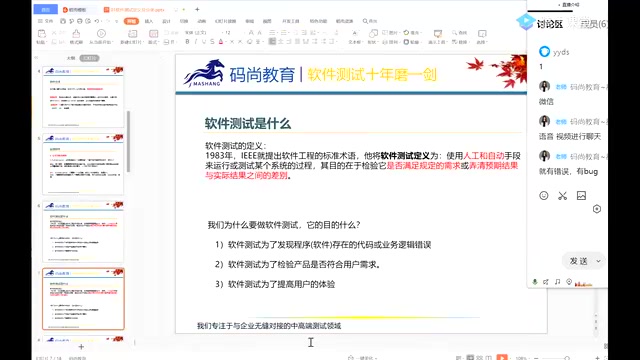
The standard definition of software testing is: The process of using manual or automated means to run or test a given system.
Here, "manual" refers to manual testing, while "automated" refers to automated testing achieved through code or testing tools. The core of testing lies in verifying whether the system under test meets specified requirements and identifying differences between expected results and actual results.
There's a key concept here—the Software Requirements Specification (SRS). It's a standardized document created by organizing and confirming user requirements, and it serves as the basis for testers to determine whether the software meets quality standards. Expected results come from the SRS, while actual results come from real test execution. Any discrepancy between the two indicates a Bug.
Three Main Purposes of Software Testing
- Finding Bugs: Identifying defects in the software by comparing expected results with actual results.
- Reducing costs: The earlier a problem is found, the lower the cost to fix it. Bugs discovered late in the process often involve more modules, and the difficulty and labor costs of fixing them grow exponentially.
- Improving quality: Finding and fixing bugs ultimately aims to enhance product quality and user experience.
Classification by Phase: The Four Testing Stages
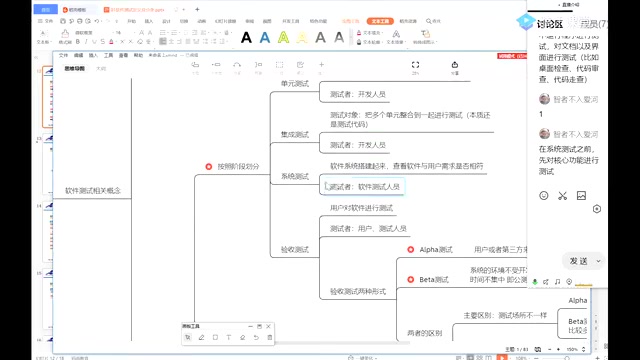
Software testing can be divided into four levels based on the stage of development. Understanding these four stages is fundamental to mastering the software testing classification system.
Unit Testing
The test target is the smallest unit in the program code—a module, function, or class. It's like buying a model car and first checking whether each individual part is intact. Unit testing is performed by developers, as it requires a deep understanding of the code logic.
Integration Testing
Multiple modules that have already passed unit testing are combined together for testing. For example, after the registration feature and login feature are tested separately, you verify whether "a user can successfully log in after registering." This is like gradually assembling the parts of a model car and checking whether the pieces connect properly. Integration testing is still essentially code-level verification and is typically handled by developers.
System Testing
The complete software system is deployed to a test environment to verify whether its functionality aligns with user requirements. This is the core of a tester's daily work. It's like verifying whether the fully assembled model car can drive on the ground, accelerate, and decelerate.
Acceptance Testing (Alpha Testing and Beta Testing)
The user or a third party commissioned by the user performs final verification of the software to confirm whether it meets the originally stated requirements. Acceptance testing comes in two important forms:
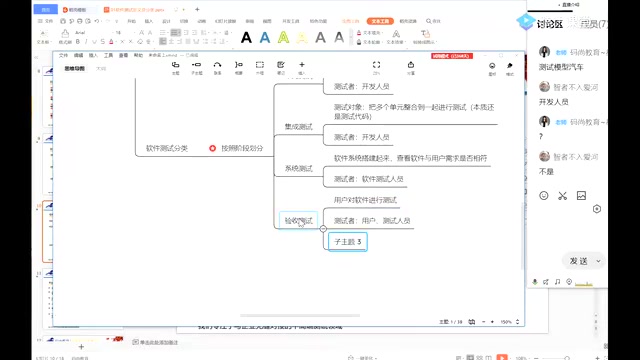
- Alpha testing: Users or third-party testing companies come to the developer's site and test the system in an environment provided by the developer. This is essentially an "internal test."
- Beta testing: The software is released into real user environments for public testing. The testing environment is not controlled by the developer, and there are many testers over a non-concentrated time period. Tencent QQ releasing a Beta version for users to try out is a classic example of Beta testing.
Key difference: Alpha testing takes place at the developer's site, while Beta testing takes place in the user's real environment. Alpha testing is conducted before Beta testing.
Classification by Technique: Black-Box, White-Box, and Gray-Box Testing
Based on whether the code is examined, software testing can be divided into three technical types:
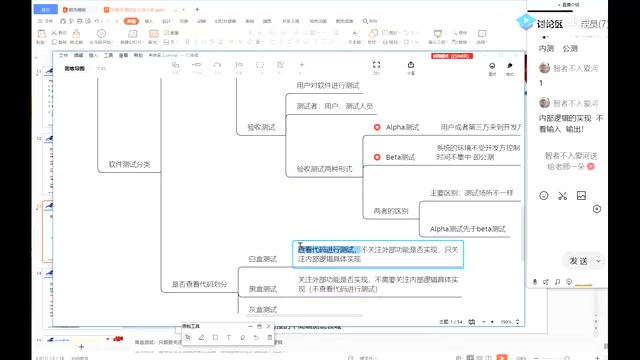
Black-Box Testing
Ignores internal implementation logic and focuses only on whether external functionality is correct. You input a value and check whether the output matches expectations. It's like playing Honor of Kings—you only care whether your character moves when you swipe the screen, without needing to know how the underlying code works. The daily work of junior and mid-level testers is essentially black-box testing.
White-Box Testing
Focuses only on whether the internal code logic is correct, requiring in-depth code review. This demands that testers not only understand code but also possess technical skills superior to the developers in order to identify issues in the code. It falls under the category of advanced testing.
Gray-Box Testing
Falls between black-box and white-box testing, paying attention to both external functionality and internal logic—a combination of both approaches. In real-world projects, gray-box testing is increasingly common, especially in the area of API testing.
Other Important Testing Classification Dimensions
By Whether the System Under Test Is Running
- Static testing: The system under test is not executed. Verification is performed through document reviews, code walkthroughs, desk checks, and similar activities.
- Dynamic testing: The system under test is executed to check whether actual results match expected results. Daily testing work primarily falls under dynamic testing.
By Testing Method
- Manual testing: Testing software through human operation—the most fundamental testing approach.
- Automated testing: Tests are executed automatically through code or tools without manual operation, suitable for highly repetitive scenarios such as regression testing.
By Testing Content
| Test Type | Core Focus |
|---|---|
| Functional testing | Verifying whether all features work correctly |
| UI testing | Checking whether the UI's colors, layout, and design meet user requirements |
| Security testing | Verifying whether the system has security vulnerabilities (e.g., SQL injection, account theft) |
| Compatibility testing | Verifying whether the system runs correctly across different browsers and operating systems |
| Usability testing | Evaluating whether the software is easy to use and convenient to operate |
| Performance testing | Verifying system stability under high-concurrency user scenarios |
Three Essential Special Testing Types
Smoke Testing
A preliminary test of core functionality conducted before system testing. After development is complete and the build is deployed to the test environment, testers don't immediately begin comprehensive testing. Instead, they first verify whether the main features work end-to-end. If smoke testing fails, it means the build quality is too poor to justify system testing, and it should be sent back to the developers for fixes.
Regression Testing
Verification testing performed on previously fixed Bugs. However, regression testing isn't just about verifying whether the Bug itself has been fixed. It also requires attention to three additional points:
- Verify whether the fixed Bug is truly resolved
- Test whether related functionality has been affected by the fix
- When time permits, perform comprehensive coverage testing of all features
This is because when developers fix one Bug, they may very well "patch one hole while creating another problem elsewhere."
Random Testing (Exploratory Testing)
Based on the tester's experience and intuition, the system is "stressed" through unconventional operations. For example, entering negative numbers or special characters in a withdrawal feature to see whether the system handles them correctly. Random testing typically serves as a supplementary approach to regular testing and can uncover many issues that standard test cases fail to cover.
Summary
Software testing is a systematic discipline. From foundational concepts to classification systems, every dimension serves a purpose. For beginners, the following core knowledge points deserve special attention:
- The four testing stages: The progressive relationship of unit testing → integration testing → system testing → acceptance testing
- Alpha vs. Beta testing: The essential difference between internal testing and public testing
- Black-box vs. white-box testing: The fundamental distinction of whether code logic is examined
- Smoke testing: The quality gate before system testing
- Regression testing: It's not just about verifying Bug fixes—you must also watch for cascading impacts
Understanding these concepts isn't about rote memorization—it's about building a solid theoretical foundation for your future hands-on testing work.
Related articles
 Tutorials
Cursor + Codex Dual-IDE Collaboration: A Practical Methodology for Open-Source Project Customization
A complete methodology for open-source project customization based on real-world experience, detailing the Cursor+Codex dual-IDE workflow, seven-stage process, MVP validation, and AI source code reading techniques.
 Tutorials
Cursor Multi-Agent in Practice: Building a Full-Stack Next.js Blog in 50 Minutes
Build a full-stack blog in 50 minutes using Cursor IDE's multi-Agent mode with Next.js, Clerk auth, and Supabase. Learn the 4-phase AI Agent workflow and key integration pitfalls.
 Tutorials
Building an AI Software Factory from Scratch: A Cursor Engineer's Hands-On Experience with Multi-Agent Collaboration
Cursor engineer Eric shares practical insights on building an AI software factory: automation levels, guardrail design, parallel Agent management, and scaling to 1000+ Agents for 24/7 development.