Running AI Models on a P106 Mining GPU: Build a Local AI Workstation for Under $10
Running AI Models on a P106 Mining GPU…
A $5 mining GPU can run AI models like Live Portrait locally — the ultimate budget AI setup.
This article explains how to repurpose a secondhand P106 mining GPU ($4-$11) to build a local AI workstation for running AI inference tasks like Live Portrait. Although the P106 lacks video output, it retains all 1,280 CUDA cores and 6GB of VRAM — exactly what's needed for parallel matrix operations in AI inference. The local deployment approach offers data privacy, zero marginal cost, and unlimited use, making it an ideal low-cost entry point for content creators looking to get started with AI.
A Second Life for Mining GPUs: From Crypto to AI
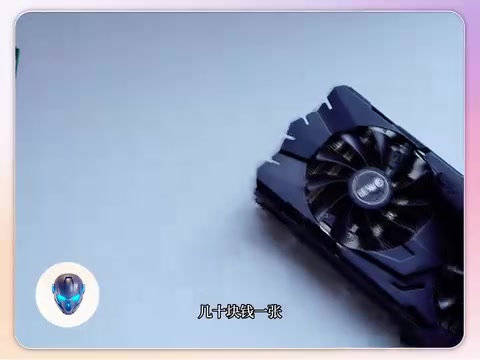
You've probably seen these odd-looking things on the secondhand market — they look like graphics cards, but with only a single HDMI port, or in some cases, no display output at all. These are the P106 or CMP series dedicated compute cards, commonly known as "mining GPUs." Once running around the clock in cryptocurrency mining farms, they can now be picked up on secondhand platforms for as little as a few dollars.
Using one for gaming? That would be painful — no video output, incomplete driver support. But if you think outside the box and use it for AI model inference, things get interesting.
Historical Background and Technical Architecture of the P106
The P106 mining GPU was born during the 2017 cryptocurrency mining boom. At the time, NVIDIA launched the CMP (Cryptocurrency Mining Processor) series and the P106-100 to ease market pressure from miners buying up gaming GPUs in bulk. These cards are based on the Pascal architecture (GP106 chip) and share the same compute cores as the GTX 1060, but with video output interfaces and some graphics rendering capabilities deliberately disabled at the hardware level to prevent gaming use. The P106-100 features 1,280 CUDA cores, a base clock of 1506MHz, 6GB of GDDR5 VRAM, and a theoretical single-precision floating-point performance of approximately 3.8 TFLOPS — a mainstream figure in 2017 that remains adequate for lightweight AI inference tasks today.
Live Portrait: The AI Tool That Brings Photos to Life
What Is Live Portrait?
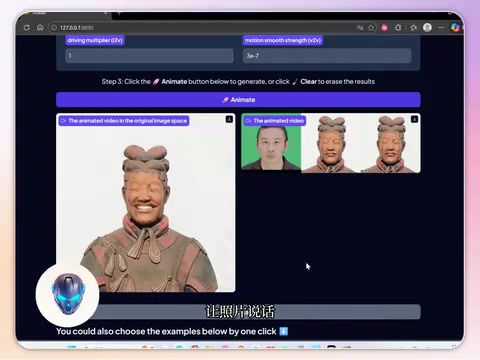
Live Portrait is a deep learning-powered AI tool whose core capability is making static photos move. All you need is a photo and a driving video, and the AI transfers the expressions and movements from the video onto the person in the photo, enabling effects like "talking photos" and "dancing portraits."
Live Portrait is based on Implicit Keypoint-driven portrait animation technology, with academic roots tracing back to pioneering work such as the First Order Motion Model (2019). The system operates in three stages: first, a feature extraction network encodes the source photo into an appearance representation in a high-dimensional feature space; second, a motion estimation network extracts per-frame motion fields from the driving video, describing displacement and deformation across facial regions; finally, an image generation network fuses the appearance features with the motion field to render the target person's dynamic video frame by frame. The entire inference pipeline relies heavily on convolutional neural network (CNN) matrix operations and is sensitive to VRAM bandwidth and CUDA parallelism, while having zero dependency on the graphics rendering pipeline (rasterization, texture sampling, etc.). The 6GB of VRAM can fully load Live Portrait's model weights (approximately 2-3GB) while retaining enough space for intermediate feature maps.
This type of technology has already gone viral on overseas platforms, but the cost of using online API services is far from cheap — fees of tens of dollars per use are enough to deter many creators.

Why Can the P106 Handle AI Inference?
Although the P106 has had its graphics rendering capabilities stripped away, it retains its full complement of CUDA cores. CUDA (Compute Unified Device Architecture) is a parallel computing platform and programming model introduced by NVIDIA in 2006. Its core concept is organizing the thousands of small processing cores in a GPU into programmable parallel compute units, allowing developers to directly dispatch these cores for general-purpose computing tasks. AI inference is fundamentally about large-scale matrix multiplication — the forward propagation of a neural network requires parallel multiply-accumulate operations on millions of parameters. This highly parallel computation pattern is a natural fit for GPU hardware architecture and has absolutely nothing to do with whether the card has video output capability.
In other words, the features the P106 is missing are exactly the ones AI inference doesn't need, and the compute power it retains is exactly what AI inference needs most. It's like a truck with the seats and stereo removed — terrible for passengers, but perfectly fine for hauling cargo.
Hands-On Guide: Building a Local AI Workstation for Under $10
Hardware Cost Breakdown
The core hardware investment for this setup is extremely low:
- P106 compute card: Secondhand price approximately $4-$11
- Host machine: Any desktop with a PCIe slot will do
- VRAM: The P106 typically comes with 6GB GDDR5, sufficient for running lightweight AI models like Live Portrait
For content creators, this cost-to-value ratio is virtually unbeatable — a single mining GPU may cost less than one API call on an online service.
Software Deployment Process
The community has already released offline integration packages for Live Portrait, significantly lowering the deployment barrier:
- Install the appropriate version of the NVIDIA driver and CUDA toolkit
- Download the Live Portrait offline integration package
- Prepare a target photo and a driving video
- Click generate and wait for the P106's CUDA cores to complete the inference computation
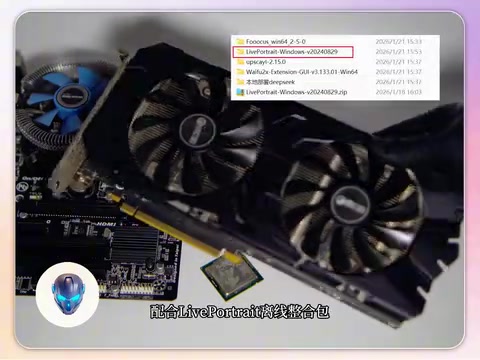
The entire process runs completely locally — no internet connection required, and no data needs to be uploaded to the cloud.
Three Core Advantages of Local AI Deployment
Data Privacy and Security
All data processing happens locally, so your photos and video assets never leave your computer. This is especially important for AI applications involving facial data. While online services are convenient, once facial data is uploaded, it's difficult to control where it ends up — regulations like the EU's GDPR impose strict restrictions on cross-border transfer of personal biometric data. Local deployment fundamentally eliminates this compliance risk.
Zero Marginal Cost
After a one-time hardware investment of a few dollars, all subsequent use is completely free. Whether you generate 100 videos or 10,000, the only cost is electricity. For content creators who need to produce content at scale, the economic advantage is overwhelming. This is precisely the core advantage of Edge Computing over cloud computing — migrating compute tasks to local devices completely eliminates API call fees that scale linearly with usage.
Unlimited, Unrestricted Use
No API call limits, no queuing, no content moderation. You can experiment with your creations anytime, free from any platform restrictions.
A Realistic View: Limitations of the P106
Of course, it's important to objectively acknowledge the P106's shortcomings:
- Limited VRAM: 6GB of VRAM can only run lightweight models and cannot handle local inference for large language models like LLaMA
- Slower compute speed: Compared to modern GPUs, the P106's inference speed is noticeably slower, and generating a video may require a longer wait
- Driver compatibility: As a mining card, driver installation may require some tinkering and isn't very beginner-friendly
- Uncertain hardware lifespan: Cards that have endured prolonged mining carry lifespan risks
Regarding lifespan concerns, the reality is more optimistic than you might expect. Mining farms typically run GPUs at 70-80% power draw with professional cooling, avoiding the frequent temperature swings common in gaming scenarios (thermal cycling stress is one of the primary sources of hardware degradation). Practical methods for assessing a mining GPU's condition include: using GPU-Z to check VRAM error rates, running FurMark stress tests to observe temperature curves, and checking whether the memory clock has been downclocked. Given the entry price of just a few dollars, even if the lifespan is cut in half, the value proposition still far exceeds that of a new card with equivalent compute power.
Conclusion: Is Running AI on a Mining GPU Worth It?
Running AI models on a P106 mining GPU is essentially an ultra-cost-effective edge computing solution. In recent years, as large model inference costs have continued to decline and model quantization and compression techniques (such as GGUF and AWQ formats) have matured, an increasing number of AI tasks are migrating from the cloud to local devices. The repurposing of P106 mining GPUs is an extreme manifestation of this trend in the consumer market. It's not suitable for professional users who demand peak performance, but for individuals and small content creators who want to experience AI creation at minimal cost while protecting their data privacy, this may be the most cost-effective entry point available today. An investment of a few dollars in exchange for a fully self-owned local AI creation workstation — no matter how you do the math, it's a deal.
Key Takeaways
- The P106 mining GPU is based on the Pascal architecture and, while unsuitable for gaming, retains a full complement of 1,280 CUDA cores ideal for AI inference tasks
- Live Portrait uses implicit keypoint-driven technology, with its inference process heavily reliant on CUDA parallel matrix operations — a perfect match for the P106's hardware characteristics
- Combined with the Live Portrait offline integration package, you only need one photo and one driving video to generate dynamic portrait videos locally
- The local deployment approach balances privacy security with zero marginal cost, offering exceptional value for content creators
- The P106 has limitations including limited VRAM, slower speeds, and driver compatibility issues, but its price tag of just a few dollars makes it an excellent entry-level AI hardware option
- This approach to repurposing mining GPUs represents a viable edge AI computing solution, aligned with the industry trend of migrating AI inference from the cloud to local devices
Related articles
 Tutorials
Cursor + Codex Dual-IDE Collaboration: A Practical Methodology for Open-Source Project Customization
A complete methodology for open-source project customization based on real-world experience, detailing the Cursor+Codex dual-IDE workflow, seven-stage process, MVP validation, and AI source code reading techniques.
 Tutorials
Cursor Multi-Agent in Practice: Building a Full-Stack Next.js Blog in 50 Minutes
Build a full-stack blog in 50 minutes using Cursor IDE's multi-Agent mode with Next.js, Clerk auth, and Supabase. Learn the 4-phase AI Agent workflow and key integration pitfalls.
 Tutorials
Building an AI Software Factory from Scratch: A Cursor Engineer's Hands-On Experience with Multi-Agent Collaboration
Cursor engineer Eric shares practical insights on building an AI software factory: automation levels, guardrail design, parallel Agent management, and scaling to 1000+ Agents for 24/7 development.