Spring AI Alibaba MCP Integration in Practice: Full Workflow from Server Setup to Client Invocation
Spring AI Alibaba MCP Integration in P…
Build MCP services with Java + Spring AI Alibaba to let LLMs invoke external tools
This article details how to build an MCP (Model Context Protocol) Server and Client using Java and the Spring AI Alibaba framework. MCP is a standardized protocol proposed by Anthropic to solve the fragmentation problem of integrating LLMs with external tools. By defining tool capabilities with @Tool and @ToolParam annotations, registering them in MCP callbacks, and exposing services via SSE endpoints, any MCP-compatible client (such as the Trae IDE) can plug and play, enabling LLMs to securely access business data.
What Is MCP? Why Should Java Developers Care?
MCP (Model Context Protocol) is becoming the standard interface layer for connecting large language models with external tools in AI applications. It enables LLMs to "know" which external capabilities they can invoke and automatically call these tools at the right moment to fulfill user requests.
MCP was formally introduced and open-sourced by Anthropic in late 2024, aiming to solve the problem of fragmented interfaces when integrating LLMs with external systems. Before MCP, every AI application that needed to interact with external tools (databases, APIs, file systems, etc.) required custom integration code, resulting in massive duplication of effort and maintenance costs. MCP draws inspiration from LSP (Language Server Protocol) — just as LSP uses a unified protocol to let any editor connect to any programming language's intelligent suggestion service, MCP uses a unified protocol to let any AI client connect to any tool service. The emergence of this standardized protocol marks an architectural evolution in AI applications from "monolithic intelligence" to "composable intelligence."
This article, based on a hands-on demonstration by a Bilibili content creator, provides a detailed breakdown of how to build an MCP Server and MCP Client using Java + Spring AI Alibaba, and demonstrates how to integrate MCP tools into AI clients like Trae, enabling LLMs to access local business data.
Spring AI Alibaba is an extension project launched by Alibaba based on the Spring AI framework, specifically targeting Chinese developers and the domestic LLM ecosystem. Spring AI itself is a project initiated by the Spring team in late 2023, with the goal of providing Java ecosystem capabilities similar to Python's LangChain for AI application development. Spring AI Alibaba builds on this foundation with deep integration of Alibaba's Qwen (Tongyi Qianwen) and other Alibaba-series LLMs, along with native support for the MCP protocol. For Java developers, this means you can use the familiar Spring Boot development paradigm (dependency injection, annotation-driven configuration, auto-configuration) to build AI applications without switching to a Python tech stack.
Project Architecture Overview: Responsibilities of MCP Server and Client
The entire project consists of two core modules:
- MCP Server: The tool service side, responsible for defining and exposing tool capabilities (e.g., weather queries)
- MCP Client: The client side, responsible for retrieving the tool list and invoking tools during conversations (optional)
The key point is: the client is optional — the Server is what matters most. Any client that can access the Server's tool list (including third-party AI tools like Trae) can directly use MCP capabilities.
MCP Server Implementation in Detail
Dependency Configuration
The Server side requires two key dependencies: the Spring AI Alibaba POM and the WebFlux POM. The WebFlux dependency package already includes the MCP core library and MCP Server WebFlux-related components.
WebFlux is the reactive web framework introduced in Spring Framework 5, implementing a non-blocking asynchronous I/O model based on the Reactor library. Using WebFlux instead of traditional Spring MVC for the MCP Server is driven by two considerations: First, MCP communication relies on SSE (Server-Sent Events), a long-connection technology where the server continuously pushes data to the client — WebFlux's reactive streams are naturally suited for this scenario. Second, an MCP Server may be concurrently invoked by multiple AI clients, and WebFlux's non-blocking model offers better resource utilization than the traditional thread-pool model under high concurrency. In short, WebFlux allows the MCP Server to support more concurrent connections with fewer system resources.
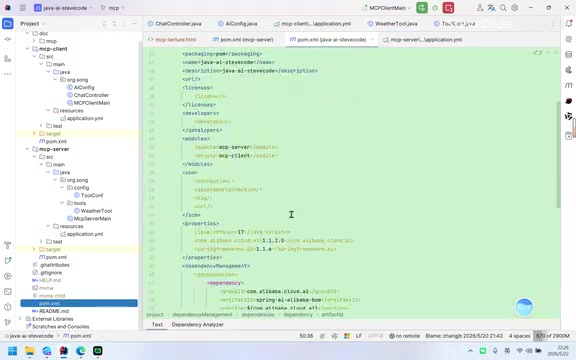
Specific dependencies can be found in the official Spring AI Alibaba documentation and won't be repeated here.
Tool Definition: Annotation-Driven with @Tool and @ToolParam
The core of an MCP Server lies in tool definition. Two key annotations are used to declare tool capabilities:
- @Tool: Applied to a method, it tells the MCP framework "this method is a tool available for LLM invocation" and describes the tool's functionality (e.g., "get weather by city")
- @ToolParam: Applied to parameters, it describes the meaning of each parameter (e.g., "city name")
Behind these two annotations lies the LLM's Function Calling capability. Function Calling was first introduced by OpenAI in June 2023 and has since been widely adopted by mainstream LLMs including Qwen, Claude, and Gemini. Here's how it works: developers pass available function names, descriptions, and parameter schemas in JSON format to the LLM. After understanding the user's intent, instead of generating a text response directly, the LLM outputs a structured function call instruction (containing the function name and parameter values). The client receives this instruction, executes the actual function call, and returns the result to the LLM for final natural language synthesis. The MCP protocol is essentially a standardized wrapper around this process — the tool descriptions generated by the @Tool annotation are ultimately converted into a Function definition format that the LLM can understand.
Taking weather queries as an example, the code logic is very straightforward: it receives a city name parameter and returns the corresponding weather and temperature data based on the city. The demonstration uses mock data (e.g., Beijing returns "Sunny, 25°C"), but in a real project, this can be replaced with actual weather API calls.
Tool Registration: Making Your Capabilities Discoverable by LLMs
After defining tool methods, you also need to register them in MCP's callback mechanism so the AI can identify "what capabilities I have."
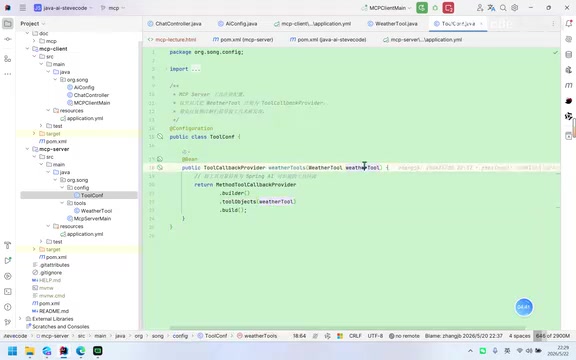
Registration uses varargs, which means you can register multiple tool capabilities simultaneously — weather queries, company data queries, fund data queries, etc. — all can be added in the same way.
After registration, some system configuration is needed, and you must ensure the tool class is managed by the Spring container (by adding the appropriate Bean annotations). Once configured, you can verify the service is running properly by requesting the current service's SSE endpoint. If SSE responds normally, the MCP Server is ready.
MCP Client Implementation: Retrieving the Tool List and Making Calls
Dependencies and Configuration
The Client side requires more dependencies than the Server side, including: Web dependencies, WebFlux client dependencies, and OpenAI model endpoint dependencies.
Core Logic: Injecting the Tool List into the Chat Client
The Client implementation follows a very clear approach:
- Retrieve the tool list: Get all available tool definitions from the MCP Server
- Inject into the chat client: Assign the tool list to the ChatClient, giving it tool-calling capabilities during conversations
- System prompt configuration: Set up system messages to tell the LLM "if the query involves weather, UV index, etc., prioritize using tools"
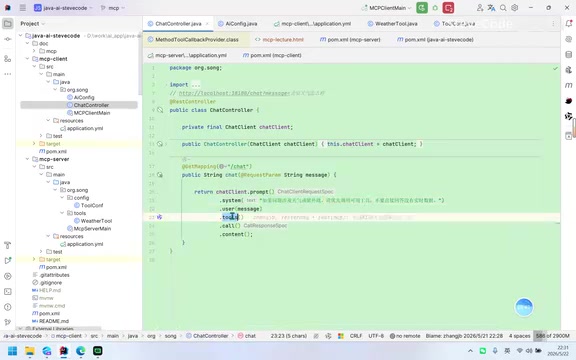
When a user sends a message asking about Beijing's weather, the LLM checks the tool list, finds a matching weather query tool, automatically organizes the parameters (city name = "Beijing"), calls the MCP Server's tool interface, and ultimately integrates the result into its response: "The current weather in Beijing is sunny with a temperature of 25°C."
Integrating with Trae: Connecting a Third-Party AI Client to the MCP Server
As mentioned earlier, the MCP Client is optional because any client that supports the MCP protocol can directly connect to the MCP Server. Using Trae as an example, the integration steps are:
- Open Trae settings, find the MCP configuration option, and enable it
- Check the necessary options (both checkboxes need to be selected)
- Configure the MCP Server information: name (e.g.,
java-mcp-server) and URL (the Server's SSE endpoint address)
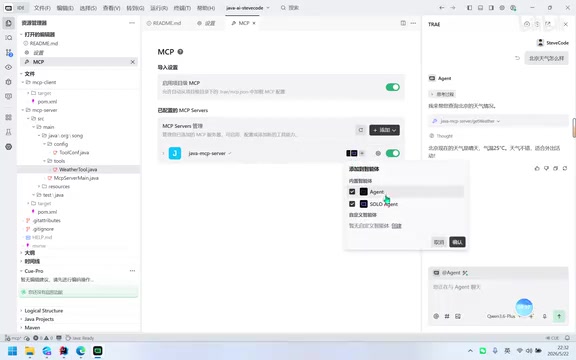
Trae is an AI-native integrated development environment (IDE) launched by ByteDance, built on the VS Code core with built-in AI conversation, code generation, and intelligent completion capabilities. Trae's support for the MCP protocol makes it a convenient tool for validating MCP Servers. Similarly, next-generation AI IDEs like Cursor, Windsurf, and Continue have also integrated MCP support, reflecting an industry trend: AI development tools are shifting from "built-in fixed capabilities" to an "extensible tool ecosystem." Developers can use MCP Servers to connect enterprise internal database queries, CI/CD pipelines, monitoring alerts, and other capabilities to AI IDEs, enabling AI assistants to not only write code but also directly operate business systems, significantly boosting development efficiency.
Once configured, you can see the tool list retrieved from the MCP Server in Trae's tool dropdown. During conversations, Trae will automatically match and invoke the appropriate tools based on the dialogue content.
In the actual demonstration, when asking about Beijing's weather in Trae, you can see it passing parameters to the MCP Server. The Server-side logs also show a tool invocation record, and the final result matches the data defined in the code exactly: Sunny, 25°C.
SSE vs. Stdio: Comparing Two Transport Methods
This article demonstrates the SSE (Server-Sent Events) transport method, which communicates via HTTP endpoints. MCP also supports another method called Stdio (Standard Input/Output), which has a different configuration syntax.
SSE is a server push technology defined in the HTML5 specification, implementing a unidirectional server-to-client data stream over HTTP. Unlike WebSocket's full-duplex communication, SSE is unidirectional (server pushes to client only), but its advantages include simple implementation, native support for automatic reconnection, and the ability to traverse most firewalls and proxy servers. In the MCP context, SSE is used in two key scenarios: first, the client establishes a persistent connection with the Server to receive tool list updates; second, during tool invocation, the Server can stream execution progress or results back via SSE. In contrast, the Stdio method communicates through standard input/output streams between processes, suitable for local scenarios where the MCP Server and Client run on the same machine (e.g., IDE plugins), while SSE is suited for network scenarios where the Server is deployed on a remote server.
If you need to use the Stdio method, refer to the official Spring AI Alibaba documentation or consult an LLM for specific configuration details.
Summary: The Core Value MCP Brings to Java AI Applications
As the "tool interface standard layer" in AI applications, MCP's core value lies in decoupling — separating the definition of tool capabilities (Server side) from tool consumption (Client side). With the Spring AI Alibaba framework, Java developers can build MCP services with great convenience:
- Declare tool capabilities using
@Tooland@ToolParamannotations - Register tools in the MCP callback
- Expose services via SSE endpoints
- Any client supporting the MCP protocol can plug and play
This architecture enables enterprise internal business data and capabilities to be securely and standardly invoked by LLMs, making it one of the key infrastructure components for deploying AI applications in production.
Related articles
 Tutorials
Cursor + Codex Dual-IDE Collaboration: A Practical Methodology for Open-Source Project Customization
A complete methodology for open-source project customization based on real-world experience, detailing the Cursor+Codex dual-IDE workflow, seven-stage process, MVP validation, and AI source code reading techniques.
 Tutorials
Cursor Multi-Agent in Practice: Building a Full-Stack Next.js Blog in 50 Minutes
Build a full-stack blog in 50 minutes using Cursor IDE's multi-Agent mode with Next.js, Clerk auth, and Supabase. Learn the 4-phase AI Agent workflow and key integration pitfalls.
 Tutorials
Building an AI Software Factory from Scratch: A Cursor Engineer's Hands-On Experience with Multi-Agent Collaboration
Cursor engineer Eric shares practical insights on building an AI software factory: automation levels, guardrail design, parallel Agent management, and scaling to 1000+ Agents for 24/7 development.