Tencent Cloud CloudBase in Practice: Full Development-to-Deployment Workflow with Zero Servers

Tencent Cloud CloudBase paired with AI tool CoderBuddy enables zero-server full-stack development in practice
This article demonstrates the complete development workflow using Tencent Cloud CloudBase's Serverless platform with the CoderBuddy AI programming tool through an "Anime Watchlist" project — covering environment creation, cloud function deployment, database configuration, cloud storage integration, and one-click deployment. The entire solution eliminates the need for server purchases, enabling full-stack application development and deployment through natural language conversation, making it ideal for indie developers and beginners to quickly validate ideas.
Introduction: A New Development Paradigm for the Serverless Era
For indie developers and beginners, building a complete web application often means dealing with server purchases, environment configuration, operations monitoring, and a host of other tedious tasks. Tencent Cloud CloudBase offers a "zero-server" solution — frontend, backend, database, file storage, and deployment are all handled on a single platform. Combined with the AI programming tool CoderBuddy, you can even drive the entire development workflow using natural language.
Serverless doesn't literally mean there are no servers — it means the management, scaling, and operations of servers are entirely handled by the cloud platform. Developers only need to write and upload business code, while the platform allocates computing resources on demand and charges based on actual invocations. This model was first popularized by AWS Lambda in 2014, followed by Google Cloud Functions, Azure Functions, and others. The core advantages of Serverless include: zero idle costs (no charges when there are no requests), automatic elastic scaling (the platform scales up automatically during traffic spikes), and extremely low operational burden. For individual developers, traditional approaches incur ongoing server costs even when no one visits the application, whereas under the Serverless model, a few hundred invocations per month may fall entirely within the free tier.
This article demonstrates the complete development and deployment process from scratch through an "Anime Watchlist" project, showing just how efficient this Serverless workflow can be.
Overview of CloudBase Platform Core Capabilities
Cloud Functions: Say Goodbye to Server Rentals
CloudBase's cloud functions are essentially Serverless backend APIs. Developers only need to write business logic code and deploy it — no need to purchase or maintain servers. For personal projects and small applications, this saves both money and effort.
From a technical implementation perspective, cloud functions are built on containerization technology. When a request arrives, the platform spins up a lightweight container (or reuses an existing warm container) in milliseconds, loads the developer's code, and executes it. After execution, the container may be recycled or kept alive for a period awaiting the next invocation. This process involves a "cold start" issue — if a function hasn't been called for a long time, the first request may require an additional few hundred milliseconds to several seconds to initialize the environment. CloudBase mitigates this through pre-warming mechanisms and container reuse strategies. Cloud functions typically have execution time limits (e.g., maximum 60 seconds) and memory limits, making them suitable for short-lived, stateless requests rather than long-running background tasks.
The platform also provides a Cloud Hosting feature that allows you to directly upload and run backend code, suitable for scenarios requiring more complex backend services.
Database: Visual Operations, Ready to Use
CloudBase offers two database types: Document Database and MySQL Database. The document database supports directly adding documents and batch importing JSON data; the MySQL database allows creating tables, defining fields, managing indexes through a visual interface, and supports CRUD operations.
These two database types represent two different data storage philosophies. Document databases (like MongoDB and CloudBase's document database) store data in JSON/BSON format, where each record is called a "document," and documents don't need to follow a uniform field structure (Schema-free). This means different documents in the same collection can have different fields, offering great flexibility. MySQL and other relational databases require predefined table structures where all rows must follow the same column definitions, with data relationships established through foreign keys. The advantage of document databases lies in faster development iteration and schema changes without migrations, while the disadvantage is that complex multi-table join queries aren't as convenient as SQL. For applications like an anime watchlist with relatively simple structures and no complex relationships, a document database is the lighter choice.
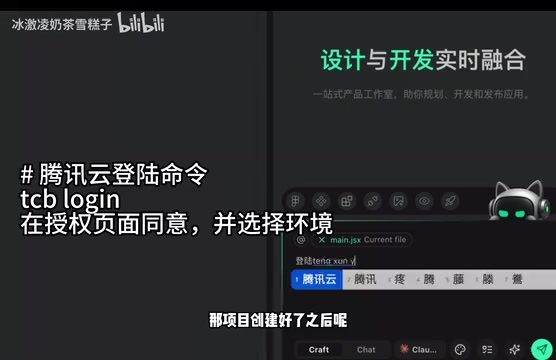
For frontend developers unfamiliar with SQL, document databases have a lower learning curve — you simply work with JSON-formatted data directly.
Cloud Storage and AI Integration
Cloud storage is used for static resources like images and videos. Developers can create directories, upload files, and access them through the SDK in code. The platform also integrates AI capabilities, supporting the creation of personalized AI agents. The generated Bot ID can be deeply integrated with cloud functions to implement AI-driven business logic.
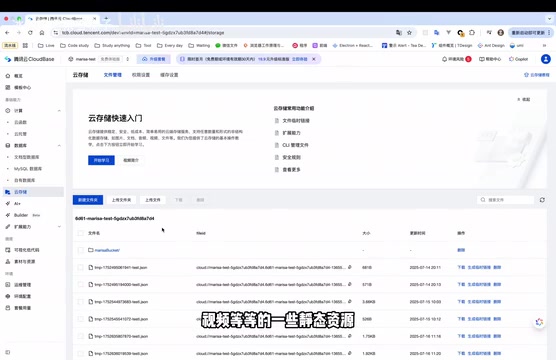
Additionally, CloudBase's built-in Builder feature can generate applications from a single sentence description using AI capabilities, further lowering the development barrier.
Hands-On: Building an Anime Watchlist with CoderBuddy + CloudBase
Step 1: Environment Creation and Project Initialization
The entire workflow starts from the Tencent Cloud CloudBase product page:
- Create a new environment: Select "Cloud Development," fill in the environment name, and activate the personal edition (free)
- Install CoderBuddy editor: This is a development tool with integrated AI conversation capabilities that can use natural language to instruct the CloudBase platform to complete deployment and launch operations, with the Cloud model currently free to use
- Create a project: Using a pre-prepared Prompt, trigger the CloudBase template-based project creation method to automatically generate the project architecture
The core of AI programming tools like CoderBuddy is the deep integration of Large Language Models (LLMs) with development toolchains. It not only understands natural language requirements and generates code but can also directly operate cloud platform resources by calling CLI commands and API interfaces. This "Agent" mode of AI tools is fundamentally different from ordinary code completion — it has execution capabilities, can read project context, analyze error logs, call deployment commands, and form a complete loop of "understand requirements → generate code → execute deployment → verify results." Similar tools in the industry include Cursor, GitHub Copilot Workspace, and others, representing the paradigm shift in software development from "humans writing code" to "humans describing intent, AI implementing."
Here's a key technique: The Prompt must contain specific keywords to make the AI generate the project structure according to CloudBase template specifications; otherwise, the generated code may not properly interface with the platform. This is essentially Prompt Engineering applied in real-world development — the output quality of AI models is highly dependent on the structure and content of input prompts. In the CloudBase context, specific keywords may trigger the model to invoke predefined project templates and scaffolding configurations, ensuring the generated code conforms to the platform's directory structure standards, SDK calling conventions, and deployment configuration requirements. This is similar to setting a "role" and "constraints" for the AI in conversation, making it work within a specific framework rather than improvising freely. Mastering this technique can significantly reduce subsequent manual adjustments.
Step 2: Backend Cloud Function Deployment and Database Configuration
After project creation, select the previously created cloud development environment through AI conversation. CoderBuddy will invoke the CloudBase CLI to execute commands, automatically finding all environments under the current account and listing them for selection.
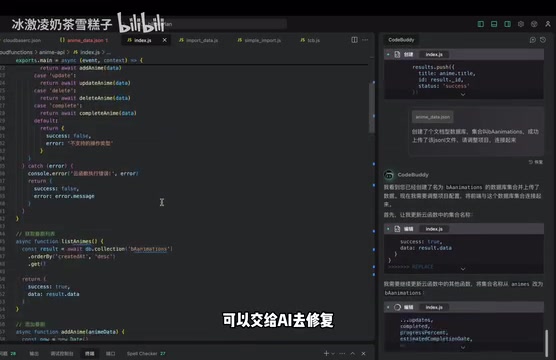
After the backend service (cloud functions) is deployed, you can view function logs and code on the platform. Next comes database configuration:
- Create document database collections
- Generate JSONL-formatted test data through AI
- Batch import data into the cloud database
A common pitfall: The database collection names referenced in the project code must exactly match the collection names created on the platform; otherwise, data retrieval will fail. If there's a mismatch, you can simply hand it off to the AI to fix.
Another important reminder: After every modification to cloud function code, you must redeploy — otherwise, the online environment will still be running the old version. This is a common cognitive blind spot in Serverless development. Unlike traditional development where services automatically restart after file changes, cloud function code is deployed to the platform as a "snapshot," and local modifications don't automatically sync to the online environment. Some mature Serverless frameworks (like Serverless Framework, SAM) provide watch modes to automatically detect changes and redeploy, but when operating manually, always remember this point.
Step 3: Cloud Storage Integration and File Upload
After creating a cloud storage directory in the CloudBase console, note the path identifier. The following operation demonstrates the core advantage of AI programming:
You don't need to write file upload code from scratch — just describe the requirements and storage path to CoderBuddy, and it will automatically write complete code for file uploads, async requests, and callback functions using the CloudBase SDK.
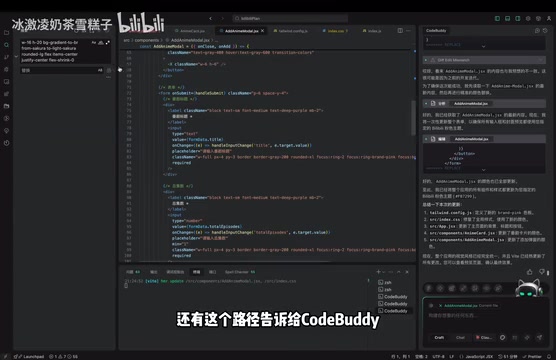
After successful upload testing, you can see the uploaded resources in object storage. The frontend then constructs and displays images by concatenating the returned FileID, domain, bucket, and path.
Regarding the FileID and object storage addressing mechanism, some additional explanation is warranted. The FileID in cloud storage is a file's unique identifier, similar to a file's "ID card number" in the cloud. In CloudBase's object storage system, a complete file access path typically consists of: CDN domain (for accelerated access), bucket name (logical storage space division), directory path, and filename. After uploading a file, developers receive a FileID, and the frontend needs to convert the FileID into an accessible HTTP URL for display. The CloudBase SDK provides methods like getTempFileURL to accomplish this conversion, or you can construct access links directly through concatenation rules. Understanding this mechanism helps troubleshoot common issues like images failing to display.
Step 4: One-Click Deployment
The final step is extremely simple — tell CoderBuddy "deploy this project online," and it will automatically generate and execute deployment commands. After the commands finish executing, enter the online domain to access the deployed project.
The entire process from environment creation to project launch can be accomplished almost entirely through natural language conversation.
Pitfalls and Lessons Learned During Development
During actual development, the following experiences are particularly important for Serverless development newcomers:
- Styling issues: Initially generated page styles may not look great and require further AI optimization
- Error handling: Errors that occur when starting the project locally can be fixed by copying the error message directly to the AI
- Deployment sync: Cloud functions must be redeployed after modifications — this is the most common reason for "why didn't my changes take effect"
- Storage paths: Cloud storage directory path identifiers must be correctly referenced in code; otherwise, data cannot be retrieved
While these issues aren't complex, they can waste significant time troubleshooting without prior experience. It's worth noting that Serverless architecture has additional advanced considerations: inter-function calls have network latency, individual functions have concurrency limits, and cold starts may affect initial response times. As project scale grows, these factors all need to be considered in architecture design.
Conclusion: Who Is CloudBase For?
The core value of Tencent Cloud CloudBase lies in providing a one-stop Serverless backend service that lets developers focus on business logic without worrying about operations. Combined with CoderBuddy's AI programming capabilities, even frontend developers or programming beginners can independently complete the development and deployment of a full web application.
This solution is best suited for the following scenarios:
- Indie developers and personal projects needing rapid deployment
- Product prototype validation and MVP development
- Programming beginners learning full-stack development
- Low-cost operation of small applications
For large-scale production environments, more architectural design and performance optimization considerations are needed, such as function orchestration (coordinating multiple cloud function calls), data consistency guarantees, and cost control beyond free tier limits. However, as a tool for quickly validating ideas and learning full-stack development, the CloudBase + CoderBuddy combination truly lowers the barrier from idea to launch significantly.
Key Takeaways
- Tencent Cloud CloudBase provides one-stop Serverless services covering cloud functions, databases, cloud storage, and static website hosting — no server purchase required
- Combined with the CoderBuddy AI editor, you can use natural language to drive the entire workflow including code generation, environment configuration, and deployment
- Supports both document databases and MySQL, provides visual data management interfaces, and supports batch JSON data import
- Cloud functions must be redeployed after every modification, and database collection names must exactly match those referenced in code — these are common pitfalls
- The entire solution is particularly suitable for indie developers and beginners to quickly validate ideas and learn full-stack development
Related articles
 Tutorials
Cursor + Codex Dual-IDE Collaboration: A Practical Methodology for Open-Source Project Customization
A complete methodology for open-source project customization based on real-world experience, detailing the Cursor+Codex dual-IDE workflow, seven-stage process, MVP validation, and AI source code reading techniques.
 Tutorials
Cursor Multi-Agent in Practice: Building a Full-Stack Next.js Blog in 50 Minutes
Build a full-stack blog in 50 minutes using Cursor IDE's multi-Agent mode with Next.js, Clerk auth, and Supabase. Learn the 4-phase AI Agent workflow and key integration pitfalls.
 Tutorials
Building an AI Software Factory from Scratch: A Cursor Engineer's Hands-On Experience with Multi-Agent Collaboration
Cursor engineer Eric shares practical insights on building an AI software factory: automation levels, guardrail design, parallel Agent management, and scaling to 1000+ Agents for 24/7 development.