The AI Website Building Formula: Create Professional Video Websites from Scratch with Zero Coding Skills
The AI Website Building Formula: Creat…
Use AI tools to replicate premium website aesthetics and quickly build professional video websites with zero coding.
This article presents an AI website building formula: first obtain design prompts from excellent websites to solve the aesthetics challenge, then use AI coding tools like Kimi to replicate the website framework in one click, add dynamic content through image-to-video conversion or direct upload, and finally iterate on details using natural language and screenshot annotations. Kimi 2.6 now has full-stack capabilities supporting databases and login authentication, enabling complete beginners to rapidly build high-quality websites.
Want to build a website with embedded videos and a premium feel, but don't know how to code? This article breaks down a simple, practical website building formula: where to find great aesthetics + where to bring them to life. With AI coding tools, even complete beginners can build visually stunning websites in just minutes.
Where to Find Premium Aesthetics? The First Step Isn't Technical
The first challenge most people face when building a website isn't technology—it's aesthetics. It's hard to precisely describe the visual effect you want in words, and even harder to translate it into prompts. So the most pragmatic approach is: find reference websites that already have premium aesthetics and borrow from them directly.
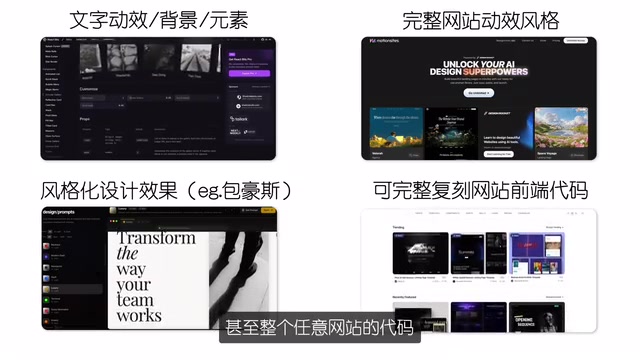
Here are several types of practical reference sources, most of which are free:
- Design system websites: Complete design systems including color palettes, typography, spacing specifications
- Front-end effects libraries: Specific element animations and interaction effects
- Website code copying tools: You can even directly obtain any website's code and prompts
Take Motion Site as an example—you can directly copy its prompts. These prompts essentially contain the entire website's design system and aesthetic standards. Getting them is like having a high-quality design blueprint.
The Underlying Logic of Design Prompts: A Design Prompt is essentially a structured description of a visual design system, typically including a color system (hex values for primary, secondary, and background colors), typography specifications (font families, weights, line heights), spacing systems (base units, component spacing), animation styles (transition durations, easing curves), and overall design language (minimalism, glassmorphism, neumorphism, etc.). When AI receives such a structured description, it can translate abstract aesthetic preferences into concrete CSS variables and component code. This is why copying prompts from excellent websites is more efficient than describing things yourself—the former has already completed the precise translation from visual to language.
The key insight: Don't design from scratch—stand on the shoulders of great design and make adjustments. This is far more efficient than describing requirements from nothing.
Use AI Tools to Replicate the Aesthetics
Once you have references and prompts, the next step is choosing an AI coding tool to bring them to life. Current options include Gemini, Claude Code, Codex, and others, but Kimi is recommended here for three reasons:
- Strong front-end and aesthetic capabilities: Testing shows Kimi excels at front-end website replication
- Directly accessible in China: No VPN needed, lowering the barrier to entry
- Upgraded to model 2.6: The new version directly supports front-end animations and can even insert videos into websites
These tools belong to the trending Vibe Coding paradigm—proposed by OpenAI co-founder Andrej Karpathy. The core idea is that users describe requirements in natural language, relying entirely on AI to generate code without needing to understand code details, only needing to feel (vibe) the final result and iterate. Representative products include Cursor, Bolt.new, Lovable, etc. Their common feature is combining AI code generation with real-time preview, letting users complete development through conversation. Kimi is a rapidly rising domestic player in this space.
The workflow is extremely simple: open Kimi's homepage, click the "Website" function on the left, paste in the previously copied prompt, type "Help me replicate this website," and click start. The AI will automatically generate a complete website page based on the prompt.
How to Add Video to Your Website? Two Practical Methods
After the website framework is built, the most crucial step is adding personalized video content. Here are two practical methods:
Method 1: Image-to-Video
Many stunning website videos are actually converted from high-quality images. Steps:
- Find an image you like (can be AI-generated)
- Upload the image to Kimi's chat box
- Enter the prompt: "Convert my uploaded image into a looping video"
Technical Background of Image-to-Video: Image-to-Video is an important branch of generative AI capabilities, with representative models including Runway Gen-3, Kling, Sora, and Pika. The underlying principle uses diffusion models to perform interpolation and motion prediction on static images along the temporal dimension, generating video frame sequences with coherent dynamic effects. For website background videos, looping is a key requirement—AI generation specifically optimizes first-and-last frame consistency to prevent jumps during seamless looping. These videos are typically output in WebM or MP4 format, and combined with HTML's
autoplay,muted,loopattributes, achieve the immersive background video effects commonly seen on websites.
The advantage of this approach is that you have complete control over the visual style and can create a website with embedded video in under a minute.
Method 2: Directly Upload Video Assets
If you already have existing video footage, you can upload it directly. Keep in mind:
- Keep video duration under 15 seconds (since it will loop)
- Don't use overly large video files
- You can also paste a video link directly
After uploading, enter the prompt: "Replace the homepage with my uploaded video, set to loop playback."
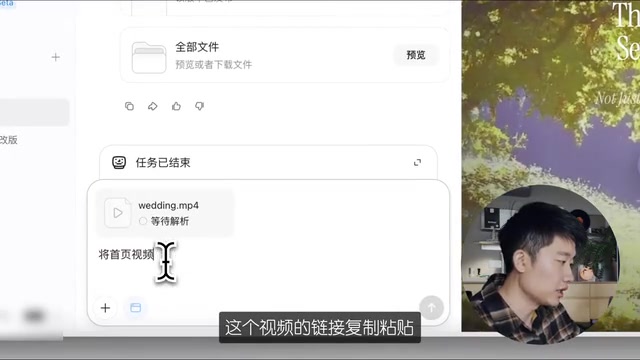
This method is especially suitable for personal brand websites or business showcase sites, because some video assets are uniquely yours, creating genuine differentiation.
Detail Adjustments: Making the Website Truly Yours
With the framework and video in place, the final step is adjusting text and details. Kimi 2.6 has significantly improved instruction comprehension, and you can make adjustments through:
- Directly telling Kimi what text content to adjust in the input box
- Screenshot + annotation + description: Upload a screenshot and mark the parts you want to modify
- Describe adjustments in natural language, such as "Move this section up a bit, add more whitespace"
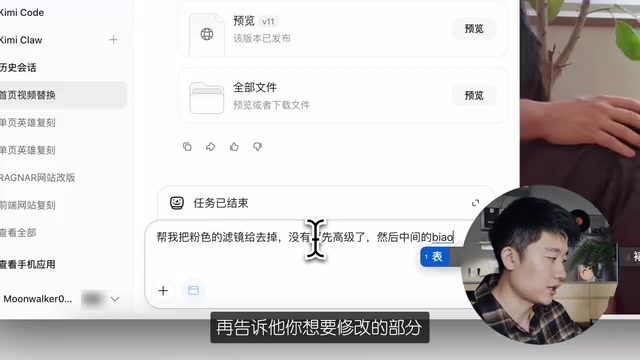
Although Kimi hasn't yet launched a local editing feature (expected within a few weeks), the screenshot annotation approach already enables fairly precise modifications.
Beyond Front-End: Kimi's Full-Stack Website Building Capabilities
It's worth noting that Kimi now has full-stack capabilities. Beyond front-end pages, it can directly generate:
- User databases
- Login authentication systems
- User information collection features
Full-Stack Capabilities vs. Traditional Website Builders: Traditional no-code website builders (like Webflow, Squarespace, Wix) primarily solve front-end display issues. Backend features (user systems, databases) typically require integrating third-party services (like Firebase, Supabase) with additional configuration. The breakthrough of AI full-stack website building tools is their ability to simultaneously generate front-end interface code and backend logic code, automatically connecting the two. User databases are typically based on SQLite or PostgreSQL, while login authentication mostly uses JWT (JSON Web Token) mechanisms. This all-in-one capability means users don't need to switch between multiple platforms or understand API integration technical details, dramatically compressing the time from idea to launch.
This means if you need a complete website with user registration and data collection features, you can now do it all within Kimi. While most Vibe Coding tools are still competing on front-end effects, the addition of backend capabilities is a significant differentiating advantage.
Summary: The Core Logic of the AI Website Building Formula
Looking back at the entire process, the core logic of this website building formula is crystal clear:
- Find aesthetics: Get design prompts from excellent websites instead of describing from scratch
- Replicate the framework: Use AI tools to generate the website's basic structure in one click
- Add personalized content: Through image-to-video conversion or direct video upload
- Iterate and adjust: Use natural language and screenshot annotations for detail optimization
The barrier to entry for this method has been lowered to an extremely accessible level. For individual developers, freelancers, and small startup teams, it provides a fast, low-cost path to building high-quality websites. Technology is no longer the bottleneck—aesthetics and content are the real competitive advantages.
Related articles
 Tutorials
Cursor + Codex Dual-IDE Collaboration: A Practical Methodology for Open-Source Project Customization
A complete methodology for open-source project customization based on real-world experience, detailing the Cursor+Codex dual-IDE workflow, seven-stage process, MVP validation, and AI source code reading techniques.
 Tutorials
Cursor Multi-Agent in Practice: Building a Full-Stack Next.js Blog in 50 Minutes
Build a full-stack blog in 50 minutes using Cursor IDE's multi-Agent mode with Next.js, Clerk auth, and Supabase. Learn the 4-phase AI Agent workflow and key integration pitfalls.
 Tutorials
Building an AI Software Factory from Scratch: A Cursor Engineer's Hands-On Experience with Multi-Agent Collaboration
Cursor engineer Eric shares practical insights on building an AI software factory: automation levels, guardrail design, parallel Agent management, and scaling to 1000+ Agents for 24/7 development.