The Complete Guide to Claude Skills: Write Rules Once, Apply Forever — Turn AI from Generalist to Specialist

Claude Skills are SOPs for AI — write once, reuse forever.
Claude Skills are essentially folders containing a skill.md instruction file that serves as a Standard Operating Procedure (SOP) for Claude. Unlike prompts that must be repeated every time, Skills are reusable domain knowledge that loads content on demand through progressive disclosure, efficiently utilizing the context window. A well-written Description is the key to triggering Skills, and in practice they can orchestrate multi-step workflows for blog generation, Git standardization, invoice creation, and more — achieving true "write once, use everywhere."
Introduction: The Pain of Repetitive Instructions
Have you ever found yourself in this situation — every time you ask Claude to help with a presentation, you have to explain from scratch which colors to use, which fonts, where the logo goes, how big the title should be. Doing it once is fine, but doing it ten times drives you crazy.
What if you could write these rules once, and Claude would automatically follow your standards every time — no reminders, no copy-pasting, and it just knows what to do even without being told? That's exactly what Claude Skills are.
This article is based on the eighth episode of Bilibili creator Noya's AI Programming in Practice series. It systematically covers the core concepts, creation methods, and practical examples of Claude Skills, helping you truly understand and make the most of this seriously underrated feature.

What Are Claude Skills?
A Simple Analogy
A Skill is essentially a folder containing an instruction manual that tells Claude how to handle tasks in specific scenarios. It's like writing an SOP (Standard Operating Procedure) for a new intern at your company — once they have the SOP, they know which template to use for weekly reports, which colors for presentations, and which tone for emails.
A Skill is an SOP written for Claude.
How Do Skills Differ from Prompts and MCP?
Let's use a chef analogy to clarify the relationship between these three:
- Prompt = What you say when ordering each time: "I'd like kung pao chicken, less oil, less salt, extra peanuts." If you're clear enough, the chef can make it well, but you have to repeat yourself every visit.
- Skill = A recipe: Once the chef has the recipe, they know the standard method, ingredients, heat level, and plating. You just need to say "one kung pao chicken please." Write the recipe once, use it forever.
- MCP = Interface standards for kitchen equipment: How to use the oven, fridge, and blender — corresponding to external tools and data sources.
Summing up the relationship: Prompts are temporary commands, Skills are reusable domain knowledge, and MCP is tool connectivity. Skills and MCP often work together — MCP provides the connection, Skills provide the workflow.
Progressive Disclosure: The Core Design Philosophy of Skills
Claude doesn't read all the content in a Skill at once. Instead, it loads in layers:
- Layer 1: Read the name and description — At startup, Claude only reads the Name and Description to determine if the Skill is relevant to the current task
- Layer 2: Read the instruction body — Once deemed relevant, it opens skill.md to read the specific instructions
- Layer 3: Load resources on demand — If the instructions mention detailed API docs in a reference directory, Claude only reads them when needed
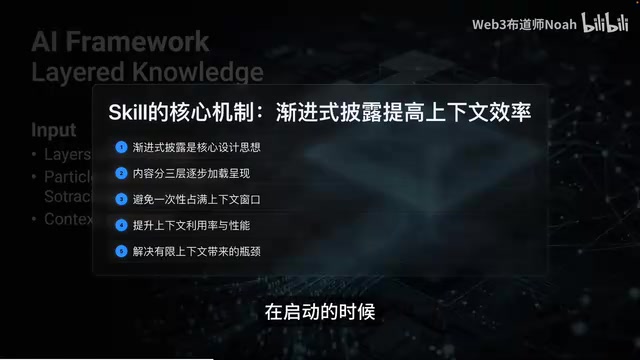
This design solves the fundamental problem of limited context windows. Skills can carry extensive reference materials, templates, and scripts, but they only consume context space when needed.
Skill File Structure in Detail
Minimal Structure
A Skill is essentially just a folder. In the simplest case, it contains only one file — skill.md. For more complex needs, it can include scripts, reference documents, and template resources.
Core principle: skill.md is the only required file.
Components of skill.md
skill.md consists of two parts: the YAML Front Matter header and the Markdown body below.
Required fields:
name: Skill name, maximum 64 characters, only lowercase letters, numbers, and hyphens allowed. In Claude Code, this becomes a slash command (e.g.,/code-review)description: Skill description, maximum 200 characters. This is the most critical field — Claude uses it to determine when to invoke the Skill
Optional fields:
disable_model_invocation: true— Prevents automatic invocation; must be triggered manuallyuser_invokable: false— Only allows automatic invocation; users cannot trigger manuallyallowed_tools— Restricts the available tool setmodel— Specifies the model
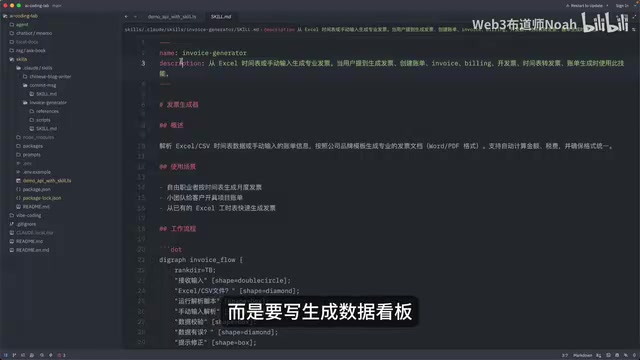
There's a practical tip from the official docs: Write your Description slightly aggressively. Don't just write "generate data dashboard" — write "Generate data dashboard — use this skill when the user mentions dashboards, data visualization, internal metrics, or wants to display any data." Because the model currently tends to under-trigger, you should proactively list possible trigger scenarios in the description.
Three Practical Examples
Example 1: Chinese Blog Generator
Problem solved: Having to specify format, style, and structure every time you write a blog post
Input: Topic, technical points, code snippets
Output: Complete technical blog in Markdown format
Skill content includes: overview, writing standards, article structure, writing style, code conventions, output requirements, and quality checklist.
Import method: In the Claude web interface, find Customize → Skills in the left navigation → click the plus icon → Upload a Skill → drag and drop the ZIP package.
When testing with "Help me write a technical blog about Claude Skills," if the Skill triggers correctly, you can see in Claude's thinking process that it loaded the custom Skill, and the generated blog has consistent formatting and style.
Example 2: Git Commit Message Standardization
Key highlight: This uses disable_model_invocation: true because Git commits have side effects — they actually modify the code repository, so you don't want Claude executing automatically.
This Skill isn't just text formatting — it's truly embedded in the development workflow: read Git Diff → analyze changes → determine type → generate standardized Commit Message → even remind you to split oversized commits.
This is the advantage of Skills over regular prompts — they can orchestrate multi-step workflows, not just provide single responses.
Example 3: Invoice Generator (with Python Scripts)
Use case: Given an Excel timesheet, automatically parse the data and generate Word/PDF invoices following brand templates.
Directory structure:
skill.md— the orchestratorscripts/— Python scripts for precise calculationsreference/— detailed rule documents and brand configurations
This embodies the Skill design philosophy: skill.md is the orchestrator, scripts are the executors, and reference docs are the knowledge base. Claude follows skill.md's instructions to orchestrate the workflow, calls scripts when precise calculations are needed, reads reference docs when detailed rules are required — each component doing its job.
Best Practices for Skills
Writing Tips
80% of whether a Skill works well depends on how well the Description is written.
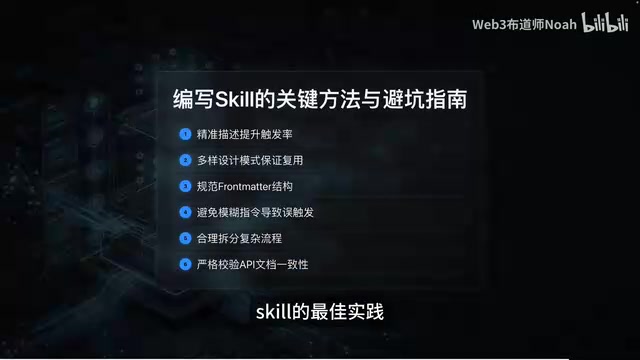
- Use third person: The Description gets injected into the system prompt, so writing "when I need..." confuses Claude. The correct approach is "Processes Excel files and generates reports"
- State both what it does and when to use it: Don't just write "generate daily report" — write "Generates daily standup summaries from Git activity. Use when the user mentions standup, daily report, daily summary, or similar keywords"
- Cover edge-case trigger words: Users won't always use expected phrasing. For a data visualization Skill, include synonyms like charts, reports, dashboard, kanban, data screen in the Description
- Validate trigger rate with end-to-end testing: Write 20 test queries — half should trigger and half shouldn't — then test accuracy and optimize accordingly
Four Common Design Patterns
| Pattern | Use Case | Example |
|---|---|---|
| Workflow Orchestration | Multi-step standard processes | Code review, deployment checklists |
| Knowledge Injection | Domain knowledge Claude doesn't have | Company coding standards, brand guidelines |
| MCP-Enhanced | Tools + best practices | GitHub + Sentry code review |
| Output Standardization | Strict format requirements | Changelog, API docs, test reports |
Common Pitfalls to Avoid
- Keep skill.md under 500 lines: Too long hurts comprehension efficiency; move detailed content to the reference directory
- Never hardcode sensitive information: API keys, passwords, and tokens should never go in there — use environment variables or MCP instead
- Test progressively: Don't write a massive Skill all at once and then test — start with core instructions, verify they work, then add details
- Get the ZIP format right: The correct structure is a ZIP containing one folder, with skill.md inside that folder
- Skills can be composed: You don't need one "super Skill" — multiple focused small Skills will automatically combine within the same task
Ecosystem Status and Usage Methods
Claude Skills have three entry points:
- Claude Web/Desktop Client: Package as ZIP and upload; automatic recognition and invocation
- Claude Code CLI: Place in the project root's
.claude/skillsor the global user directory; invoke with slash commands - API Calls: Load Skills in code via the Anthropic Messages API
All three methods use the same Skill files, achieving true write once, use everywhere.
The ecosystem is already quite rich: Anthropic's official pre-built Skills, GitHub open-source skill repositories, and community projects like AntiGravity Awesome Skills (cataloging over 1,200 Skills with 20,000+ stars). Most importantly, Skills follow the Agent Skill open standard, meaning the same file works across Claude Code, Cursor, Windsurf, and other platforms.
Conclusion
If you can only remember one thing today: Skills turn AI from a generalist into a specialist, and writing Skills means defining exactly where the AI should specialize.
The essence of Claude Skills is writing SOPs for Claude — write once, reuse infinitely. The core file skill.md consists of YAML metadata and Markdown instructions. The design philosophy is progressive disclosure — only loading detailed content when needed to keep context usage efficient. Three key elements: a well-written Description determines trigger rate, controlling file size determines execution efficiency, and choosing the right design pattern determines the Skill's ceiling.
Related articles
 Tutorials
Cursor + Codex Dual-IDE Collaboration: A Practical Methodology for Open-Source Project Customization
A complete methodology for open-source project customization based on real-world experience, detailing the Cursor+Codex dual-IDE workflow, seven-stage process, MVP validation, and AI source code reading techniques.
 Tutorials
Cursor Multi-Agent in Practice: Building a Full-Stack Next.js Blog in 50 Minutes
Build a full-stack blog in 50 minutes using Cursor IDE's multi-Agent mode with Next.js, Clerk auth, and Supabase. Learn the 4-phase AI Agent workflow and key integration pitfalls.
 Tutorials
Building an AI Software Factory from Scratch: A Cursor Engineer's Hands-On Experience with Multi-Agent Collaboration
Cursor engineer Eric shares practical insights on building an AI software factory: automation levels, guardrail design, parallel Agent management, and scaling to 1000+ Agents for 24/7 development.