The Complete Process of Building an Excel File Management Tool with AI — Zero Code Written
The Complete Process of Building an Ex…
A non-programmer built an Excel file management tool entirely through AI conversations — zero code written.
A Bilibili creator and Excel designer built a complete Excel file management tool without writing any code, accomplishing everything through AI conversations. The tool features one-click directory scanning, double-click file opening, and batch renaming. This case demonstrates a new productivity paradigm in the AI era: technical implementation skills are being replaced by the ability to express requirements clearly. Ordinary users just need to organize their business needs and learn to communicate with AI to automate repetitive work.
The Pain Point of File Management: Are You Stuck in It Too?
As work files multiply and scatter across deeply nested folders, finding and opening anything requires clicking through multiple directory levels — an experience most of us know all too well. Bilibili creator "灰飞烟灭" (HuiFeiYanMie), an Excel designer, had been plagued by this problem for a long time.
He has a habit of naming files and folders with numbered prefixes so they automatically sort in order. The problem is, during the development process there's rarely time to manage these serial numbers. By the time a project is finished, dozens or even hundreds of files across multiple folders need renaming — doing it one by one is painfully inefficient.
So he decided to build his own Excel-based file management tool — and here's the key part: he didn't write a single line of VBA code. Everything was handled by AI.
Tool Demo: Three Core Features
One-Click Directory Scanning
The first feature is "File Collection." Click a button, a dialog box pops up, select the target folder, and the tool automatically scans all files and subfolders at every level, displaying the complete directory structure in an Excel spreadsheet.
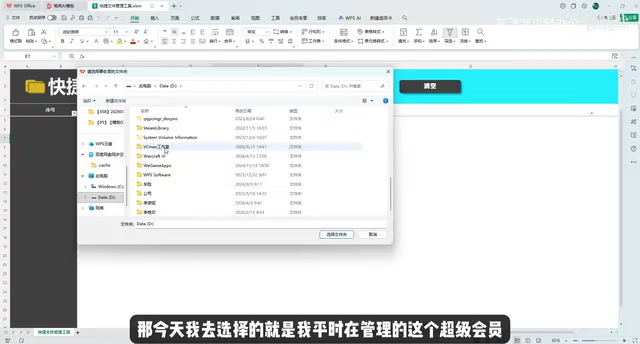
Using his "Super Member" folder as an example, after scanning, row 5 shows the selected folder's path, and from row 6 onward, all contents are listed level by level. The hierarchy is clearly represented through numbering: "1, 2, 3" represent folders in the root directory, while "1.1" represents a file one level below folder "1" — clear and intuitive at a glance.
Double-Click to Open: Quick Access to Files and Folders
The second feature solves the efficiency problem of finding and opening files. In the scanned directory list, double-clicking any folder name opens it directly in File Explorer; double-clicking a file name opens the corresponding file for editing.
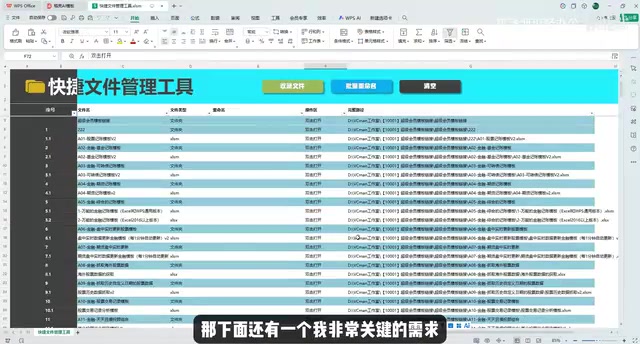
No more clicking through folder after folder to find your target file. Everything is laid out flat in Excel — just double-click whatever you want to open. For users managing large numbers of files, the time savings are substantial.
Batch Renaming: Say Goodbye to One-by-One Modifications
The third feature is the one the creator values most — batch renaming. The traditional way requires entering a folder, right-clicking to rename, typing the new name, then moving to the next folder and repeating. When you have many files, this process is maddening.
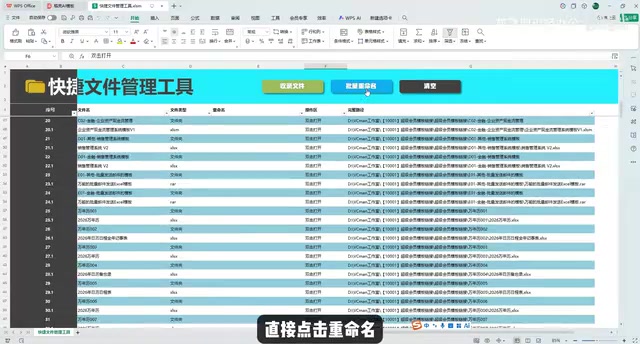
With this tool, you simply edit file names directly in the Excel spreadsheet — for example, renaming a folder to "A01" or changing a file's version number from "V2" to "V2.0" — then click the "Batch Rename" button, and all changes sync to the actual file system. After clicking "Refresh Directory," the links in the spreadsheet update accordingly. The entire process happens within a single spreadsheet, improving efficiency by an order of magnitude.
The Key Insight: You Don't Need to Learn Code — Just Learn to Talk to AI
The technical implementation of this tool is based on VBA (Visual Basic for Applications), involving file system operations, dialog box interactions, event triggers, and multiple programming concepts. But the creator explicitly stated: he never even looked at how the code was written. All the logic was completed through conversations with AI.
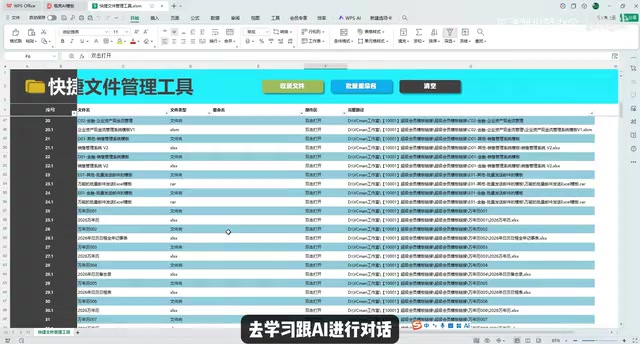
This sends an important signal: in the AI era, the ability to implement technology is being replaced by the ability to express requirements. In the past, you'd need months to learn VBA syntax and debug code logic. Now you only need to do two things:
- Clearly organize your business requirements — What problem are you actually trying to solve? What features do you need? What should the workflow look like?
- Learn to express requirements in a way AI can understand — Break down your needs into specific, actionable descriptions that AI can "comprehend."
The creator's own words are quite inspiring: "As long as your requirements are clear enough for AI to understand, AI can help you build these features." This isn't an empty claim — it's a methodology he validated with actual output.
What This Means for Everyday Users
The value of this case goes beyond the tool itself — it demonstrates a new productivity paradigm:
- Excel is more than a spreadsheet tool: Combined with VBA, it can become a lightweight application development platform, and AI has dramatically lowered the barrier to entry.
- From "learning technology" to "using technology": You don't need to become a programmer — you just need to become a good "requirements owner." Think through the business logic clearly, and let AI handle the technical implementation.
- Imitation is the best way to learn: Observe how others converse with AI, how they break down requirements, how they iterate and optimize — then replicate this approach in your own scenarios.
For professionals who regularly handle large volumes of files and manage complex data, this "AI + Excel" combination may be the lowest-cost, highest-return path to efficiency gains available today. You don't need to install new software or learn a new platform — just leverage AI's power within the familiar Excel environment to automate repetitive work.
Final Thoughts
This case once again confirms a trend: AI is transforming programming from a specialized skill into a universal capability. What matters isn't whether you can write code, but whether you can clearly define problems and describe requirements. For most users without a technical background, rather than spending time learning programming syntax, it's better to practice how to communicate effectively with AI — this may be the highest-ROI skill investment you can make right now.
Related articles
 Tutorials
Cursor + Codex Dual-IDE Collaboration: A Practical Methodology for Open-Source Project Customization
A complete methodology for open-source project customization based on real-world experience, detailing the Cursor+Codex dual-IDE workflow, seven-stage process, MVP validation, and AI source code reading techniques.
 Tutorials
Cursor Multi-Agent in Practice: Building a Full-Stack Next.js Blog in 50 Minutes
Build a full-stack blog in 50 minutes using Cursor IDE's multi-Agent mode with Next.js, Clerk auth, and Supabase. Learn the 4-phase AI Agent workflow and key integration pitfalls.
 Tutorials
Building an AI Software Factory from Scratch: A Cursor Engineer's Hands-On Experience with Multi-Agent Collaboration
Cursor engineer Eric shares practical insights on building an AI software factory: automation levels, guardrail design, parallel Agent management, and scaling to 1000+ Agents for 24/7 development.