Three Forms of AI: From Chat Windows to Collaborative Work to Command Line
AI has three forms — Chatbox, Cowork, and CLI — and most people only use the first one.
Most people only use AI through chat windows, but AI actually has three forms: Chatbox for Q&A, Cowork for collaborative automation with scheduled tasks, and CLI for powerful command-line operations. This article breaks down each form's capabilities and provides practical selection advice across Claude, OpenAI Codex, Kimi, and DeepSeek, including cost-effective combination strategies.
Most people use AI by simply opening a chat window and asking a few questions. But those who truly know how to leverage AI are quietly pulling ahead — you might be paying a monthly subscription but only using 10% of its capabilities, with the remaining 90% hidden in places you've never even opened.
AI actually comes in three forms: Chatbox, Cowork, and CLI (Command Line Interface). Most people only know the first one, but the latter two are what truly let AI do the heavy lifting for you.
The First Form: Chatbox — The Chat Window Everyone Knows
This is the most basic and widespread way to use AI. ChatGPT, DeepSeek, Doubao… open them up and you get a conversation box where you can edit drafts, write content, ask questions, and make plans.
Typical scenarios Chatbox handles well include:
- Writing meeting minutes, event plans, ad copy
- Travel planning, knowledge Q&A
- Everyday text processing tasks
Any AI can handle these tasks — just use whichever you prefer. But there's one critical caveat: AI has a "hallucination" problem — it will confidently fabricate information. "Hallucination" is an inherent flaw of large language models, stemming from how they work — models are essentially doing "next token probability prediction" rather than retrieving facts from a database. When a model lacks sufficient training data on a topic, it will "fill in" content that seems plausible but is actually incorrect based on statistical patterns. This issue has been mitigated but far from eliminated in top models like GPT-4 and Claude, and is especially prone to errors involving specific numbers, dates, and cited sources. So when looking up data or facts, always ask it to provide original sources — never directly cite its conclusions.
The Second Form: Cowork — An Intelligent Assistant Living in Your Computer
Cowork is the collaborative work mode, and the most mature implementation currently is Claude's desktop version. After downloading Claude Desktop, you'll find three options in the upper left corner: Chat, Cowork, and Code.
Cowork feels like having a little assistant living inside your computer — it doesn't just answer questions, it can directly do work for you: searching the web for information, organizing local folders, writing complete research reports.
From a technical perspective, Cowork mode relies on Anthropic's Computer Use technology and the MCP (Model Context Protocol). MCP is a standard protocol open-sourced by Anthropic in late 2024 that allows AI models to securely connect to external data sources and tools — including local file systems, browsers, email clients, and more. This means AI is no longer just "answering questions" but can proactively invoke tools to complete multi-step tasks.

Cowork's Core Capability: Scheduled Tasks
One of Cowork's most powerful features is Schedule (scheduled tasks). The Schedule function adds a concept similar to cron jobs (scheduled task scheduling) on top of the MCP protocol, allowing AI to continuously run preset workflows in the background. You can set up:
- Automatic industry news briefings pushed every morning at 9 AM
- Daily email scanning, flagging which ones need replies and which can be ignored
- Scheduled tracking of specific information you're following
As a practical example, if you're planning to buy a house, you can set up a task for AI to push daily real estate updates, checking new listings and price changes. Previously you'd have to search manually every day and would forget when busy — now you just hand it to AI and check the results.
Once set up, everything runs automatically — you don't have to do anything.
Other Platforms Catching Up
While Claude has the most mature Cowork implementation, other AIs are catching up. OpenAI's ChatGPT has a similar Task feature, and Elon Musk's Grok has comparable capabilities. However, in terms of overall completeness, Claude currently remains in the lead.
The Third Form: CLI — The Most Powerful Yet Most Overlooked Form
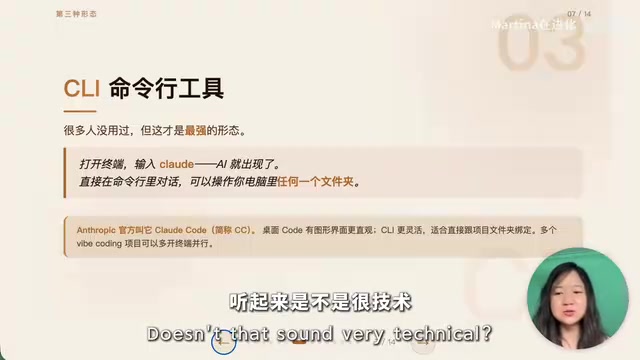
CLI (Command Line Interface) is something many people have never used, but it's AI's most powerful form. CLI is the most primitive yet most powerful way to interact with computers — it communicates directly with the operating system kernel, without the performance overhead and functional limitations of graphical interfaces. In Unix/Linux philosophy, all operations can be completed through text commands — file management, network requests, program compilation, system configuration, etc.
Open a terminal, type claude, and AI appears in the command line, directly operating on any folder in your computer.
A Counterintuitive Insight: The Command Line Was Born for AI
The command line used to be a programmer's exclusive language, requiring memorization of extensive command syntax (like grep for text search, awk for data processing, sed for text replacement, etc.) — one wrong character would throw an error, and ordinary people couldn't understand it at all. But with AI, this barrier has completely disappeared — you describe your needs in natural language, and AI translates them into precise command sequences for execution. It's like giving everyone their own system administrator who's fluent in every command.
You only need to learn one command: cd folder-path (navigate to a folder), and leave everything else to AI.
Anthropic officially calls this CLI tool Claude Code (abbreviated CC). The difference from the desktop Code version is: the desktop Code has a graphical interface that's more intuitive, while CLI is better suited for working directly bound to project folders. If you're working on multiple projects simultaneously, you can open several terminals running Claude Code in parallel for extremely high efficiency.
What CLI Can Handle
- Web Coding: Program in natural language, having AI directly write and modify code. You just describe "I want a webpage with login functionality," and AI will automatically generate HTML, CSS, JavaScript, and even backend code, then help you debug and run it.
- Managing Obsidian Notes: Two CLIs working together to build an efficient second brain. Obsidian is a knowledge management tool based on local Markdown files, with the core concept of weaving scattered notes into a knowledge network through bidirectional links. When CLI-form AI combines with Obsidian, AI can directly read and write your note files — automatically organizing tags, generating knowledge summaries, discovering potential connections between notes, and even automatically creating new knowledge cards based on your reading history.
- Organizing Computer Storage: Scanning which files can be deleted, which are taking up significant space
- Installing Tools and Skills: Throw a GitHub repository URL to CLI and let AI install it automatically
How to Choose AI Products? Four Core Recommendations
There are many AI products on the market. Here are the definitive recommendations:
Claude: Most Complete Across All Three Forms
Claude Desktop includes Chat, Cowork, and Code all in one package, with Cowork being the most mature currently. The downsides are higher pricing, no allowance for third-party tools to directly use subscription accounts (requiring separate API Key purchases), and account ban risks for users in China. But the model's capabilities are genuinely very strong right now.
OpenAI Codex: Best Value for Programming
Codex is OpenAI's dedicated programming Agent and a direct competitor to Claude Code. It can write code, fix bugs, and understand codebases — the same task consumes roughly one-quarter the Tokens of Claude Code, offering exceptional value.
Here's an explanation of the Token concept: A Token is the basic unit that large language models use to process text, roughly equivalent to 3/4 of an English word or 1-2 Chinese characters. Every interaction with AI consumes Tokens for both input and output, forming the basis of API billing. Claude Code can consume tens of thousands or even hundreds of thousands of Tokens in a single conversation when executing complex programming tasks (because it needs to read the entire codebase's context), so Codex consuming only one-quarter means a cost difference of hundreds of dollars per month for heavy users.
You can subscribe through ChatGPT Plus ($20/month), and this subscription can be directly used in AI Agent frameworks like OpenRouter and Hermes without buying a separate API Key — much more generous than Claude. OpenRouter is a unified API gateway for AI models that integrates dozens of different vendors' models under one interface, so developers only need to integrate once to switch between models. Hermes is an AI Agent framework that allows users to build AI agents capable of autonomously executing multi-step tasks — like complex workflows such as "research a topic → compile into a report → send email." The fact that ChatGPT Plus subscriptions work directly in these third-party frameworks means users get not just ChatGPT itself, but an "engine" that can power various automation tools.
Kimi: The Domestic All-Rounder
If neither Claude nor Codex is accessible, Kimi is one of the most well-rounded domestic large models, with strong Chat, vision, and code capabilities. The gap between it and Claude/Codex is actually not that large.
DeepSeek: Top Choice on a Budget
DeepSeek has very strong text processing capabilities, with price being its biggest advantage. It has also launched image recognition capabilities (visual abilities are still in early stages) and is perfect for providing Tokens to various small tools via API at extremely low cost.
Practical Combination Plans and Selection Advice
Based on different needs, here are the selection strategies:
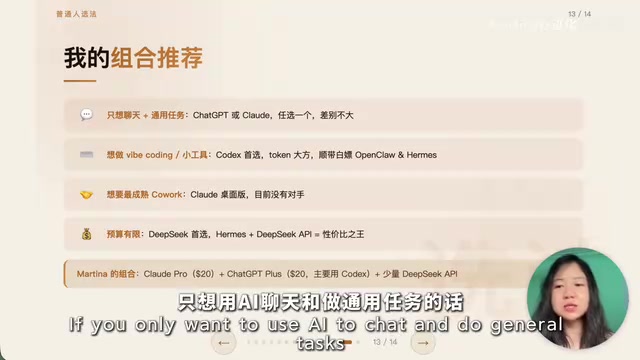
- Just want to chat and do general tasks: Pick either ChatGPT or Claude — not much difference
- Want to do Web Coding and build small tools: Codex offers the best value with very generous Token allowances, and ChatGPT Plus gives you free access to OpenRouter and Hermes
- Want the most mature Cowork experience: Claude Desktop currently has no rival
- On a budget: DeepSeek paired with the Hermes Agent framework is absolutely the value champion
A reference combination plan: Claude Pro ($20/month) + ChatGPT Plus ($20/month, primarily for Codex and connecting to Hermes) + a small amount of DeepSeek API costs. Since Claude Code and Codex have overlapping functionality, you can gradually shift focus toward whichever offers better value based on actual usage.
Final Thoughts
No matter how AI evolves, it's always just a tool — a tool that serves you. Don't blindly worship any brand. Before, you might have been someone else's assistant, helping your boss make presentations, research information, and write reports. But with AI, everyone can have their own assistant, freeing themselves from repetitive work to do what they truly want to do.
The key is taking that first step: upgrading from only knowing how to use a chat window to actually letting AI work for you.
Related articles
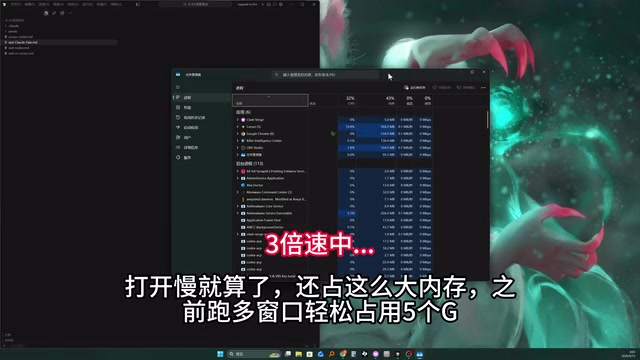
Zed Editor Hands-On: 6x Faster Startup — A Lightweight Alternative for AI Coding on Older Hardware
Real-world comparison of Zed vs Cursor: startup speed, memory usage, and AI coding experience. Built in Rust, Zed launches in 3 seconds with minimal RAM usage — ideal for developers with limited hardware.
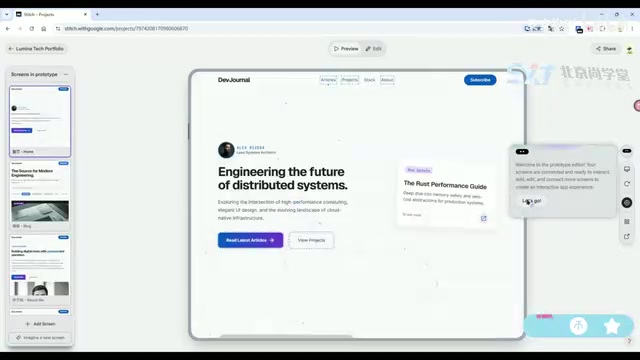
Building a Personal Blog from Scratch with Cursor: A Complete AI-Powered Development Tutorial
Learn how to build a personal blog from scratch using Cursor AI — covering UI prototyping, full-stack code generation, database setup, and bug debugging with almost no hand-written code.
Building a 2D Shooter with Cocos + Trae: A Complete Zero-Code AI Programming Walkthrough
Learn how to build a Vampire Survivors-style 2D shooter using Cocos Creator and Trae CN with zero coding — from setup and design docs to AI code generation and debugging.