Zed Editor Hands-On: 6x Faster Startup — A Lightweight Alternative for AI Coding on Older Hardware
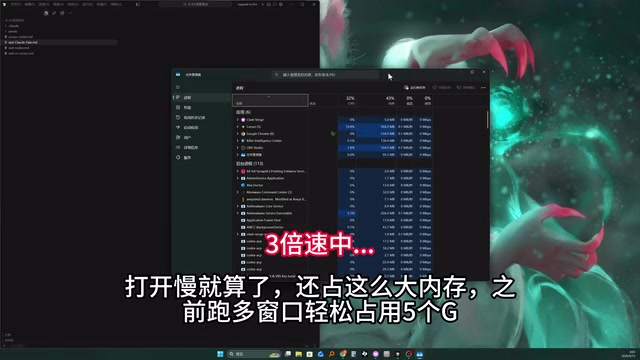
Zed Editor launches 6x faster than Cursor and uses far less RAM, making it ideal for AI coding on older hardware.
A hands-on comparison reveals Zed Editor starts in 3 seconds vs. Cursor's 18 seconds, with dramatically lower memory usage thanks to its Rust-based architecture. While Cursor excels in plugin ecosystem and deep codebase context understanding for large projects, Zed offers a free, lightweight alternative that's perfectly capable for embedded development, frontend work, and other small-to-medium projects where developers need AI assistance without the resource overhead.
How Sluggish AI Coding Tools Get on Older Machines
AI coding tools have become a daily essential for more and more developers. Cursor, as a standout product in this space, has won over a massive user base with its powerful AI-assisted capabilities. But for developers with limited hardware, Cursor's resource consumption is an unavoidable pain point.
A Chinese tech YouTuber shared his real experience running Cursor on an 8-year-old computer: each startup takes about 18 seconds, memory usage easily exceeds 5GB with multiple windows open, and daily development becomes so laggy it makes you "question your life choices." This isn't an isolated case — many developers have reported performance issues with Cursor (a VS Code fork based on the Electron architecture) on low-spec machines.
It's worth explaining why the Electron architecture is so resource-hungry. Electron is an open-source framework developed by GitHub that allows developers to build cross-platform desktop applications using web technologies (HTML, CSS, JavaScript). Well-known apps like VS Code, Slack, and Discord are all built on Electron. Its core principle involves bundling the Chromium browser engine and Node.js runtime into the application, meaning every Electron app is essentially running a full Chrome browser instance. This architecture dramatically lowers the barrier to cross-platform development, but the trade-off is significant memory overhead — a single Electron app typically has a baseline memory footprint of 200-400MB, which multiplies in multi-window scenarios. As a fork of VS Code, Cursor inherits this architectural characteristic, and with the additional overhead of AI feature modules stacked on top, resource consumption climbs even higher.
So the question becomes: if your daily development doesn't require all of Cursor's heavyweight features, is there a lighter alternative? The answer is Zed Editor.
Zed vs. Cursor: Real-World Performance Comparison
Startup Speed: A 6x Gap
On the same computer, opening the same project folder, the YouTuber ran a direct comparison:
- Cursor startup time: ~18 seconds
- Zed startup time: ~3 seconds
Startup speed is a full 6x faster. When you're frequently opening projects and switching workspaces throughout the day, this gap gets amplified significantly.
Memory Usage: An Order-of-Magnitude Difference
The memory comparison is even more dramatic. Cursor easily consumes 5GB of RAM in multi-window scenarios, while Zed's memory usage is "barely a fraction of that." For machines with 8GB or even 16GB of RAM, saving several gigabytes means you can run more development tools simultaneously, or give compilation and debugging tasks more breathing room.
The reason Zed achieves such a lightweight footprint is that it's built from scratch using Rust, rather than being based on the Electron framework. This fundamentally eliminates the memory overhead that comes with the Chrome engine.
Rust is a systems-level programming language primarily developed by Mozilla Research, with version 1.0 released in 2015. Its core design goal is to guarantee memory safety without sacrificing performance. Through its innovative "ownership system," it eliminates common bugs like null pointers and data races at compile time, without needing a garbage collector (GC). This means Rust programs can match the runtime efficiency of C/C++ while significantly reducing runtime overhead. Zed's choice of Rust as its development language means the editor can interact directly with the operating system's graphics APIs — Zed uses its custom GPUI framework to call the GPU directly for UI rendering, bypassing the multiple layers of abstraction in Electron involving JavaScript interpretation and DOM rendering. This is the technical foundation that enables Zed to achieve order-of-magnitude improvements in startup speed and memory usage. In recent years, Rust adoption in infrastructure has been steadily climbing — the Linux kernel, Android system, and Cloudflare's network edge services have all incorporated Rust code.
How's Zed's AI Coding Experience?
Zed isn't just a "fast but barebones" editor — it also has built-in AI coding capabilities.
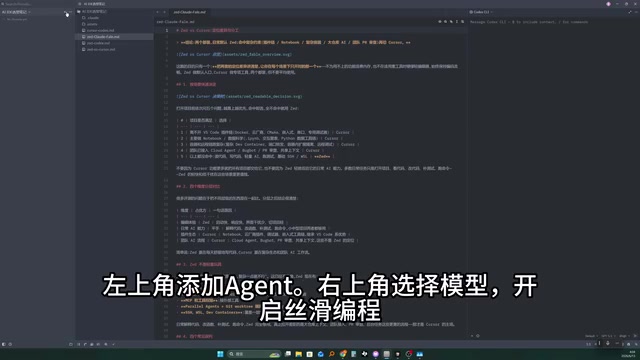
The interface design takes a clean, minimalist approach:
- Top left: Add AI Agent
- Top right: Select different AI models
- Overall interaction is smooth and works out of the box
For everyday AI-assisted coding needs — code completion, conversational programming, code explanation, etc. — Zed's experience is already smooth enough.
It's worth understanding that the AI capabilities of current mainstream AI coding tools primarily rely on cloud-based large language models (LLMs), with the editor itself serving as the interaction interface and context manager. Cursor's core competitive advantage lies in its context engineering capabilities — it can intelligently index an entire codebase, organizing relevant files, symbol definitions, project structure, and other information into high-quality prompts sent to backend models for processing. This deep integration has clear advantages in large projects, where modifying a single file often requires understanding cross-file dependencies. Zed's AI features also connect to mainstream models like Claude and GPT, supporting inline editing, conversational programming, and other basic capabilities, but in terms of codebase-level context understanding depth, it still lags behind Cursor. However, for small to medium-sized projects, single-file or few-file context is usually sufficient for models to provide high-quality suggestions.
Who Should Use Zed vs. Cursor?
The YouTuber candidly had AI compare the pros and cons of both tools and reached an interesting conclusion: the reason he couldn't tell the difference was that his use cases hadn't yet touched Cursor's core strengths.
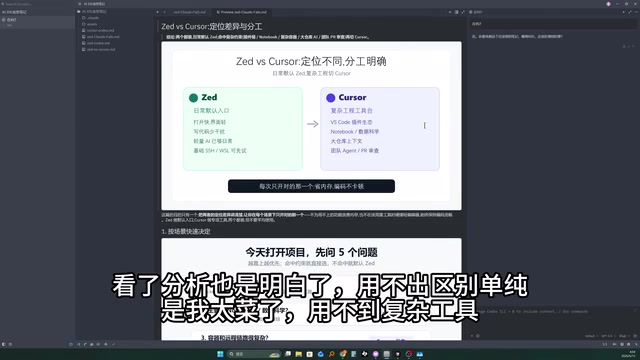
Where Cursor Is Irreplaceable
- VS Code plugin ecosystem: Massive plugin support covering virtually every development scenario
- Data science workflows: Deep Jupyter Notebook integration, etc.
- Complex project management: Large codebase indexing, cross-file context understanding, and other advanced AI features
The VS Code Extensions Marketplace currently has over 50,000 extensions, covering everything from language support, debugging tools, and container management to remote development. Some plugins have become essential for specific development workflows: Remote-SSH allows developers to code directly on remote servers, Dev Containers supports running complete development environments in Docker containers, and the Python and Jupyter extensions provide interactive computing experiences for data scientists. After nearly 10 years of accumulation, this ecosystem has formed a powerful network effect — developers choose VS Code because of plugins, and plugin developers prioritize VS Code because of its user base. Zed has also launched its own extension system, but the ecosystem is still in its early stages, which is its biggest short-term weakness.
Scenarios Where Zed Shines
- Embedded development, frontend development, and other small to medium-sized projects
- Development environments with limited hardware
- Workflows that don't depend on specific VS Code plugins
- Developers who prioritize maximum responsiveness
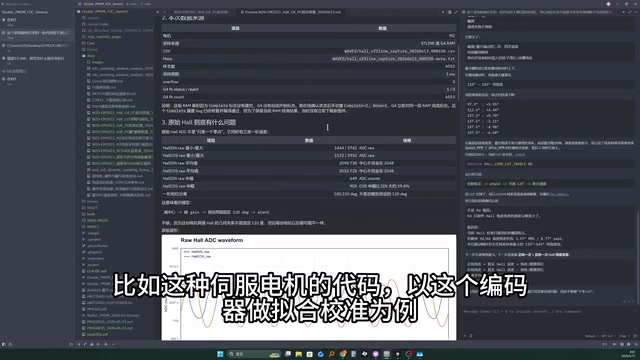
The YouTuber used his own real projects as examples: 4V motor control code, encoder fitting calibration, and other embedded programming tasks involving online debugging, data acquisition and analysis, algorithm research and application, and documentation output. These all fall into the "simple application" category where Zed is more than sufficient. In his words, he had previously been "driving a tank to the farmers' market to buy groceries."
Here's some additional context about embedded development toolchains. Embedded development refers to software development targeting resource-constrained hardware platforms like microcontrollers (MCUs) and DSPs, with typical applications including motor control, sensor data acquisition, and industrial automation. Unlike web or mobile development, embedded codebases are usually smaller (thousands to tens of thousands of lines), but have strict requirements for real-time performance and hardware interaction. Developers' daily work often revolves around register configuration, interrupt handling, and communication protocol implementation — low-level operations primarily using C/C++. In terms of toolchains, embedded developers typically rely on specialized compilers (like ARM GCC), debuggers (like J-Link, ST-Link), and flashing tools, most of which run via command line or standalone software, with relatively light dependency on the code editor itself. This is exactly the "simple application" scenario the YouTuber described — the editor only needs to provide good code editing and AI assistance capabilities, without requiring complex IDE-level features.
Should You Switch from Cursor to Zed?
If you're on the fence, use these four questions to quickly decide:
- Do you depend on specific VS Code plugins? If your workflow includes irreplaceable VS Code plugins (like specific language debuggers, remote development plugins, etc.), switching isn't recommended for now.
- How large are your projects? If you mainly work on small to medium-sized projects, Zed's AI capabilities are already sufficient.
- Does your computer frequently lag because of the editor? If so, Zed's performance advantage will deliver immediate improvement.
- Are you doing data science work? If so, Cursor and VS Code's ecosystem advantages are more apparent.
Conclusion: Choosing the Right Tool Matters More Than Choosing the Expensive One
Zed is a next-generation code editor worth paying attention to. It rewrites the performance baseline for editors using Rust while embracing the AI coding trend. For developers who don't need heavyweight IDE features, Zed offers a free, blazing-fast, and capable choice.
Of course, Zed is still iterating rapidly, and its plugin ecosystem and feature completeness still lag behind the VS Code family. But as the YouTuber put it — if you're just "going to the farmers' market to buy groceries," there's no need to drive a tank every time. Choosing the tool that fits your actual needs is the key to maximizing efficiency.
Zed can be downloaded directly from its official website, completely free.
Related articles

Claude Fable 5 Hands-On Review: Double the Price — Is It Worth It?
Hands-on comparison of Claude Fable 5 vs Opus 4.8 on landing page design and website rebuilds. Detailed API pricing analysis and practical advice on whether double the cost delivers double the value.

Introduction to AI Literacy: How Teachers Can Build a Systematic Cognitive Framework
A teacher's guide to AI literacy: from AI history and LLM fundamentals to the Agent era, build a systematic cognitive framework and master tool selection strategies.

The 4-Stage Roadmap for AI Application Development: A Career Transition Guide from Beginner to Senior Engineer
A 4-stage roadmap for AI application development: from Python and RAG basics to Agent cluster architecture, covering the core skills needed for career growth.