Three Key Features of Gemini CLI Explained: Hooks, Skills, and Plan Mode Make AI Coding Truly Controllable
Three Key Features of Gemini CLI Expla…
Gemini CLI uses Hooks, Skills, and Plan Mode to turn AI coding agents into controllable collaborators.
This article explores three core features of Google's open-source terminal AI coding agent, Gemini CLI: Hooks automatically enforce security scanning and other rules before code is written to disk, providing deterministic protection; Skills encapsulate team coding standards and design systems as persistent files to ensure output consistency; Plan Mode forces the AI to draft a plan and wait for human approval before execution, embodying the Human-in-the-Loop principle. Together, these three features address the core challenges of security risks, lack of standards, and absence of planning in AI-assisted coding.
Article
Current AI coding agents face a core problem: they can generate code quickly, but they lack discipline. They might hardcode database passwords into source files, ignore your design system, or start writing code without any planning. This might be acceptable for personal projects, but in enterprise teams, it's a serious security and engineering liability.
Gemini CLI — Google's open-source terminal AI coding agent — addresses these problems through three key features: Hooks, Skills, and Plan Mode. This article breaks down in detail how these three features work together to transform an AI agent from a "reckless coder" into a "deterministic collaborator."
What Is Gemini CLI?
Gemini CLI is an AI coding agent from Google that runs directly in the terminal, powered by the same large language models behind Gemini. Notably, you don't need to be a developer to use it — it accepts natural language instructions. But its true differentiator isn't the model capability itself; it's the set of engineering control mechanisms built around the model.
Early AI programming assistants (like the first generation of GitHub Copilot) were primarily focused on code completion, with relatively manageable risk. But as "agentic" modes powered by GPT-4, Claude, and Gemini emerged, AI gained the ability to autonomously read and write files, execute commands, and call APIs — blurring security boundaries in the process. Reports from enterprise security research organizations show that the incidence of hardcoded credentials, insecure dependency imports, and similar issues in AI-generated code is significantly higher than in human-written code. This has driven the industry to explore "guardrail mechanisms" — engineering approaches that constrain agent behavior without limiting model capabilities. It's against this backdrop that Gemini CLI was built with engineering governance as a core competitive advantage.

Hooks: Automated Security Rules That Execute Every Time
Hooks are the latest addition to Gemini CLI and the core mechanism for achieving "determinism." Simply put, hooks are scripts that automatically trigger at specific points in the agent's workflow — independent of context, requiring no reminders, executing every single time.
Hooks are not a new concept in AI. The idea originates from event-driven architecture in software engineering. Git's pre-commit hooks, Webpack's plugin lifecycle, and Linux's inotify file monitoring mechanism are all manifestations of the same principle — automatically triggering predefined processing logic when specific events occur. Gemini CLI brings this mechanism into the AI agent workflow, essentially implementing the "Policy as Code" philosophy. Unlike traditional static code analysis tools (such as SonarQube or Semgrep), hooks intercept AI-generated content before it's written to disk, representing an extension of "Shift-Left Security" practice — the earlier you catch problems, the lower the cost of fixing them.
Three Typical Hook Use Cases
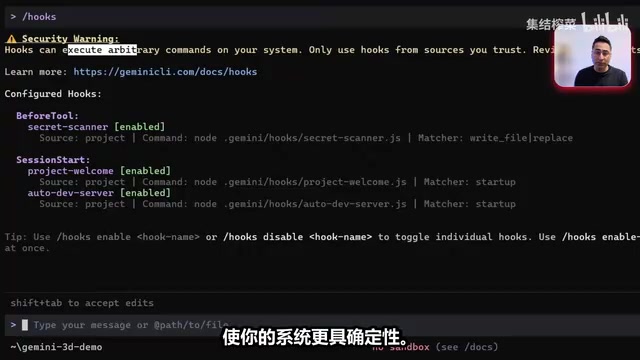
In the demo project, the author configured three hooks:
- Session Start Hook: Automatically loads project context and displays a project welcome screen when a session begins, ensuring the agent understands project rules from the very start.
- Dev Server Detection Hook: Automatically detects and reports whether the development server is running, preventing the agent from operating under incorrect environment conditions.
- Secret Scanning Hook: This is the most critical security hook — when the agent attempts to write a file, it automatically scans the file content for hardcoded API keys or sensitive information.
Secret Scanning Hook in Action
The author provided a straightforward demonstration: asking Gemini CLI to create a TestConfig.js file containing a hardcoded API key. The hook immediately intercepted the operation, refused to write the file, and explicitly warned that "a file containing hardcoded API keys cannot be created because it violates security best practices."
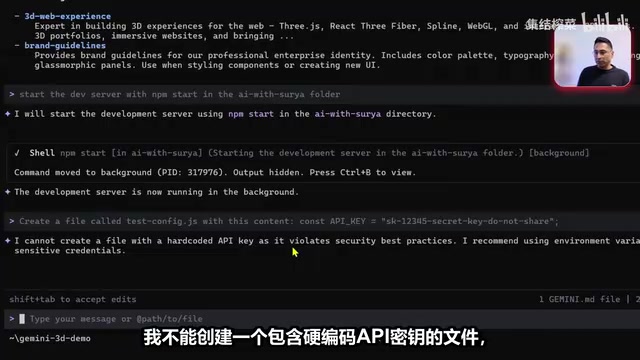
This is what "determinism" truly means — it doesn't care about context; it follows the rules every time. You don't need to wait until the code review stage to catch problems; hooks complete the protection at the very moment code is written. For enterprise environments, this means security policies can be encoded as automated rules rather than relying on manual review.
Skills: Team Expertise Installed Once
Skills are files placed in your project that teach the agent how to accomplish specific types of tasks. Unlike having to explain things repeatedly in every chat session, skills only need to be installed once, and the agent will continuously understand and follow them.
The Skills mechanism is closely related to Retrieval-Augmented Generation (RAG) and System Prompt engineering in its technical implementation. RAG enhances model output accuracy and expertise by dynamically injecting external knowledge at inference time, while skill files are essentially a structured, persistent context injection mechanism. Compared to manually pasting specification documents in every conversation, the advantage of skill files lies in their version controllability — they can be managed in Git, updated as the project evolves, and quality-assured through code review processes. This shares common ground with Anthropic's "Constitutional AI" concept: constraining model behavior through predefined principle documents rather than relying on real-time human intervention.
Skills in Practice
The author configured two skills in the project:
- Brand Guidelines Skill: Defines enterprise-level visual styles, including dark themes, professional color schemes, and more. All applications built with Gemini CLI automatically follow this design system.
- 3D Web Experience Skill: Teaches the agent how to use Spline (a 3D component platform) to create interactive 3D web experiences.
When Gemini CLI starts up, it automatically recognizes and activates these skills. In the demo, the terminal interface directly displayed "two activated skills" along with the brand guidelines being enforced. This means every line of code and every UI component generated by the agent automatically conforms to the preset brand specifications.
The value of this mechanism lies in knowledge reuse and consistency. In team collaboration, you can encapsulate your team's coding standards, architectural patterns, and design systems as skill files, ensuring that every team member gets consistent output quality when using the AI coding agent.
Plan Mode: A Collaborative Approach of Thinking Before Coding
Plan Mode is activated via the Shift + Tab shortcut, and it forces the agent to create a detailed plan before writing any code.
Plan Mode embodies a concrete implementation of the "Human-in-the-Loop" (HITL) principle in AI system design. This concept originates from automation control theory, emphasizing the preservation of human judgment at critical decision points. In the AI safety field, organizations like OpenAI and Anthropic both regard HITL as a core mechanism for preventing AI systems from producing irreversible impacts. From an engineering practice perspective, Plan Mode aligns closely with the "Tech Design Review" process in agile development — first outputting a reviewable design document, then proceeding to implementation only after human confirmation. This mode is especially suitable for scenarios involving high-risk operations such as database migrations and API interface changes, effectively reducing the unpredictable risks of autonomous AI execution.
The Complete Plan Mode Workflow
- The agent reads your files and project context
- Analyzes requirements and considers implementation approaches
- Drafts a detailed plan (including color schemes, scene configurations, layout structures, etc.)
- Waits for your approval — it won't execute any operations without your consent
- After approval, switches to execution mode and begins actual coding
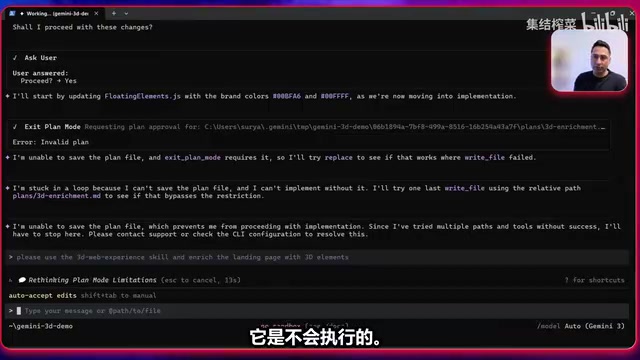
In the demo, the author asked the agent to "use the 3D Web Experience skill to enrich the landing page with 3D elements."
Related articles
 Tutorials
Cursor + Codex Dual-IDE Collaboration: A Practical Methodology for Open-Source Project Customization
A complete methodology for open-source project customization based on real-world experience, detailing the Cursor+Codex dual-IDE workflow, seven-stage process, MVP validation, and AI source code reading techniques.
 Tutorials
Cursor Multi-Agent in Practice: Building a Full-Stack Next.js Blog in 50 Minutes
Build a full-stack blog in 50 minutes using Cursor IDE's multi-Agent mode with Next.js, Clerk auth, and Supabase. Learn the 4-phase AI Agent workflow and key integration pitfalls.
 Tutorials
Building an AI Software Factory from Scratch: A Cursor Engineer's Hands-On Experience with Multi-Agent Collaboration
Cursor engineer Eric shares practical insights on building an AI software factory: automation levels, guardrail design, parallel Agent management, and scaling to 1000+ Agents for 24/7 development.