Use Claude Code for Free Unlimited: Agnes AI + CC Switch Setup Guide
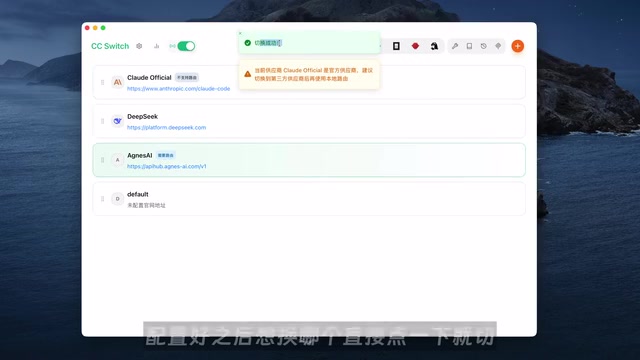
Free unlimited Claude Code usage via Agnes AI's free models and CC Switch interface router.
This guide details how to use Claude Code for free by combining Agnes AI's free multimodal API (text, image, and video) with CC Switch, an open-source interface router. It covers the complete setup process including API key generation, provider configuration, model mapping, and route activation, plus real-world tests showing practical results for dashboards, landing pages, image generation, and video creation.
Claude Code is widely recognized as one of the most powerful AI Agent tools available today, but the barrier to entry is high — you either subscribe to an official paid plan or connect to a third-party API service. Either way, it costs money. Recently, a free solution combining three tools has been gaining significant attention in the developer community: by pairing Agnes AI's free model API with the CC Switch interface router, you can use Claude Code at zero cost with no limits — supporting not just text generation, but also image and video generation capabilities.
This article provides a detailed breakdown of the setup process and real-world results of this solution.
The Three Core Tools and How They Work Together
Before getting started, let's clarify the role each of the three tools plays in this solution:
- Claude Code: The AI Agent frontend that does the actual work — accepting user instructions and executing tasks like code writing and content generation. An AI Agent refers to an AI system capable of autonomously perceiving its environment, making plans, and executing multi-step operations. This is fundamentally different from traditional "question-and-answer" AI assistants. An Agent can break down complex tasks, invoke external tools (such as file systems, terminal commands, and browsers), dynamically adjust strategies based on intermediate results, and ultimately deliver complete work outputs. Claude Code is a prime example of this type of Agent — you give it a goal, and it plans the steps, writes code, debugs, and fixes errors on its own until the task is complete.
- Agnes AI: The backend platform providing free models. It's not a wrapper or relay — its text, image, and video models are all self-developed, directly competing with first-tier providers like OpenAI and Google. The key point is that it offers full multimodal API access completely free, with no time limits or usage caps.
- CC Switch: An open-source interface router responsible for forwarding Claude Code's requests to Agnes AI's gateway and managing backend configurations in a unified way.
In simple terms: Claude Code does the work, Agnes AI provides free models, and CC Switch connects them together.
According to reports, in the first week after Agnes AI opened free access on June 1st, text model calls exceeded 1 trillion, image generation surpassed 2 million images, and video generation exceeded 2 million seconds. While the business model remains unclear, it's undeniably a real benefit for users.
Setup Process: From Getting Your Key to Completing the Connection
The entire setup process consists of three steps, none of which are complicated — just follow along.
Step 1: Get Your Free Agnes AI API Key
Open the Agnes API platform, click "API Keys" in the left sidebar menu, then click "Create New Key" and give it any name you like. Once created, copy the key — you'll need it when configuring CC Switch.
An API Key (Application Programming Interface Key) is an authentication credential — essentially a unique string used to identify the caller and control access permissions. When your application sends a request to Agnes AI, the API Key is attached to the request header, allowing the server to determine "who sent this request, whether they have access, and how many calls they've made." This is similar to entering a username and password when logging into a website, except API Keys are designed for machine-to-machine authentication. Keeping your API Key secure is crucial — if it's leaked, others can impersonate your identity to make calls.
Step 2: Configure the Provider in CC Switch
Open CC Switch, switch to the "Cloud CLI" tab in the top toolbar (specifically designed for configuring Claude Code), then click the plus icon in the upper right to add a new provider:
- Provider Type: Select Cloud Provider → Custom Provider
- API Key: Paste the key you copied from the Agnes platform
- Request URL: Enter Agnes's gateway address, which forwards Claude Code's requests to Agnes
- API Format: Keep the default setting
The "gateway address" mentioned here is the entry URL of an API Gateway. An API Gateway is a core component in microservices architecture that serves as the unified entry point for all external requests. Its responsibilities include: request routing (distributing requests to the correct backend services), authentication (validating API Keys), traffic control (rate limiting, circuit breaking), protocol conversion, and more. In this solution, CC Switch forwards requests from Claude Code to Agnes's API Gateway, which then distributes them to the corresponding text, image, or video model services. The advantage of this architecture is that users only need to remember one address — all the complex backend orchestration is completely transparent.
After filling in the fields, click "Get Model List." If the model list loads successfully, you're connected to Agnes AI.
Step 3: Model Mapping and Route Activation
Next, set up model mapping — map all models that Claude Code might call to Agnes 2.0 Flash. This way, regardless of which model Claude Code requests, it will actually use Agnes's free model.
Model Mapping is a common feature in API proxy tools. Here's how it works: when Claude Code sends a request, it specifies the model name in the parameters (e.g., claude-sonnet-4-20250514, claude-3.5-haiku, etc.). However, these model names don't exist in Agnes AI's system, and forwarding them directly would cause errors. Model mapping creates a "translation table" — when CC Switch intercepts a request, it replaces the original model name with one that actually exists on the Agnes platform (e.g., agnes-2.0-flash), then forwards it. This way, Claude Code thinks it's calling Anthropic's models, but the request has been seamlessly redirected to Agnes's free models. Routing is the switch that makes all of this work — only after enabling routing will CC Switch actually intercept and rewrite requests.
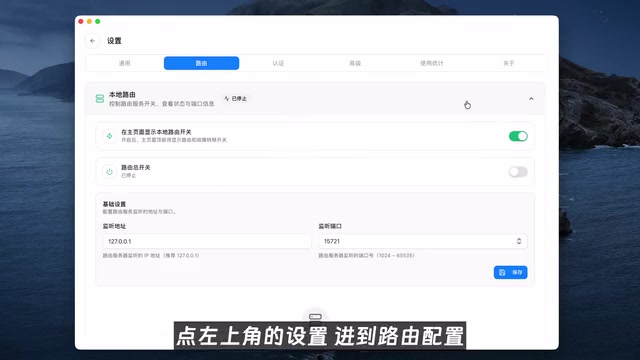
After confirming and saving, you still need to enable route forwarding:
- Click "Settings" in the upper left to enter the routing interface
- Turn on "Local Routing"
- Enable the Cloud routing toggle
- Go back to the provider list, find Agnes, and click "Enable"
Once done, type the Claude command in your terminal and send a "hello" test. If you receive a successful response, the entire setup is ready to go.
Real-World Testing: Text Model
Completing the setup is just the first step — what really matters is how the free model actually performs. Here are test results based on real work scenarios.
The tester used their own video operations data (over 100 entries across multiple platforms) as input and had Claude Code call Agnes 2.0 Flash to complete two tasks:
Task 1: Operations Review Dashboard. The generated dashboard included charts, filters, and detailed data with clean layouts — fully usable for daily performance reviews.
Task 2: Business Collaboration Landing Page. Building on the dashboard, it was upgraded into a page suitable for sending to brand partners, complete with data snapshots, featured works, and collaboration options — all looking quite professional.
From an ordinary data spreadsheet to a review dashboard to a business landing page — the entire process relied on the free model, and the results were highly practical. These tasks involve coordinating multiple steps including data parsing, visualization code generation, and frontend page building — exactly where AI Agents shine compared to regular chatbots: they don't just answer questions, they complete an entire workflow end-to-end.
Real-World Testing: Image Generation
Since Claude Code natively only supports text models, the tester created a dedicated Skill for calling Agnes's image generation model. Usage is straightforward — just ask Claude Code to generate an image based on a prompt in the chat, and it automatically invokes the Skill and saves the image to the project directory.
A "Skill" here refers to an extension mechanism in Claude Code, similar to a plugin or custom command. Users can pre-write a script or configuration that defines how Claude Code should call external APIs in specific scenarios. When a relevant intent is triggered during conversation, the Agent automatically executes the corresponding Skill logic. Through this approach, Claude Code — which originally only supports text interaction — can indirectly gain multimodal capabilities like image and video generation.
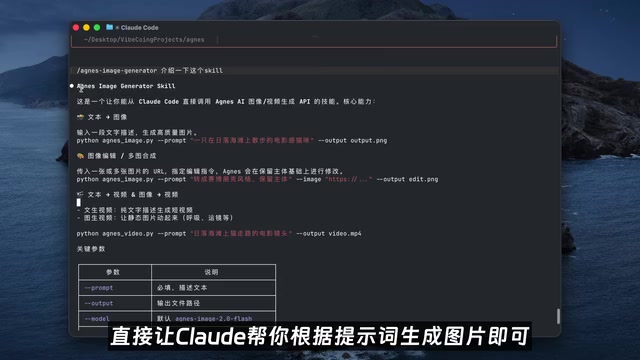
Text-to-Image Test
The prompt requested a portrait photo in 35mm film direct-flash style. The results showed solid film grain texture, direct flash highlights, realistic skin texture and pores — all conveying a street-sport aesthetic.
Text-to-Image is one of the most mature applications of generative AI today. The core technical approach has evolved from GANs (Generative Adversarial Networks) to Diffusion Models. Most mainstream text-to-image models (such as Stable Diffusion, DALL·E, and Midjourney) are based on diffusion model architectures: starting from pure noise and gradually "denoising" under the guidance of text semantics to ultimately generate images matching the prompt. The model's understanding of photography terms like "35mm film" and "direct flash" comes from the vast amount of real photography works with such labels in its training data, enabling it to reproduce the corresponding visual styles.
It's worth noting that AI image generation typically requires generating multiple images from the same prompt before getting a satisfactory result. With paid models, costs of a few cents per image add up quickly. With Agnes being completely free, you can experiment freely without worrying about expenses.
Image-to-Image Test
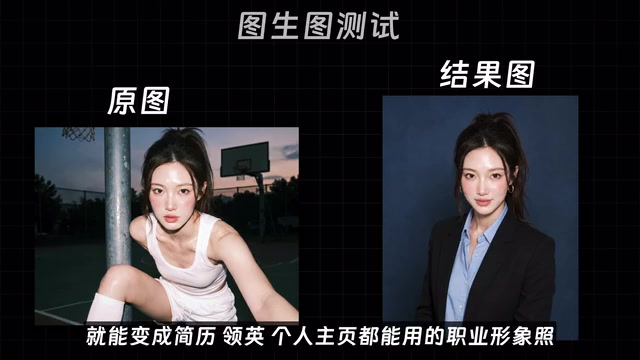
Given a reference image, Agnes was asked to create a derivative work based on it. In the test, a casual photo was input with a request to generate a professional headshot. The result was a standard half-body composition with natural expression and genuine smile — crucially, the face remained unchanged while the clothing, background, and lighting were all replaced.
The key difference between Image-to-Image and Text-to-Image is that it doesn't start from pure noise — instead, it uses an existing image as the starting point for style transfer, partial modification, or complete redrawing. The "change outfit but keep the face" capability involves more complex technology — Face Preservation (Identity Consistency). The model first locks down the facial identity information (such as facial proportions, skin tone, and facial contours) through face detection and feature extraction, then injects these features as strong constraints during the generation process. This ensures the face in the output image remains highly consistent with the original while allowing free variation in non-facial areas like clothing, background, and lighting. This technology has broad applications in virtual try-on, ID photo generation, digital avatar creation, and more.
This "change outfit, keep the face" capability is quite practical — one casual photo plus a prompt, and you get a professional headshot ready for resumes or LinkedIn profiles.
Real-World Testing: Video Generation
Video generation is the most demanding test of model capability. The tester used a prompt to generate a short video of a red-haired female singer performing.
AI video generation is a frontier area in generative AI, with technical difficulty far exceeding image generation. The core challenge lies in "temporal consistency" — the model must not only make each frame look realistic but also ensure coherent motion between frames, stable object forms, and reasonable lighting changes. Most mainstream video generation models (such as Sora, Runway Gen-3, Kling, etc.) are based on diffusion models or Transformer architectures with joint spatiotemporal modeling, processing both spatial and temporal dimensions simultaneously in latent space. Despite rapid progress, AI video generation is still in a "usable but imperfect" stage, especially prone to artifacts in multi-person scenes, complex motion, and long-duration coherence.
The standout quality was the progression of facial expressions: from calmly closing her eyes to build emotion, to gradually getting into the groove and opening her mouth to sing, to slightly furrowing her brows and becoming fully immersed in the emotion. The hand gripping the microphone, lip movements, and breathing rhythm were all coherent, without the typical AI stiffness.
Of course, the model has its failures too. In another nighttime street video, the main subject was stable, but a passerby on the left suddenly "split" into two people, as if cloned out of thin air. This phenomenon in AI video generation is called "entity splitting" or "Ghost Artifact." The root cause is insufficient attention allocation to non-subject areas — during training, the model primarily learns the motion patterns of the main subject and lacks adequate temporal tracking capability for secondary elements like passersby appearing incidentally in the background, causing duplicate feature responses for the same person in certain frames. However, the main subject clarity was fine, and in such cases you can simply regenerate a few times — after all, it's completely free with no limits.
Summary and Considerations
The core value of this solution is zero-cost access to full multimodal AI capabilities:
| Capability | Tool | Cost |
|---|---|---|
| AI Agent Interaction | Claude Code | Free |
| Text/Image/Video Models | Agnes AI | Free |
| Interface Management & Routing | CC Switch (Open Source) | Free |
A few things to keep in mind:
- Sustainability of the Free Policy: How long Agnes AI's free access will last remains uncertain — it's recommended to try it while the window is open. Based on industry norms, many AI platforms use free access strategies early on to rapidly acquire users and usage data for model optimization and market validation, potentially transitioning to a Freemium (basic free + premium paid) model later.
- Model Capability Boundaries: The free model may fall short of Claude's native models on complex reasoning tasks. It's well-suited for everyday development, content creation, and other moderate-complexity scenarios. Specifically, for tasks involving multi-step logical reasoning, large-scale code refactoring, or precise mathematical calculations, it's advisable to cross-validate outputs against native models.
- Use Caution in Production: For critical production tasks, thorough evaluation is recommended before deciding whether to replace paid solutions. Production environments have strict requirements for model stability, response latency, and SLA (Service Level Agreement) guarantees — free services typically don't provide these commitments.
Overall, this Claude Code + Agnes AI + CC Switch combination offers a worthwhile option for budget-conscious developers and content creators.
Related articles

Politicization of the 2026 World Cup: How the Trump Administration Is Undermining the Fairness of the Tournament
The Trump administration is politicizing the 2026 World Cup by banning a Somali referee, detaining Iraq's team, and revoking Iran's ticket allocation, sparking global concerns over host fairness.
Codex + Claude Code in Practice: From Vibe Coding to Enterprise-Grade AI Engineering
A deep dive into Codex and Claude Code for real-world AI programming—from Vibe Coding prototypes to Plan mode and SuperPAL engineering, with LLM selection strategies and enterprise workflows.
Hands-On Tutorial: Building an AI Trending News Dashboard from Scratch with Claude Code
Learn to build an AI trending news dashboard from scratch with Claude Code — no coding required. Covers CC setup, domestic model integration, and full-stack development.