v0 Annotations Explained: How Visual Markup Is Revolutionizing AI Code Collaboration
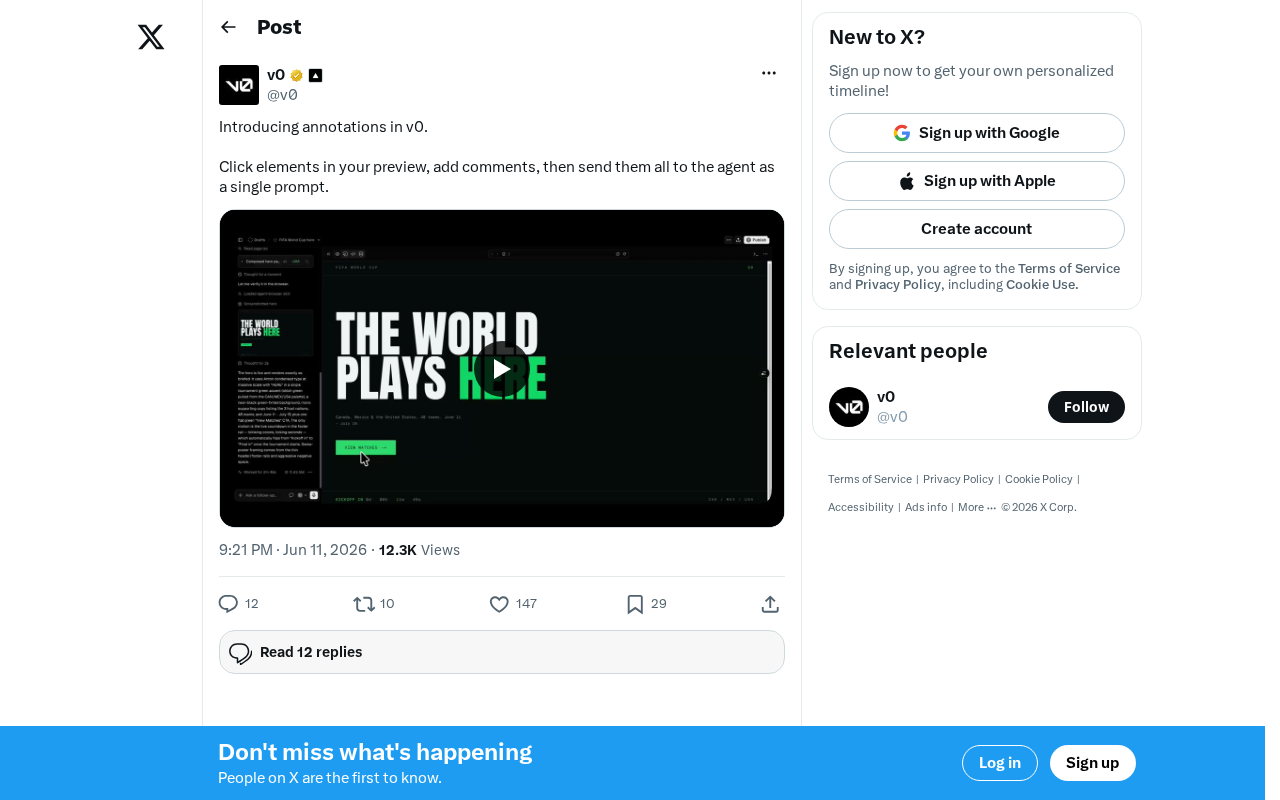
v0's Annotations lets users visually mark up previews and batch-submit feedback to AI for code changes.
Vercel's v0 introduces Annotations, a feature that lets users click on elements in the live preview, add comments, and submit all markups as a single prompt to the AI agent. By bridging the gap between visual feedback and text-based AI input, Annotations dramatically reduces communication rounds, supports batch processing for efficiency, and lowers the barrier for non-technical stakeholders to participate in frontend development.
Vercel's AI code generation tool v0 recently launched a new feature called Annotations, which allows users to click directly on elements in the preview interface, add comments, and then send all annotations to the AI agent as a single prompt in one go. This release marks a significant step forward in human-computer interaction for AI-assisted development tools.
Vercel is a globally leading frontend cloud platform company, founded by Guillermo Rauch, the creator of the Next.js framework, with a focus on providing developers with an end-to-end solution from development to deployment. v0 is an AI code generation tool launched by Vercel in 2023 that leverages large language models to automatically generate React components and complete frontend interface code from natural language descriptions. What makes v0 unique is that it doesn't just generate code — it simultaneously renders an interactive, real-time preview. It's precisely this "generate and preview" model that laid the technical foundation for the Annotations feature.
Feature Breakdown: A WYSIWYG Feedback Mechanism
Core Workflow
The Annotations workflow is highly intuitive, consisting of three main steps:
- Click an element: In the preview page generated by v0, click directly on the UI element you want to modify
- Add a comment: Write specific modification suggestions or requirement descriptions next to the selected element
- Submit in batch: Consolidate all annotations into a single, complete prompt and submit it to the AI agent for processing
This approach completely transforms the old communication model where you had to describe things like "change the color of the third button to blue" or "the spacing below the navigation bar is too large." Users no longer need to precisely describe element positions — they can simply "point at" it and state their needs.
Why the Annotations Feature Deserves Attention
In traditional AI code generation workflows, there's a significant "gulf of execution" between users and AI — you can clearly see the problem, but accurately conveying it to the AI through pure text often requires multiple rounds of communication. This concept was originally introduced by cognitive scientist Donald Norman in The Design of Everyday Things, referring to the gap between user intent and the input a system can accept. In AI code generation scenarios, this gulf is particularly pronounced: visual information is inherently two-dimensional and spatial, while text descriptions are linear and sequential. When users try to describe a visual problem in words, they must go through multiple transformations — "visual perception → spatial localization → linguistic encoding → text output" — and each step can introduce information loss. Research shows that in UI feedback scenarios, the first-attempt accuracy rate of pure text descriptions is less than 40%, with significant time wasted on clarification and repeated communication.
The core value of the Annotations feature lies in directly converting visual information into context, enabling the AI to precisely understand which specific element the user is pointing to, thereby drastically reducing ineffective communication rounds.
Industry Trends: From Conversational to Interactive AI Development
A Visual-First Design Philosophy
This v0 update reflects a clear trend in the AI development tools space: evolving from pure text-based conversation to multimodal interaction. Multimodal Interaction refers to a system's ability to simultaneously accept and process multiple forms of input, including text, images, voice, gestures, and spatial positioning. The technical foundation for this trend comes from the rapid advancement of multimodal large models — models like GPT-4V and Claude already possess the ability to understand both images and text simultaneously.
Similar philosophies are also reflected in tools like Cursor and Bolt — enabling developers to express intent in the most natural way possible, rather than conforming to AI input limitations. The Cursor editor combines code context with the user's cursor position to achieve an "edit where you point" experience; Bolt.new allows users to generate and modify full-stack applications directly through natural language. v0's Annotations feature takes this a step further by binding precise DOM element positioning information (including CSS selector paths, component hierarchy relationships, and other structured data) with the user's natural language comments, forming a context-rich composite prompt that enables the AI to precisely locate modification targets.
Efficiency Gains from Batch Processing
Here's a noteworthy detail: Annotations supports a "batch annotation, single submission" model. Users can first review the entire page holistically, mark all the areas that need adjustment, and then let the AI handle all modifications at once. Compared to the traditional approach of providing feedback one item at a time and generating changes iteratively, this batch processing mechanism significantly reduces interaction rounds and dramatically improves iteration efficiency.
There are deep engineering considerations behind this design. In the working mechanism of large language models, each independent request requires reloading context, parsing code structure, generating a modification plan, and re-rendering. If a user has 10 modification requests, submitting them one by one means 10 complete inference cycles — not only taking longer, but also potentially creating conflicts since each modification is based on a different code snapshot. Batch submission allows the AI to holistically consider all modification requests in a single inference pass, identify potential dependencies and conflict points, and generate an overall consistent modification plan. This is similar to the concept of a "Transaction" in databases — packaging multiple operations into a single atomic unit for execution, ensuring consistency and integrity of the results.
Practical Impact for Developers and Designers
This feature effectively lowers the barrier for non-technical people to participate in frontend development. Product managers, designers, and even clients can directly "circle and annotate" issues in the preview without needing to understand CSS property names or DOM structure. This collaboration model is closer to the review workflows common in design tools (similar to Figma's commenting feature), but acts directly on runnable code output.
Figma is currently the most mainstream online collaborative design tool, and its commenting feature allows team members to leave feedback directly at specific positions on design mockups, forming the industry-standard review workflow for design. However, Figma's comments apply to static design mockups — designers need to manually revise designs based on feedback, and then developers must translate the designs into code. v0's Annotations feature embeds this review workflow directly at the runnable code level — the objects being annotated are not pixels on a design file, but real rendered DOM elements, and the entity executing the feedback is not a human designer or developer, but an AI agent. This means the path from "discovering a problem" to "fixing a problem" is dramatically shortened. The traditional design review cycle of "design → feedback → revise design → develop → feedback → revise code" is compressed into a single-loop closure of "preview → annotate → AI automatically modifies code."
For professional developers, Annotations provides a more efficient fine-tuning mechanism — when the AI's initial output is already close to expectations and only needs local adjustments, precise annotations are far more efficient than re-describing the overall requirements.
Conclusion
v0's Annotations feature may seem like a minor update, but it actually represents an important evolution in the interaction paradigm of AI development tools. When we can collaborate with AI the same way we "point at something and talk about it" in the real world, the efficiency of human-AI collaboration will achieve a qualitative leap. This also signals that future AI tools will increasingly integrate visual, spatial, and other multidimensional information, rather than being confined to the single channel of text-based conversation.
Related articles
Wise Large Transfer Delayed Two Weeks: How Should Cross-Border Entrepreneurs Respond?
Wise Business users face 10-14 day delays on large transfers, sparking debate on whether fintech is repeating traditional banking mistakes. Analysis and practical tips for cross-border entrepreneurs.

Perplexity Partners with Intel: Local AI Models and Hybrid Inference Come to Laptops
Perplexity partners with Intel to bring local AI models and hybrid inference to Core Ultra Series 3 laptops. We break down the architecture, NPU capabilities, and the cloud-to-edge AI trend.

AI Large Model Learning Roadmap Breakdown: Three Stages from Application Development to Model Fine-Tuning
Deep breakdown of a popular AI large model learning roadmap covering LangChain, RAG, Agent, and LoRA fine-tuning across three stages, with analysis of its strengths and limitations for career changers.