v0 Browser Use Feature Comes to iOS, Elevating the Mobile AI Coding Experience
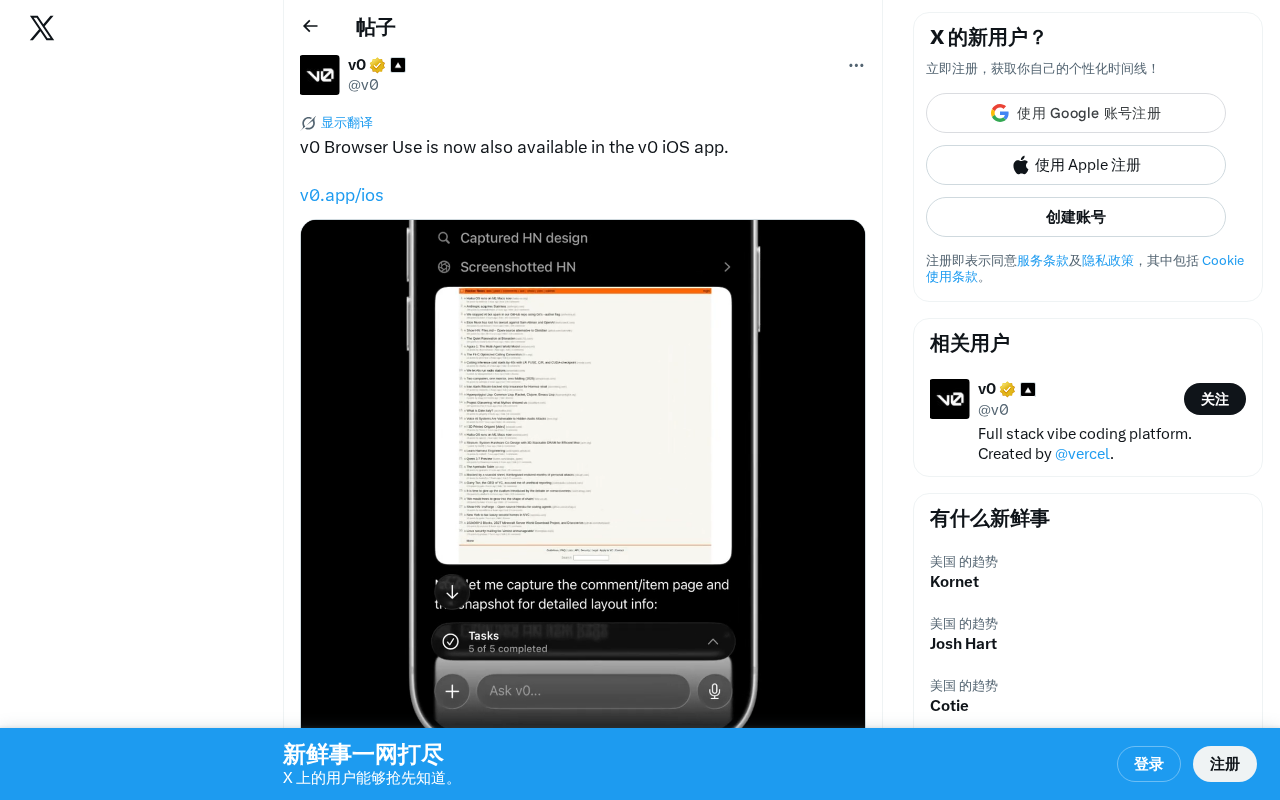
v0's Browser Use feature now available on iOS, bringing AI-powered code preview to mobile.
Vercel's AI coding tool v0 has launched its Browser Use feature on iOS, allowing developers to preview and interact with AI-generated code directly on iPhone and iPad. This move reflects a broader trend toward mobile AI development tools and gives v0 a competitive edge over desktop-focused rivals like Cursor and Windsurf.
v0 Browser Use Officially Launches on iOS
Vercel's AI coding tool v0 recently announced that its Browser Use feature is now officially available in the v0 iOS app. This means users can experience AI-powered browser interaction directly on their iPhone or iPad, taking the mobile AI development experience to new heights.
What Is v0 Browser Use?
From Text Generation to Browser Interaction
v0 is Vercel's AI-powered frontend code generation tool that lets users generate complete UI components and page code simply by describing what they want in natural language. The Browser Use feature takes this a step further — it allows the AI to operate directly within a browser environment, enabling users to see rendered output of generated code in real time and interact with it.
Previously, Browser Use was primarily available on v0's web platform. Its expansion to iOS signals that Vercel is actively pushing a mobile-first strategy for its AI coding tools.
New Possibilities for Mobile Development
Bringing Browser Use to iOS introduces several noteworthy changes:
- Prototype validation anytime, anywhere: Developers can quickly validate UI design ideas during commutes, between meetings, or other spare moments
- More intuitive interaction: Directly touch-interacting with generated interfaces on a mobile device feels closer to the real mobile user experience than simulating with a desktop mouse
- Lower barriers to development: Even without access to a work computer, developers can complete simple frontend tasks from their phone
v0's Product Evolution
From Tool to Platform
Since its launch, v0 has been iterating rapidly. From simple UI component generation, to full page building, to cross-platform Browser Use coverage — v0 is evolving from a standalone code generation tool into a comprehensive AI-assisted development platform.
This trend aligns with the broader direction of the AI coding space. More and more AI coding tools are no longer content with serving only desktop users — they're expanding to mobile and multi-platform environments to cover a wider range of developer use cases.
Differentiation in a Competitive Landscape
In the increasingly crowded AI coding tool market, v0's decision to invest in mobile is a smart differentiation strategy. Most AI coding tools (such as Cursor, Windsurf, etc.) still focus primarily on the desktop. By continuously upgrading its iOS app's capabilities, v0 is carving out a relatively untapped mobile development niche.
What This Means for Developers
For frontend developers and designers, v0 Browser Use on iOS means further liberation of their workflow. Here are a few typical use cases:
- Client demos: During face-to-face meetings with clients, generate prototypes on your phone using natural language and present them on the spot
- Capturing inspiration: When you spot a great design, immediately recreate and save it using v0 on your phone
- Team collaboration: Quickly generate components on mobile and share them with team members for discussion
While the mobile coding experience can't yet fully replace deep development work on a desktop, as a lightweight supplementary tool, v0's Browser Use feature on iOS undoubtedly gives developers greater flexibility.
Takeaway
The expansion of v0 Browser Use to iOS may seem like just a feature update, but it reflects a broader trend of AI coding tools moving toward mobile-first, full-scenario coverage. As AI capabilities continue to grow and mobile device performance keeps improving, completing more complex development tasks on a phone will no longer be a distant dream.
Related articles

Vibe Coding Beginner's Guide: A Complete Roadmap to Building Software with AI — No Coding Experience Required
Vibe Coding lets anyone build software using plain language instructions with AI. Learn what it is, when to use it, which tools to pick, and how to get started.

Beginner's Guide to Vibe Coding: Turn Ideas into Products with AI — No Coding Experience Required
Vibe Coding lets anyone build software products through natural language conversations with AI — no programming skills required. Learn the concept, top tools (Cursor, Claude Code, Codex), and how to get started.
Codex in Action: One Prompt, 47 Minutes, a Complete Algorithm Research Paper
Testing OpenAI Codex: one detailed prompt generates a complete algorithm paper in 47 minutes, including working code, figures, and LaTeX manuscript. Covers prompt design, quality assessment, and real submission experience.