V0 + Cursor + Supabase + Vercel: Build a SaaS App with AI in 4 Steps — No Coding Required

Build and launch a SaaS app in 4 steps with V0, Cursor, Supabase, and Vercel — no coding needed.
This article introduces a zero-code tech stack for building SaaS applications: use V0 to generate UI design code through natural language, Cursor AI editor to transform designs into a runnable Next.js app, Supabase for database and authentication backend services, and Vercel for one-click deployment. This approach is extremely low-cost with a modern tech stack, ideal for non-technical people to quickly validate business ideas and build MVPs, though complex scenarios still require professional development skills.
The Zero-Code Era Is Here
Not long ago, building a SaaS (Software as a Service) application required a full development team — front-end engineers, back-end engineers, and DevOps engineers were all indispensable. SaaS is one of the three major cloud computing service models, where users subscribe to software through a browser without needing local installation. Traditional SaaS development demands mastery of front-end frameworks, back-end languages, database design, server operations, and many other technology stacks, creating an extremely steep learning curve — which is precisely the core driver behind the explosive growth of AI-assisted development tools over the past two years.
Now, thanks to the rapid advancement of AI tools, someone with absolutely no programming experience can independently complete the entire process from design to deployment.
This article introduces a proven tech stack combination: V0 + Cursor + Supabase + Vercel. In just 4 steps, you can turn your idea into a live, running SaaS application.
Step 1: Design Beautiful Interfaces with V0
V0 (v0.dev) is an AI interface generation tool launched by Vercel. Its core philosophy is straightforward — design UI through conversation.
All you need to do is describe the interface you want in natural language. For example, "Design a SaaS homepage with user login, a data dashboard, and a pricing page," and V0 will automatically generate high-quality UI components based on React and Tailwind CSS.
It's worth explaining these two underlying technologies: React is a mainstream front-end framework developed by Meta that uses a component-based approach to build user interfaces — currently over 40% of front-end projects worldwide use React. Tailwind CSS is a "utility-first" CSS framework that controls styling directly in HTML through predefined atomic class names, dramatically improving UI development efficiency. V0's generated code is built directly on these two technologies, meaning the output integrates seamlessly into modern front-end engineering ecosystems rather than being an isolated prototyping tool.
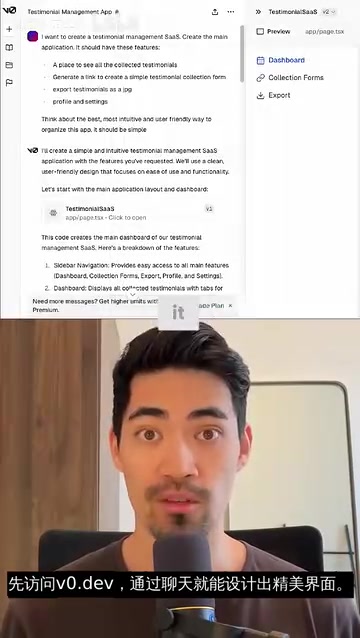
Key action: After iterating on your design in V0 until you're satisfied, click the copy button to get the generated design code. These are standard React components that can be directly integrated into a Next.js project. V0's advantage is that it doesn't generate simple mockups — it produces production-ready code that you can use immediately.
Step 2: Turn Designs into a Working App with Cursor
Cursor is currently the most talked-about AI coding editor. Built on the VS Code open-source core, it deeply integrates large language models like GPT-4. Unlike plugin-based AI tools such as GitHub Copilot, Cursor natively embeds AI capabilities into the editor workflow, supporting multi-file context understanding, codebase-level Q&A, and refactoring. After downloading and installing it, the real magic lies in its Composer feature — developers can describe requirements in natural language, and the AI automatically generates and modifies cross-file code changes. What would take hours of manual work in a traditional IDE can now be completed in minutes.
Here's the specific workflow:
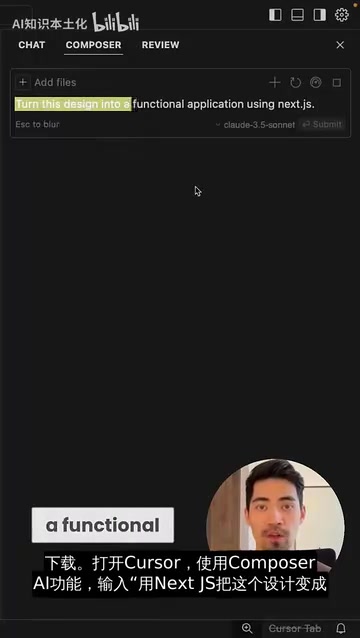
- Open Cursor and create a new Next.js project
- Launch the Composer AI feature (shortcut: Ctrl+I)
- Enter the prompt: "Turn this design into a working app using Next.js"
- Paste the code copied from V0
It's worth introducing Next.js here: it's a full-stack React framework developed by Vercel that supports Server-Side Rendering (SSR), Static Site Generation (SSG), and API routes, allowing developers to handle both front-end pages and back-end endpoints within a single codebase. Compared to pure React applications, Next.js comes with built-in production-grade features like SEO optimization, image optimization, and code splitting. It's currently the most popular full-stack JavaScript framework, adopted by companies like Netflix, TikTok, and many others.
Cursor's AI understands your intent and automatically handles routing configuration, component splitting, state management, and more. It doesn't simply paste code — it organizes the project structure according to Next.js best practices. For beginners, this step eliminates a huge amount of time that would otherwise be spent learning framework configuration.
Tip: If the AI-generated code throws errors, don't panic. Just copy the error message to Cursor's AI, and it can usually fix it automatically. This "conversational debugging" is the essence of AI-powered programming.
Step 3: Build the Backend with Supabase
A complete SaaS application can't just have a front-end interface — it also needs a database, user authentication, API endpoints, and other backend capabilities. This is where Supabase comes in.
Supabase is a BaaS (Backend as a Service) product, often called the "open-source Firebase alternative." Its core competitive advantage lies in being built on PostgreSQL, providing enterprise-grade relational database capabilities rather than Firebase's NoSQL approach. PostgreSQL supports complex queries, transactions, foreign key constraints, and other features that are better suited for SaaS applications with complex data structures. Additionally, Supabase uses Row Level Security (RLS) policies that let developers control user data permissions directly at the database level, greatly simplifying the implementation of backend security logic.
Specifically, Supabase provides:
- PostgreSQL Database: A powerful relational database
- Authentication System: Supports email, Google, GitHub, and other login methods
- Real-time Subscriptions: Automatically pushes data changes to the front end
- Storage Service: File upload and management
- Edge Functions: Serverless functions
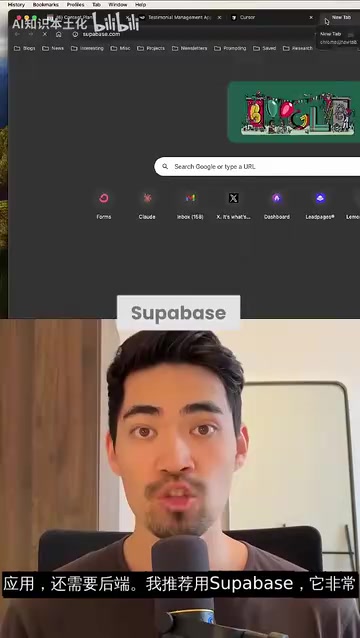
Integration is equally simple: ask the AI in Cursor to list the steps for integrating Supabase, then execute them one by one. This typically includes installing the @supabase/supabase-js package, configuring environment variables, creating database table structures, and so on. Throughout the process, you can still rely on Cursor's AI to write the code.
Supabase's free tier is more than sufficient for projects in the MVP (Minimum Viable Product) stage. MVP is a core concept in lean startup methodology — the idea is to build a product version with minimal development cost that can validate core assumptions, quickly gather real user feedback, and avoid wasting significant resources on unvalidated directions. The greatest value of this tech stack is compressing the MVP build cycle from weeks to days, enabling entrepreneurs to complete the "build-measure-learn" validation loop at extremely low cost.
Step 4: Deploy with One Click Using Vercel
Once your application is complete, the final step is publishing it to the internet. Vercel, as the official deployment platform for Next.js, offers an incredibly simple deployment experience.

Deployment workflow:
- Push your code to a GitHub repository
- Link your GitHub account on the Vercel website
- Select the corresponding repository and click Deploy
- Wait a few seconds, and your application is live
Vercel's core technical advantage lies in its global Edge Network, which deploys static assets and server-side functions across 100+ data center nodes worldwide. User requests are automatically routed to the nearest node, significantly reducing access latency. Vercel automatically handles building, CDN distribution, HTTPS certificates, and all other DevOps tasks. Every time you push new code to GitHub, Vercel automatically triggers a redeployment and generates an independent Preview Deployment for each Pull Request, achieving true CI/CD (Continuous Integration/Continuous Deployment). For independent developers, Vercel's free tier provides enough bandwidth and function invocations to support the cold-start phase of an early-stage SaaS product.
Strengths and Limitations of This Tech Stack
Strengths
- Zero programming barrier: You can rely on AI for all code writing throughout the process
- Extremely low cost: All four tools offer free tiers, making startup costs virtually zero
- Modern tech stack: Next.js + Supabase + Vercel is a mainstream full-stack solution in the industry today
- Highly scalable: As your business grows, this architecture can scale smoothly
Limitations
- AI-generated code quality varies; complex business logic still requires human oversight
- For high-concurrency or complex data processing scenarios, more specialized architecture design may be needed
- Over-reliance on AI may lead to insufficient understanding of underlying principles, leaving developers unable to troubleshoot difficult issues
Final Thoughts
This V0 + Cursor + Supabase + Vercel combination essentially represents a new software development paradigm: AI-assisted rapid prototyping. It's particularly well-suited for validating business ideas, building MVPs, or serving as a starting tool for non-technical founders.
However, it's important to recognize that "no-code" doesn't mean "no barriers." You still need to understand basic product logic, user experience design principles, and have the ability to evaluate AI-generated results. These tools lower the barrier to technical implementation — not the barrier to thinking.
If you have a SaaS idea that you've never acted on, now is the best time — go give it a try.
Key Takeaways
- V0 generates high-quality React UI component code through natural language conversation, dramatically lowering the front-end design barrier
- Cursor editor's Composer AI feature can automatically transform design code into a complete, runnable Next.js application
- Supabase provides one-stop backend services including database, authentication, and storage — its free tier is sufficient for the MVP stage
- Vercel supports one-click deployment and automatically handles building, CDN, HTTPS, and other DevOps tasks
- This tech stack is ideal for quickly validating business ideas, but complex business scenarios still require professional development expertise
Related articles
 Tutorials
Cursor + Codex Dual-IDE Collaboration: A Practical Methodology for Open-Source Project Customization
A complete methodology for open-source project customization based on real-world experience, detailing the Cursor+Codex dual-IDE workflow, seven-stage process, MVP validation, and AI source code reading techniques.
 Tutorials
Cursor Multi-Agent in Practice: Building a Full-Stack Next.js Blog in 50 Minutes
Build a full-stack blog in 50 minutes using Cursor IDE's multi-Agent mode with Next.js, Clerk auth, and Supabase. Learn the 4-phase AI Agent workflow and key integration pitfalls.
 Tutorials
Building an AI Software Factory from Scratch: A Cursor Engineer's Hands-On Experience with Multi-Agent Collaboration
Cursor engineer Eric shares practical insights on building an AI software factory: automation levels, guardrail design, parallel Agent management, and scaling to 1000+ Agents for 24/7 development.