Vibe Coding Beginner's Guide: Tool Selection Across Three Categories with Practical Examples

A beginner's guide to Vibe Coding covering three tool categories and practical workflow examples.
This guide explains Vibe Coding — AI-driven programming through natural language — covering three tool categories: Agent frameworks for quick prototyping, CLI Coding tools for core development, and IDE tools for fine-tuning. It includes practical examples from a 5-minute Snake game to a complex data analysis workbench, demonstrating multi-AI collaboration strategies and cloud-based solutions for stable development environments.
What is Vibe Coding?
Vibe Coding is a completely new approach to programming — instead of writing code line by line, you describe your requirements in natural language and let AI generate code at scale to complete development work.
This concept was first introduced by Andrej Karpathy, former Tesla AI Director and OpenAI co-founder, in early 2025. He described his new programming state on social media: "Fully immersed in the vibes, embracing exponential growth, forgetting that code even exists." This approach stands in stark contrast to traditional programming — where developers must precisely master syntax rules, data structures, and algorithmic logic — Vibe Coding hands these technical details to AI, and humans only need to clearly express "what I want."
Why do Vibe Coding? The core purpose is to turn AI capabilities into tools. We use AI not just for chatting, but to solve concrete problems. However, large models are essentially a "gacha" mechanism with unstable outputs. The "gacha" here refers to the probabilistic sampling nature of large language models — when generating each token, the model is actually sampling from a probability distribution. The same input may produce different outputs, just like gacha draws have inherent randomness. The higher the Temperature parameter, the greater the randomness and the more unpredictable the output. Through Vibe Coding, we can solidify validated AI capabilities into stable, usable tools that serve us consistently and reliably.
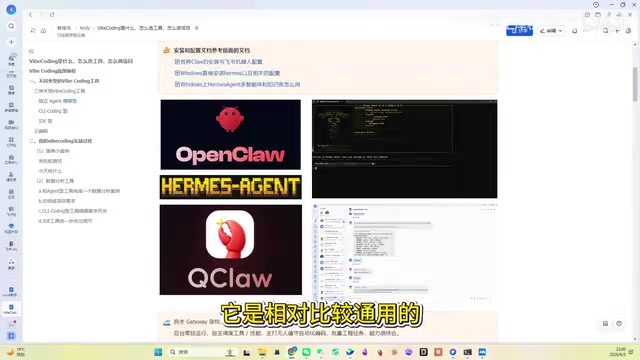
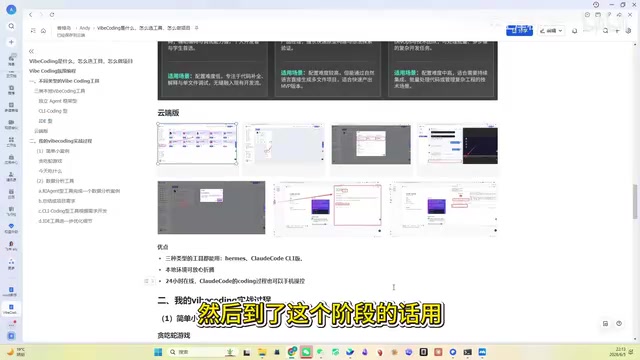
Three Categories of Vibe Coding Tools Explained
Category 1: Standalone Agent Framework Tools
Representative tools: OvenAI, Claude Hermes, QCloud, etc.
The biggest advantage of these tools is extremely strong controllability. They use a Gateway mechanism that allows remote control through various communication platforms like WeChat, Feishu (Lark), and others. They support background execution, unattended coding, and batch task processing.
An Agent framework refers to an AI system architecture with autonomous planning and execution capabilities. Unlike simple "question-and-answer" interactions, an Agent can decompose complex tasks into multiple sub-steps, autonomously determine execution order, and adjust strategies based on feedback during the process. The Gateway mechanism acts as a unified message relay station — whether you send commands from WeChat, Feishu, or Telegram, the gateway converts them into a standard format the Agent can understand, then relays execution results back to your communication tool. This architecture allows you to "remote control" AI work from your phone anytime, anywhere.
However, in terms of coding capability, they don't perform as well as the other two categories when handling complex projects. This is because Agent framework tools are designed for generality — they need to handle file management, information retrieval, code writing, and many other tasks, so their optimization depth in the vertical domain of programming naturally falls short of specialized tools. They're suitable for early-stage simple projects, like writing a Snake game, which can be quickly completed using Hermes or even Doubao.
Category 2: CLI Coding Tools
Representative tools: OpenCode, Cloud Code, CodeX, and other tools with "Code" in their names.
These tools were designed from the ground up for coding scenarios, clearly outperforming Agent framework tools in programming professionalism. They use pure natural language-driven coding, with a relatively low barrier to entry for beginners.
CLI (Command Line Interface) tools run in terminal environments without graphical windows — all interaction happens through text. The technical architecture of these tools typically includes three core components: a context manager (responsible for organizing project files, directory structures, and other information into context the AI can understand), a model invocation layer (communicating with backend LLM APIs), and a file operation layer (writing AI-generated code to the correct file locations). Because they focus on coding scenarios, they've undergone extensive targeted optimization for code generation accuracy, project structure understanding, and multi-file collaborative editing.
But there's one obvious shortcoming: the installation and configuration process is quite cumbersome, especially affected by network conditions. This is mainly because CLI tools need to call cloud-based LLMs through APIs, which may face unstable connections in certain network environments; additionally, the tools themselves often depend on Node.js or Python environments, and version compatibility issues occur frequently. Also, these tools lack traditional visual code editing interfaces, so the "code feel" is somewhat diminished — though since this is Vibe Coding, the focus isn't on line-by-line code anyway.
Category 3: IDE-Type Tools
Representative tools: Cursor, Trae, VS Code, etc.
These tools are essentially designed for professional programmers, featuring visual graphical editors that let you view code and run tests. Cursor and Trae come with free AI credits, ready to use out of the box.
The concept of IDE (Integrated Development Environment) has decades of history, from early Turbo Pascal to Eclipse, IntelliJ IDEA, and today's VS Code — IDEs have always been core tools for professional developers. AI-enhanced IDEs integrate three AI interaction modes on top of traditional features (syntax highlighting, auto-completion, debugger, version control): inline completion (real-time prediction of subsequent code as you type), Chat panel (sidebar conversational programming), and Agent mode (AI autonomously completing multi-step development tasks). Cursor is a deep modification of VS Code that weaves AI capabilities into every corner of the editor; Trae is a similar product from ByteDance that's more friendly to users in China.
For beginners without programming backgrounds, jumping straight into IDE tools can be overwhelming — just familiarizing yourself with all the buttons on the interface takes considerable time. But when a project enters the refinement and optimization phase, IDE tools become indispensable — you need to precisely locate issues in a specific line of code, set breakpoints for debugging, and inspect variable states. These operations can only be efficiently completed with a visual IDE.
Tool Combination Strategy
Key principle: These three categories aren't meant to be chosen exclusively — they should be used in combination.
| Project Phase | Recommended Tool Type | Applicable Scenarios |
|---|---|---|
| Early Exploration | Agent Framework | Simple web games, small utilities |
| Core Development | CLI Coding | Complex project architecture building |
| Fine-tuning | IDE-Type | Feature detail adjustments, bug fixes |
The logic behind this phased strategy is: early in a project you need to quickly validate the feasibility of ideas, and the convenient controllability of Agent frameworks is most suitable; entering the core development phase, project complexity increases, requiring CLI tools' stronger code generation and project management capabilities; in the final refinement phase, issues are often concentrated in specific lines of code, where the IDE's visual debugging capabilities become most critical.
Additionally, it's important to note: apart from the free credits provided by Cursor and Trae, token costs for most tools must be borne by the user, and configuring an API Key is an unavoidable step. A token is the basic billing unit for large models — one Chinese character corresponds to approximately 1.5-2 tokens, and the model consumes tokens every time it processes your input and generates output. Taking Claude 3.5 Sonnet as an example, input costs about $3/million tokens and output about $15/million tokens — a complex project's development process might consume hundreds of thousands of tokens.
Cloud Solutions: Solving the Pain Point of Environment Crashes
Frequently installing AI tools locally can easily lead to environment crashes that are time-consuming and labor-intensive to fix.
Environment crashes are one of the most headache-inducing problems for developers (especially beginners). Common causes include: Python multi-version conflicts (system-bundled Python 2.x interfering with newly installed 3.x), Node.js version incompatibilities, npm global package pollution, system PATH variable chaos, and dependency library version conflicts between various tools. For non-professional developers, troubleshooting these issues is often far more difficult than programming itself. Cloud solutions use containerization technology (like Docker) to isolate each development environment in independent containers — even if one environment has problems, it won't affect other projects or your local system.
Cloud solutions integrate all three types of tools together, providing a more stable development environment. This aligns with industry trends — cloud development platforms like GitHub Codespaces and Gitpod have grown rapidly in recent years, with more and more developers accustomed to completing all development work in the browser.
Taking YouCloud Computing as an example, it integrates:
- Hermes dialogue (Agent framework capability)
- Cloud Code programming assistant (CLI Coding capability)
- VS Code-like online editor (IDE capability)
Core advantages include:
- Painless Cloud Code usage — eliminates the tedious local configuration process
- 24/7 online cloud host — code is stored on a Linux cloud host; even if you shut down your computer, AI can continue executing long-running tasks
- WeChat Bot remote control — use your phone to direct cloud AI to code for you; push projects forward even during your commute
- Protects your local environment — experiment with AI tools without fear of crashing your local system
Practical Examples: Vibe Coding Demos from Simple to Complex
Example 1: Snake Game (Completed in 5 Minutes)
Simply tell the AI "write a web-based Snake game," and it will generate an HTML file that you can save and run immediately. You can then iterate: "the speed is too fast, slow it down," "make multiple fruits appear at once" — the AI modifies it instantly.
This type of simple project can be completed with any AI tool — it was even achievable when GPT first appeared.
Example 2: "What Should I Eat Today" Randomizer
Prompt example: "Write a small web app that helps me decide what to eat. Options include [list]. After opening it, click to draw a dish, and eat whatever comes up."
The AI not only completed the basic functionality but also automatically added sound effects, making the experience surprisingly good. Perfect for friends with decision paralysis.
Example 3: Data Analysis Workbench (Complex Project)
This is a complex project that demonstrates the complete Vibe Coding workflow:
Step 1: Use Agent tools for initial exploration. Install a data analysis Skill package, let Hermes do preliminary analysis on data files, and validate feasibility. A Skill package is a capability extension module in Agent frameworks, similar to apps on a phone — the base Agent has general conversational ability, while Skill packages add specialized capabilities in specific domains (such as data analysis, image processing, web scraping, etc.). After installing a Skill package, the Agent "learns" how to read CSV files, calculate statistical metrics, generate visualizations, and more.
Step 2: Plan rather than develop directly. Break the data analysis into 7 steps (upload data → view data → preprocessing → correlation analysis → data insights → chart generation → report export), and have the AI write a development plan in MD format first. This step reflects the core software engineering principle of "design before implementation." In traditional development, this corresponds to the requirements analysis and system design phases; in Vibe Coding, it translates to having AI output a structured development plan. The benefit of planning first is: you can discover logical flaws in the plan before starting, avoiding situations where AI generates large amounts of code in the wrong direction that must be scrapped and redone.
Step 3: Cross-AI collaborative plan optimization. Hand the plan to Cloud Code for evaluation and improvement — every AI has strengths and weaknesses, and complementary use produces better results. Different large models exhibit varying performance on different tasks due to differences in training data, model architecture, and optimization objectives. For example, Claude excels in long-text understanding and code architecture design, GPT-4 has advantages in creative generation and multilingual processing, while some specialized coding models are more precise in code completion. The essence of cross-AI collaboration is leveraging these capability differences, having one AI's output undergo "review" and "optimization" by another AI, similar to the Code Review mechanism in human teams.
Step 4: Confirm and let AI execute development. Cloud Code will confirm details and then write the code independently — you only need to handle authorization-related operations.
Step 5: IDE fine-tuning. The previous steps completed 70-80% of the work; the remaining detail adjustments are handled by IDE tools.
Core Mindset Summary
The most important thing about Vibe Coding isn't which specific tool you use, but your mindset for collaborating with AI:
- Don't expect one AI to handle everything from start to finish — leverage multiple AIs complementarily
- For complex projects, plan before developing — have AI write plans rather than jumping straight to code
- Use tools in combination — different phases call for different types of tools
- Cloud solutions effectively reduce environment maintenance costs, suitable for users who experiment frequently
Multi-Agent collaboration has become an important trend in AI applications. From academia's "AI debates" (having two AIs question each other's reasoning) to industry's multi-Agent workflows (like MetaGPT simulating multi-role collaboration in a software company), the field increasingly recognizes that a single AI's capability ceiling can be broken through multi-AI collaboration. Vibe Coding is precisely the implementation of this concept at the individual developer level.
From a broader perspective, Vibe Coding represents the democratization trend in software development. Just as Excel enabled non-finance professionals to do data analysis, and Canva enabled non-designers to create beautiful posters, Vibe Coding is enabling non-programmers to build software products. This doesn't mean professional programmers will be replaced — quite the opposite: people who understand software architecture, system design, and engineering practices can tackle more complex projects and produce higher-quality results in the Vibe Coding era.
For complete beginners, the recommendation is to start with cloud-integrated solutions, practice with simple web games, and gradually transition to complex project development.
Related articles

Claude Code Chinese Tutorial: A 100-Page Systematic Learning Guide on Feishu Docs
A detailed look at the Claude Code Chinese learning resource on Feishu Docs, covering AI agent learning, memory systems, and task decomposition with a systematic path from beginner to advanced.
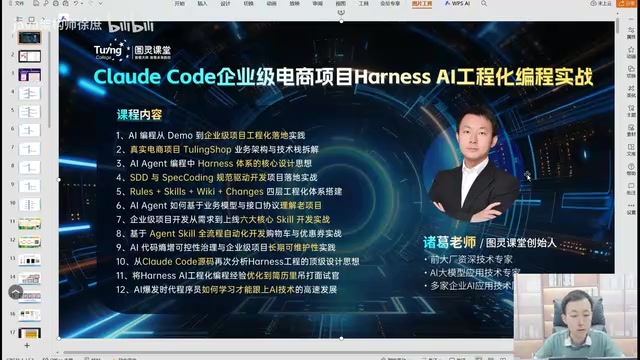
Claude Code Enterprise E-commerce in Practice: A Methodology for Taking AI Programming from Demo to Industrial-Grade
A deep dive into engineering methodology for enterprise e-commerce development with Claude Code and Harness AI, covering architecture, code quality, and CI/CD practices.
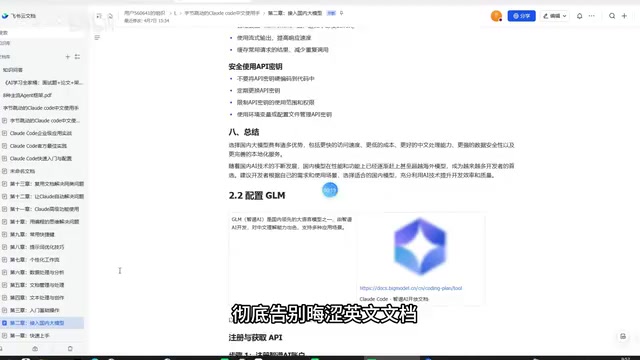
Claude Code Chinese Tutorial: A Complete Guide from Installation to Real-World Applications
A detailed Chinese practical guide for Claude Code covering installation, domestic model integration, code development, copywriting, data analysis, and more to help you master this AI programming tool.