visionOS 27 Update Roundup: Why Vision Pro Users Are Disappointed
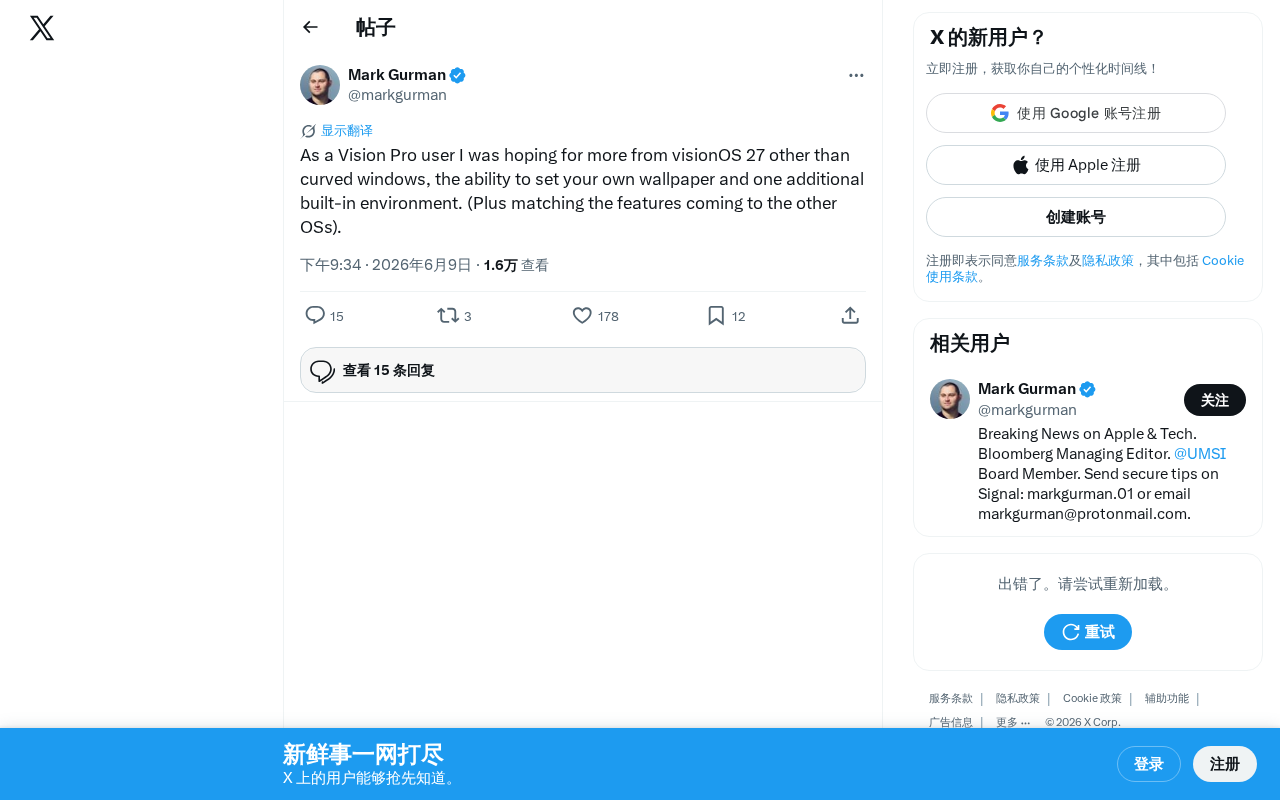
Vision Pro users express disappointment over visionOS 27's incremental updates that fail to match the device's $3,499 price tag.
After WWDC 2025, Vision Pro users voiced frustration that visionOS 27 delivers only incremental improvements—curved windows, custom wallpapers, and one new environment—rather than the breakthrough features expected from a $3,499 spatial computing device. The article examines how underutilized hardware potential, slow ecosystem growth, and wavering early adopter confidence contribute to the community's disappointment.
Vision Pro Users' Real Feedback on visionOS 27
Following Apple's announcement of visionOS 27 at WWDC 2025, a noticeable wave of disappointment swept through the Vision Pro user community. One Vision Pro user was blunt about their feelings on social media: aside from curved windows, custom wallpapers, and one additional built-in environment, they had expected much more from this update.
Key Updates in visionOS 27
Based on the information released so far, the core changes in visionOS 27 include:
- Curved Windows: Window interfaces shift from flat to curved, theoretically providing a more immersive visual experience. Curved windows represent an important evolutionary direction in spatial computing interface design. On traditional 2D screens, all windows are flat rectangles; but in 3D space, flat windows have an inherent problem—when windows are large, the edges are farther from the user's eyes, causing perspective distortion and reading difficulty. Curved windows bend the interface along the natural arc of the user's field of vision, keeping all parts of the window equidistant from the eyes, thereby reducing visual fatigue and improving readability. This design philosophy draws from the principles behind IMAX curved screens and ultrawide curved monitors. In the VR/MR space, Meta Quest's Horizon OS is also exploring similar curved UI approaches.
- Custom Wallpapers: Users can finally set their own wallpaper backgrounds
- New Built-in Environment: One additional immersive environment has been added
- Cross-platform Feature Sync: New features from other Apple operating systems are being brought to visionOS
While these are all practical improvements, for a cutting-edge device priced at $3,499, users clearly expected more groundbreaking features.
Why Vision Pro Users Are Disappointed
Hardware Potential Remains Underutilized
Vision Pro boasts extremely powerful hardware—the M2 chip, R1 coprocessor, high-resolution Micro-OLED displays, and advanced eye-tracking and hand gesture recognition systems.
Vision Pro employs a unique dual-chip architecture: the M2 chip handles general computing tasks including app execution, graphics rendering, and AI inference; the R1 coprocessor is dedicated to processing real-time data streams from 12 cameras, 5 sensors, and 6 microphones, compressing sensor-to-display latency to under 12 milliseconds—a latency level below the human perceptible threshold and key to preventing motion sickness. This design separating perceptual processing from computational processing ensures that even when the M2 chip is under heavy load running complex applications, head tracking and environmental awareness remain silky smooth. This also means that from a hardware perspective, Vision Pro has computational headroom far exceeding what current software can leverage.
Its Micro-OLED displays are custom-manufactured by Sony—each panel is merely stamp-sized yet packs 23 million pixels, with a pixel density of approximately 3,400 PPI (pixels per inch), far exceeding the iPhone's 460 PPI. The core difference between Micro-OLED and traditional OLED lies in the manufacturing process: it builds the emissive layer directly on a silicon wafer rather than using a glass substrate, enabling extremely high pixel density and ultra-fast response times. This technology allows Vision Pro to deliver near-retina-level clarity at very close viewing distances, serving as the hardware cornerstone for achieving the immersive feel of "spatial computing."
When users purchased this device, they expected software to continuously tap into the hardware's potential, delivering entirely new interaction paradigms and use cases. However, updates like curved windows and wallpaper customization feel more like interface polish than functional breakthroughs. For early adopters, what they need are "killer features" that justify the device's value.
Slow Ecosystem Development
The description of "matching features from other operating systems" itself hints at a problem: visionOS is still playing catch-up with Apple's own other platforms rather than leading innovation. As Apple's most cutting-edge computing platform, visionOS should be the first to debut new features, not passively follow.
Here it's important to understand the bigger picture of Spatial Computing. Spatial computing refers to a computing paradigm that merges digital information with physical space—users no longer interact with information through flat screens but naturally manipulate digital content in three-dimensional space. This concept was first proposed by Simon Greenwold at the MIT Media Lab in 2003, but only recently has hardware matured enough for it to enter the consumer market. The current major players in spatial computing include: Meta's Quest series focusing on social and gaming ecosystems with accessible pricing ($299–$499); Apple's Vision Pro positioned for high-end productivity and entertainment; and Microsoft's HoloLens focused on enterprise and industrial scenarios. The divergent paths of these three reflect different industry bets on the ultimate form of spatial computing. In this competitive landscape, the pace of visionOS iteration isn't just about user satisfaction—it's about Apple's strategic positioning in the spatial computing race.
Early Adopter Confidence Is Wavering
The Vision Pro early adopter community is relatively small, and these users have shouldered both the steep purchase cost and the risk of being "pioneers." Every major system update is an opportunity for Apple to demonstrate its long-term commitment to these users. If updates lack substance, it may intensify doubts about whether Vision Pro is worth buying.
This disappointment can be understood through the classic "Technology Adoption Lifecycle" proposed by Everett Rogers, which categorizes users into Innovators, Early Adopters, Early Majority, and other groups. Vision Pro's current users are primarily the first two categories—people willing to pay a premium for cutting-edge technology but who simultaneously have extremely high expectations for product iteration speed. Historically, many revolutionary products have gone through the "Trough of Disillusionment"—a period of stagnation after initial enthusiasm fades but before mass adoption takes off. Apple needs to maintain developer and user confidence during this phase; otherwise, the platform risks falling into a vicious cycle of "fewer users → developers unwilling to invest → app scarcity → even fewer users."
What Vision Pro Users Actually Want
Based on community discussions, Vision Pro users likely expect developments in these directions:
- Richer Immersive Environments: Not just one more preset environment, but more open environment creation tools
- Deeper Multi-user Collaboration Features: Collaboration is one of the core value propositions of spatial computing
- More Native Spatial Apps: Unique application experiences that fully leverage 3D space
- Performance and Comfort Optimization: Longer usage sessions with reduced fatigue
Conclusion and Outlook
The visionOS 27 update suggests Apple may be taking a more conservative iteration strategy in the spatial computing space. For a platform still in its early stages, this approach has its merits—stability and foundational experience refinement are equally important. But Apple needs to give Vision Pro users more confidence in subsequent updates, proving that this device's future is worth looking forward to.
The potential of spatial computing is beyond doubt. The key question is whether Apple can convert that potential into user-perceivable value quickly enough.
Related articles

Five Common Claude Code Mistakes — How Many Are You Making?
Five common Claude Code mistakes developers make: copy-pasting code, skipping CLAUDE.md, inefficient prompting, ignoring docs, and poor context management — with fixes.

Andrew Ng's New Course Explained: A Practical Guide to Using OpenAI's O1 Reasoning Model
Deep dive into Andrew Ng and OpenAI's Reasoning with O1 course covering test-time scaling, new prompting paradigms, multi-model orchestration, and practical applications for developers.

Learning AI After College Entrance Exams: A Complete Path from Zero to Freelancing
How to efficiently learn AI skills during summer break after exams? A complete path from mastering prompts and hands-on projects to freelancing on platforms.